Someone building on Replit wrote this about a redesign they had asked the Agent for: “I tried asking the Replit Agent to redesign one of the pages, but the result looked worse, so I reverted it.” That is the version of this story that ends well. They looked at the result, judged it, and put the app back.
The version that brings people to this page ends differently. The Revert button is greyed out. Or the restore ran, the app came back, and it is still broken. Or they asked the chat to put things the way they were and got a third version that resembled neither. Three different problems with three different answers, all typed into the same search box.
A builder revert puts your code back, and code is all it puts back. When the control itself is refused, Lovable’s documentation names three specific situations, each needing a different response. Asking the AI in chat to undo the change is not one of them.
Which kind of undo do you need after an AI change?
Three different controls answer to the word undo, and the wrong one costs credits and time. Builder version history moves your code. Deployment rollback changes what visitors see without touching the code in your editor. Restoring records is its own operation on its own clock.
| What happened | Where the answer is |
|---|---|
| The last prompt made the app worse, and it was fine before that prompt | Builder version history. The next three sections are about it |
| It broke right after you published or deployed, and the editor still looks fine | The host’s deployment list rather than the builder’s history: roll the deployment back instead |
| The code reads correctly and the records are wrong, missing, or duplicated | Records changed by a prompt do not move when the code moves. Start with what a rollback can destroy and whether a backup exists to restore from |
| You cannot say which prompt or edit caused it | Diagnosis before restoring anything. A date in the history list is not evidence that the version behind it worked |
Two of those rows lead away from this page on purpose. If the app breaks only for visitors and works in your editor, the state you need is a published build sitting in your host’s deployment list, which the builder’s history does not touch. If the code is fine and the records are wrong, the control you want restores rows and knows nothing about versions of your project.
Get back to the last version that worked in Lovable
Lovable keeps the history whether you ask it to or not. Its version history documentation says every change the tool makes to your project creates a version on its own, and that nothing has to be pressed to save one. The version you want almost certainly exists. Finding the right one is the work.
- 01 Open the History panel: click the History toggle in the top bar of the editor, or the menu next to the message input, and select History.
- 02 Narrow the list with the two tabs. History lists every version, Bookmarks lists the ones you marked, and the state your users currently see carries a Published badge.
- 03 Click a version to open it in a snapshot view and look around that state of the app without changing anything. Back to latest, in the top bar, returns you to the present.
- 04 Open View code changes on the version you suspect and read which files and lines it changed, as a diff, before you restore anything.
- 05 Choose Revert. Lovable asks you to confirm and shows the date of the version you are returning to, so check that date against when the app last actually worked.
Every button name and refusal condition below came off the vendor page cited beside it, opened in a browser on 25 August 2026, never in a paid account, so the wording inside your own project is the wording that counts. Any of these vendors can rename a button or move a limit without telling anyone.
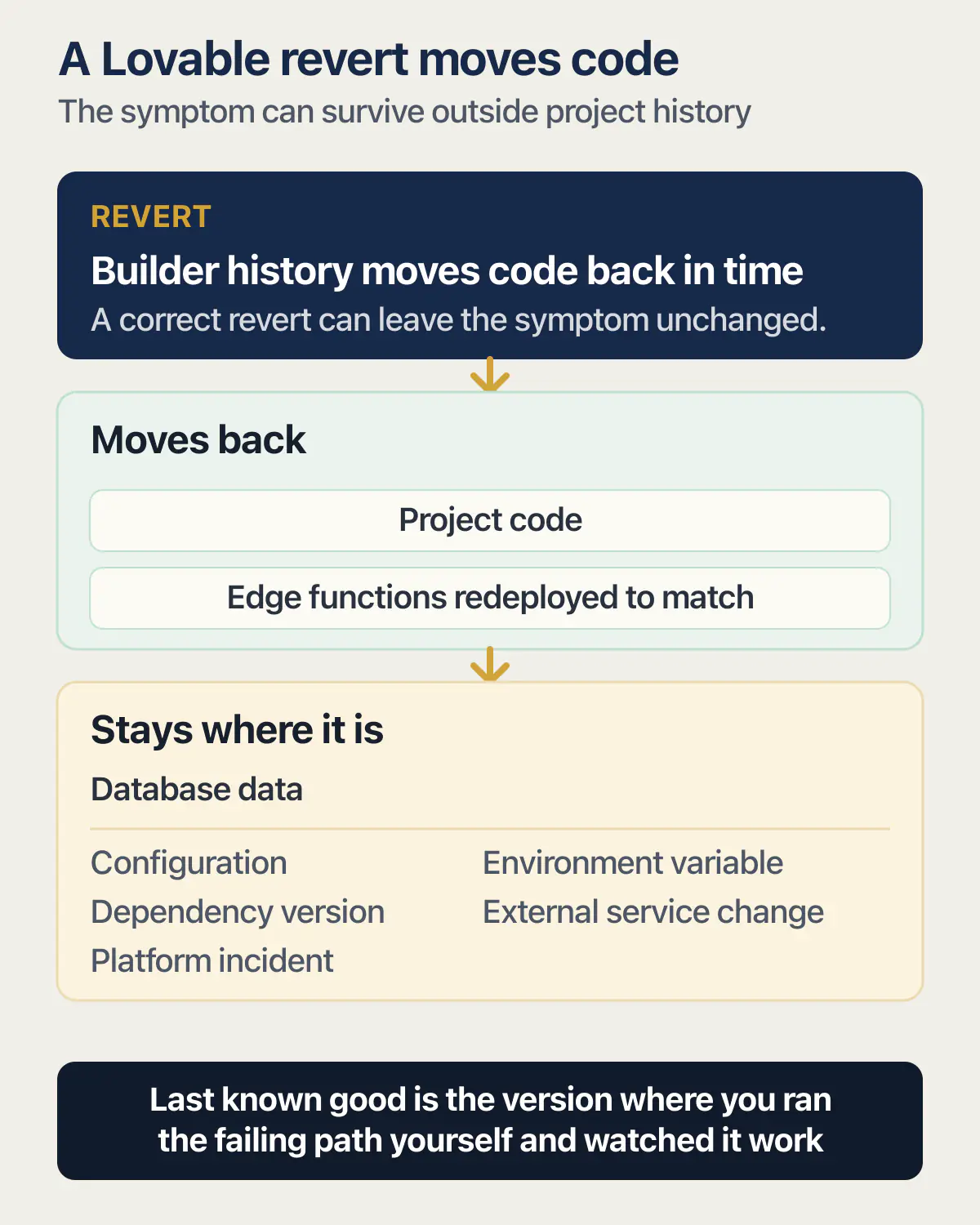
Reverting does not cost you the conversation. The same page says the chat carries on from where you are, and the edits made after the version you restored stay there to be reapplied. What comes back is the code. The same page is explicit that a revert restores the project’s code and redeploys the app’s edge functions to match it, and leaves your database data exactly where it is. If the prompt you are undoing also wrote rows, changed values, or ran a migration, none of that moves when the code moves.
Version history moves your code back in time. Your database stays where the last prompt left it.
That boundary is not a Lovable quirk. What each builder’s restore does and does not bring back asks the same question of Replit, Bolt and Base44 side by side, and the answers differ enough to matter before you press anything.
The same surface has a second route, for when you want a different attempt rather than the old version. Hover one of your own messages, click Edit message, change the wording, and confirm Revert and resend. Lovable goes back to that point and continues from the new instruction.
Why is the Revert button greyed out in Lovable?
Three documented situations disable Lovable’s Revert button: you are already on that version, the project was remixed from a Cloud-backed project and the version predates the remix, or the version is too old to restore. Each one needs a different response, and only the third puts an explanation on screen.
Lovable’s version history page lists them under a heading it calls When revert is unavailable. The third column below is the part a documentation page has no room for.
| What the documentation says | What it means | What to do instead |
|---|---|---|
| ”You are already on that version.” | There is nothing to move to. The state on screen is the state you picked. | The revert is not your problem. Read the next section: something outside the code you were about to restore is breaking the app. |
| ”The project was remixed from a project on the built-in backend (Cloud): versions from before the remix can’t be restored.” | The condition nobody guesses. Remixing starts a fresh history, and Lovable’s remix documentation lists version history among the things a copy does not carry over, saying the copy’s History panel starts fresh. Anything older than the remix belongs to the original project. | Look in the original project if you still have access to it. If you do not, treat the copy’s earliest version as your floor and work forward from there, or go to the connected repository. |
| ”The version is very old. You can still open and preview it, but it can no longer be restored.” The tooltip reads “Cannot revert this far back in history”. | Read-only, not gone. Lovable will show you that version and its diff, and will not put your project into it. | Open it anyway. Preview it, open View code changes, and carry the specific code you need forward by hand as a new change rather than trying to move the whole project back. |
A refused revert is one rung of a longer sequence. The rest of the Lovable fix ladder covers what to try before it and when to stop trying.
The revert ran in the builder and the app is still broken
The most common reason is that the prompt did two things and the revert undid one of them. Code and records run on separate clocks in every builder named on this page, with one exception: Replit can restore your development database along with the code, but only if you select that option first. If the change added rows, rewrote values, or ran a migration, the restored code now runs against data it was never written for, and the symptom can look exactly like the original bug. Getting the deleted rows themselves back is a different operation with its own time window, and no builder’s version history offers it. So is a value overwritten with no audit trail, where nothing was removed and nothing looks wrong.
The second reason is harder to accept: the fault was never in the code you reverted. An environment variable, a secret held by the host, a change on a service your app calls, or an incident at the platform all survive a revert untouched, because none of them lives in the project history. A dependency version or a configuration file that is tracked with the code does come back with the revert, but the installed packages and any download the build fetched may not match it until the next build runs. That is the point to stop restoring and start reading the diff, which is what find which AI edit actually broke it is for. A bug that survives every attempt, including a clean restore, is its own situation, and so is the question of whether the AI can be trusted to fix its own work.
Third, and found last: the version you picked was already broken. A date in the list proves only when a prompt landed. Last known good means the last version where you ran the failing path yourself and watched it work. On a project taking a prompt every few minutes, the version that felt fine yesterday afternoon can sit four versions after the one that broke.
None of this covers the loop where it breaks something else every time you fix one thing. More restores will not touch that one.
When a failed revert in Lovable is the platform and not you
Check the vendor’s status history before you spend another prompt on it.
The clearest entry is an incident titled Project Revert Functionality, dated 27 May on the May-to-August 2026 view of Lovable’s status history, read on 25 August 2026. Lovable’s own write-up says a code change deployed at 12:35 PM UTC “introduced a compatibility issue that caused project reversions to fail” and that this “affected approximately 92% of reversion requests during the incident window”. The corrected code went live at approximately 12:57 PM UTC. Under a heading the page labels Current status, it says “Project reverts are working normally.”
Remix has a run of its own entries on the same page: “Degraded performance remixing projects” on 20 June, “Remixing a project is currently failing more often than usual” on 14 July, and “Remixing and enabling Lovable Cloud are failing for some projects” on 21 August. One older incident has its own page and a full date: Some projects are failing on remix was resolved on Mon, Jul 21, 2025, with the update “Remixes are now working again”.
When the control is broken at the platform, nothing you change inside your project fixes it, and the prompts you send working around it still consume credits. Reading a status page costs nothing. Whether Lovable itself is down, as opposed to your revert being refused for one of the three documented reasons, is worth settling before you try either.
Visual edits and remix: two other things people mean by undo in Lovable
Searching for why Lovable’s visual edits are not working turns up the vendor’s own launch posts for the feature and almost nothing that gives the answer. Lovable’s preview toolbar documentation states plainly that “The preview toolbar replaces the previous Visual edits experience.” There is no separate editing panel left to open. The toolbar carries four modes, named on that page as Select elements, Edit text inline, Draw annotation and Add a comment, reachable with the S, T, D and C keys.
So a tutorial or video showing a Visual edits panel is describing a surface that no longer exists, and no amount of hunting through the editor will produce it. The modes are also not priced alike: inline text edits are free up to a documented daily limit of 100 per user, resetting every 24 hours, while selecting an element and describing a change counts as standard chat usage and consumes credits. Whatever you change there lands on the preview, and the preview and the published site are not the same app.
Reaching for remix as an undo is expensive. Lovable’s remix documentation describes a copy rather than a rewind: “Remixing creates your own independent copy of a project. The copy is a new project that you own, and changes you make to it never affect the original.” The page lists what does not carry over: “Database data”, “Version history: the copy’s History panel starts fresh”, “Secrets”, “Custom domains”, “Publish state: the copy starts unpublished”, “Collaborators”, and “Service connections (Git sync and connectors)”.
Read that list as someone who remixed hoping to get a working app back. The copy has none of the records, no history to revert into, and none of the secrets, domain or repository connection the original had, and it arrives unpublished. Remix is a good way to keep a safe copy before a big change and a poor way to recover from one.
Remix has documented blocks of its own. Public remixing is a toggle in project settings that Lovable says is off by default, so a project you reached by link may not be remixable by you at all, and it is unavailable in Enterprise workspaces. Projects wired to an external Supabase project “can only be remixed by people with edit access to the source project”. A search result read on 25 August 2026 shows someone hitting a connection-based block: an r/lovable thread whose snippet reads “Because the project is connected to Shopify, I cannot remix / duplicate it. Remixing / duplicating is essential for my workflow”. Lovable’s page documents the restriction for external Supabase connections and says nothing about Shopify, so treat that thread as reader vocabulary rather than a second documented rule.
If the builder cannot get you back, use the repository
A connected repository is the copy of your code that a greyed-out button cannot withhold from you. Lovable’s GitHub integration documentation describes the link as two-way, with changes made in Lovable syncing out to GitHub and pushes to the active branch syncing back in, and says Lovable edits and syncs one branch at a time. The commit history on that branch is a second timeline, and it does not stop existing when the project’s own history refuses to move.
Git’s own undo is worth understanding before you need it. The git revert documentation describes the command as recording new commits that reverse the effect of earlier ones rather than removing those earlier commits, which is what makes it usable on a branch other people and other tools are also reading. The careful command sequence belongs with the deployment rollback route in the table above.
Then the part nobody documents. As of 25 August 2026, neither Lovable’s GitHub integration page nor its version history page states how a revert inside the builder lands in the connected repository, and neither page mentions the other. That is a gap in the documentation rather than a claim that nothing happens. So after any revert on a connected project, open the repository and confirm the latest commit is the one you expect before building anything on top of it. If the sync itself has stopped working, that is a separate failure with its own symptoms.
Doing this after the emergency is harder than doing it before, so get the code out to a repository you control while the app is still fine.
Replit checkpoints and Base44 version history, in one line each
Replit’s checkpoints and rollbacks documentation answers the two questions this page needs: rolling back takes every later change with it, code edits included, and the checkpoint timeline runs in both directions, so rolling forward again is a documented move rather than a lost cause. How Replit checkpoints work in full covers where checkpoints appear, what the database does, and the published-app case.
Base44 spreads undo across two controls. Its troubleshooting page names both: a Revert icon on each chat message, and Version History, reached from the clock icon in the AI chat panel. It says asking the AI in chat to roll the app back will not undo a prompt, and that only those two controls will. Its escalation order is the Revert icon first, Version History second, support if neither works.
Connecting a repository takes part of that away, which is the one Base44 refusal nobody warns you about in advance. Base44’s GitHub documentation, read 25 August 2026, carries it as a warning: once a repository is connected, the History panel can no longer take you back to any version made before the connection. The reason given is storage: the repository only holds versions created after the link, so a revert aimed earlier than that fails with an error, and the restorable set is whatever the connected repo contains. So on Base44 the day you connect GitHub is a floor under your history, and it is worth marking.
The paid feature is a different thing wearing the same word. Base44’s product changelog announced data version history on 20 July 2026 for Enterprise workspaces, with automatic snapshots of entity data kept for 30 days, and extended it to the Elite plan on 1 August 2026 with 7 days of history. That is an undo for your records, on two plans, with a clock running. The Revert icon on a chat message is not it.
Stop needing the Revert button in Lovable
Bookmarks are the one feature on this page that prevents the problem instead of repairing it. Lovable’s documentation frames a bookmark as a flag you put on a version worth coming back to, a stable release or a design you may want again, so the ones that matter sit in their own tab instead of somewhere down a long list. Bookmark from the History panel using the toggle on any version, or from chat by selecting Bookmark in history on the activity card of a finished change. The habit matters more than the feature: mark the version you would want back while the app is working, before the next prompt.
Two more things keep version history usable. Ask for one change at a time, so one version holds one decision and a restore does not undo three things you wanted to keep. And confirm the repository holds a complete, current copy, which means opening it rather than assuming the connection is doing its job.
Restoring is a procedure like any other, so it can fail on the day you need it. Test the restore before you need it was written about database backups and applies just as squarely to a builder’s version history. For a deployed app, what a rollback plan is covers the one page to write in advance, the database half, and a drill that proves it.
Common questions about reverting an AI change
How do I revert changes in Lovable?
Open the History panel from the History toggle in the top bar of the editor, or from the menu next to the message input. Click the version you want to inspect, look around it in the snapshot view, then choose Revert and confirm the date Lovable shows you. Your chat is untouched; the later edits are still there to reapply.
Does Lovable have version history?
Yes, and there is nothing to switch on. Lovable’s documentation says the history is always complete and up to date, with no save button anywhere in the editor. The History panel has two tabs, History and Bookmarks, and the version your users currently see is marked with a Published badge.
Why can I not revert to an earlier version in Lovable?
Lovable disables Revert in three documented cases: you are already on that version, the project was remixed from a project on the built-in backend and the version predates the remix, or the version is too old, with the tooltip “Cannot revert this far back in history”. The third case still lets you open and preview the version, so you can read its diff and copy the code you need forward by hand.
Does reverting in Lovable undo database changes?
No. A revert restores the project’s code and redeploys the app’s edge functions to match, and Lovable’s documentation states it does not restore or roll back your database data. If the prompt you are undoing added records, changed values, or ran a migration, all of that is still in place after the code goes back.
Can I undo an AI change by asking the chat to put it back?
No, and Base44’s troubleshooting page says so directly about its own product: asking the AI in chat to roll the app back does not undo prompt changes, and only the Revert control or Version History will. Asking tends to produce a third version that matches neither the state you had nor the state you wanted.
What happened to Lovable’s Visual edits?
The preview toolbar replaced it. Lovable’s preview toolbar documentation states that the toolbar replaces the previous Visual edits experience, so there is no separate editing panel to find. The toolbar’s four modes are Select elements, Edit text inline, Draw annotation and Add a comment.
Is remixing a project the same as reverting it in Lovable?
No. A remix is a new independent project that you own, and Lovable’s documentation lists version history among the things a remix does not carry over: the copy’s History panel starts fresh. Database data, secrets, custom domains, collaborators, publish state and service connections are left behind too, so a remix used as an undo loses all of them.
Replit checkpoint rollback not working, what should I check?
Check whether you are trying to roll back the published app rather than the project itself, and whether the change you want undone was ever in the code at all. A Replit rollback removes every change made after the checkpoint you pick, including code edits, and the checkpoint timeline runs both ways, so you can roll forward again if you went back too far.
Did the last AI change break your app?
When a revert will not run, or runs and leaves the app still broken, more prompting often makes things worse. During an audit, we look at the app with you, help you work out what changed, and point out the safest way back. You also leave knowing how to make the next change easier to undo.
Book a free audit → Free · 30 minutes · No code access needed