Bolt.new costs $0 on the free plan, then $25 a month for the entry Pro rung, $30 per member a month on Teams, and a custom price on Enterprise. Everything is metered in tokens rather than credits, and unused tokens on a paid plan survive into the next month.
Bolt prints its prices in two places that do not agree with each other: the public pricing page and the help center. Every figure here comes off one of those two, checked 16 August 2026. No paid Bolt account sits behind any of it. Two things make Bolt arithmetic different from the other AI app builders. Pro is a ladder rather than a single price, and the $25 entry rung is the worst value per token on that ladder. The annual discount is published as two different numbers on two Bolt pages, and both of them are correct at different rungs.
How much does Bolt.new cost per month?
Bolt.new costs $0 a month on Free and $25 a month on the entry Pro plan billed monthly. Teams is $30 per member a month. Enterprise has no published price. Above the $25 rung, Bolt’s own billing documentation names Pro 50, Pro 100 and Pro 200.
| Plan | Monthly | Annual, where Bolt publishes it | Tokens per month | Daily token limit |
|---|---|---|---|---|
| Free | $0 | not offered | 1M | 300K |
| Pro (Pro 10M) | $25 | $216 a year, $18 a month | 10M | none |
| Pro 50 | $50 | $540 a year, $45 a month | 26M | none |
| Pro 100 | $100 | not published | 55M | none |
| Pro 200 | not published | not published | not published | none |
| Teams | $30 per member | not published | per member, by tier | none |
| Enterprise | custom | custom | custom | none |
Prices checked 16 August 2026 against Bolt’s pricing page and Bolt’s billing documentation. The pricing page carries only the Free, Pro, Teams and Enterprise columns, and it describes Pro as a plan that will “Start at 10M tokens per month”. The rungs above it appear in the billing page’s worked upgrade and downgrade examples rather than in a table of their own, which is why most write-ups of Bolt pricing stop at one Pro price.
Two cells in that table deserve their exact wording. Bolt names a “Pro 200 monthly plan” in a downgrade example on the billing page but does not state its price or its token allocation anywhere on the four pages checked here, so both cells stay empty rather than getting a number filled in by the naming pattern. Teams is the same story in a smaller way: the pricing page says each paid member “receives a monthly token allotment based on the subscription tier” and that “Tokens are not shared among team members”, but it does not print the per-member allowance or a Teams annual price.
Bolt meters tokens rather than credits, and that is the single most common mix-up between Bolt and the builders around it, because Base44, Lovable and Rork all sell credits. A credit is a unit the vendor defines. A token is a unit of text, so the same feature request costs a different amount depending on how big your project already is.
Bolt.new plans: the Pro ladder above the $25 entry rung
Tokens per dollar improves as you climb the Pro ladder. The $25 rung buys 400,000 tokens per dollar, the $50 rung buys 520,000, and the $100 rung buys 550,000. The cheapest plan is the worst value per token, which is the opposite of what most people assume when they pick the entry tier to save money.
| Rung | Price | Tokens included | Tokens per dollar |
|---|---|---|---|
| Pro 10M, monthly | $25 a month | 10M a month | 400,000 |
| Pro 50, monthly | $50 a month | 26M a month | 520,000 |
| Pro 100, monthly | $100 a month | 55M a month | 550,000 |
| Pro 10M, annual | $216 a year | 120M a year | 555,556 |
| Pro 50, annual | $540 a year | 312M a year | 577,778 |
The three monthly allocations come from Bolt’s own upgrade example, which walks a user from the “Pro 50 monthly plan” to the “Pro 100 monthly plan” and says they receive “29M additional tokens, which is the difference between the 26M plan and the 55M plan”. The $25 rung’s 10M is stated on the pricing page and repeated in the billing page’s “$25 Pro 10M monthly plan”. The two annual figures are the list prices in the same document’s annual examples. One naming note before the arithmetic: the second rung is called Pro 50 everywhere on this page, because Bolt’s own pages use both names for this rung, Pro 50 by its monthly price and Pro 26M by its token allocation.
The last two rows are the part worth acting on. Paying $216 up front for the entry rung buys more tokens per dollar than paying $100 a month for the third rung, 555,556 against 550,000, because annual billing is discounted far harder at the bottom of the ladder than higher up.
Bolt.new Free: $0 a month
Free is $0 with 1M tokens a month and a 300K daily ceiling. It includes public and private projects, hosting, unlimited databases, a 10MB file upload limit, and Bolt branding on the sites you publish. There is no card to enter and no end date, so Free is a permanent tier here and not a countdown.
Bolt.new Pro: $25 and the rungs above it
Pro starts at $25 a month billed monthly, removes the daily token limit, removes Bolt branding, raises the upload limit to 100MB, and adds custom domain support, private site sharing and expanded database capacity. Above the entry price, Bolt’s billing documentation names Pro 50 at $50 with 26M tokens, Pro 100 at $100 with 55M, and a Pro 200 whose price and allocation Bolt does not publish on the pages checked.
Bolt.new Teams: $30 per member a month
Teams is $30 per member a month and includes everything in Pro plus centralized billing, team-level access management, admin controls, user provisioning, organization sharing and private NPM registry support. Tokens stay attached to the individual, not the workspace, which matters for budgeting: a quiet member’s allowance does not fund a busy one.
Bolt.new Enterprise: no published price
Enterprise has no price on the pricing page. Bolt lists what it adds, including SSO, audit logs, compliance support, a dedicated account manager, 24/7 priority support, custom SLAs and flexible billing, and routes you to a quote request. Treat every Enterprise number you find on a third-party site as unsourced until Bolt publishes one.
What is a Bolt.new token, and what spends one?
A token is a piece of text. Bolt’s token documentation says “Tokens are small pieces of text”, with short common words usually costing one token each and longer words splitting into several. Bolt spends them when it reads your project, thinks about it, and writes code.
That definition has one consequence that dominates every Bolt bill. Bolt’s token documentation says most usage comes from Bolt reading, understanding and syncing your project files, so a bigger project costs more per message. The same prompt, typed in month two against an app with twice the files, costs more than it did in month one. Nothing about the prompt changed. The context around it did.
For exactly that reason, the free plan’s 300K daily ceiling stops being generous and starts being the thing that ends your afternoon. Bolt’s token documentation points at its own prompting and token-efficiency guides as the answer, and managing what sits in the project is genuinely the lever with the most effect on a bill. The release-path version of the same fact, which is about what a project can and cannot do rather than what it costs, belongs with whether a Bolt.new app is production ready.
Do Bolt.new tokens roll over?
Yes, on a paid plan, but with a two-month expiry rather than forever. Unused paid tokens stay valid “for two months from the start of the billing cycle in which you received them”. They are spent oldest first. Cancelling the plan destroys all of them, including the rollover. Free-plan tokens do not roll over at all.
Four mechanics sit inside that answer, and they come from Bolt’s own token documentation rather than from anyone’s summary of it.
The window is two months, counted from the start of the billing cycle the tokens arrived in, not from the day they landed. Bolt’s pricing page describes the same rule from the other side: “Starting July 1, 2025, tokens from a paid subscription will roll over for one additional month, making them valid for up to two months in total.” Those two surfaces agree, which is worth saying out loud given what the next section covers.
Consumption is oldest first. Bolt says “Tokens are consumed on a first-in, first-out basis, meaning the oldest (rollover) buckets are consumed before the newer tokens from your latest billing cycle.” That is the mechanic that makes rollover useful instead of decorative, because your carried balance gets spent before it can expire.
The free plan is excluded. “Tokens on the free plan don’t roll over. Any tokens that you have accrued are assigned as fixed one-month buckets.” Free tokens also reset on the 1st of the calendar month, while paid tokens reset on your renewal date.
Cancelling deletes the lot. “When you cancel your paid plan, you lose access to all allocated tokens (including rollover tokens) when the billing cycle ends.” Bolt adds that resubscribing before they would have expired brings the unexpired ones back, and that a failed payment does the same damage as a deliberate cancellation. The one exception to every expiry rule above is purchased top-ups: “Any tokens purchased as a reload do not expire.”
Rollover on Bolt is a two-month sliding window that cancellation empties, not a savings account you can leave alone and come back to.
Downgrading is gentler than cancelling. Bolt says you keep unused tokens from the higher tier “until they expire, which is up to two months from their original issue date”, and start receiving the smaller allocation on your next renewal date. Upgrading is gentler still: the billing page says “Unused and unexpired tokens in your account always roll over when you upgrade.”
Bolt.new annual billing: 28% or 10%?
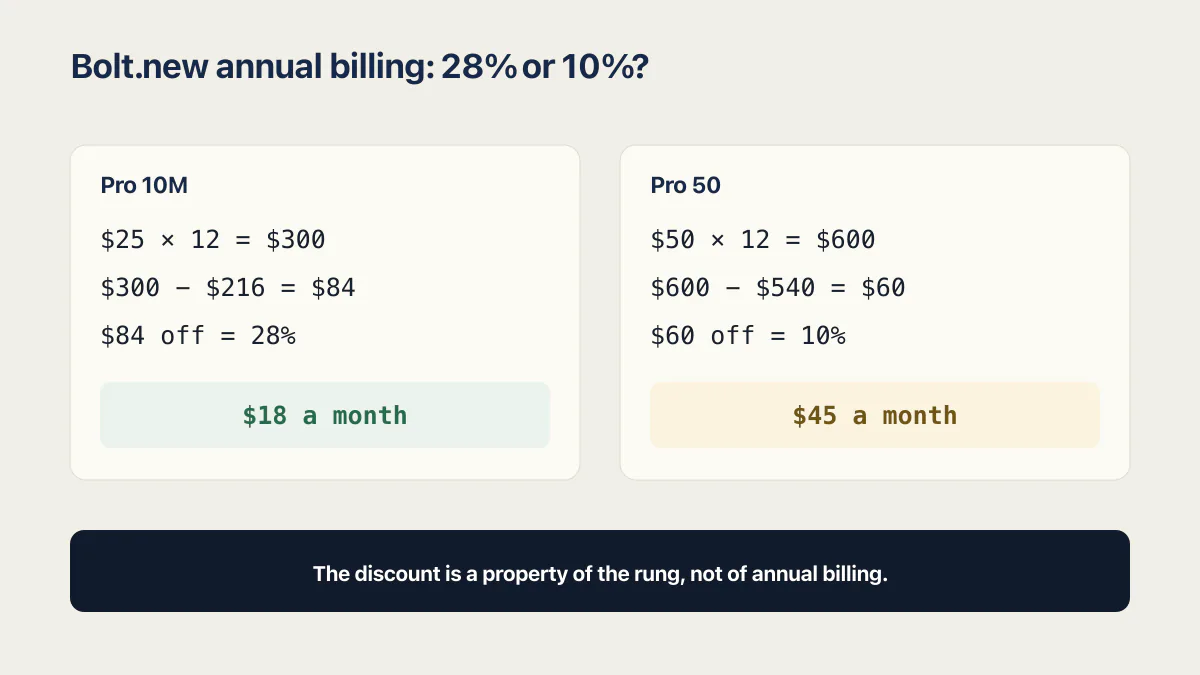
Both, at different rungs. Bolt’s pricing page says “Save up to 28% with yearly billing” and its billing page says “You can save 10% by subscribing to an annual plan”. The list prices in that same billing page settle it: the entry rung is discounted 28%, and the rung above it is discounted 10%.
Here is the arithmetic, and every number in it is Bolt’s own.
The entry rung, Pro 10M, is $25 a month billed monthly. Twelve of those is $300. Bolt’s billing page prices the annual version at $216 a year. That is $84 off $300, which is 28%, and it works out to $18 a month.
The second rung, Pro 50, is $50 a month billed monthly. Twelve of those is $600. The same billing page prices the annual version at $540 a year. That is $60 off $600, which is 10%, and it works out to $45 a month.
So the pricing page’s “up to 28%” is accurate as a ceiling and misleading as an expectation, and the billing page’s flat 10% is accurate for the rung it happens to describe and wrong for the one below. The billing page states the 10% figure twice, once under a Discounts heading and once in the upgrade steps as “Toggle annual on or off for yearly pricing at 10% off”, so this is not one stray sentence.
The practical version: check the annual price of the specific rung you want before you assume a percentage. The discount is a property of the rung, not of annual billing. And if you are choosing between the entry rung annually and a higher rung monthly, the entry rung annually is the better token buy, which the ladder table above shows in full.
One more annual rule that catches people. Bolt says you cannot move from an annual plan back to a monthly one by upgrading; annual plans only upgrade to higher annual plans. Switching from monthly to a lower-tier annual plan is treated as a downgrade and does not start until your current monthly period ends.
Is Bolt.new free, and what does the free plan meter?
Yes, Bolt.new has a real free plan at $0 with no card and no expiry. It meters two things: tokens, at “a 300,000 token daily limit and 1 million token monthly limit”, and hosting, at 10 GB of bandwidth and 333,333 requests a month. Free tokens are fixed one-month buckets that never roll over.
The token half is the one people hit first. 1M tokens a month sounds like a lot until you remember that Bolt spends most of them re-reading your project on every message, so the monthly figure gets smaller in practice as the app gets bigger. The 300K daily ceiling then decides how much of that monthly allowance you can actually reach in a sitting.
The hosting half is the one people do not see coming, because it does not degrade. Bolt’s Cloud hosting plans documentation describes the free tier as “Up to 10 GB bandwidth + 333,333 requests per month, with a hard limit on traffic” and then states the consequence plainly: “Free plan sites stop serving content once they hit their monthly data limits.” The site goes offline and stays offline until usage resets at the start of the next billing cycle. Bolt estimates the free tier supports roughly 10,000 to 15,000 monthly visits, and those limits apply across your whole account rather than per project, so publishing three sites splits one allowance three ways.
Free sites also carry a “Made in Bolt badge in both preview and published sites”, sit on a Bolt subdomain rather than a custom domain, and cap uploads at 10MB. Upgrading removes the badge on the next site update.
Money is one reason to leave the free plan and the release path is another. What the free plan cannot do at launch time, as opposed to what it costs, belongs with whether a Bolt.new app is production ready.
What a Bolt.new subscription leaves out
Four costs sit outside the subscription line, and one of them can arrive without you doing anything at all, because it is driven by the people using your published app rather than by you.
Traffic above the Pro hosting cap is billed separately. Pro hosting is “included with every Bolt paid subscription” at up to 30 GB and 1 million requests a month, and above that Bolt offers pay-as-you-go data up to a spending cap you set yourself in the dashboard. Once your cap is reached the site pauses until usage resets. That is the second meter, and it moves on its own schedule while you are not looking.
Money already spent is not coming back. “Bolt subscriptions are non-refundable, as stated in our Terms of Service”, and cancelling destroys unused tokens including rollover at the end of the cycle. Those two facts compound: leaving mid-year on an annual plan costs you the remaining months and the token balance in the same move. Bolt also accepts only credit and debit cards for Pro and Teams, and says it does not take PayPal or bank transfers for those plans.
Debugging is not cheaper than building, and on a token meter it can be dearer. Bolt re-reads the whole project to answer a bug report exactly as it does to add a feature, and bug reports pile up at the end, when what is left is edge cases and one-line corrections against the biggest version of the project you have ever had. Plan the token budget around that tail, not around the first version that works. If token spend on repeated fixes is what is pushing you up the ladder, the honest options are a bigger rung, a smaller project context, or moving a Bolt.new app off Bolt entirely, and those are three different decisions with three different costs.
Shipping to a phone adds the app stores’ own developer fees, which Bolt does not collect and does not include. And price is a separate question from platform risk, which is what whether Bolt.new is safe to build on works through.
Why every Bolt.new pricing article quotes a different number
Because they were written on different dates and Bolt changed its entry price. Four of the five independent explainers on page one now say $25. The one that still says $20 carries a 2025 date. Bolt’s own token documentation still contains a “Pro 20” in one downgrade example, which is where a lot of the confusion comes from.
| Publication | Pro price it states | Date on its page |
|---|---|---|
nocode.mba | $25 a month | ”Updated August 5, 2026” |
banani.co | $25 a month | 12 May 2026 in the page data, no date shown to the reader |
zite.com | starting at $25 a month | April 2026 in the page data |
vitara.ai | $25 a month | 20 March 2026 in the page data |
uibakery.io | $20 a month | ”Updated: April 16, 2025” |
Every price above was read off the publication’s own page on 16 August 2026, with the date that page carries. None of those domains is linked here; the domain names and dates are enough for you to check each claim.
The annual discount splits the same way, and it splits along Bolt’s own fault line. nocode.mba and banani.co both report roughly 28%. zite.com says annual billing gives “10% off any Bolt plan”. vitara.ai prints both without noticing: its plan table shows Pro at about $18 a month annually, which is the 28% rung, and Teams at about $27 per member annually, which is a 10% discount. None of the five reconciles the two figures, because none of them puts the two Bolt pages side by side.
The ladder splits differently again. uibakery.io is the only one of the five that lists the higher Pro rungs by name with token allocations, and it is also the oldest and the one with the stale entry price. It additionally marks token rollover as unavailable on every Pro rung, which stopped being true when Bolt introduced rollover on 1 July 2025. zite.com names one higher rung. The other three show a single Pro price.
On a page about a vendor’s prices, the date is part of the fact. A price with no visible date is a claim you cannot check.
How Bolt.new’s meter compares to the other AI app builders
Bolt is one of two meters in this set where unused units survive the month. The rest expire on a cycle, a day, or a grant period. Comparing entry prices across these tools tells you almost nothing, because a credit, a token and an hour of session capacity are not the same unit.
| Tool | What it meters | Does anything survive the month? |
|---|---|---|
| Bolt.new | Tokens, from 10M a month on the entry Pro rung | Yes, paid tokens roll over and stay valid two months, spent oldest first |
| Base44 | Two separate credit meters, one for building and one for what your published app does at runtime | No, unused credits expire at the end of the cycle on every plan |
| Lovable | One credit balance, drawn down by usage-specific grants first (a daily build grant, monthly service grants) and then by general plan credits | Partly, plan credits roll over on their own expiry clock while grants expire daily or per period |
| Rork | Credits, roughly one build-or-edit request each | No, unused credits do not roll over |
| Claude Code | Session and weekly usage capacity on a subscription, or per-token billing on an API key | No, capacity resets on a rolling window rather than banking |
One row each is the right amount of detail here, because each of those meters has a full plan table of its own. Base44’s five plans and two meters is the closest comparison to this page, since it is the other builder that charges twice for the same app. How Lovable meters credits is the one people most often confuse with Bolt’s, because both use the word rollover for different mechanics. What Rork credits cost and why they do not roll over is the sharpest contrast in this table, since fixing a broken build there costs exactly what building it did with nothing carried forward. What Claude Code costs per month is a different shape entirely, because it sells time-boxed capacity rather than units.
Bolt appears as a single price row inside a couple of cross-tool comparisons written about other builders. The full ladder, the rollover mechanics and the annual arithmetic live here.
Which Bolt.new plan do you actually need?
Free if you are testing an idea, the $25 Pro rung if you are building something that will have users, and the annual entry rung if you already know you will still be building nine months from now, because $216 a year passes six monthly $25 payments ($150) and breaks even at the ninth. Teams only when you need centralized billing and access control, because tokens do not pool across members.
If you are trying an idea, stay on Free and expect the 300K daily ceiling to be your working limit rather than the 1M monthly one. You will hit it faster as the project grows. That is fine for evaluating whether Bolt suits the way you work.
If you are building something real that will have users, the $25 rung is the floor, because it is where the daily cap, the branding and the custom domain restriction all disappear at once. Watch two meters after that, not one: tokens as the project grows, and hosting bandwidth as traffic arrives. If you are confident about the next twelve months, $216 a year is the same rung at 28% off and better value per token than the $100 monthly rung.
For a team, Teams at $30 per member buys centralized billing and admin controls rather than a shared pool of tokens. Price it as the number of people who will actually prompt, multiplied by $30, and check that each of them has enough allowance individually.
None of those is a universal answer, and the honest ceiling on any of them is that Bolt has moved its entry price before. Check the pricing page on the day you buy.
Common questions about Bolt.new pricing
Is Bolt.new free today?
Yes. Bolt.new runs a permanently free tier that costs $0, with 1 million tokens a month and a 300,000 token daily limit, checked 16 August 2026. It includes hosting, unlimited databases, public and private projects, and a 10MB upload limit, and it puts Bolt branding on the sites you publish. No card is required and nothing switches off on a date, so treat it as a permanent tier and not a trial.
How much does a Bolt.new subscription cost?
Bolt.new costs $0 on Free, $25 a month on the entry Pro plan, $30 per member a month on Teams, and a custom price on Enterprise, all checked 16 August 2026. Bolt’s billing documentation also names higher Pro rungs: Pro 50 at $50 a month for 26M tokens and Pro 100 at $100 a month for 55M. A Pro 200 rung is named in one Bolt example without a published price or allocation.
Is Bolt.new Pro worth it?
It depends on whether the daily cap or the branding is what is blocking you. Pro at $25 a month removes the 300K daily token limit, removes Bolt branding, raises the upload limit to 100MB, and adds custom domain support and expanded database capacity, so it is worth it the moment your project needs its own domain or needs to work past a daily ceiling. If you are still evaluating Bolt, the free plan answers that question for nothing.
Is Bolt.new a monthly subscription?
Yes, with an annual option. Bolt.new bills Pro and Teams monthly by default and offers a yearly alternative at a discount that varies by rung, checked 16 August 2026. You can cancel at any time and the cancellation takes effect at the start of the next billing period, though Bolt states that subscriptions are non-refundable and that unused tokens including rollover are lost when the cycle ends.
Is Bolt.new free for 1 year?
No. As of 16 August 2026, Bolt’s pricing page and the accounts and subscriptions section of its help center document no free-for-a-year offer, and the only discounts Bolt itself documents are annual billing (28% on the entry rung, 10% on the rung above, as read from its billing page) and a referral program. The free plan has no end date, which is probably where the question comes from, but it is a permanently limited tier rather than a year of the paid product.
Does Bolt.new have a student discount?
Not one that Bolt publishes. As of 16 August 2026, Bolt’s pricing page and the accounts and subscriptions pages of its help center document no student or education discount; the discounts they do document are annual billing and a referral program, plus promo codes that Bolt says come from Bolt itself or its authorized partners. Third-party coupon sites claim a student rate, but no Bolt page supports that, so treat those claims as unverified until Bolt publishes terms of its own.
Do Bolt.new tokens expire?
Yes, on a two-month clock. Tokens from a paid subscription stay valid for two months from the start of the billing cycle in which you received them, and they are spent oldest first, so a carried balance gets used before it lapses. Free-plan tokens do not roll over at all and sit in fixed one-month buckets. Tokens bought as a reload are the one exception: Bolt says they do not expire.
What happens to my tokens if I cancel Bolt.new?
You lose all of them at the end of the billing cycle, rollover included. Bolt’s token documentation says cancelling a paid plan means losing access to every allocated token when the cycle ends, and that a failed payment that is never resolved does the same thing. Resubscribing before the tokens would have expired restores the unexpired ones. Until then, your limit drops to the free tier’s 1 million a month.
Can I buy more Bolt.new tokens?
Yes, but not on every plan. Bolt’s token documentation says reloads are available if you are on the highest individual monthly Pro plan or on any annual Pro plan, and that upgrading to a higher tier is the more cost-effective route otherwise. Bolt does not publish a reload price: it says the price per reload varies by plan, that higher annual tiers pay less per 10M tokens, and that you see your own price at the point of purchase. Reload tokens do not expire.
Do Bolt.com’s prices apply to Bolt.new?
No, they are three unrelated companies that share a name. Bolt.new is the AI app builder operated by StackBlitz, whose billing portal and copyright notice both carry the StackBlitz name. Bolt the ride-hailing app is a European transport company, and bolt.com is a separate checkout and payments business whose own pricing page ranks on searches for Bolt pricing. None of the prices on this page applies to either of the others.
If you have a working app built with these tools and need it ready for real customers, this is what we do.
Built it with AI. Now it has to hold up for real customers.
The Production Hardening Sprint takes the app you already have and builds the production foundation underneath it. Authentication and access rules, payments that stay consistent, error handling, monitoring, backups, automated tests and a documented handover. Our engineers work inside your existing codebase for ten working days. All 123 deliverables are included, and you get the evidence for each one.
See the Production Hardening Sprint →  $2,500 fixed price · 10 working days · One codebase