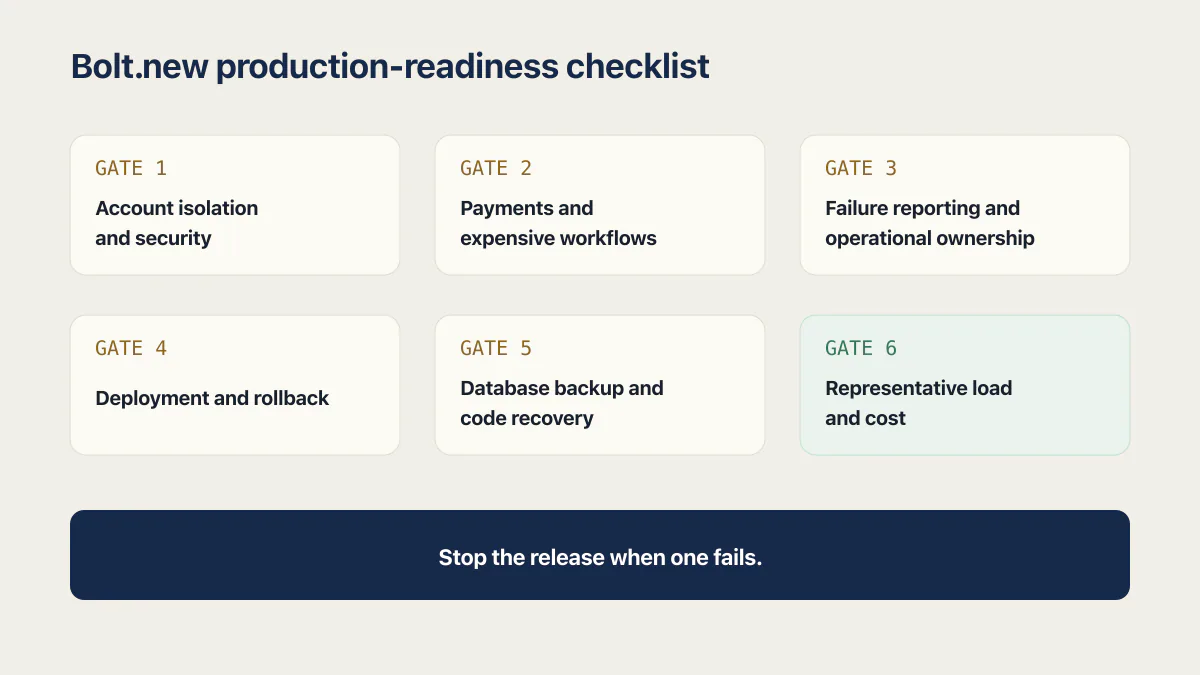
Yes, a Bolt.new app can be production ready, but publishing it does not make it so. It gets there when you can show evidence for six things: account isolation, payment correctness, failure reporting, deployment and rollback, code and data recovery, and behavior under real traffic.
Bolt now provides built-in hosting, a managed database, authentication, server functions, secrets, logs, and security checks. Publishing proves that the selected build can run. Production readiness requires evidence that the app protects account boundaries, processes money correctly, reports failures, survives deployment changes, recovers compatible code and data, and handles representative traffic.
That answer is intentionally app-specific. A simple public site may be ready after a short release check. A multi-tenant product with payments and AI usage needs stronger evidence because more can fail and the consequences are larger.
Bolt will tell you the build finished. Nothing in that message says whether the app is safe to hand a stranger.
If you want the checklist rather than the reasoning, the nine-step version near the end of this post is the compressed form of everything below.
Has anyone built a production app with Bolt.new?
Yes. That heading is not rhetorical: it is the title of a Product Hunt thread from February 2025 that people still land on when they search this, and the replies are founders describing shipped apps with real users, not experiments.
One of them, describing a real Bolt app on Product Hunt, put it plainly: Bolt “does a great job generating code that is almost production ready, but like all of these text to code tools, we find that it needs a good review, esp from a security standpoint, found some exposed API keys and such.”
Our own sample points the same way from the other side. The 21 third-party apps in the AxonBuild audit corpus were all real applications that had already shipped, built by founders on tools of this kind, not projects assembled for a study. Apps built this way reach production constantly.
So the useful question is not whether it can be done. It is what these apps look like once they are there, and which parts of them are usually missing. The six gates below are that list, and running them is the review that builder is describing. For a small team that wants to hold that check as one meeting, the production readiness review page covers how to run it in about an hour and the questions the reviewer asks.
What Bolt.new provides for production
As of 2 August 2026, Bolt Cloud combines the main infrastructure pieces needed to launch an application:
- Bolt Hosting publishes to a built-in
.bolt.hostaddress, supports public or private visibility, and offers custom domains on paid plans. - Bolt Database includes a managed database, authentication, server functions, secrets, security settings, and logs.
- The project security audit checks code and database risks on paid plans, while a database security check is available on all plans.
- Database logs expose activity from server functions, authentication, Postgres, and other managed services for diagnosis.
Each of those covers a real job. None of them covers the job next to it. This is the split that decides how much work is left:
| Bolt feature | What it covers | What you still have to prove |
|---|---|---|
| Bolt Hosting | Publishing the built app to a live URL, public or private, with custom domains on paid plans | That the deployed environment carries the right secrets, database connections, callback URLs, and allowed origins, and that you can get back to the previous version |
| Bolt Database | A managed Postgres database with authentication, server functions, secrets, and file storage | That one account’s requests cannot read, change, or delete another account’s rows through direct calls |
| Project security audit (paid plans) | A scan of code and database risks: data access, public information, authentication and sessions, input safety, keys, and some business-logic abuse | The states a scan cannot reach: real account combinations, real provider responses, partial failures, and restores |
| Database logs | Activity from server functions, authentication, Postgres, and other managed services | That a failure reaches a person, with a request trail, inside the time your app can tolerate |
| Version History | Restoring the project files to an earlier saved state | That a compatible database copy restores alongside those files and still serves a customer workflow |
| Bolt Agent | Planning, writing, and troubleshooting code while you build | That the checks your release depends on exist, run on every change, and stop a bad release |
What you cannot do on the free plan
A few of these limits are launch blockers rather than annoyances, and they are easier to see collected in one place than scattered across a pricing page:
- No project security audit. The whole-project audit is paid-plan functionality. Free projects get the database security check only.
- No custom domain. Free projects publish to a
.bolt.hostaddress. Custom domains arrive with a paid plan. - No Max agent. Only the Standard agent is available on the free plan; Max is the agent built for large codebases with complex dependencies, which is roughly what a project looks like by the time it is close to launch.
- A 300K token daily cap. Bolt’s token documentation puts a daily usage limit of 300K tokens on the free plan, and most token use comes from Bolt reading and syncing your project files, so the cap tightens as the project grows.
One structural detail matters for testing. Bolt builds and previews the app on StackBlitz’s WebContainers, a Node.js runtime that executes entirely inside the browser tab with no server or VM behind it. That sandbox is where the app gets built, not where it gets used. Once published, the code leaves the sandbox and starts answering real requests from real strangers, so everything the preview never had to prove, such as whether a second account can read the first one’s rows, gets asked for the first time in production.
These capabilities narrow the remaining production work. The release still needs to prove that each one is configured for the app’s actual users and workflows.
| Visible milestone | Production evidence |
|---|---|
| The app has a public URL | The release passed security, critical-path, failure, and recovery checks before traffic moved to it |
| Users can sign in | Two ordinary accounts cannot read, change, or delete each other's records through direct requests |
| Checkout reaches a success page | The server grants access only after a verified provider event and handles duplicate or delayed events safely |
| Logs exist | A known failure reaches the responsible person with a request trail and useful context |
| Version History can restore code | A compatible code version and database copy have been restored together and passed a customer workflow |
Account isolation and security (Gate 1)
First, know which database you are testing. A Bolt project either uses Bolt Database, the managed option, or connects to an existing Supabase project that you administer yourself. The gate is identical either way, but the settings, policies, and console you check live in different places, and Bolt’s own security tooling only sees the part it manages.
Run Bolt’s database security check and, on a paid plan, the full project security audit against the release candidate. The full audit covers data access, public information, authentication and sessions, input safety, keys, and business-logic abuse such as price changes or replayed actions. Review the action list and rerun the audit after relevant fixes.
Then create two ordinary accounts with different data. Repeat account A’s real read, update, delete, file, and server-function requests while authenticated as account B. Replace identifiers in the URL, request body, and query parameters. The expected result is an authorization error or no data.
This behavioral test matters even when the database check is clean. A row level security (RLS) policy may correctly require authentication while granting every authenticated user access to every row, which is the single most common isolation failure in AI-generated apps. A server function may run with elevated rights and trust a caller-supplied userId. The audit and the two-account test answer related questions with different evidence.
If your app is on Supabase rather than Bolt Database, test the RLS policies directly as well as through the app, so a policy that only looks correct in the editor has to prove itself against a real second session.
Whether Bolt itself is a trustworthy platform to build on is a separate platform-safety question. Production readiness assumes the platform controls are understood and asks whether this app can be relied on in its intended use.
Gate 2: payments and expensive workflows
The browser should never decide whether a payment succeeded, which plan a user bought, or how much an action costs. Verify payment-provider signatures on the server, derive the price and product from trusted configuration, and make fulfillment idempotent. Send the same valid event twice and confirm it produces one entitlement. Send delayed and out-of-order events and confirm the final access state remains correct.
Apply the same rule to AI calls, email, file conversion, exports, webhooks, and background jobs. Require authentication before paid work starts. Enforce an account or IP quota on the server, then call the endpoint quickly enough to verify the limit. A disabled browser button does not control a direct request.
The checkout leakage guide covers the payment boundary in detail. For readiness, keep a concise record of the valid, duplicate, failed, and delayed cases that the release passed.
Gate 3: failure reporting and operational ownership
This gate is the one the audited sample failed most often. Across the 21 third-party apps in the AxonBuild corpus, at least 18 had no working test anywhere, 17 recorded errors nowhere, and at least 17 sent every push to production unchecked. Bolt’s database logs provide several useful streams, including server-function, authentication, and Postgres activity. A production app also needs a route from a failure to the person expected to respond.
Bolt’s homepage sells the opposite of that gap. It advertises “98% less errors” from automatic testing and iteration while you build. Read that as a claim about code quality during the build, not as failure reporting in production. The corpus is the reason to keep the two apart: the same 21 apps that mostly recorded errors nowhere also scored worst of the twelve areas measured on reliability and correctness, at 31.4 out of 100. Checks the agent writes can stop a bad change from shipping. They cannot tell you that a payment webhook started failing at 3am, and they cannot wake anyone up. A generated test suite and a route from a failure to a person are different pieces of infrastructure, and only one of them is included.
Trigger a known exception in a safe environment and confirm three things:
- the user receives an honest failure state rather than false success;
- the log or error tracker includes a request identifier and relevant context without sensitive data;
- the responsible person receives an alert within the response time the app needs.
Test one partial failure too. Make the payment provider succeed while a later entitlement write fails, or make a background job fail after the initial request returns. These cases expose workflows where the interface says “done” while the system is incomplete. Silent failures that still return 200 OK need application-level checks because infrastructure uptime may see them as healthy.
Deployment and rollback (Gate 4)
Bolt’s hosting overview describes built-in Bolt Hosting, with Netlify available as a separate option. Pick the host before the first publish. Bolt’s Netlify guide says new projects publish to Bolt hosting by default, and that a project must not already have been published to Bolt hosting before you switch it to Netlify. That makes the first publish close to a one-way door, which is an odd thing to discover during a launch. Use the same host and environment configuration in the release rehearsal that production will use. Verify server-function secrets, database connections, callback URLs, and allowed origins after deployment rather than assuming preview settings transferred.
A safe deployment gate can begin with four checks:
- the current database and project security checks have no unresolved critical issue;
- a critical-path test covers sign-in, the primary action, and one failure path;
- the schema change has been tested against representative data;
- the prior application version and a compatible database recovery point are recorded.
Stop the release when one fails. A manual checklist is adequate at first if it is consistently required and leaves evidence. Automate the stable checks as the app and team grow.
Database backup and code recovery (Gate 5)
Bolt’s Version History documentation says restoring a version returns the project files to that saved state. It does not restore Bolt Database or a connected Supabase database. Code rollback and data recovery therefore need separate plans. If you connected your own Supabase project, the split is the same: Version History restores the Bolt files, and the data recovery method is whatever your Supabase plan provides.
Connect GitHub and the version record moves outside Bolt entirely. Bolt’s GitHub integration creates a repository from the project and commits automatically every time a change does not break the project, keeping a full history of changes that lives outside Bolt. Do that before launch for two reasons. It is the exit route if the app outgrows Bolt Hosting, because the code is already somewhere a developer can build and deploy from. And it strengthens recovery: commits, tags, and branches are a more precise thing to roll back to than a list of in-platform snapshots. It still does not touch your data. Version History and GitHub are both records of code.
Before a schema or data change, export or back up the database using the capabilities of the active database service. Record the application version that can read that data shape. Restore both into a separate environment, compare expected row counts, and complete one end-to-end customer workflow.
This test also catches a common rollback trap. Old code may fail after a new migration removes or renames a field, even though Version History restored the files perfectly. Prefer backward-compatible migrations and separate destructive cleanup from the release that introduces the replacement.
Gate 6: representative load and cost
A public URL working for one person provides no capacity evidence. Run a load test that resembles the expected mix of reads, writes, authentication, server functions, and external calls. Watch latency percentiles, error rate, database connections, slow queries, function failures, provider quotas, and cost together.
Start with the next realistic milestone rather than an arbitrary huge number. If 50 people will use the app during a launch event, test that concurrency with production-shaped data. If an AI workflow is the costly path, include its quota behavior and a safe provider stub where calling the real model at full load would be wasteful.
Why AI-built apps can stall at 100 users explains how database connection limits, synchronous work, and unbounded external calls can become constraints before hosting compute does.
The token wall: cost pressure that shapes what ships
One failure mode nobody puts in a launch post is more mundane than security. Every message you send Bolt re-syncs your project’s files to the model, and Bolt’s own token documentation says the biggest driver of cost is project size, not the complexity of the request. A prompt that cost a few thousand tokens on day one costs more by month two, purely because the app you’re prompting against is bigger. On the free plan that means the 300K daily cap arrives sooner every week, right when the project is large enough to need a readiness pass.
The meter shapes what ships, too. A debug loop that’s burning tokens rewards the shortest fix that makes the error go away, and the shortest fix for a failing API call is pasting the key straight into the file:
// The anon key here is meant to be public. This one isn't:
// a service_role key inlined during a debug loop, not read from
// an environment variable, now sitting in the client bundle.
const supabaseAdmin = createClient(
  'https://xyzcompany.supabase.co',
  'eyJhbGciOiJIUzI1NiIsInR5cCI6IkpXVCJ9.example-service-role-key',
);
A shrinking token budget pushes a founder to spend what’s left on features a demo can show, not on the low-visibility engineering, a test, an error tracker, a staging database, that a demo can’t. That split matches the corpus almost exactly. Reliability scored last of the twelve areas measured across the 21 third-party apps, while secrets and credentials, the thing every founder worries about first, averaged 84.4 out of 100, the best of them. The stereotype has the risk backwards.
Bolt.new production-readiness checklist
- 01 Publish a release candidate to the same hosting path and environment configuration intended for production.
- 02 Run the current database security check and paid project security audit where available, then resolve or document every applicable finding.
- 03 Use two ordinary accounts to test cross-account reads, writes, deletes, files, and server functions through direct requests.
- 04 Verify payments on the server and test valid, failed, duplicate, delayed, and out-of-order provider events.
- 05 Require authentication and server-enforced quotas before AI, email, export, file-processing, and other metered actions.
- 06 Trigger a normal exception and a partial workflow failure, then confirm honest user states, useful logs, and an alert to the responsible person.
- 07 Run a repeatable critical-path suite and stop the deployment when security, tests, or schema verification fails.
- 08 Restore a compatible application version and database copy into a safe environment, then complete one customer workflow.
- 09 Load-test the next expected traffic milestone while watching latency, errors, database pressure, provider limits, and cost.
The checklist turns “production ready” into a release-specific claim. Keep the evidence with the release and rerun the affected gates after changes to authentication, payments, schema, hosting, server functions, or the main customer workflow. The broader launch-readiness review adds ownership, privacy, and operational questions that may matter beyond Bolt itself. For the whole app rather than one release, production hardening covers what it means for a web app you already run and which page to open first. For a SaaS app, the production readiness checklist lists every item by area, with how to verify it.
Common questions about Bolt.new production readiness
Is a Bolt.new app production ready out of the box?
No universal answer applies to the first generated build. Bolt supplies real production capabilities, including hosting, database, authentication, secrets, logs, and security checks. The app becomes ready for a defined use after its account, payment, failure, deployment, recovery, and capacity paths pass appropriate tests.
Can Bolt.new replace developers?
For getting a working app in front of people fast, largely yes; that is the real capability. For the judgment calls that decide whether that app is safe to run with real users and real money, no tool has closed the gap. Veracode’s 2025 GenAI Code Security Report found that 45% of its generated code samples failed security tests and introduced OWASP Top 10 vulnerabilities. The study tested more than 100 models across four languages. Bolt writes code that runs. Someone still has to verify what it protects.
Can Bolt.new host a production app?
Yes. Bolt Hosting publishes the app to a built-in domain, supports public and private visibility, and offers custom domains on paid plans. Hosting capability answers where the app runs. The gates above answer whether people should rely on it.
Is Bolt.new’s security audit enough for production?
It is a useful gate, especially because it covers database settings, authentication, keys, inputs, and some business-logic abuse. It cannot exercise every real account state, external provider response, deployment failure, or recovery sequence. Pair it with two-account, payment, failure, and restore tests.
Does Bolt.new back up the database with Version History?
No. Bolt documents Version History as a project-file restore. It does not restore Bolt Database or Supabase data. Maintain a separate database recovery method and test it alongside a compatible application version.
Can I export a Bolt.new app to GitHub?
Yes. Bolt connects to a GitHub account, creates a repository from your project, and commits automatically as you build, so the code and its history live outside Bolt. Connect it before launch rather than after a problem: it is the exit route if the app outgrows Bolt Hosting, and it gives a developer an ordinary repository to deploy and roll back from. It does not export or back up your database, which still needs its own recovery plan.
How long does it take to get a Bolt.new app production ready?
For a single-tenant app with no payments, expect a few days of focused work: the two-account test, one failure drill, a restore rehearsal, and a deployment checklist. For a multi-tenant app with payments, AI spend, and live customer data, plan two to six weeks. The size of the app matters less than how much of the operating layer already exists, because most of that time goes into fixing what the tests find and into building the error tracking, safe environment, and repeatable checks that were never there.
What should I test first if launch is close?
Start with two-account isolation, server-verified payment fulfillment, one known failure that reaches an alert, and a database restore into a safe environment. These checks cover customer data, money, operational visibility, and recoverability. Then add the critical-path deployment gate and representative load test before broader traffic.
What is Bolt.new for?
Bolt.new is StackBlitz’s browser-based AI app builder: you describe a web app, Bolt writes and previews it inside a WebContainer running in the browser tab, and publishes it to Bolt Hosting against a managed database with authentication, server functions, secrets, and logs. Its job is getting a working full-stack web app in front of people quickly.
Its workflow starts from a prompt and runs to a live URL, and editing a codebase you already have is a side path rather than the thing it is built around. That distinction is why the gates on this page exist: the tool is optimized for the distance from an idea to a live URL, and the readiness work starts on the other side of that URL.
Is Bolt.new free?
There is a free plan, and it stops short of several things a launch needs. Bolt’s token documentation, checked 16 August 2026, puts a daily usage limit of 300K tokens on the free plan, and most token use comes from Bolt reading and syncing your project files, so the cap bites harder the bigger the project gets. Free projects also get only the Standard agent, a .bolt.host address rather than a custom domain, and the database security check rather than the whole-project audit.
Read that as a build-and-try tier. Three of the four limits above sit directly on the release path, so a project close to launch is usually on a paid plan by the time it runs the gates on this page. What each paid tier costs, and how token spend meters against it is a pricing question rather than a readiness one.
Is Bolt DIY the same as Bolt.new?
No. bolt.diy is the open-source project forked from stackblitz/bolt.new, and its README calls it “the official open source version of Bolt.new, which allows you to choose the LLM that you use for each prompt!” You run it yourself and supply your own API keys across its documented 19+ provider integrations, checked 17 August 2026.
That difference matters for everything above. bolt.diy gives you the build loop and none of the hosted parts: no Bolt Hosting, no managed Bolt Database, no project security audit. Every gate on this page that names a Bolt feature has to be answered by whatever you host and run the app on instead, which is more work rather than less. The same applies to installing a fork locally: it changes where the code is generated, not what a release has to prove.
Bolt can shorten the distance from an idea to a running application. The readiness work begins where the generated happy path ends: another account’s request, a duplicate payment event, a broken release, a failed dependency, and a restored database.
If this checklist left you with more open items than you expected, the sprint below works through all of them in ten working days.
Built it with AI. Now it has to hold up for real customers.
The Production Hardening Sprint takes the app you already have and builds the production foundation underneath it. Authentication and access rules, payments that stay consistent, error handling, monitoring, backups, automated tests and a documented handover. Our engineers work inside your existing codebase for ten working days. All 123 deliverables are included, and you get the evidence for each one.
See the Production Hardening Sprint →  $2,500 fixed price · 10 working days · One codebase