Moving an AI-built app off the builder is a code problem for about an hour and an accounts problem for the rest of the week. A thread title on r/lovable describes it best: “Migrating away from Lovable Cloud. Auth breaking, .env being overwritten, and general migration pain.” Three separate failures in one sentence, and the person writing it had already done the part everyone worries about, getting the code out.
A migration off an AI builder moves the code and very little else. The front end travels because it is ordinary files in a repository. The four things that live in the builder’s account do not: user accounts, secret values, uploaded files, and the server-side work nobody looks at. Only the login failures announce themselves.
Lovable’s introduction says it generates an application “that includes frontend, backend, database, authentication, and integrations, all backed by editable code”. The editable-code half is true, and it is the half that fits in a zip. One agency in the mining corpus had “built an app in Lovable with the expectation that I could export it, containerize it, and move it into a deployable Kubernetes setup with a multi-tenant configuration model” (one row of 1,255 read on 14 August 2026). The code exported. The configuration model was not in it.
Two things the move does not buy you. Lovable SSR is a common reason to leave, and switching hosts does not add server-side rendering to a client-rendered build. And Lovable does provide hosting: its custom domain docs say that if you bought the domain through Lovable, it registers the domain on your behalf, configures the A and verification TXT records, and installs the SSL certificate. Three jobs that come back to you at cutover. A domain you registered somewhere else was never held that way, so only the certificate and the DNS records move.
What travels with the code and what stays in the builder’s account
| What | Lovable | Base44 | Replit | Bolt |
|---|---|---|---|---|
| Front-end code | Travels. GitHub sync runs both ways | Travels. eject “downloads the frontend code from the selected app” | Travels. Download as zip from the file tree, or the Git pane | Travels. Export then Download as a zip, or GitHub sync |
| Database schema | Rebuilt by hand on the documented route into your own Supabase, even though the Cloud export itself carries structure and data | Travels. “Entity schemas are copied” | Not in a project copy, but reachable: it comes out over the production database’s connection string | Claimable into a Supabase project you own |
| The data itself | Exported from Cloud, then loaded into the new project | Stays. “The ejected project has an empty database” | Not in a project copy, but reachable: connect to the production database with the connection string from its Settings tab and dump it | Claim it. Connecting a new Supabase project instead “may cause data loss” |
| User accounts and passwords | Lovable Cloud exports no usable passwords, so users need a reset path. A generic Supabase-to-Supabase move can preserve hashes | Five sign-in methods documented, no export path documented | Replit Auth accounts are Replit accounts, not yours | No export path documented |
| Environment variables and secrets | VITE_ values were compiled into the old build | No export path documented | Stays. Secrets are not included in a project copy | Values are hidden once entered |
| Domain and hosting | Lovable holds DNS and the certificate, and the domain too if you bought it through Lovable | No migration path documented | Stays. Deployment configuration is not included in a copy | No migration path documented. You connect a domain you own to a published project |
Every cell was read from that vendor’s own documentation on 15 August 2026, and the sourced statements are linked below. Five cells say “not documented”, which describes those docs on that date rather than proving the capability is absent.
Two pages set whole columns. Lovable’s docs state there is “no one-click migration from the built-in backend (Cloud) to your own Supabase project”, with the workaround being to export the Cloud data, connect your own Supabase project to a new Lovable project, and rebuild the schema by hand. Lovable’s Advanced settings docs say the export contains the full database structure and data. The same page says user passwords are not exported in a usable form, so migrated users need a password-reset flow. The hand work is in the route into your own project, not in what came out of Cloud. Base44’s eject command “downloads entity schemas and other backend resources, but not your data”, leaving the two projects independent afterwards.
The rows that hurt are the middle three, because none of them produce an error at the moment they fail. A schema restores clean with no rows in it. An app boots fine with a missing secret and falls over later, when a user reaches the code path that reads it. If you are leaving Lovable’s built-in backend specifically, what the Lovable Cloud backend actually contains and how to disable it covers that side.
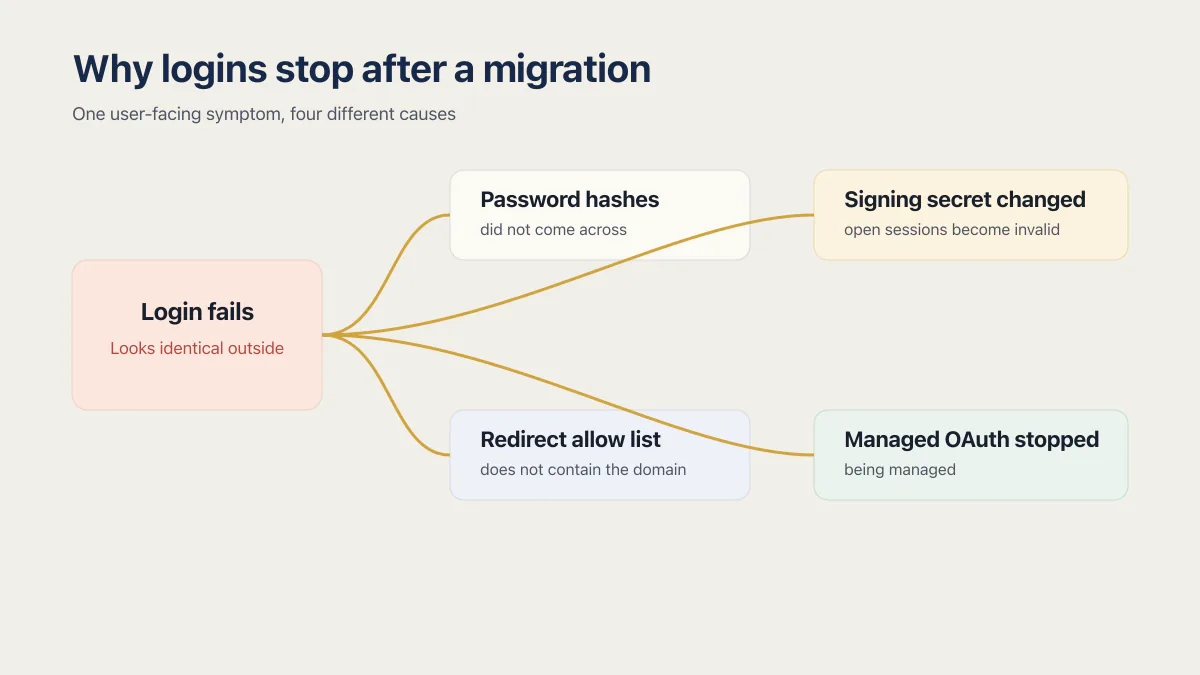
Why do logins stop working after a migration?
Logins break after a migration for four separate reasons and the repair differs for every one: the password hashes did not come across, the token signing secret changed so every open session is void, the new project’s redirect allow list does not contain your domain, or managed OAuth stopped being managed. All four look identical from the user’s side.
The hashes. A generic Supabase-to-Supabase move can keep them. Supabase’s guide says you can migrate all tables in the auth schema, “including users and their hashed passwords”, and that “users do not need to reset or recreate their passwords after migration”. Lovable Cloud is different: its documented export does not contain usable passwords, so plan a reset flow for those users. A cross-provider move can preserve passwords only if the old provider hands the hashes over. Supabase imports users from Auth0 as bcrypt or Argon2, with the caveat that “To export password hashes and MFA factors, contact Auth0 support”, and the Firebase Auth path works by saving Firebase’s scrypt parameters (base64_signer_key, base64_salt_separator, rounds, mem_cost). If your builder will not release usable hashes, a reset for every user is what remains.
The signing secret. This is the one that catches people who did everything else right. Supabase provisions each project with a unique JWT secret: “If the JWT secret is different in the new project, existing tokens will become invalid, and users will be required to log in again to get new tokens.” Reuse the original and sessions survive, with one side effect to know first: “Updating the JWT secret will regenerate your anon and service_role API keys in the new project.” A founder in the corpus described it exactly: “I put my app into maintenance for about 30 min and did the full migration… user login sessions were being denied.”
The allow list. Supabase’s redirect URL configuration sets a Site URL that “defines the default redirect URL when no redirectTo is specified in the code”, and the URL passed in redirectTo “should match the Redirect URLs list configuration”. A new project knows nothing about your domain, so the symptom is a login that appears to work and lands somewhere wrong.
Managed OAuth. Google and GitHub sign-in stop being handled for you. Lovable’s deployment guide states that “Managed OAuth configuration and automatic token refresh are only available when the backend runs on the built-in backend (Cloud)”, and tells you to open “your OAuth app settings (for example, Google Console, GitHub)” and “update redirect URLs to use your new Supabase project URL”. Replit has a sharper version: Replit Auth “uses Replit’s own login system”, so signing in means “creating or using an existing Replit account”, with Clerk offered as the alternative giving “user accounts that are independent of Replit”. An app on Replit Auth has no user table to bring with it.
Why did my Lovable environment variables disappear?
Lovable environment variables prefixed with VITE_ never existed as a file you could copy. Lovable’s documentation states they are “embedded at build time, not runtime”, so the value you are hunting for was compiled into a bundle the old platform built. Three different versions of this failure hit during one move.
The first is that compiled value, from Lovable’s external deployment guide. It is not in the export, so you recover it from whichever provider issued it, or you rotate it.
The second is the source platform’s secret store. Bolt’s database secrets hide the value as you type it, and Lovable Secrets behave the same way. Replit differs. Its current Secrets documentation says an authorized owner or collaborator can reveal a value with the eye control and edit the set as JSON or .env. Inventory every value before the move and rotate anything whose custody is uncertain. Do not assume every platform will show a saved value again.
Third, the destination does the same thing to you. Vercel’s sensitive environment variables documentation now has you choose Config or Secret when you add or edit a variable: Secret values “are write-only after saving”, the current value is hidden when you edit a Secret, and existing Sensitive variables “continue to work as Secrets” (page last updated 28 August 2026, read 23 September 2026). A typo in a value you cannot read back stays invisible until something calls the API that rejects it.
External services behave the same way. Lovable’s guide is explicit: if you use “any external services (for example, Stripe) in your project, you need to manually reconfigure API keys, tokens, and credentials in your new Supabase project”. For the underlying model, what an environment variable is and where each host expects it covers the build-time versus runtime split and the prefix rules that decide what reaches the browser.
What does a database dump not include?
A database dump includes roles, schema, data, functions and triggers, and it is not a copy of the application. Five other parts of the project move on their own track.
Supabase’s backup and restore guide lists all five: storage objects need a scripted transfer, edge functions are redeployed separately, database webhooks are re-enabled by hand, non-default extensions are re-activated, and custom roles arrive without their passwords, which “you must manually set” in the new project. Add the encryption root key if the project uses one, because encrypted columns are unreadable without it.
Then uploaded files, which Lovable’s guide handles in a sentence that sounds small and is not: “Download any files from storage buckets in your project and upload them to your new Supabase project.” Every profile picture, every attachment, every generated PDF.
This is the quietest part of any migration. The restore reports success, the row counts match, the app starts, and nothing tells you that a nightly reconciliation job stopped two weeks ago or that a payment webhook still posts to a function on the old project. The database side of the Lovable case has its own walkthrough: getting the database itself out of Lovable.
Lovable GitHub sync not working after a repo move
Lovable GitHub sync survives a repository rename and breaks on a transfer or a delete. The Git integration docs are exact about all three: rename and “Sync continues. Lovable detects the rename and updates the connection automatically”; transfer and “Sync breaks. The project stays attached to the original owner’s connection”; delete and “The connection breaks and the project stops syncing.”
The safe rename is the repository’s own. If you rename your GitHub username or organization, the GitHub connection breaks. Your project stops syncing, and the documented fix is to put the old name back. A sync that stopped without anyone moving anything is a different case, and the sync that broke on its own, and how to tell whether the repository holds a complete copy covers it.
One detail is worth stating plainly, because plenty of migration write-ups say the sync is one-way: as of 15 August 2026 Lovable’s Git integration docs describe it running both ways, “Changes made in Lovable sync to GitHub” and “Changes pushed to the active GitHub branch sync back into Lovable”. A delete is recoverable if you restore the repository on GitHub, or disconnect and reconnect for a new one.
The consequence is an ordering rule. Moving the repo into a company organization is usually one of the first things a founder does once a migration starts feeling official, and it is the step that cuts the way back. Do it while you still want to make changes in the builder and you have two half-projects: an editor that no longer publishes, and a repo nobody is generating into.
The other three differ. Bolt’s Git integration commits on every working change and “checks GitHub every 30 seconds for any updates made outside Bolt”, with a zip download as the offline route. Replit projects “can’t be transferred directly”, so an account move is a share-and-fork, and the copy leaves the secrets, the database and the deployment configuration behind. The database is still reachable from outside that copy, over the connection string on the production database’s Settings tab. If Replit is the platform you are weighing rather than leaving, whether a Replit app is ready for production is the other half of that call.
The pre-cutover check list, ordered by what you cannot undo
The first four are the ones you cannot cleanly take back. The rest can be redone on a bad afternoon.
- 01 Keep the old project alive until the new one has served real users for a week, on a paid plan if that is what it costs.
- 02 Write down every secret value while you can still read one. A value you skip is a value you rotate.
- 03 Do not transfer or delete the GitHub repository until you have stopped editing in the builder. Renaming the repository is safe; renaming your GitHub username or organization is not.
- 04 Decide about the JWT secret before you create the new project. Carry it across and sessions survive; leave it and everyone is logged out at cutover.
- 05 Export the data before you disconnect any backend, then check the row counts against the old project.
- 06 Download every storage bucket with the object paths intact and re-upload them before traffic moves.
- 07 Add the new domain to the redirect allow list and update each OAuth provider console, both before the DNS change.
- 08 Re-enable webhooks, scheduled jobs, extensions and custom-role passwords by hand, then trigger each one and read the log.
- 09 Move the domain last, once a real login, a real write and a real payment have succeeded on the new host.
What the list cannot tell you is how long the tail runs. The visible part of a migration takes a day or two. The part where a monthly job fails for the first time, or a user who has not logged in since March finds their password gone, lasts as long as your slowest recurring process. Whether a builder lets you take the code out at all is a separate question from what the code is worth once it is out, and the export mechanics for Lovable, Base44, Replit and Bolt each need their own page. Once the app runs on the new host, the production readiness checklist covers every item for one SaaS app, by area, with the test that proves each one is done.
Common questions about migrating off an AI builder
Will my users have to reset their passwords?
Not necessarily. Between two Supabase projects, Supabase documents migrating the auth schema “including users and their hashed passwords”, and says users “do not need to reset or recreate their passwords after migration”. Lovable Cloud is an exception because its export does not include usable passwords, so those users need a reset flow. A different old provider works only if it releases compatible hashes, such as bcrypt or Argon2 from Auth0, or Firebase’s scrypt with its hash parameters.
Why did my logins stop working right after the migration?
Most often because the new project signs tokens with a different secret. Supabase gives each project a unique JWT secret, and if it differs, “existing tokens will become invalid, and users will be required to log in again”. Three other causes look identical from outside: the hashes never arrived, the redirect allow list does not contain your domain, or an OAuth provider still points at the old callback URL.
Do my environment variables come with the exported code?
No. Values live in the platform, not the repository, and the browser-facing ones never existed as a copyable file: Lovable’s deployment guide says variables prefixed with VITE_ are “embedded at build time, not runtime”. Inventory every value before you start. Replit lets authorized owners and collaborators reveal saved values, while other secret stores may require recovery from the provider that issued the credential or a rotation.
Why did GitHub sync stop after I moved the repository?
Because a transfer breaks the connection by design. Lovable’s Git docs say the “project stays attached to the original owner’s connection”, so moving a repo into a company organization detaches it from the builder with no warning. Renaming the repository is safe and sync continues, but renaming your GitHub username or organization breaks the connection and stops the sync. If you deleted the repository, restoring it on GitHub resumes syncing, or you disconnect and reconnect for a fresh one.
What does not export from Base44?
Your data. Base44’s eject “downloads entity schemas and other backend resources, but not your data”, and “The ejected project has an empty database.” The original keeps running with the rows in it while the local copy starts empty. As of 15 August 2026 the Base44 authentication docs list email and password plus Google, Microsoft, Facebook and Apple sign-in, and document no user export path. What Base44 gives you and what it keeps has more.
Does Lovable provide hosting?
Yes, and taking it back is part of the move. Lovable publishes the project, and if you bought the domain through Lovable it registers that domain on your behalf, creates the A and verification TXT records, and installs the SSL certificate. A domain you hold at another registrar stays yours throughout. Transferring the domain away to another registrar means “Lovable automatically disconnects the domain from any connected projects when the transfer completes”, so the DNS change belongs at the end of a migration.
Do I lose my uploaded files when I move the database?
They do not travel with the database, so it comes down to whether you remember them. Supabase treats storage objects as a separate scripted transfer, and Lovable tells you to download the files from your buckets and upload them to the new project by hand. Nothing in a database restore reports them missing; the app finds out when a user opens an old attachment.
What breaks when you migrate off Lovable?
Six things: managed OAuth stops being managed, existing sessions are invalidated by the new signing secret, VITE_ variables turn out to have been compiled into the old build, storage buckets stay behind, third-party keys like Stripe need re-entering by hand, and the schema is rebuilt because Lovable’s docs state there is “no one-click migration from the built-in backend (Cloud) to your own Supabase project”.
Every vendor sentence quoted here was read from that vendor’s own documentation on 15 August 2026. These docs change most months, so open the page before you rely on a line of it.
Moving platforms is the moment the missing production pieces show up. The sprint below builds them into the codebase you land on.
Built it with AI. Now it has to hold up for real customers.
The Production Hardening Sprint takes the app you already have and builds the production foundation underneath it. Authentication and access rules, payments that stay consistent, error handling, monitoring, backups, automated tests and a documented handover. Our engineers work inside your existing codebase for ten working days. All 123 deliverables are included, and you get the evidence for each one.
See the Production Hardening Sprint →  $2,500 fixed price · 10 working days · One codebase