Your web app works. Real people use it. And the same question keeps arriving: is there an app?
Someone in a builder community described the job in one line: “He created a super specific prompt in Claude and built it in base44 but wants to convert it to a different server to publish on iOS”. The thing runs. Now it has to be on a phone.
Four honest paths get you there. Pay a wrapper vendor to build a native shell around your live site. Ship a progressive web app, which installs from the browser and never appears in a store. Build your own Capacitor shell and keep it in your own repository. Or rebuild the interface in React Native with Expo. Each has a different year-one cost, a different owner, and a different relationship with App Review.
This page prices all four. It does not argue whether you need a native app at all, which is the decision before this one. And if you landed here wanting your site as an icon on your own iPhone, that is a Safari home-screen shortcut: ten seconds, no store listing. Everything below is about a real app package, with every price and policy read from the vendor’s or the platform’s own page on 15 August 2026, where it rendered.
Four paths take a working web app onto phones: a paid wrapper, a progressive web app, your own Capacitor shell, or an Expo rebuild. Wrappers are fastest, from $119 one time. The two shell paths create the clearest guideline 4.2 risk when the app adds nothing beyond the website, but every submitted app still has to provide adequate utility and an app-like experience.
The four ways to get a web app onto phones
| Path | What it actually is | Year one cost | Who owns the build and the accounts | What App Review is likely to say |
|---|---|---|---|---|
| Wrapper vendor | A native shell built and rebuilt by a paid service, showing your live site | $119 to $439 one time (Appilix) or $144 to $699 (Natively), plus $99 a year to Apple and $25 once to Google | The vendor’s pipeline builds it. The developer accounts should still be yours | Exposed to guidelines 4.2 and 4.2.6 |
| Progressive web app | Your existing site, installable from the browser, no app package and no listing | $0 beyond your hosting | You own all of it. No developer accounts needed | Nothing. There is no submission and no review |
| Capacitor shell | An open-source native container you add to your own codebase and build yourself | $0 for Capacitor itself, plus $99 a year to Apple and $25 once to Google, plus your build time | You own the shell, the codebase and both accounts | Same 4.2 exposure as a wrapper, unless the app does something a browser tab cannot |
| Expo rebuild | The interface rewritten in React Native. The backend and API usually survive intact | $0 to $199 a month for Expo’s build service, plus the rebuild itself, plus the same $99 and $25 | You own the code and both accounts | Avoids being only a web wrapper. Guideline 4.2 still tests utility, uniqueness, and an app-like experience |
Prices checked 15 August 2026.
The wrapper suits a companion app: your site is the product, the store listing is a distribution channel, and an icon plus push notifications are the only mobile behavior you want.
The progressive web app suits anyone whose real goal is “installable and on the home screen” rather than “findable in the App Store”. It costs nothing, updates the moment you deploy, and since iOS and iPadOS 16.4 a web app added to the Home Screen can request permission to receive push notifications, as long as the request follows a direct tap by the user. It cannot appear in a store search result.
The Capacitor shell suits a technical founder or a developer you already pay. Its documentation calls it a cross-platform native runtime, which in practice is the same shape as a wrapper, except the shell lives in your repository and nobody can stop rebuilding it for you.
The Expo rebuild suits an app where the phone is the product, meaning offline work, camera, background location, health data, or an interface that has to feel like iOS.
What do website to app converters cost?
Wrapper subscriptions run from $12 a month billed annually up to a $699 one-time license, and one-time Android and iOS licenses from Appilix run $119 to $439. None of those figures include Apple’s $99 a year, Google’s $25 registration fee, or the rebuild fees that start once your included rebuilds run out.
First, the word. Nothing is converted. A “web to app converter” generates a small native project whose only screen is a browser view pointed at your URL, then builds and signs that project. Your site is still your site, served from your servers, rendered inside a frame with no address bar.
Four vendors dominate these results. All four are named below and none is linked, because every one of them sells the path this page is helping you judge.
| Vendor | Plan | Price | What the price covers |
|---|---|---|---|
| Natively | Free | $0 | Website to app conversion and the JS SDK. No app binaries and no App Store publishing |
| Natively | Essential | $19 a month, or $12 a month billed annually ($144 a year) | App Store publishing, push notifications, in-app purchases, 4 rebuilds, then $9 per extra rebuild |
| Natively | Unlimited | $49 a month, or $32 a month billed annually ($384 a year) | Unlimited rebuilds and dedicated support |
| Natively | Lifetime | $699 one time | Unlimited builds and the Unlimited feature set |
| Natively | Services | App Store Publishing from $600, Custom Assistance from $900, Custom Development from $2,000 | Work done for you, priced separately from the subscription |
| Appilix | Free | $0 | A 15-day free trial |
| Appilix | Android Standard / Premium | $119 / $229 one time | One Android app, no recurring charge |
| Appilix | iOS Standard / Premium | $149 / $269 one time | One iOS app, no recurring charge |
| Appilix | Combo packs | $229 / $439 one time | One Android and one iOS app |
| webtoapp.design | Small / Medium / Large / Enterprise | Not readable on 15 August 2026 | Tiers are sold by monthly active users (250, 2,500, 25,000, unlimited) with push caps of 5 and 100 a month on the middle tiers, billed yearly |
| Median | Not readable | Not readable on 15 August 2026 | Ranked first on the converter searches on this date |
Prices checked 15 August 2026 at buildnatively.com/pricing and appilix.com/pricing. On the same date webtoapp.design/pricing rendered its tier names and user limits but no price figures, and median.co returned an HTTP 403 when I tried it, so no price for either appears above. Third-party quotes of their prices are not a substitute.
Three things sit outside the comparison columns. Rebuilds are metered: Natively’s Essential plan includes four and charges $9 after that, and a rebuild is what happens every time you change your icon, splash screen, permissions or plugin set. Your website changes stay free. Your app changes stop being free on the fifth one.
When the subscription ends, so do the builds. A one-time license leaves you holding a binary and a project. A monthly plan leaves you renting a service that stops rebuilding when the payments stop, on a listing that still needs new builds every time Apple or Google raises a minimum SDK requirement.
Then there is whose account the app lives in, which guideline 4.2.6 below decides and which is worth settling before you pay. Natively advertises a “100% app store release guarantee” on its paid plans. Read what that guarantee actually covers, because no vendor controls what an App Review reviewer decides; it is a commitment about the vendor’s own work. Natively also lists Bubble, Shopify, Webflow, WordPress, Lovable, Base44 and Replit among the sources it converts, which tells you who this category is now selling to.
What a webview app actually is
A webview app is a native application whose entire interface is one browser view pointed at your website. The native part contributes an icon, a splash screen, push notifications, store presence and permission prompts. The screens, the logic and the data are still your web app, loaded over the network at launch. That makes its protection the web app’s own, and web app security covers the 12 controls behind it, each with a test. If someone else is going to check them, what a web application security audit is covers how one is run and what the report has to contain.
Everything Apple’s minimum-functionality rule objects to follows from that. A reviewer opening a webview app sees a website, and if nothing on the screen would be impossible in Safari, the guideline is the reviewer’s whole argument.
What changes on iOS and on Android
Both stores want an app worth installing and charge very differently for the privilege. The gap between $99 a year and $25 once is the small part. What happens before your first public release is the large one.
Creating an Android app from a website
Google charges once. Its Play Console help page states there is a US$25 one-time registration fee. After that, publishing is free.
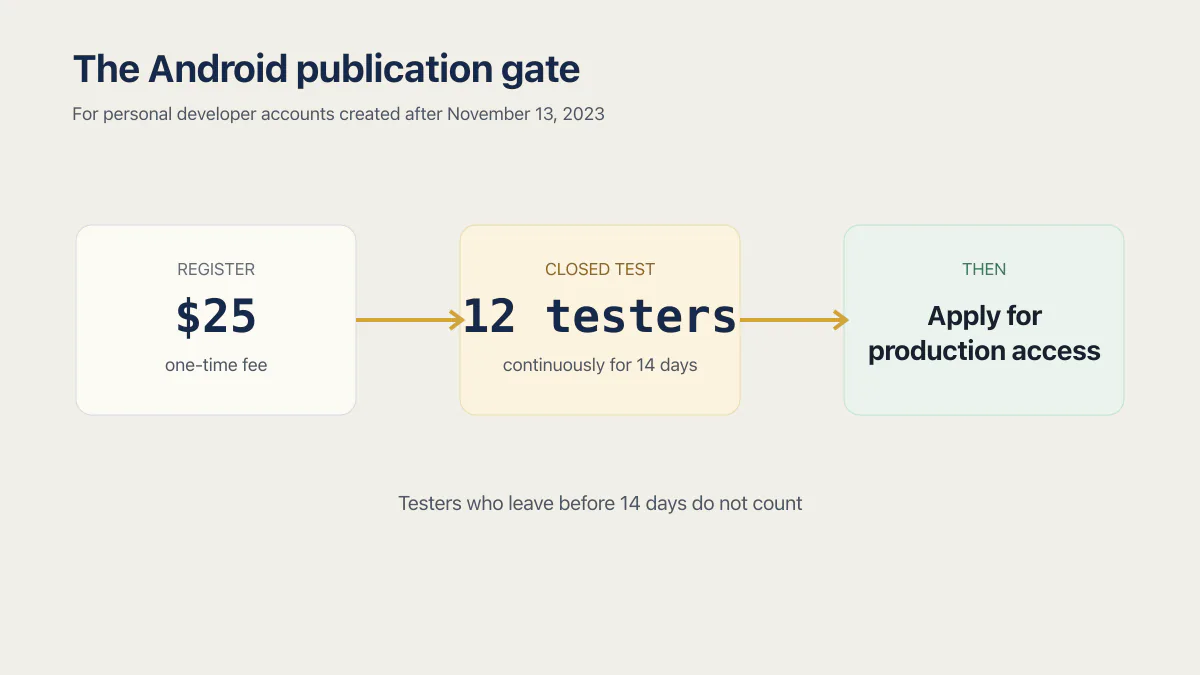
Then comes the rule almost nobody expects. In Google’s own wording, “Developers with personal accounts created after November 13, 2023, must run a closed test for their app with a minimum of 12 testers who have been opted in continuously for at least 14 days” before applying for production access. The continuity is literal: Google’s page adds that testers who opt in, test for fewer than 14 days and then opt out do not count. For a solo founder wrapping a site, finding and holding twelve people for two solid weeks is a bigger job than the build.
There is also a spam clause quoted at wrapper builders constantly, usually backwards. Google’s policy says: “We don’t allow apps whose primary purpose is to drive affiliate traffic to a website or provide a webview of a website without permission from the website owner or administrator”. Both halves are load-bearing. A webview of somebody else’s website, published without their permission, is banned. A webview of your own website is not what that sentence prohibits, because you are the owner giving the permission. The clause exists to stop people repackaging sites they do not run.
Creating an iPhone app from a website
Apple charges annually and reviews every release. Its enrollment page states: “The Apple Developer Program annual fee is 99 USD and the Apple Developer Enterprise Program annual fee is 299 USD, in local currency where available”. There is no free publishing tier and no one-time option.
You do not need to own a Mac. A cloud build service signs and uploads the same binary a Mac would produce, which is how the hosted wrapper services build iOS apps and how you would work with a Capacitor shell too. Getting a signed build to TestFlight without a Mac is a separate job with its own steps.
Will Apple reject a website wrapper?
Website wrappers do get approved, and they get rejected under guideline 4.2 when a reviewer finds nothing in the app a browser tab could not do. Two more clauses matter: 4.2.6 decides whose developer account submits the app, and 3.1.1 decides how you may charge inside it.
Wrapper-forum paraphrases of these clauses are consistently stronger or weaker than the real text, so here are the five that matter, quoted from Apple’s App Store Review Guidelines as published on 15 August 2026.
Guideline 4.2, Minimum Functionality:
“Your app should include features, content, and UI that elevate it beyond a repackaged website. If your app is not particularly useful, unique, or “app-like,” it doesn’t belong on the App Store.”
The bar is real and it is low, which is why wrappers clear it regularly. What gets rejected is a submission where the reviewer opens the app, sees a page, and finds nothing justifying its existence as a download.
The same guideline applies to an Expo or other native rebuild. A rebuild removes the specific problem of submitting only a browser view. It does not guarantee adequate utility, uniqueness, or an app-like experience.
Guideline 4.2.2:
“Other than catalogs, apps shouldn’t primarily be marketing materials, advertisements, web clippings, content aggregators, or a collection of links.”
Brochure sites are what this one catches. If your web app is a working product with accounts and data, 4.2.2 is not your problem. If it is a marketing page with a contact form, it is.
Guideline 4.2.6:
“Apps created from a commercialized template or app generation service will be rejected unless they are submitted directly by the provider of the app’s content. These services should not submit apps on behalf of their clients and should offer tools that let their clients create customized, innovative apps that provide unique customer experiences.”
That sentence decides whose developer account the listing lives in. A wrapper vendor is an app generation service, and Apple’s answer is that the person whose content the app shows submits it. When a vendor offers publishing as a paid service, ask which Apple account the submission goes through.
Guideline 3.1.1, In-App Purchase:
“If you want to unlock features or functionality within your app, (by way of example: subscriptions, in-game currencies, game levels, access to premium content, or unlocking a full version), you must use in-app purchase. Apps may not use their own mechanisms to unlock content or functionality, such as license keys, augmented reality markers, QR codes, cryptocurrencies and cryptocurrency wallets, etc.”
For a wrapped web app that sells digital subscriptions, this is the base rule, not the whole answer. The allowed purchase path depends on the storefront, the app category, and any applicable entitlement. Guideline 3.1.1(a) says United States storefront apps do not need an entitlement to include buttons or links to other purchase methods. It also describes external-purchase entitlements for specific regions. Guideline 3.1.3 lists further exceptions for reader apps, enterprise services, person-to-person services, physical goods or services, and free companion apps.
Guideline 3.1.3(b), Multiplatform Services:
“Apps that operate across multiple platforms may allow users to access content, subscriptions, or features they have acquired in your app on other platforms or your web site, including consumable items in multi-platform games, provided those items are also available as in-app purchases within the app.”
For a multiplatform service using this clause, a subscriber who paid on your website can sign in and use what they bought. The closing condition says the same item must also be available as an in-app purchase. Other storefront or category rules can produce a different purchase path, so check the current guideline against the app you are submitting.
If a rejection notice is already in hand, that is a different job from this one, and the place to start is to match the guideline Apple cited to the fix.
When a wrapper is the wrong answer
On 15 August 2026 I checked the top ten Google results for how to create mobile app from website, web to app converter and convert website to app. Apart from the Reddit and Facebook threads, a YouTube walkthrough at position 9 on one of the queries, and Play Store listings at positions 2 and 6 on two of the pulls, every page-one result across all three was a company selling the conversion. That is position rather than dishonesty: a vendor cannot publish the cases where its own product is the wrong purchase.
Every commercial result on page one sells a wrapper, which is exactly why none of them tells you when a wrapper is the wrong purchase.
- 01 You sell subscriptions or digital access. Check the storefront, app category, and applicable entitlement before assuming in-app purchase or an external purchase link is required. If in-app purchase applies, its commission changes revenue you currently collect through the web.
- 02 The app would do nothing a mobile browser does not already do. That is guideline 4.2 stated plainly. Ship a progressive web app instead and keep the $99.
- 03 You need it to work offline. A webview needs your site to answer. Build your own shell and cache what matters, or rebuild the screens that have to work on a train.
- 04 You need the camera, background location or health data. Plugin coverage varies by vendor and background behavior is where it usually stops. Own the shell so you can add the native piece yourself.
- 05 The phone app is the product rather than a companion to a website. Rebuild it. A frame around a website will always feel like a frame around a website.
- 06 You expect to stop paying the vendor one day. A monthly plan stops rebuilding when the payments stop, and store minimum requirements move every year. Buy a one-time license you can rebuild from, or own the shell.
- 07 You want another developer to rebuild and submit it later. Nobody can maintain a pipeline they cannot see. Keep the project in your repository from the start.
The first and the sixth are money questions rather than technical ones, and they hurt most after the fact. When in-app purchase applies, its commission changes the unit economics of a subscription business. A vendor dependency changes what your app is worth when you sell the company or change developer.
What a real rebuild involves
A rebuild replaces the interface and usually leaves your database, your API and your business logic alone. The front end is the part that does not survive, and the reason is mechanical.
React Native does not render HTML. Its documentation puts it plainly: “At runtime, React Native creates the corresponding Android and iOS views for those components”. Its View component becomes an Android ViewGroup and an iOS UIView, Text becomes a TextView and a UITextView, and TextInput becomes an EditText and a UITextField. There is no DOM underneath and no CSS file to carry over, so every screen gets rewritten even where the logic behind it does not change. That single fact is most of what a rebuild costs.
Building and signing the binaries is the cheap part. Expo Application Services lists these plans on its pricing page: Free at $0 a month with 15 Android and 15 iOS builds and one build concurrency, Starter at $19 a month with $45 of build credit, Production at $199 a month with $225 of build credit, and Enterprise on custom pricing from $1,000 of build credit. Prices checked 15 August 2026. A solo founder shipping a few releases a month fits inside the free tier.
A build that comes out is not yet a build that survives. What an Expo-built app has to survive before it ships covers the device-level checks a green build says nothing about, and what developers actually charge for this answers the question about someone’s time.
If your web app came out of a builder, the rebuild question starts one step earlier: whether your builder lets the code out at all decides how the rest of the job goes, because nobody rewrites what they cannot read. What Lovable can and cannot ship to the stores, what a Base44 app can become on iOS, and the Expo route out of Replit are three separate answers. Settle yours before buying a subscription that assumes the website stays where it is, or have someone do the move for you.
Common questions about turning a website into an app
Can I turn my website into an app for free?
Partly. Capacitor is MIT-licensed open source from the Ionic team, and a progressive web app costs nothing beyond your existing hosting. Store distribution is never free: Apple charges $99 a year, Google charges $25 once, and no tool removes either fee. The free wrapper builders in the search results are trials or free tiers that stop before they hand you a signed binary.
What is a download app prompt and can I add one to my site?
A download app prompt is the banner inviting a phone visitor to install the app instead of continuing in the browser. On Android and desktop Chrome, a progressive web app can trigger an install prompt from the browser itself. iOS has no equivalent browser prompt, so sites either point people at their App Store listing or explain the Safari share sheet in a banner of their own.
Will links to my website open inside the app?
Only if you set it up. Deep linking takes two pieces of configuration: a file hosted on your domain naming the app allowed to claim your links, and a matching declaration inside the app. Wrapper vendors vary in whether they expose it. Without it, a link to your site opens in the phone’s browser even when your app is installed.
Does the app update when I update the website?
On a hosted wrapper, your content updates instantly and the app shell does not. Those builds load your live site, so a deploy shows up with no store submission. A Capacitor shell you build yourself works the other way round: its configuration bundles a folder of compiled web assets, the webDir, so a deploy changes nothing on the phone until you ship a new build. Pointing that shell at a live address instead is documented by Capacitor as “intended for use with live-reload servers” and “not intended for use in production”. On every path, the native pieces change only in a new build: icon, splash screen, permission set, plugins. That boundary is where wrapper rebuild fees are charged.
Do I need a Mac to make an iPhone app from my website?
No. A cloud build service produces and signs the same binary a Mac running Xcode would produce, which is the only way a hosted converter could build an iOS app for you at all. You do still need an Apple Developer Program membership at $99 a year, and somewhere to run the build.
Do I need my own developer account?
Yes, in your own name. Guideline 4.2.6 says apps from an app generation service should be submitted by the provider of the app’s content, which is you. The account is also where the listing, the reviews, the ratings and the ability to ship an update live. Publishing under someone else’s account means asking permission every time you need to fix something.
Will a wrapper pass App Review?
Plenty of webview apps are live on the App Store, so there is no automatic rejection. Approvals usually rest on something the app does that the site alone cannot: push notifications, saved offline content, camera access, or a workflow shaped for a phone. A submission carrying none of that has nothing to answer guideline 4.2 with.
Is a home-screen shortcut the same as an app?
No. Adding a site to your home screen through the browser gives you an icon and a full-screen window on your own device, with no app package, no store listing and nothing you can distribute. A progressive web app is the deliberate version of the same idea, built to be installed rather than bookmarked.
Can I do this if my app was built on Lovable, Base44 or Replit?
Yes, and the wrapper vendors target exactly this: Natively names Lovable, Base44 and Replit on its own pricing page. Answer one question first, whether you can get the code out of the builder, because that decides whether the Capacitor and Expo paths are open to you or whether you are limited to what a hosted wrapper can do with your live URL.
The four paths do not converge. A wrapper is a distribution decision, a progressive web app is a hosting decision, and a rebuild is a product decision. The mistake worth avoiding is paying for the first one while expecting the third.
If you have a working app built with these tools and need it ready for real customers, this is what we do.
Built it with AI. Now it has to hold up for real customers.
The Production Hardening Sprint takes the app you already have and builds the production foundation underneath it. Authentication and access rules, payments that stay consistent, error handling, monitoring, backups, automated tests and a documented handover. Our engineers work inside your existing codebase for ten working days. All 123 deliverables are included, and you get the evidence for each one.
See the Production Hardening Sprint →  $2,500 fixed price · 10 working days · One codebase