Replit’s Launch flow will sign your iOS build and push it into App Store Connect without you owning a Mac. On Android it hands you a file and a download link, and everything after that is yours.
Replit can build mobile apps. It can make iOS apps and deliver them into App Store Connect: Agent scaffolds React Native through Expo, and Replit’s Launch signs and uploads the build in up to 45 minutes. Android stops at a file you upload yourself.
Every platform fact on this page was read on 15 August 2026 from Replit’s, Apple’s and Google’s own documentation, including the 24 English mobile pages under docs.replit.com/build/. No submission was reproduced for this page. Where the documentation says nothing, this page says so instead of filling the gap.
What does Replit build when you ask for a mobile app?
Replit builds a React Native app through Expo, selected as an app type on the home screen. One codebase compiles to both iOS and Android. Replit’s documentation describes React Native as rendering platform-native UI components rather than a webview, so what installs on a phone is a native binary.
The entry point is a single choice. Replit’s mobile documentation says: “On the Replit home screen, describe your app idea and select Mobile app as the app type.” From there Agent scaffolds the project, and the same page describes React Native as an open-source framework that “renders platform-native UI components, not a webview”.
Underneath, Replit mobile apps are Expo projects. Expo handles the builds and the native modules, and the Replit React Native work stays visible outside Replit. The Android upload page sends you to look for a slow build “in your Expo dashboard under Builds”, and the iOS page says the same thing: “Check your Expo dashboard under Builds before assuming something’s broken.” That dashboard is Expo’s rather than Replit’s, so a stalled build gets chased down outside Replit.
There are two ways to look at the app while you build. Expo Go, a free app you install on your phone, runs your code from a QR code without a full native binary. Or Replit streams a real iOS Simulator or Android Emulator into the Preview panel. Chrome, Safari and Chromium-based browsers are supported for that; Firefox is not, and Replit’s docs say the iOS and Android options “appear disabled with a ‘Firefox not supported’ note” when you open Replit in Firefox.
Two limits are worth knowing before you plan around the preview. Simulator and emulator streaming is plan-gated: Replit’s documentation says those previews “are available to builders on Core, Pro, and Enterprise plans”, and the option is hidden for web-only projects. As of 15 August 2026 Replit’s mobile documentation states no plan requirement for the Launch submission flow itself, so read nothing into that either way: the docs simply do not say. And native pieces stop hot-reloading at some point, because “changes like app icons or permissions usually require a new store build”.
Up to here the Replit mobile app builder has given you a project, a preview and a simulator. Nothing yet exists that a phone outside your own can install.
Who does what: Replit, Expo, you, and Apple or Google
Most write-ups of Replit mobile app development stop at the preview, where the two platforms still look identical. They stop being the same job the moment a real build exists. Every cell below was read from Replit’s own documentation on 15 August 2026.
| Step | On iOS | On Android |
|---|---|---|
| Scaffold the app code | Replit Agent | Replit Agent, same codebase |
| Preview on a device | Expo Go, or the streamed iOS Simulator | Expo Go, or the streamed Android Emulator |
| Developer account | You, in the Apple Developer Program | You, in Google Play Console |
| Production build | Expo’s servers, started by Replit’s Launch | Expo’s servers, started by Agent |
| Signing certificates | Replit’s Launch picks one or creates it | Google, if you let it manage the signing key |
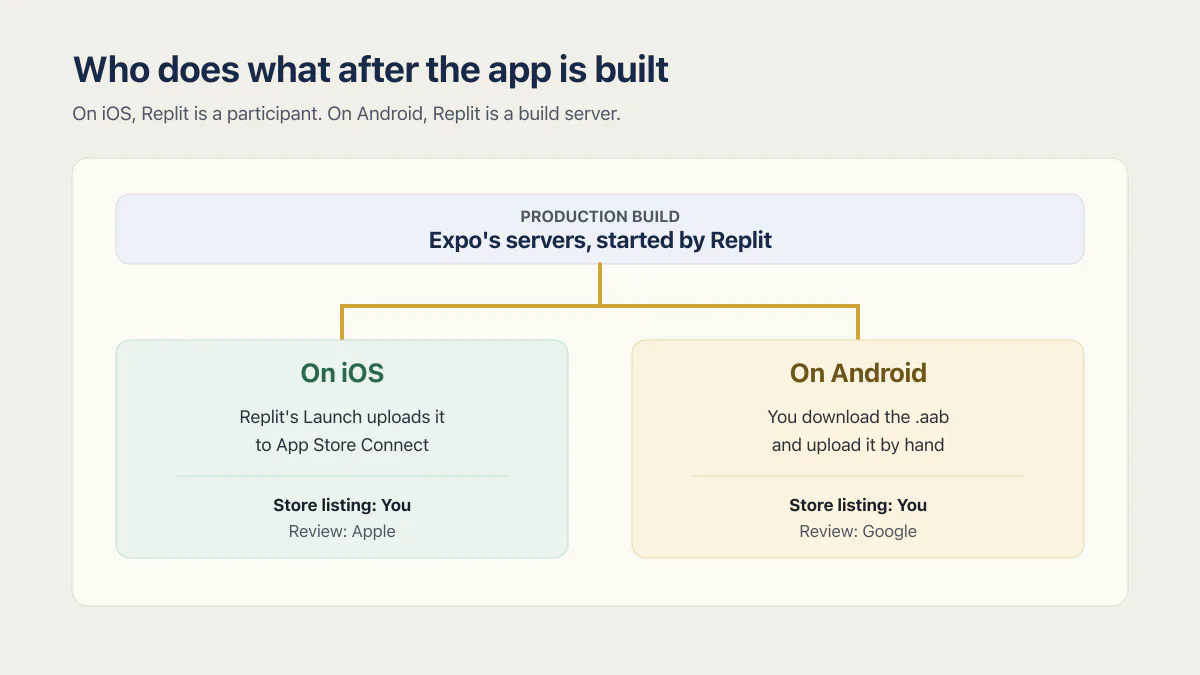
| Getting the build to the store | Replit’s Launch uploads it to App Store Connect | You download the .aab and upload it by hand |
| Store listing | You, in App Store Connect | You, in Play Console |
| Review | Apple | |
| Payments for digital content | Apple’s in-app purchase system | Google’s in-app purchase system |
Read down the two upload rows and the asymmetry is the whole story. On iOS, Replit is a participant in the submission. On Android, Replit is a build server.
One prerequisite sits above the table on both platforms. Launch does not start until the web app is published, because the phone client needs a live backend to talk to. The same deployment serves the website and the app, which puts more weight on what Replit’s publishing stack gives a production app than a web-only launch does.
If you already have a Replit web app
Replit documents adding a mobile app to a project you already have: its artifacts documentation says you can ask Agent to “add a mobile app to this project”, and that artifacts in the same project “automatically share the same data and backend logic”. The phone app becomes a second front end on the backend you already run.
No converter exists, though. As of 15 August 2026 Replit’s documentation describes no flow that turns an existing web app into a mobile app, and it warns that “when Agent translates features between artifact types, some things may not carry over perfectly …”.
Four routes exist for putting a web app on phones. A wrapper service such as median.co or catdoes.com loads your existing site in a native shell. A progressive web app installs from the browser with no store involved. A Capacitor-style shell wraps your own web build and adds native plugins. A rebuild in Expo and React Native starts the interface again, which is Replit’s route. Which of the four ways a web app becomes a phone app fits you turns on how much of the product needs the phone.
What does building a Replit iOS app cost outside Replit?
A Replit iOS app costs $99 a year in Apple Developer Program membership before the first upload, plus a government ID check, roughly a day of enrollment approval, a bundle identifier you can never change, and a listing you write in App Store Connect. Replit’s Launch covers none of that.
Start with the gate. Replit’s Apple account page is blunt about the order: “Apple requires a developer account before you can upload anything, even to share a build privately with testers.” Enrollment takes long enough that it belongs at the start of the build, while the app is still ugly.
The membership is $99 per year from Apple, which also lists a possible fee waiver for nonprofits, educational institutions and government entities. Replit’s own page only says the program “has an annual membership fee, billed annually”, so the number comes from Apple. Individuals verify with a government ID; organizations verify the business, which needs a D-U-N-S number. Approval is “usually about a day, occasionally longer”.
Then the irreversible one. In Replit’s Launch flow you set the app name and bundle identifier, and the documentation is direct: “The bundle identifier can’t change later.” Everything after that is App Store Connect work Replit does not touch. Replit’s iOS publishing guide says the listing needs screenshots for each device size, a description, keywords, an age-rating questionnaire and privacy details covering exactly what the app collects. It says Apple’s review then takes “a day or two, and sometimes longer, especially the first time you submit a new app”. Replit’s mobile app guide says the first build of a version typically needs a TestFlight beta review before external testers can install it.
One Replit builder described hitting exactly that seam, sitting in App Store Connect with a submission form that would not go through for want of a build: “I was under the impression the build would have been uploaded by Replit. Not at all as easy as I thought it would be.”
In 2026 the first half of that sentence is right, and the expectation behind it was reasonable. Replit does upload the iOS build now. What Replit has never done, and still does not do, is hold the Apple account, write the listing or pass the review. If the build itself is what you are stuck on, the full TestFlight path, including the version without a Mac covers the mechanics this page deliberately stops short of.
Can Replit publish an Android app to Google Play?
Replit does not publish to Google Play. Agent runs a production build on Expo’s servers and gives you a download link, typically 10 to 15 minutes, and you upload the .aab to Play Console yourself. Replit’s own documentation calls Google Play publishing not supported through a guided experience yet.
As of 15 August 2026, Replit’s mobile documentation says: “Publishing to Google Play is not supported through a guided experience yet, but can be accomplished manually.” The word “yet” is Replit’s own, and it is why this section carries a date rather than a verdict.
The Android upload page describes itself the same way: “Build a production release and upload it to Google Play Console by hand.” Agent produces an .aab, the Android App Bundle format Google Play expects. You create the app in Play Console, create a release, drop the file in, and repeat that by hand for every version. Two details bite later. Play Console rejects an upload whose version code did not increase, so “the version code has to increase with every upload”. And on the very first upload Replit recommends letting Google manage the signing key, which is the default and lets Google re-sign future uploads for you.
The account side is cheaper than Apple’s and slower in a different way. Google charges a US$25 one-time registration fee, which does not come back every year the way Apple’s $99 does, and it may ask for a valid government ID and a credit card, both under your legal name. Replit’s Play Console setup page says that identity step “can take a few days”.
Then there is the rule Replit’s mobile documentation never mentions. A personal Play Console account created after 13 November 2023 has to run a closed test with at least 12 testers, opted in continuously for at least 14 days, before it can even apply for production access. Twelve real people, for two unbroken weeks, before the app can be public. Nothing in Replit’s mobile docs prepares you for that, and at 14 days it is the longest fixed wait anywhere in the path.
Payments work differently than they do on your web app
If your Replit web app charges through Stripe today, that arrangement does not travel to the phone for digital goods. Replit’s payments documentation states it plainly: “Apple and Google both require using their own in-app purchase system for digital content like this, and both take a cut of the sale …” and “You can’t route around it with an external payment link.” Replit’s own answer is to wire the app to RevenueCat, which is a real integration and also a second billing system to reconcile against the one you already run.
Where this actually goes wrong
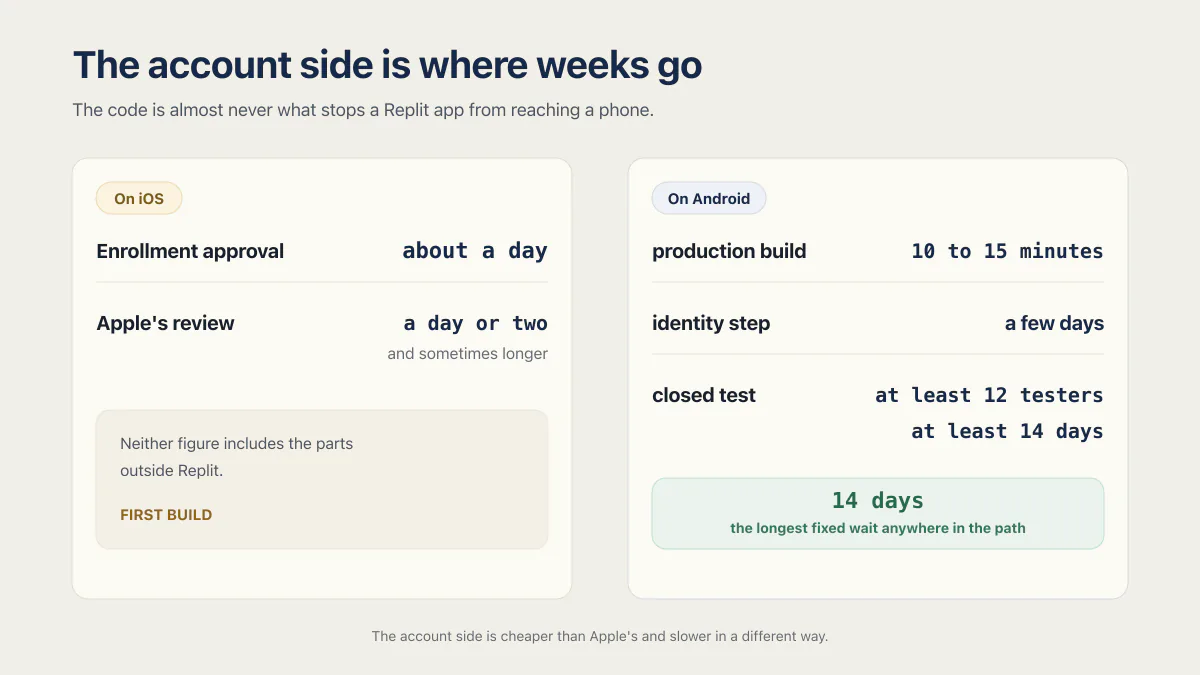
The code is almost never what stops a Replit app from reaching a phone. Agent scaffolds fast, Expo builds in the cloud, and the simulator makes it feel close to done long before it is. The account side is where weeks go: enrollment queues, an ID check, a bundle identifier chosen carelessly, a privacy questionnaire nobody drafted, and on Android two weeks of closed testing that has to start before you feel ready for it.
Replit says as much on its own mobile apps page: “Replit is not an app store and does not distribute apps directly to mobile devices. Apps built on Replit are submitted through Apple’s App Review.”
Two questions usually come next, and both are answered elsewhere on this site. If a submission already came back refused, which guideline a rejection cites, and the fix for each matters more than anything on this page. If the worry is the app itself rather than the store, what Replit secures and what your app still has to is the separate question.
The loose end is that word “yet”. Replit’s own sentence implies a guided Android flow is coming, and nothing in the documentation says when.
Common questions about Replit mobile apps
Does Replit build native apps or webviews?
Native. Replit builds React Native apps through Expo, and its documentation describes React Native as rendering “platform-native UI components, not a webview”. What installs on the phone is a real binary using platform APIs like the camera, haptics and push notifications, not your website inside a frame.
Can Replit build Android apps too?
Yes, from the same codebase, but the publishing half is manual. Agent runs the production build on Expo’s servers and gives you a download link for an .aab, typically in 10 to 15 minutes. You create the Play Console app, create the release and upload the file yourself. Replit’s docs say Google Play publishing “is not supported through a guided experience yet”.
Can Replit make iOS apps without a Mac?
Yes. Replit’s documentation puts the question as “Do I need a Mac or Xcode?” and answers it in one word plus the reason: “No. Replit and Expo manage the build process for you in the cloud.” The build compiles on Expo’s servers and Launch uploads it to App Store Connect, so no Mac and no Xcode are involved. What you do need is an Apple Developer Program membership, because Apple requires the account before any upload.
Can Replit build mobile apps with Flutter?
Not through a documented path. As of 15 August 2026 Replit’s mobile documentation covers React Native and Expo only, and the 24 English mobile pages listed in docs.replit.com/sitemap.xml include no Flutter page. Ask Agent for Flutter and you are outside anything Replit documents, including the Launch submission flow.
Is “repl.it ios app” Replit’s own app or an app you build?
Both meanings are in circulation, and the search results mix them. Replit publishes its own iOS and Android apps for coding on a phone. That is a different thing from an app you build with Replit. Replit’s own page draws the line: “The Replit mobile app is built for vibe coding websites and web apps. To build a native iOS app and submit it to the App Store, open Replit on the web …” (replit.com/mobile).
Can I turn my existing Replit web app into an iOS app?
Not by conversion. You can ask Agent to add a mobile app to the same project, and artifacts in one project share the same data and backend automatically, so the phone app talks to the backend you already run. The interface is built again in React Native. As of 15 August 2026 Replit’s documentation describes no flow that converts a web app into a mobile app.
How long does the first build take?
On iOS, publishing “can take up to 45 minutes”, and builds queue at peak times. On Android, the production build is “typically 10 to 15 minutes”. Neither figure includes the parts outside Replit: enrollment approval of about a day on Apple’s side, Apple’s review of a day or two, or Google’s 14-day closed-testing window for a new personal account.
If you have a working app built with these tools and need it ready for real customers, this is what we do.
Built it with AI. Now it has to hold up for real customers.
The Production Hardening Sprint takes the app you already have and builds the production foundation underneath it. Authentication and access rules, payments that stay consistent, error handling, monitoring, backups, automated tests and a documented handover. Our engineers work inside your existing codebase for ten working days. All 123 deliverables are included, and you get the evidence for each one.
See the Production Hardening Sprint →  $2,500 fixed price · 10 working days · One codebase