You have an app in an AI builder, or you are about to pick one, and you want it on phones. On this page, publisher means a tool that puts your app on the Apple App Store and Google Play, not an alternative Android storefront and not the developer name printed on a store listing.
AI app builders split into two groups at the store step. Some produce a real store file, and some produce a web address that looks like an app once it sits on a home screen. None of the eleven checked here presses submit for you, and the Apple and Google accounts stay in your name on every route.
Everything below is read from each builder’s own documentation on 16 August 2026. No app was put through App Review for this page, so nothing here reports on how a review went. If you have an idea rather than an app, the first question is how to get one made without writing code, which is a different job from this one.
Which AI app builders can make mobile apps, checked 16 August 2026
Base44, Replit, Bolt, Bubble, FlutterFlow and Adalo can put a real app in front of a store. Lovable, Glide and v0 make web apps; Cursor and Claude Code write code somebody still has to build. Each was asked the same four questions in order: does it emit a store binary, build it, upload it, submit it.
| Builder | Builds a store binary? | Uploads it? | Submits it for review? |
|---|---|---|---|
| Base44 | Yes, from the editor | No, you upload | No |
| Lovable | No | No | No |
| Replit | Yes, with Expo inside Replit | iOS yes, Android no | No |
| Bolt | No, EAS does that outside Bolt | No, you run the upload command | No |
| Bubble | Its guide walks a deploy step | Not stated on the guide | No |
| Glide | No | No | No |
| FlutterFlow | Yes | Yes, from the platform | No, you click Add for Review |
| Adalo | Yes | Yes, with your app-specific password | No, you distribute and submit |
| v0 | No | No | No |
| Cursor | No | No | No |
| Claude Code | No | No | No |
What each builder produces, and where its free tier stops, read from the same pages on 16 August 2026:
| Builder | What it outputs | Where the free tier stops |
|---|---|---|
| Base44 | iOS and Android files around your published app, as a web view | Scan on Free, download needs Builder or higher |
| Lovable | A web app at a URL | Publishing is web only at every tier |
| Replit | A React Native app built with Expo | Simulator previews need Core, Pro or Enterprise |
| Bolt | An Expo project you build with Expo’s EAS | Free to test, paid store accounts to distribute |
| Bubble | A native mobile app alongside the web app | No plan named on the native mobile guide |
| Glide | A web app you share by link | Publishing at all needs a paid plan |
| FlutterFlow | An iOS build sent to App Store Connect | No plan named on the deployment page |
| Adalo | An iOS build delivered to TestFlight | Native publishing needs Starter or higher |
| v0 | A web app deployed on Vercel | No store path documented at any tier |
| Cursor | Code in whatever repository you point it at | No store surface documented |
| Claude Code | Code in whatever repository you point it at | No store surface documented |
Of the eleven builders checked on 16 August 2026, none submits your app for review. Four of them build a store binary, three upload it, and all eleven stop before a person holding an Apple Developer Program membership and a Google Play Console account submits it. A free AI app builder and publisher, in the sense of a tool that carries the app onto a store for you, does not exist yet.
A twelfth builder, Appy Pie, was left out: its site returned HTTP 403 that day, and a search-result description is not documentation. Zapier’s roundup, the one non-vendor page ranking for these searches, scores builders on how well they build, not on what happens at the store.
Three rows carry more than a cell can hold. Base44 wraps the app you already published in a store file you download. What that store flow actually ships, and the end-to-end path from a Base44 app to both stores, both need more room.
Lovable’s publish documentation documents no packaged route from a Lovable project to either store, and adds that Lovable does not generate React Native projects. What Lovable’s own docs allow for mobile, including the wrapper route people take next, is a separate question with a longer answer.
Replit builds with Expo, signs and uploads the iOS build into App Store Connect, and leaves Android as a file you drop into the release yourself. What Replit and Expo do for you, and what stays yours, is worth reading in full before you count on either half.
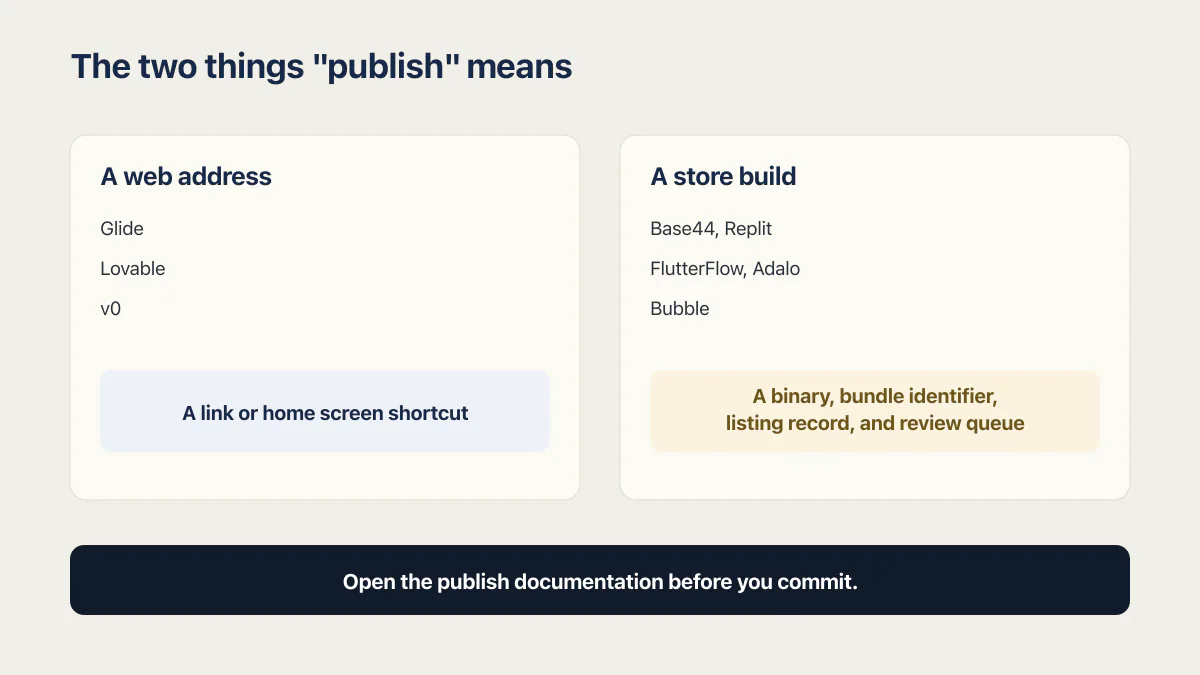
The two things “publish” means
Same word, same button position, two completely different outcomes. On Glide, Lovable and v0, publish produces a web address. Glide’s documentation puts it plainly: “Glide apps live on the web, so you can share them with just a link.” Getting one onto a phone is a home screen shortcut, and the same page says so: “To install an app on your phone or tablet, you need to add it to your home screen.”
On Base44, Replit, FlutterFlow, Adalo and Bubble, publish means a store build with a store account behind it. There is a binary, a bundle identifier, a listing record, and a review queue. The word costs nothing to say and weeks to satisfy, and whether the FlutterFlow app behind such a binary is ready for production at all is the parent question. Bolt sits between the two groups: its documented store route runs through Expo’s EAS, outside Bolt itself.
Buyers get caught right here: the demo ends with a publish button, and what shipped turns out to be a link. Open the publish documentation before you commit. A web address wrapped in a native shell is a real route, and what that shell has to survive at review is a subject of its own.
Is there a free AI app builder that publishes for you?
A free AI app builder that publishes for you does not exist as of 16 August 2026. Several of these tools are free to build in, and the paywalls land in different places.
Somebody put the question in plainer words than any keyword tool does: “Can a non-developer build a production-ready mobile app for $100?” That is the real shape of the search behind free app builder and publisher and free app maker and publisher. Building is close to free. Publishing has a floor set by two companies that are not in the app-builder business.
The paywalls are not in the same place:
- Glide gates publishing itself. Its documentation says “Publishing apps requires a paid plan.”
- Base44 runs the store-readiness scan on the Free plan and gates the download of the submission files behind Builder or higher.
- Adalo gates native publishing to Starter and up, and states that trial plans do not offer it.
- Bolt is free to test. Its Expo guide says testing is free on Expo’s development tools, and that distributing through the official stores needs paid Apple and Google developer accounts.
- Replit gates the iOS Simulator and Android Emulator previews to Core, Pro and Enterprise builders.
Two fees sit outside all of that, and no builder plan makes them go away. Apple charges $99 a year for a Developer Program membership, and Google charges $25 once to register a Play Console account. Prices checked: 16 August 2026. What publishing actually costs, beyond the $99 and the $25, adds up in places the fee pages never mention: a paid builder tier, screenshots, and the time between your first upload and a live listing.
The step no builder does for you
The listing record goes with the accounts: its name, its screenshots and its privacy answers are typed by a person. Adalo’s guide makes the identity side concrete. To publish an iOS build you must be able to approve sign-ins from a Mac, iPhone, iPad or Apple Watch with two-factor authentication enabled, which means somebody holding a device rather than an automation.
Keep that account in your own name. The account controls the listing, reviews, update submissions, and any later transfer. Individual or organization, and how to give a helper access without giving away the account, is worth settling before you enrol.
Getting a build into TestFlight is the first rung on the Apple side. What the store step involves once you have a build is a longer walk than any builder’s docs cover, and the Google Play side has its own rules, including a testing requirement that catches new accounts by surprise.
Bubble, Glide, FlutterFlow and Adalo
The no-code builders that predate the current AI tools have the most documented store paths, and they still stop in the same place.
Bubble treats mobile as a separate release from the web app. Its native mobile guide says that deploying a web app through Bubble means clicking the Deploy button, while releasing a native mobile app requires additional steps involving third-party platforms: the Apple App Store and Google Play Store. The same page lists both fees and puts “submit your app for review” in your column, so anyone working out how to publish a Bubble app to the App Store should treat the store accounts as a prerequisite. The guide names no required Bubble plan, and Bubble’s pricing page did not render on 16 August 2026, so the plan question stays open here.
Glide is the clearest No in the set: its documentation describes no path to the Apple App Store or Google Play at all, and publishing anything requires a paid plan. Anyone searching for how to publish a Glide app to the App Store is looking for a feature that is not there.
FlutterFlow goes furthest inside the platform. Its App Store deployment guide has you create an Apple account and purchase an Apple Developer membership first, then deploy from Settings and Integrations, App Settings, Mobile Deployment, App Store, using the Deploy To App Store button. The build lands in App Store Connect, where you select My Apps, choose your app, select Prepare for Submission, add the assets and metadata, and click Add for Review. That last click is the one nobody automates, so FlutterFlow publish to App Store ends with you in Apple’s console. As of 16 August 2026 that page states no FlutterFlow plan requirement for iOS deployment, which is an absence in the docs rather than a statement that it is free.
Adalo builds the binary and delivers it. Its App Store guide walks creating an Apple Developer account, setting up the annual payment, creating a bundle ID, generating an app-specific password, starting the build in Adalo, then distributing the build and choosing a release option. Adalo uses that password to start a TestFlight build and emails you when the app is ready to test, which is more than most tools here do. On plans Adalo is explicit where others are silent: its publishing docs say publishing to the Apple App Store or Google Play store requires the Starter, Professional, Team or Business plan, so anyone weighing how to publish an Adalo app to the App Store should price that in early.
Cursor, Claude Code and the coding agents
The appeal of this group is simple: it can write mobile code for a person who does not yet know the toolchain underneath it.
The coding agents have no store surface, and that follows from what they are. Cursor describes itself as a coding agent for building software, and Claude Code as an agentic coding tool that works on a codebase in place. v0 generates full-stack applications and deploys them to Vercel. As of 16 August 2026, none of those three documentation sets describes an App Store or Google Play submission surface. They will write React Native or Expo code in whatever repository you point them at, and every account, signing key, listing and review cycle after that is yours.
The route works only when a person drives it. Driving an Expo build you did not write is the skill sitting between generated code and a store listing, and nothing in the agent does it for you.
Which route you are actually on
The shortlist is short once a store listing is a requirement rather than a maybe, and it is set by the four questions in the table rather than by which builder writes the nicest code.
Four routes exist: a native rebuild in React Native or Flutter, a no-code platform in the Adalo and FlutterFlow shape, a web view wrapper around your published URL, and a progressive web app that skips the stores and their fees with them. The wrapper is the fastest and the one Apple looks at hardest. The four ways to get a web app onto phones, and what each costs, deserve more room than a paragraph, and whether you need a native app at all is the question that comes before all four.
If the answer is that your current tool cannot do the job, which builder to move to instead is a different comparison with different criteria. And if the app is going onto a store for real money, whether the app is ready before you spend the fees is worth an hour before the $99 leaves your account.
Common questions about AI app builders and the app stores
Can a non-developer put an app on the App Store?
Yes. Apple’s Developer Program is open to individuals, and several builders in the table will produce and upload the build for you. What no tool removes is the part that needs a person: enrolling, passing identity verification, filling in the listing, answering the privacy questions, and pressing submit.
Does any AI builder submit the app for me?
No. Of the eleven builders read on 16 August 2026, none submits an app for review. Replit, FlutterFlow and Adalo get a build as far as App Store Connect or TestFlight, and Base44 hands you the files to upload. All of them stop before the submit action, because that action belongs to the account holder.
Does publishing through an AI builder need a Mac?
Not for the build itself with the platform-based tools, which compile on their own servers. For Adalo’s documented flow you do need an Apple device to run the account: its guide states you must be able to approve sign-ins from a Mac, iPhone, iPad or Apple Watch with two-factor authentication enabled, and an iPhone covers that. Whether your own Apple account can authenticate another way is a separate check against Apple’s current sign-in options.
What is the cheapest way to get an app into both stores?
The floor is $99 a year to Apple and $25 once to Google, checked 16 August 2026, and you pay those whatever you build with. Under that, the cheapest route is a builder whose free or lowest tier lets you produce and upload the file yourself. A web app people add to a home screen costs nothing.
Will Apple reject an app that is just my website in a shell?
It can. Apple’s minimum functionality guideline sets a bar that a thin wrapper around a website can fail, and names marketing material and collections of links. Wrappers do get approved when the app does something a browser tab does not. The guideline numbers behind an App Store rejection are worth reading before you submit.
Can I change builders after I have published?
Yes, and the listing survives the move as long as the developer account does. The account retains the app record, reviews, ratings, and update path, so switching builders means shipping a new build under the same bundle identifier from the same account. The work is in rebuilding the app.
Who should control the developer account if a contractor publishes the app?
Keep the developer account in your name or your company’s name. If a contractor publishes under their own Apple Developer Program membership, that account controls the listing, update submissions, reviews, and any later transfer. Enrol first, then add the contractor through an account role.
Is a PWA good enough instead?
Often, and for internal tools almost always. A progressive web app installs to a home screen, works offline when built for it, costs nothing in store fees, and can update without a store release, subject to its service worker and browser cache lifecycle. What it gives up is store search, the credibility of a listing, and the in-app purchase machinery store payments require.
If you have a working app built with these tools and need it ready for real customers, this is what we do.
Built it with AI. Now it has to hold up for real customers.
The Production Hardening Sprint takes the app you already have and builds the production foundation underneath it. Authentication and access rules, payments that stay consistent, error handling, monitoring, backups, automated tests and a documented handover. Our engineers work inside your existing codebase for ten working days. All 123 deliverables are included, and you get the evidence for each one.
See the Production Hardening Sprint →  $2,500 fixed price · 10 working days · One codebase