EAS Build produces the signed binary and EAS Submit uploads it, but only to a store record you created yourself. Four different things get called publishing in an Expo project, and one of them ends in a listing. The signing keys sit on Expo’s servers under your account.
Every command, limit and rule below was read from Expo’s, React Native’s, Apple’s or Google’s own documentation on 16 August 2026. Nothing here was built, signed or submitted in order to write it.
This page is about a public release. Getting the same build to testers first is a shorter path with its own rules, and which builders can produce a store file at all is the question that sits before this one.
What “publish” means in an Expo project
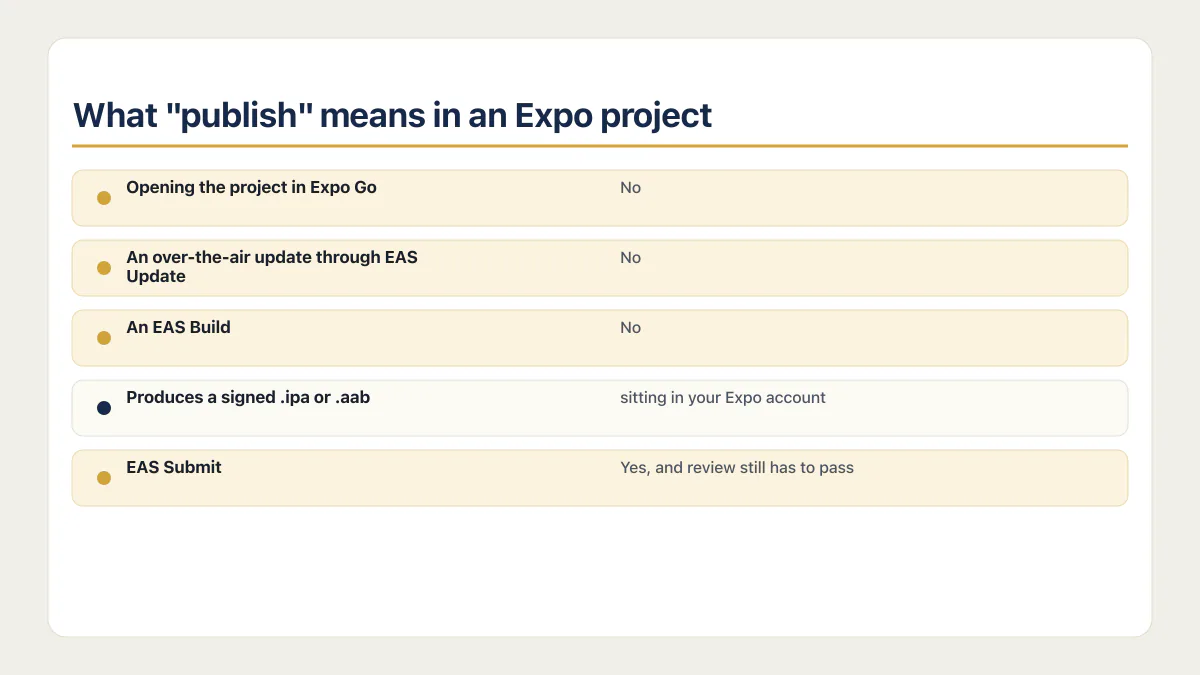
The confusion is visible in what people type into Google. “Publish expo app to app store” and “publish expo app to expo go” get searched by the same person on the same afternoon, and only one of those describes something a stranger can install from a store.
| What people call publishing | What it actually does | Does it put you in a store? |
|---|---|---|
| Opening the project in Expo Go from a link or QR code | Runs your JavaScript inside a shared development app already on the phone | No |
| An over-the-air update through EAS Update | Replaces the non-native parts of an app that is already installed | No |
| An EAS Build that finishes and hands you a file | Produces a signed .ipa or .aab sitting in your Expo account | No |
| EAS Submit | Uploads that file to an App Store Connect or Play Console record you already created | Yes, and review still has to pass |
The term itself carries a dead command. Expo’s update documentation states that “The Classic Updates service was available before December 2021 and is now deprecated. New updates cannot be published via expo publish, however, existing apps will continue to receive Classic Updates that have already been published and are actively used” (Expo’s EAS Update introduction, page dated 22 July 2026, read 16 August 2026). So a tutorial telling you to run expo publish was never talking about the App Store, and it no longer does anything for a new project either.
The update row is the one that trips founders who came from web deploys. Expo describes EAS Update as “a cloud service that serves updates for projects using the expo-updates library”, and its documentation is direct about the ceiling: an update covers the non-native pieces, meaning JavaScript, styling and images, and it cannot change native code or native dependencies, cannot change app permissions such as camera or location, and cannot move the Expo SDK version. Anything in that second list needs a new binary built and submitted. That is the mechanical answer. What an over-the-air update may and may not carry past review is a policy question with a separate answer.
Build and submit are two different jobs
EAS Build compiles and signs. Expo defines it as “a hosted Expo Application Services (EAS) service that builds app binaries (also called standalone apps) for your Expo and React Native projects”, and states plainly that “iOS builds run on macOS runners hosted in Expo’s macOS cloud” (Expo’s EAS Build introduction, page dated 22 July 2026, read 16 August 2026). The output is a file.
EAS Submit moves that file. Expo’s deployment page says EAS Submit uploads your .aab to Google Play Console and places it in the track you choose, and uploads your .ipa to App Store Connect, where it becomes available in TestFlight after processing (Expo’s submit-to-app-stores guide, page dated 22 July 2026, read 16 August 2026).
Neither command creates the store record. That is where a first attempt usually stops, because everything before it succeeded and nothing warned you. The record is an object you make by hand in Apple’s or Google’s console, and until it exists there is nowhere for the upload to land.
On the Android side, the documented pair is short:
eas build --platform android
eas submit --platform android
Run the second one bare and Expo’s Android submission page says the command “will walk you through selecting a build and uploading it”. Among the prerequisites it lists are a Google Play Developer account, an app already created in Play Console, a Google Service Account key uploaded to EAS, and your package name in the app config (Expo’s Android submission guide, page dated 21 July 2026, read 16 August 2026). The service account key is the one nobody expects, because nothing in the build process asks for it.
On the Apple side, Expo names three prerequisites before you submit: a paid Apple Developer account, your bundle identifier set in the app config, and the EAS CLI installed with your Expo account signed in. What you configure after that is a submission profile in eas.json carrying your App Store Connect app ID. Expo’s iOS submission guide (page dated 22 July 2026, read 16 August 2026) tells you to find that ID by signing into App Store Connect and reading it off the app’s App Information page, which only exists once you have created the app there. As of 16 August 2026, that page documents no way for EAS to create the App Store Connect record for you. Apple’s own help page for adding a new app lists what the New App dialog asks for: one or more platforms, app name, primary language, bundle ID, and SKU (Apple’s add-a-new-app help page, read 16 August 2026).
If the upload finishes cleanly and no build ever appears in App Store Connect, that is a distinct failure with its own causes rather than a submission you need to repeat. And what being in the stores costs once a build service is in the picture is a separate calculation from this one, priced in its own place.
Who holds the keys to your app
Signing credentials have an owner, and it is not the tool. EAS generates them, keeps them encrypted on its servers, and hands them back when you ask. “EAS handles it” describes the work, not the custody, and those two come apart the first time somebody needs the certificate and nobody knows where it lives.
Expo’s build documentation covers the generation half: EAS Build makes the Android keystore, the iOS provisioning profiles and the distribution certificate itself, unless you hand it material of your own. Its automatically managed credentials page adds the iOS push key, and the sentence that matters on every build after the first: “on subsequent builds of your app, these credentials will be re-used unless you specify otherwise” (Expo’s managed credentials page). That page is dated 21 May 2025, more than a year older than the rest of Expo’s signing documentation, so read it as the oldest thing cited here.
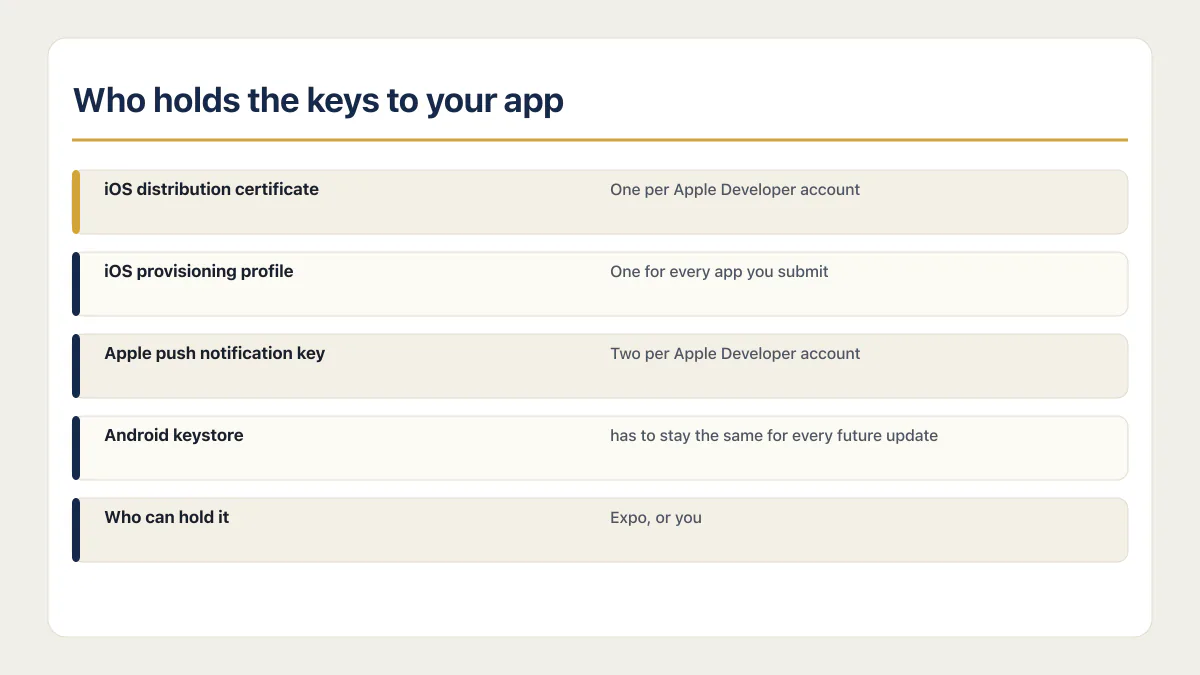
The ceilings are what make custody matter, because these are shared, capped resources rather than per-app ones.
| Credential | What it does | Who can hold it | The limit that matters |
|---|---|---|---|
| iOS distribution certificate | Signs builds for distribution under an Apple Developer team | Expo, or you | Apple applies limits by team and certificate type |
| iOS provisioning profile | Pairs one app with that certificate and that account | Expo, or you | One for every app you submit |
| Apple push notification key | Sends notifications | Expo, or you | Two per Apple Developer account, and one key works with any number of apps |
| Android upload key | Signs the bundle you send to Play | Expo, or you | Google supports resetting a lost or compromised upload key |
| Play app-signing key | Signs the APKs installed on users’ devices | Google under Play App Signing | Google keeps it separate from the upload key |
Expo’s current app credentials page contradicts itself on the first row. Its prose says one distribution certificate per account, while its summary table says two. Apple’s certificate overview is the controlling source here. It says distribution certificates belong to the team and applies limits by certificate type. Check the exact team and certificate type in the Apple developer account instead of planning around Expo’s unresolved aggregate. Expo describes provisioning profiles as app-specific and caps APN keys at two per Apple Developer account (Expo’s app credentials page, page dated 29 July 2026, read 16 August 2026).
The Android rows need the same precision. Under Play App Signing, the keystore EAS uses normally contains the upload key. Expo or you hold that key and Google can reset it. Google holds the separate app-signing key used for distributed installs. Android’s signing guide documents both roles and their different recovery paths.
What Expo says it stores: your credentials, on EAS servers, encrypted at rest, and, in its own words, “Credentials are additionally encrypted using KMS.” What it says it does not store: your Apple account login. Expo’s security page says “We do not store these on our servers…” and describes EAS CLI using them locally instead. It names one exception itself. On an ad-hoc build, Expo temporarily holds an Apple Developer session token to create the profile, and destroys the token once it is finished with it (Expo’s credentials security page, page dated 10 August 2026, read 16 August 2026).
You can also take all of it back. Running eas credentials opens a menu whose credentials.json entry offers “Download credentials from EAS to credentials.json”, which pulls the signing material onto your own machine. Menu labels move between releases, so treat that string as the current wording rather than a permanent one. The keystore is the piece to be careful with once it is local: Expo’s guidance is that your keystore should be kept private and under no circumstances checked into your repository.
This is the one part of a vibe-coded app where “the tool handles it” and “someone else owns it” are easy to hear as the same sentence. They describe two different arrangements, and only one of them survives you losing access to the account. When a rebuild changes the upload key Play is expecting, recovery runs through Google’s upload-key reset process rather than a redeploy. That is the best argument there is for knowing where the Expo-held keystore lives before you need it.
Publishing from Windows, and where the Mac actually is
An Expo project publishes to the App Store from Windows. Expo’s documented path puts every macOS-only step, both the build and the upload, on Expo’s hardware instead of yours, so the operating system on your desk stops being the blocker. The Mac still exists. It belongs to Expo.
Two sentences from Expo’s own pages carry the whole answer, and they only work together. The build side: “iOS builds run on macOS runners hosted in Expo’s macOS cloud.” The submit side, from the deployment guide: “EAS Submit is the recommended path since it works from any OS (including Windows and Linux for iOS), integrates with EAS Build and EAS Workflows, and can be run from a CI/CD service.” Compiling and uploading are the two steps that historically forced a Mac purchase, and Expo documents both of them running somewhere else.
This is not the only stack that can do that, and the claim is worth keeping honest. A Flutter project can reach the same beta channel through a hosted CI service with macOS runners without anyone owning a Mac either. What is genuinely different about Expo is that both halves, build and submit, are covered by one documented toolchain that already ships with the project your AI coder produced. The route came with the code, so the work is running it rather than assembling it.
For a stack with no cloud build of its own, the routes are different and worth ranking properly: hosted CI with macOS runners, a rented Mac in the cloud, or borrowing one for an afternoon. None of it removes the Apple Developer Program membership, which is an account you hold and pay for regardless of whose machine compiles the binary.
What EAS does not do for you
EAS finishes the binary. Everything Apple and Google want besides the binary is still an artefact somebody has to produce, and thinking of these as artefacts rather than steps is what stops a founder assuming the tool covered them. What every store submission needs, whichever way the build was made, is a longer list than most first-timers expect.
- 01 The store record itself. An App Store Connect app and a Play Console app, created by hand before either submit command has anywhere to upload to.
- 02 The listing text. App name, subtitle, description, keywords, support URL, and the equivalents on Play. None of this exists in your project.
- 03 Screenshots and the app icon, at the exact pixel dimensions each store demands for each device class it still requires.
- 04 The age rating and the pricing decision, both answered through questionnaires in the console rather than set in code.
- 05 The privacy answers. Apple asks what data your app collects and how it is used; Google asks the same question in a different form and holds you to it.
- 06 A demo account and review notes, if anything behind a login needs a reviewer to get past it.
- 07 The export-compliance answer on the Apple side, which blocks a build from becoming available until it is answered.
- 08 The Android release track. A build sitting in your Play Console is not a build users can install until it is promoted into a track that reaches them.
The Play side has more of this than the Apple side, including a timing rule that catches new personal developer accounts and adds weeks rather than days to a first release. The rest of a Play release, including that rule, deserves its own treatment, because none of it is engineering and all of it is on the critical path.
Why React Native apps get rejected for things nobody wrote
Rejections on a React Native or Expo build cluster around one root cause: your dependencies write native configuration into your app without asking. Permissions, usage strings and privacy declarations arrive from libraries and config plugins, not from anything you typed, so the first time you read them is in a rejection notice.
Expo states the mechanism directly: “Most permissions are added automatically by libraries that you use in your app either with config plugins or with a package-level AndroidManifest.xml” (Expo’s permissions guide, page dated 28 July 2026, read 16 August 2026). Three consequences follow from that one sentence.
The iOS usage strings are somebody else’s placeholder text. A config plugin writes a default reason for every permission it adds, and Expo’s own warning about those defaults is that “These default messages will most likely need to be tailored to your specific use case for your app to be accepted by the App Store.” A reviewer reads that string in a system prompt on a real device, with no other context for why your app wants the camera. Placeholder text is a poor answer to the question the prompt is asking, and none of it has anything to do with whether your code works. Before submitting, open your app config and read every usage-description string out loud as if you were the person being asked. Builder platforms write these strings into your app for you as well, which is the same problem arriving through a different door.
Android permissions accumulate from libraries you may have stopped using. A package can merge its own manifest entries into yours, and removing a dependency does not always remove what it added. Expo documents exactly one route out: “The only way to remove permissions that are added by package-level AndroidManifest.xml files is to block them with the android.blockedPermissions property.” Before submitting, look at the permission list Play shows on your release and check that every entry maps to something a user would recognise in your app.
The privacy manifest inherits your dependencies’ obligations. An iOS privacy manifest is a file named PrivacyInfo.xcprivacy in your native project, and third-party libraries carry required-reason API usage into it. Expo’s guidance is that you can check whether a library ships its own manifest by looking for a PrivacyInfo.xcprivacy file in that package’s node_modules/package_name/ios directory, and it notes that Apple does not correctly parse all of the manifests included by static CocoaPods dependencies (Expo’s privacy manifests guide, page dated 29 July 2026, read 16 August 2026). That page also says its information and steps are still in development and may change, so treat it as current guidance rather than a settled procedure.
When a notice is already in hand, the guideline number on the rejection notice and what it is asking for is a faster read than any of this. An app that comes back from review a third time carrying the same number has stopped being a build problem and become a resubmission problem, which takes a different approach again.
It published, and now it crashes on real phones
A store build is a release build, and a release build is a different program from the one your development server was serving. It bundles its JavaScript in and runs with no computer attached, so it can fail in ways the preview you were shown never could.
React Native’s documentation puts the mechanism plainly: apps built for Release disable the in-app Dev Menu and bundle the JavaScript locally, so the app can go on a device and be tested without a connection back to the computer (React Native’s App Store publishing guide, page dated 12 August 2026, read 16 August 2026).
The recognisable version of this is a founder watching the build number climb while the same crash survives every round. Every attempt spends a build, an upload and another wait in the queue, and each change going up is a guess. Incrementing a build number is not a diagnosis. When the coding agent keeps announcing a fix and the next install crashes identically, that pattern is a second problem sitting on top of the first, and it needs handling on its own terms.
Why a release build fails where the one you were shown did not has a real answer, and it involves reading the crash report rather than shipping another candidate. That belongs on its own page, with the actual gaps named.
Common questions about publishing a React Native app
Do I need a Mac to publish a React Native app?
No, not for an Expo project. Expo’s documentation states that iOS builds run on macOS runners hosted in Expo’s macOS cloud, and that EAS Submit works from any OS including Windows and Linux for iOS. A React Native project that does not use EAS needs its own answer, because the routes for a stack with no cloud build service of its own rank differently and cost differently.
How do I publish an Expo app to Expo Go?
You do not, in the sense that word usually means. Expo Go is a development app that runs your JavaScript on a phone that already has Expo Go installed. Nothing you do there produces a store listing, and nobody outside your project can install your app as an app. A listing requires an EAS Build and then a submission.
Can I publish an Expo app without EAS?
Yes. The build can run through the local native toolchains instead, which means Xcode on a Mac for iOS and Android Studio with the Android SDK for Android, plus the signing material handled by you rather than by Expo. The cost is machine requirements and setup time, and the iOS half of it puts a Mac back on your desk.
What is the difference between eas build and eas submit?
eas build compiles and signs your project and hands you a binary, an .ipa or an .aab, held in your Expo account. eas submit takes that binary and uploads it to App Store Connect or Google Play Console. A binary that never gets submitted reaches nobody, and a submit command with no build behind it has nothing to send. Neither one creates the store record that the upload needs to land in.
Do I need to upload the first Android release myself?
Not necessarily, but Expo documents it as an option. Its Android submission page offers a manual submission guide for creating the first release in Play Console yourself, phrased as a preference rather than a requirement. If a first EAS submission behaves oddly, that manual route is a documented fallback rather than a workaround somebody invented.
Why did Apple reject my app for a permission I never asked for?
Because a library added it. Expo documents that most permissions are added automatically by the libraries you use, through config plugins or a package-level AndroidManifest.xml, and the same mechanism writes default iOS usage-description strings that Expo says will most likely need tailoring before the App Store accepts the app. Read your generated app config before you submit, not after.
Can I push a fix without submitting a new build?
Mechanically, yes, if the fix lives in JavaScript, styling or images. EAS Update serves those to installed apps without a new binary. It cannot change native code, native dependencies, app permissions, or the Expo SDK version, and none of it produces a store listing. Whether a given change is acceptable to ship that way is a review question with its own answer.
My app is in the store and it crashes. Where do I look first?
The crash report on the store that hosts it, before anything else. A release build bundles its JavaScript and runs with no development server, so the failure is usually configuration, a missing bundle, or a permission the preview never had to request. Reading the report first is the difference between a fix and another build number.
The work that remains after the build
The build can finish while the store account, artifact, and review work remains.
Most of what is left after eas build finishes is account work and artefact work. Records, keys, strings, screenshots, answers to questionnaires. None of it is code, all of it is yours, and the tool that wrote your app has no opinion about any of it.
If you have a working app built with these tools and need it ready for real customers, this is what we do.
Built it with AI. Now it has to hold up for real customers.
The Production Hardening Sprint takes the app you already have and builds the production foundation underneath it. Authentication and access rules, payments that stay consistent, error handling, monitoring, backups, automated tests and a documented handover. Our engineers work inside your existing codebase for ten working days. All 123 deliverables are included, and you get the evidence for each one.
See the Production Hardening Sprint →  $2,500 fixed price · 10 working days · One codebase