- The verdict: yes, FlutterFlow can run a production app. Your app is production ready once its critical journeys, backend rules, environments, monitoring, and release path have been tested outside Preview Mode.
- What breaks most: no automated test covering the flows a paying session actually runs, one environment pointed at production data, backend rules that trust the interface, and nothing standing between the editor and the store build.
- Time to close: set the schedule after running the checks. The time depends on which journeys, backend rules, environments, monitoring paths, and release controls fail, and how much of the app each failure touches.
- The one test that settles it: two real accounts, requests replayed straight at Firebase, Supabase, or your Cloud Functions, and the second account gets nothing that belongs to the first.
- What it costs: code download starts on the paid Basic plan and branching past main starts on Growth, so parts of this checklist are a purchase, not a setting.
Yes, FlutterFlow can be used for a production app. It exports a complete Flutter project, supports separate backend environments, offers automated user-journey testing, and can deploy mobile and web builds. Those capabilities support production delivery. The readiness verdict still belongs to the specific app.
For a specific FlutterFlow app, the answer is yes only after its critical journeys, backend permissions, failure handling, monitoring, and release path have been tested outside the easiest preview mode. A successful build or app-store deployment proves deliverability, not correctness under real users and real data. Deployed is a real accomplishment; it is also a presence check, the same shape as the check Lovable apps pass: it confirms the app shipped, not that it holds.
This assessment is based on FlutterFlow’s current public documentation and the failure patterns in the AxonBuild audit corpus. It makes no hands-on claim about a private FlutterFlow project. The corpus also lacks a representative FlutterFlow cohort, so its numbers are context for what to verify rather than a FlutterFlow failure rate. The full AI-built app readiness guide keeps those app-level questions separate from the builder.
FlutterFlow production readiness at a glance
| Question | What the platform provides | What your app still has to prove |
|---|---|---|
| Is the code real and portable? | A complete Flutter project can be exported or pushed to GitHub | The exported project builds reproducibly and your team can maintain custom code |
| Can important flows be tested? | Test Pilot and Flutter integration-test generation | Your own login, checkout, permissions, and recovery cases are covered |
| Can test data be isolated? | Development, staging, and production environments | Each environment is configured and no test points at production data |
| Can failures be observed? | Firebase Crashlytics integration for Android and iOS | Backend, API, web, and business-flow failures also reach someone who can respond |
| Can releases be controlled? | Direct deployment or a GitHub-based path | A reviewed, tested commit is the only code allowed to become a release |
The distinction matters because FlutterFlow supplies several production ingredients without automatically assembling them into a release standard. The project owner still decides which tests must pass, who may access each record, what happens when an API fails, and which branch is allowed to ship.
What FlutterFlow users actually report after launch
The sample here is the FlutterFlow reviews and Reddit threads that ranked for this question when this page was written in August 2026, most of them single-project accounts. They are consistent enough to be useful, and they split cleanly: praise for the build, complaints about what comes after. Read them for the failure patterns rather than the verdict, and check the date on every one.
What people praise is speed. Teams describe getting a good-looking app running on both mobile platforms in days, without hiring a Flutter developer first, and the reviews that stay positive tend to come from projects that stayed close to the size they launched at.
What people complain about splits into three themes that recur across Reddit threads and independent review write-ups: an exported project that does not build cleanly on the first attempt, maintenance after launch costing more than the build did, and the editor changing underneath a finished project. The maintenance complaint is the one worth planning for, and the mechanics behind it are in “What breaks after launch, not before” further down this page.
The reviews disagree with each other because most of the write-ups that rank are single-project accounts, written at one moment in a product that keeps moving. A review published before separate environments existed describes a different tool from the one you are buying today. Treat anything older than roughly a year as history rather than a description of the current platform, and weigh a report by whether the writer says what they built and how long they ran it.
None of that settles the question for your app. It tells you where to point the checks below.
What FlutterFlow’s plan tiers do and do not include
Most readiness advice for FlutterFlow skips the part where several of the recommended controls sit behind a paid plan. Check the price of following the checklist before you plan around it. The table below maps each readiness requirement to the lowest plan that unlocks it, using FlutterFlow’s published pricing, re-verified 16 August 2026.
| Readiness requirement | Lowest plan that unlocks it | What that plan costs |
|---|---|---|
| Download the Flutter project or an APK | Basic (the Free plan has no code download) | $39 per month |
| Push to GitHub and deploy from a repository | Growth | $80 per month for the first seat, $55 for the second |
| Work on a branch instead of main | Growth, which allows up to 2 branches plus main | Same Growth seat pricing |
| Up to 5 branches plus main, and up to 5 users | Business | $150 for the first seat, $85 each for seats 2 to 5 |
| Keep more than one saved test per project | Business, which allows up to 3 tests per project (Growth allows 1, Free and Basic none) | $150 for the first seat, $85 each for seats 2 to 5 |
| Use AI features within the plan’s published allowance | Fixed allowance on every plan | 5 requests for the lifetime of a Free project, then 50, 200, and 500 per month on Basic, Growth, and Business |
Test Pilot runs are metered on top of the plan: each project gets five free credits, which equals five single-test runs, after which runs draw on a Test Pilot Credits Pass.
Read that table against the checklist at the end of this post. On the Free and Basic plans, several of those items are a purchase rather than a setting.
This page stops at the plan lines a release process depends on. What FlutterFlow costs in total, once seats, metered credits, and your own backend bill are counted across a year, is a separate question and deserves a separate answer.
What FlutterFlow testing actually proves
FlutterFlow has more testing capability than a simple visual preview suggests, but its modes answer different questions.
Preview Mode is for interface checks
FlutterFlow’s run-mode documentation says Preview Mode is primarily for testing the interface. Business logic and integrations such as API calls, authentication, Firestore, and RevenueCat are not fully available there. A screen that renders in Preview Mode therefore does not prove that the signed-in, data-backed version of the flow works. It is the same gap as an app that works locally and then fails in production: the easiest environment answers the easiest question.
Test Mode and Run Mode exercise more of the app. Local Run goes further by running downloaded code on a device or emulator. Use the least simulated mode that can exercise the risk you are checking. A mobile permission, push notification, deep link, or device-only crash needs a real device or emulator, not a browser-shaped substitute.
Test Pilot checks journeys, not every failure mode
Test Pilot builds a web snapshot and asks an AI agent to follow natural-language instructions. Its results include pass or fail status, screenshots, playback, the actions taken, and credit usage. That makes it useful for repeatable journeys such as sign-in, onboarding, profile updates, and checkout confirmation. Runs are metered: each project gets five free credits, equal to five single-test runs, and after that runs draw on a Test Pilot Credits Pass. That is a budget line, so decide which journeys are worth a run before you start burning them on cosmetic checks.
It is still a browser-based journey test. It does not, by itself, prove that a second user cannot call an API for the first user’s data, that a webhook rejects a forged signature, or that an app recovers after the network drops halfway through a write. Those require permission tests, server-side tests, or targeted failure injection.
FlutterFlow’s older Automated Tests feature generates Flutter integration-test code that can run locally or through services such as Firebase Test Lab. FlutterFlow now labels that workflow as legacy and recommends Test Pilot for new testing workflows. Existing generated integration tests can still be valuable when a real mobile runtime matters.
FlutterFlow can supply a test runner. Production readiness depends on the cases you make that runner prove.
Across the broader AxonBuild corpus, at least 23 of 26 audited AI-built apps had no working automated tests. The selected corpus cannot attribute missing tests to FlutterFlow; the figure supports verifying test execution instead of assuming a builder created meaningful coverage.
The texture behind that number matters more than the number. Of the 21 third-party apps in the corpus, only one, a healthcare records hub, had a real, working test suite, and even that suite skipped sign-up, login, and the payment webhook: the three flows a paying user’s session actually runs through. Reliability, the pillar that measures exactly this, scored 31.4 out of 100 across those 21 apps, the worst of the twelve areas the audits cover, well behind even secrets handling, which averaged 84.4. Nothing about a visual builder changes that arithmetic. A prompt for a login screen produces a login screen; in nothing I have audited has it also produced a test that logs in with the wrong password and checks that the app refuses, which is also why an AI-built app gets harder to change every week: nothing catches what the next prompt breaks.
Environments are available, but isolation is not automatic
FlutterFlow supports development, staging, and production environments. Each can use its own environment values and Firebase or Supabase project, and the selected environment affects testing, deployment, and exported code. A new project starts with only a Production environment, however. Isolation exists only after someone configures it, and the corpus shows how rarely anyone does: deployment and operations, whether anything stands between a push and production, averaged 37 out of 100 across the 21 audited apps, the third-worst pillar of twelve.
Check the date on anything you read about this. Several FlutterFlow reviews still ranking today were written before those environments shipped and state flatly that the platform has no separation between staging and production. That is out of date. What is still true is the part that catches people: a new project starts with Production only, so an untouched project has no isolation at all. If one database is serving both your testing and your customers, that single environment is a deploy set to break.
Before launch, verify all four of these facts:
- Development and staging use separate databases from production.
- Test accounts, payment keys, API URLs, and analytics identifiers change with the selected environment.
- A staging build cannot send email, charge cards, or modify production records accidentally.
- Exported Cloud Function files and environment-specific configuration do not expose secrets in Git.
Treat the environment dropdown as configuration. The release control requires evidence that each environment points where its label says it does.
Exported code improves ownership, not app-level security
FlutterFlow’s export is a genuine advantage. Teams can download the full Flutter project, extend it in an IDE, or connect it to version control. The generated code is not merely a screenshot or a hosted-only description of the app.
Treat the export as unverified until it builds. Reports of exported projects arriving with missing imports, broken widget references, and inconsistent variable names recur often enough in the reviews read for this page that code you have never compiled is not ownership yet. The proof is cheap: clone the export into an empty directory on a machine that has never opened the project, install dependencies, and build it. Do that on a normal Tuesday, not on the day you actually need the escape hatch.
That portability does not answer who may call a custom action, Cloud Function, or database query. FlutterFlow’s Firestore rules guidance explicitly tells builders to restrict access to private information before going live. Private API calls can be routed through Cloud Functions, but authentication and authorization still have to be configured for the app’s actual rules.
Test backend permissions with two accounts. Sign in as user B and attempt the same read, update, delete, and file-access operations that belong to user A. Run those checks against the backend or API as well as through the interface. If your backend is Supabase, the method is the same one in how to test row level security: replay the request with the second account’s token and confirm the rows come back empty.
Whether a FlutterFlow app is safe for someone else’s data is narrower than the full production-readiness question. It deserves its own evidence: enforced backend rules, protected server actions, scoped storage access, and abuse controls for paid APIs.
Performance and state, the two things that show up at scale
The two complaints that follow FlutterFlow apps into production are speed and state. Neither is unique to FlutterFlow. What is specific is that a visual builder makes the slow version easy to assemble and quiet to miss, because your test data is small and your phone is nice.
Three checks, and none of them need a load-testing tool.
Unnecessary widget rebuilds. State parked high in the tree means one field change repaints a whole screen. The check: profile one list screen with a realistic row count, not the five rows in your test project, on a mid-range Android device rather than a simulator. Scroll it. If frames drop with 500 rows, they will drop harder with a real account.
Repeated network calls. List screens and detail screens re-query on every navigation, and tab switches often refetch everything behind them. The check: open the network log, switch tabs once, and count the requests that fire. If the count surprises you, that is also your backend bill and, on a Firestore or Supabase plan, your first surprise invoice. The pattern behind most of it is the N+1 query problem.
State nobody owns. As screens multiply, page state, app state, and component state get mixed until a value is set in three places and read in five. The check: name the owner of state for the three screens with the most inputs. If nobody on the team can say where a value lives, neither can the person who inherits it.
These are the same mechanics behind why an AI-built app stalls at 100 users. Do the three checks before launch, not after the first traffic spike.
GitHub can create a release gate, if the team uses it as one
FlutterFlow can push generated code to GitHub, but its documented workflow has an important ownership rule: FlutterFlow pushes to a flutterflow branch, and direct changes there can be overwritten. Custom changes should live on a separate branch and move through merges.
That makes a safe release path possible:
- Generate to the FlutterFlow branch.
- Merge into a development branch where custom code is preserved.
- Run automated tests and build checks on the merged result.
- Review the change before merging to the release branch.
- Deploy the tested commit, not an unreviewed editor state.
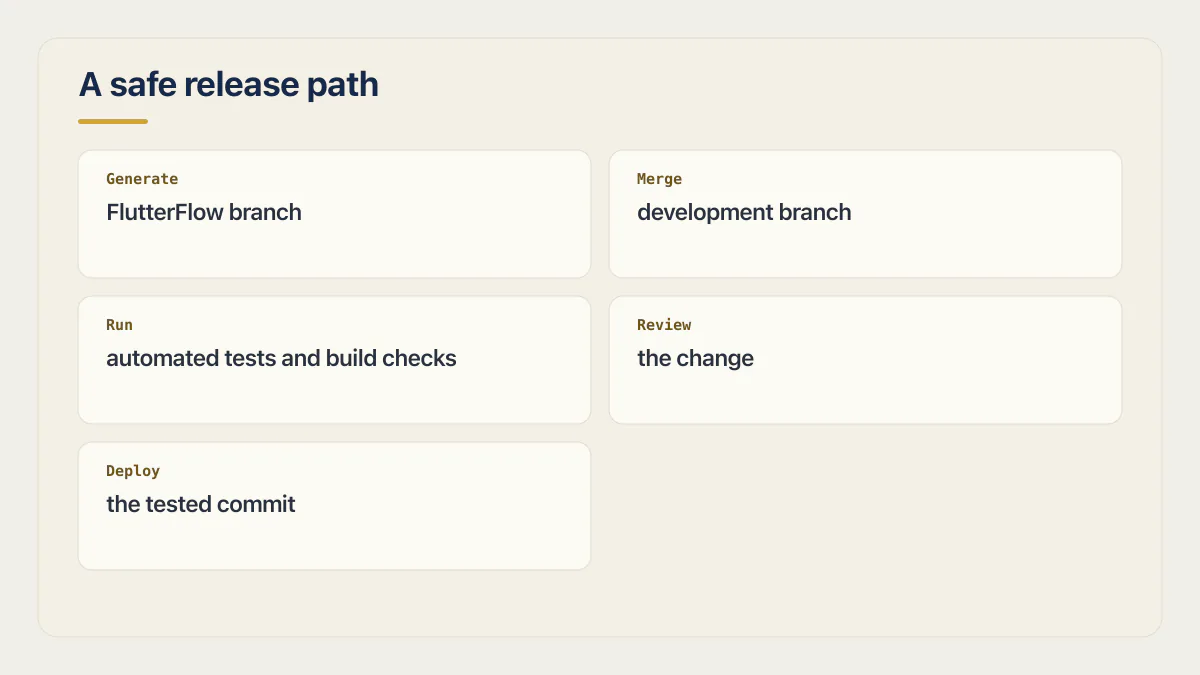
Deploying from GitHub gives teams control over source, automation, and the branch used for an app-store build. Direct deployment is convenient, but convenience is not a substitute for a gate when a project has custom code or paying users.
What breaks after launch, not before
The most common thing experienced FlutterFlow builders say in public is some version of the same sentence: deployment is easy, maintenance is not. Three things drive that.
The first is platform updates you did not ask for. FlutterFlow ships changes to the editor and to the code it generates. A project that built cleanly last month can generate differently, or behave differently, after an update nobody on your team made. This is the failure mode that surprises founders most, because every other tool they own only changes when they change it.
The second is drift in custom code and packages. Custom actions, custom widgets, and pub.dev packages have their own release cycles, their own breaking changes, and their own abandonment risk. Every one you add is a small maintenance contract signed on your behalf.
The third is the visual project and the deployed code diverging. Someone patches the exported repository directly to fix a live bug. Someone else regenerates from the editor a week later. Do that twice and nobody can say which artifact is the real app. That is technical debt in AI-generated code in its most expensive form, because the divergence is invisible until a release overwrites a fix.
Two verifications close most of this:
- Pin a known-good export before every release. Tag the exact commit that produced the build you shipped, so you can rebuild it later without depending on the editor’s current state.
- Re-run the critical journeys after any FlutterFlow platform update, before you regenerate anything for the next release. An update that changes generated code is a change to your app, whether or not you treat it as one.
Pair that with alerting you actually receive. A crash reporter on the mobile build covers one class of failure; the backend, the payment webhook, and the scheduled job need monitoring a founder will actually notice.
When not to use FlutterFlow
Five cases where the workaround costs more than the tool saves.
- Your product’s core is heavy backend logic. FlutterFlow builds the client well. Complex server-side processing, long-running jobs, and intricate business rules belong on a server you control, and the more of that you push into the app, the less the builder is buying you.
- You have HIPAA, SOC 2, or similar obligations to evidence. What you have to evidence is where data lives, who can reach it, what is logged, and who reviewed the generated code. If you cannot answer that for the whole stack, do not start here.
- The value of the app is a native capability. Deep Bluetooth work, background processing, heavy camera or on-device machine learning: reachable only through custom code, at which point you are writing Flutter with an extra layer on top.
- Nobody on the team can read Dart. The export is the escape hatch, and the escape hatch is Dart. A team that cannot read the generated code has ownership on paper only.
- The plan you can afford does not include your release process. If branching, GitHub deployment, and more than one saved test are not in your budget, do not design a release process that assumes them. Pick controls you can actually turn on.
These are the cases where the honest answer is that the app you want is not the app this builder is shaped for, and none of them make FlutterFlow a bad tool.
The other question people ask at this point is which builder they should have picked instead: FlutterFlow versus Bubble, Adalo, Draftbit, Bravo Studio, AppMaster, Dreamflow, or Lovable. Once the app exists in FlutterFlow, that comparison is mostly academic, because switching means rebuilding the screens, the data model, and every integration by hand, and what you get at the end is a new app with the same idea. The comparison that pays is the one in the bullets above: FlutterFlow against a hand-written Flutter or React Native codebase, for the one thing your product’s value actually depends on. Run that comparison before launch. Run the builder-versus-builder one only if the answer puts you on the wrong side of a bullet.
If the app is right for FlutterFlow and the open items on the checklist are simply beyond what your team can close, that is a hiring question rather than a tooling one: a developer who already knows the builder closes those items faster than a rewrite does, and it is cheaper to answer that before the next release than after it.
The FlutterFlow production-readiness checklist
What makes code production ready in the fullest sense is a longer argument than any single builder’s limits. For a SaaS app, the production readiness checklist lists every item by area, with how to verify it. For FlutterFlow, start with the platform-specific proof below. Store review is a separate hurdle, covered right after the checklist.
- 01 Run the real sign-up, login, password-reset, checkout, and account-deletion journeys in Test Pilot or an equivalent repeatable suite
- 02 Exercise mobile-only behavior on a real device or emulator, including permissions, deep links, notifications, interrupted networks, and upgrades
- 03 Create isolated development and staging backends, then verify that every environment-specific key and URL points to the intended service
- 04 Use two accounts to test record, file, and admin boundaries directly against Firebase, Supabase, Cloud Functions, and private API routes
- 05 Inventory every custom action, custom widget, package, and Cloud Function, then assign an owner for updates and failures
- 06 Send a deliberate mobile crash to Crashlytics and a deliberate backend failure to the system that monitors APIs and business workflows
- 07 Build from version-controlled code and require tests plus review before the release branch can deploy
- 08 Rehearse rollback and database recovery before customer data depends on either process
If any item cannot be demonstrated, label that gap directly. A small app may accept some risks, but it should do so knowingly rather than treating a green build as evidence for controls the build never checked.
Store review is a distribution check, not a correctness check
FlutterFlow deploys to the App Store and Play Store, and store acceptance is the first hurdle most founders actually hit. It is also the hurdle people most often mistake for a readiness verdict. Review checks that your build meets distribution rules. It does not open two accounts, and it does not read your Firestore rules.
Whether an AI builder can produce a real, publishable mobile app in the first place, and what the full submission run costs in time and accounts, is the broader question sitting behind this one. This section assumes you have decided to ship and covers only what review checks.
The rejections a FlutterFlow build hits are usually generic app-store rejections rather than anything about the builder. Apple’s App Review Guidelines require that an app supporting account creation also offers account deletion inside the app, which is a flow visual builders frequently skip because nobody prompted for it. Guideline 4.2 rejects apps that do not go beyond a repackaged website, which catches thin wrapper builds. Add the ordinary causes: missing or wrong privacy declarations, incomplete metadata, a crash on the reviewer’s device, and a demo account that does not work.
Two practical steps. Put a real build through TestFlight and let someone who has never seen the app use it, which is the fastest way to find the crash review will find; the pre-submission pass is written up in TestFlight submission for vibe-coded apps. Then read the common rejection reasons for AI-built apps before you submit, not after the rejection email.
Common questions about FlutterFlow production apps
Is FlutterFlow production-ready?
FlutterFlow is production-capable. It provides real Flutter source code, deployment paths, environments, and testing tools. A particular app is production-ready only when its critical flows, permissions, monitoring, recovery, and release controls have been verified.
Can FlutterFlow build iOS apps ready for the App Store?
Yes. FlutterFlow supports iOS and Android deployment, and the exported project is a standard Flutter codebase. Store acceptance proves that the build meets distribution requirements; it does not prove the app’s authorization, payment logic, reliability, or recovery behavior.
Does FlutterFlow test an app automatically?
FlutterFlow provides Test Pilot for AI-driven browser journeys and a legacy feature that generates Flutter integration tests. Builders still have to define meaningful cases, choose the correct environment, review failures, and add API or device-level tests for risks a browser journey cannot cover.
Should I export FlutterFlow code before launch?
Exporting is most valuable when you need version control, custom code, automated checks, or a deployment gate. It is not mandatory for every launch, but you should have a current source backup and a clear path for maintaining the app if the visual project and deployed code diverge. Code download starts on the paid Basic plan, so on the Free plan this is a decision you have to buy your way into.
What are the limitations of FlutterFlow in large applications?
The limits that bite in large apps are performance, state, and process. Screens with real data volume expose unnecessary widget rebuilds and repeated network calls, state ownership blurs as screens multiply, and heavy business logic pushes you into custom code until you are maintaining Flutter with an extra layer on top. Branching and multi-user editing are also plan-gated, so a bigger team hits a pricing limit before it hits a technical one.
When should I not use FlutterFlow?
Skip FlutterFlow when the core of the product is heavy server-side logic, when you have HIPAA or SOC 2 obligations you must evidence across the whole stack, when the app’s value depends on a native capability reachable only through custom code, or when nobody on the team can read Dart if the export breaks. Add one more: if your budget does not cover the plan that includes branching, GitHub deployment, and saved tests, do not design a release process that assumes them.
Does FlutterFlow have extra costs?
Yes, in three places beyond the seat price. Editor AI requests are metered per plan, Test Pilot runs consume credits after the first five free ones per project, and the controls a release process needs are plan-gated: code download starts on Basic at $39 per month and GitHub deployment starts on Growth at $80 for the first seat. Your backend is billed separately, so Firebase or Supabase usage and any paid APIs the app calls sit on top of whatever FlutterFlow charges.
Is FlutterFlow safe to use?
FlutterFlow documents real platform controls and is used for production apps, but neither fact removes platform or application risk. The decision for one app depends on whether its backend rules, environments, exported code, dependencies, and release controls protect the people whose data it holds. FlutterFlow gives you backend rules, separate environments, and code you can read; it does not enforce any of them on your behalf.
FlutterFlow’s own Firestore guidance says so plainly: before the app goes live, limit access to collections that may hold a user’s private information, remove the default rules such as the dated test-mode rule, and exit Test mode. An app that ships in test mode is readable by anyone who finds the endpoint, however careful the screens look. Prove your version with the two-account test in this post: sign in as a second user and replay the first user’s reads, writes, and file access straight at Firebase, Supabase, or your Cloud Functions.
How does FlutterFlow compare to React Native and native development?
The first comparison to get straight is FlutterFlow versus Flutter itself, because they are not rival frameworks. Flutter is what your app runs on either way; FlutterFlow is a visual editor that writes the Flutter for you and can give the project back. The difference between Flutter and FlutterFlow is who writes the Dart, not what the app is made of. Against React Native or native code, the runtime comparison is therefore Flutter versus React Native versus native, not builder versus code.
What you trade for the speed is control over structure: generated code follows the builder’s patterns, custom behavior arrives as attached code rather than a design you chose, and platform updates can change the output. Hand-written Flutter or React Native costs more time upfront and gives you a codebase whose shape is your decision. Pick plain Flutter when that shape is a decision you want to own, and FlutterFlow when getting a correct app in front of users sooner is worth inheriting someone else’s structure.
If this checklist left you with more open items than you expected, the sprint below works through all of them in ten working days.
Built it with AI. Now it has to hold up for real customers.
The Production Hardening Sprint takes the app you already have and builds the production foundation underneath it. Authentication and access rules, payments that stay consistent, error handling, monitoring, backups, automated tests and a documented handover. Our engineers work inside your existing codebase for ten working days. All 123 deliverables are included, and you get the evidence for each one.
See the Production Hardening Sprint →  $2,500 fixed price · 10 working days · One codebase