You own an application that works, and somebody has told you it needs maintenance. The word usually arrives attached to a price rather than to a list, which is the wrong way round, because the list is the part you can check and the price is the part you cannot.
Maintenance on a working application covers a pile of separate jobs, and they divide along a single line: who started them. Apple, the bodies that write the certificate rules, whoever hosts your code and whoever publishes your database all set dates, and those dates land on your application whether or not you open the project. Everything else on the pile happens because somebody asked: a feature, a wording change, a page that got slow, a message from a user who found something odd.
This page names both halves, job by job, and puts the page that publishes each date next to it.
App maintenance is two piles of work. One arrives on schedules published by Apple, by the certificate bodies, by your host and by your database, and you cannot decline any of it. The other happens only because somebody asked for it. Nineteen dated requirements sit on Apple’s list today, and every one is already in the past.
What app maintenance actually means
Maintenance is everything done to a piece of software after it is released and while people are still using it. That is the whole of it. The older and wider term is software maintenance, which covers any software at all, from a payroll system to a game engine; mobile app maintenance is the same work on something that lives in a store, plus the store’s own rules; and the people typing websites maintenance are looking at the same list with the store rules taken out. The meaning of software maintenance has not changed since the phrase was coined. What changed is who publishes the dates.
Somebody on a founder forum asked plainly what happens after the build: who watches it, who moves the database when it needs moving, and who keeps the pieces it depends on current. That is a better description of the subject than most of what ranks for it.
The pages that do rank define maintenance by type. Read on 1 September 2026, the definition pages in this family run through four named kinds of software maintenance, corrective, preventative, perfective and adaptive, and define each one in the abstract: corrective is fixing what broke, preventative is heading off what has not broken yet, perfective is adding and removing features, adaptive is keeping up with changes around the software. Thales publishes the version most often copied, at cpl.thalesgroup.com/software-monetization/four-types-of-software-maintenance. The taxonomy is real and it is fine. It is also not much use to somebody holding a bill, because knowing that a job is adaptive rather than corrective tells you nothing about whether it is due this month, who set the date, or what happens if you ignore it.
Every item below was checked on 1 September 2026 against the page that publishes it: Apple’s requirements list read in its page source, the certificate rules the browsers and the issuers agreed between them, Google’s own account of when a sign-in credential stops working, PostgreSQL’s release policy, and one host’s notice about the runtime it is switching off. Five of the pages ranking for this subject on the same day were read as well, and not one of them names a single one of these dates.
Every job that lands on a maintenance bill
Here is the pile, split by who starts it. The dated half comes first.
| The job | Who starts it | What sets the date | How it shows up |
|---|---|---|---|
| Rebuild against a newer store SDK | Apple | Apple’s requirements page | The upload is refused. The live app carries on |
| Answer the updated age rating questions | Apple | A due date in App Store Connect | Updates get held at submission |
| Renew the site certificate | The certificate rules, and your issuer | Clause 6.3.2 of the baseline requirements | A full browser warning page, all at once |
| Trust a swapped platform certificate | Apple | Apple’s requirements page | Push, or receipt checks, stop. The rest works |
| Refresh an expiring sign-in credential | Google’s OAuth documentation | People cannot sign in | |
| Move to a supported runtime version | Your host | A changelog entry | The next deploy errors. The running app is fine |
| Upgrade the database major version | The PostgreSQL project | Its versioning policy | Fixes stop arriving. Nothing breaks that day |
| Add a feature, or change wording | You | Nothing. You decide | Only when you raise it |
| Make a slow page faster | You | Nothing. You decide | Complaints, or a quiet drop in use |
| Fix something a user reported | Your users | Whenever somebody notices | An email, usually about money |
| Design and copy work | You | Nothing. You decide | Nothing at all |
Difficulty is not what separates the two halves. Some of the dated jobs take an hour and some of the optional ones take a fortnight. What separates them is who holds the calendar. The top half of that table sits on somebody else’s, the bottom half sits on yours, and the only thing they have in common is that they end up on the same invoice with the same word printed above them.
That is also why the usual way of pricing this work is useless. Two of the five ranked pages read for this one put annual upkeep at a share of what the build cost. The frame prices the work by the size of the build, and almost every job in the top half of that table is scheduled by people who have never seen your application. A certificate does not know what the build cost.
One row is deliberately thin. Dependency updates belong on this list, they arrive constantly, and the case worth knowing about is the update you applied rather than the one you skipped. What to do when the update is the thing that broke it works that case through properly, so this page names the job and leaves it there.
One job on the pile carries no date whatsoever, and that is precisely the reason it never gets done: nobody has ever restored one of your backups. There is no calendar entry for that and no email from a vendor, so it waits until the day it matters. Proving a backup actually restores is an afternoon, once, and again whenever the database or the host changes.
Android and iOS deadlines nobody asked you for
Apple keeps a page called Upcoming Requirements. Read in its page source on 1 September 2026, it carries nineteen dated entries, running from 9 November 2022 to 28 April 2026, and every single one of them is introduced with the word Since. Not one entry on a page called Upcoming Requirements is in the future.
That is worth sitting with, because it tells you what the page is really for. It works as a record of things that have already happened to applications whose owners were not watching, kept in one place so that somebody debugging a refused upload can work out which of them they walked into. Apple’s upcoming requirements page is the primary source for every Apple date on this page, and the count moves whenever Apple adds an entry.
Two of the nineteen are worth naming, because they are different kinds of job.
The first is code. Apple has required a current toolchain and a current SDK on every upload since 28 April 2026, and an application that uploaded fine two years ago now needs somebody to open the project and move version numbers before it will upload at all. The build floor an upload has to clear, and what an upload looks like when it does not, are covered where store rejections are worked through.
The second is paperwork, and it is the one nobody budgets for. Apple’s age rating entry asked developers to provide responses to the updated age rating questions for each of their applications by 31 January 2026, “to avoid an interruption when submitting your app updates in App Store Connect”. No code changes. Somebody logs in, answers questions about every application they own, and saves. Skip it and the next update sits still, which is a strange failure to diagnose if you did not know the questions existed.
Behind both of them sits the developer account itself, which renews annually and stops working if it does not. What the stores charge for the account behind that renewal, and when it falls due, is set out where the publishing bill is itemised.
Android app maintenance is the same shape of work with a different landlord. Google sets its own build requirements for the Play Store and publishes them in advance, so an application listed on both stores carries two calendars rather than one. This page does not restate the dated Google requirement, and nothing above was read from a Google Play page.
The things that expire on a date
Certificates and credentials are the class of job that catches owners hardest, because the thing that expires usually lives inside somebody else’s platform rather than inside your code. Nothing about your application changes. It simply stops being trusted.
Two entries from Apple’s own list show the shape. On receipts, Apple wrote that “The SHA-1 intermediate certificate used for signing App Store receipts expires on January 24, 2025. If your app performs on-device receipt validation, make sure it supports the SHA-256 algorithm…”. On push, that “The Apple Push Notification service (APNs) will be updated with a new server certificate in production on February 24, 2025.” In both cases an application that did nothing kept running, kept serving screens, and quietly lost one function.
The certificate on your own domain is on a clock that is getting shorter, and this is the single change most likely to turn a once-a-year chore into a recurring one. In April 2025 the CA/Browser Forum passed ballot SC081v3, which its own summary describes as an “Eventual reduction of maximum validity period from 398 days to 47 days”, with the reductions “proposed to occur starting in March 2026 and concluding in March 2029”. Voting ran from 4 April 2025 to 11 April 2025, and the certificate issuers voted 25 in favour with none against, alongside all four certificate consumers, Apple, Google, Microsoft and Mozilla. The ballot page for SC081v3 records the result.
The schedule itself is now written into the rules. Clause 6.3.2 of version 2.2.9 of the baseline requirements, dated 6 August 2026 and read in full on 1 September 2026, sets four steps. Certificates issued before 15 March 2026 must not run longer than 398 days. Issued on or after 15 March 2026 and before 15 March 2027, the ceiling is 200 days. From 15 March 2027 it is 100 days, and from 15 March 2029 it is 47 days. The middle of those steps is already in force, so a certificate issued today expires inside 200 days rather than inside a year, and whatever renews it has to succeed roughly twice as often as it used to. The CA/Browser Forum’s baseline requirements carry the clause.
Renewal is almost always automatic until the day it is not, and the failure stays silent right up to the point where every visitor sees a warning page. Finding out that a certificate lapsed before a visitor does is a watching job rather than a maintenance job, and it is set up elsewhere.
Sign-in credentials have their own clocks, and Google documents its ones precisely. Read on 1 September 2026, Google’s OAuth 2.0 documentation states that a project “with an OAuth consent screen configured for an external user type and a publishing status of ‘Testing’ is issued a refresh token expiring in 7 days, unless the only OAuth scopes requested are a subset of name, email address, and user profile”. The same page lists the reasons a refresh token stops working, one of which is that it “has not been used for six months”, and notes a limit of 100 refresh tokens per account per client ID, past which the oldest one is invalidated without warning. A project that was set up quickly, left on the testing setting and never revisited will lose its stored Google authorisations on a schedule nobody in your building chose: an expired refresh token means the app can no longer call Google’s APIs for that user until they authorise it again, and where sign-in itself leans on that token they are sent back through the consent screen as well. Requests limited to the name, email and profile scopes are exempt from the seven-day rule. Google’s OAuth 2.0 documentation is the source.
Signing keys behave the same way. One owner had to reset the signing key for their published application because newer builds arrived signed with a different one. That is one line on a maintenance bill and a working day of somebody’s time.
When your host or your database moves the floor
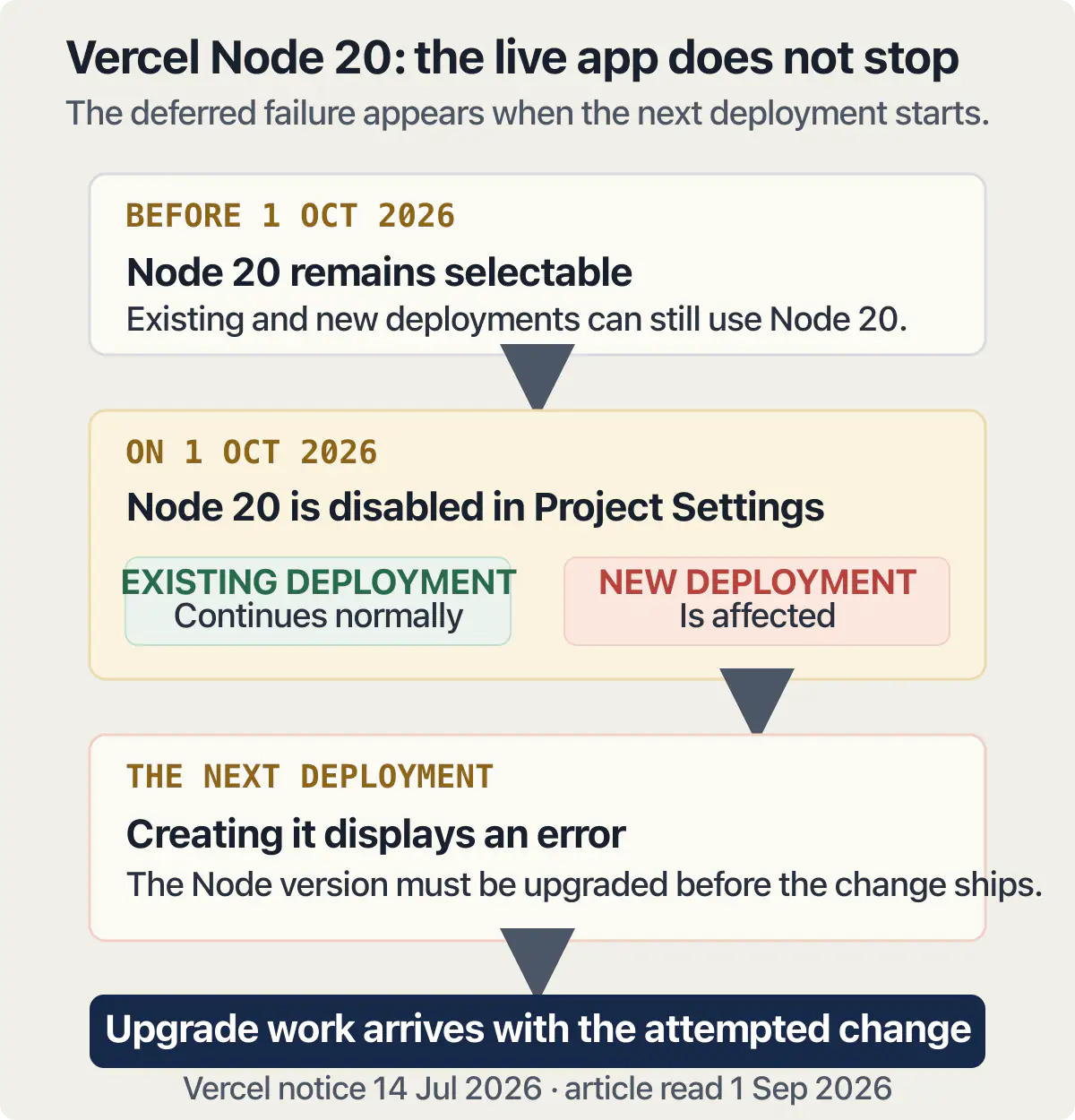
This is the sharpest thing on the page, and it is the reason skipped maintenance feels harmless right up until it is expensive: nothing breaks on the day the deadline passes. It breaks the next time you try to change something.
Vercel’s changelog entry of 14 July 2026 is the cleanest published example. It opens by saying that “Following the Node.js 20 end of life on April 30, 2026, we are deprecating Node.js 20 for Builds and Functions on October 1, 2026”, and then answers the two questions an owner actually has. On whether anything already running is affected: “No, existing deployments with Serverless Functions will not be affected. Invocations to already-deployed functions will continue to work normally. Only new deployments will be affected.” On the date itself: “On October 1, 2026, Node.js 20 will be disabled in Project Settings. Existing projects using 20 as the version for Functions will display an error when a new deployment is created.” The fix is a version number in project settings or in the engines field. Vercel’s Node.js 20 deprecation notice is the source, and the date it names is one month after this page was written.
Read that answer twice, because it is what deferred maintenance actually looks like. Your application keeps serving customers. Nothing on any dashboard turns red. The cost lands the first day you need to ship a fix, which is normally the worst day you could have chosen to also be doing a runtime upgrade you have never done before. The list of versions on offer moves too: Vercel’s supported versions page, which states it was last updated on 27 February 2026, lists 24.x as the default with 22.x and 20.x also available, and notes that “Only major versions are available. Vercel automatically rolls out minor and patch updates when needed, such as to fix a security issue.” Vercel’s supported Node.js versions page carries the current list.
Databases run the same pattern on a longer cycle and publish it further ahead. PostgreSQL’s versioning policy states that the project “supports a major version for 5 years after its initial release. After this, a final minor version will be released and the software will then be unsupported (end-of-life).” Its releases table, read on 1 September 2026, gives version 14 a final release of 12 November 2026 and version 15 a final release of 11 November 2027. Nothing stops working on those dates. What stops is fixes arriving, and the upgrade that follows is a planned job with a rehearsal in it rather than an afternoon. PostgreSQL’s versioning policy publishes both the rule and the table.
A planned job still has a surprise inside it. One owner took a live application offline for a short window to move its database, and found afterwards that people who were already signed in were being turned away. That is the second job hiding inside the first, and it is the reason these upgrades want a rehearsal rather than a weekend.
This section is about work rather than about the bill. What the host and the database charge you every month is a separate sum, and none of it is on this list.
The work that only happens because somebody asked
Now the honest half. Everything above arrives on somebody else’s schedule. Everything below arrives because a person decided it should, and a small application can go a long stretch with none of it happening and nothing bad following.
Features are the obvious one. A setting somebody wants made optional, a summary a customer has asked for twice, a second way to pay. Copy and design changes sit next to them. So does speed work, which usually gets raised long after anybody could say when the page got slow.
Bugs that users report are the awkward member of this group, because they feel unavoidable and they are still not scheduled. Somebody whose first application was already live heard from a user that the in-app purchase was hanging. Nobody put that on a calendar. It arrived, it was real, and it went to the top of the list, and that is the whole character of this half of the pile: it is unpredictable in timing and entirely predictable in kind.
Plenty of small applications genuinely want a repair now and then rather than a monthly arrangement. Whether that list is long enough to be worth paying somebody by the month is a different question, and it turns on how fast your own list refills.
Knowing what the jobs are still leaves the question of whose hands do them, and there are four honest answers to that. What usually settles it is which half of the list above you are willing to keep being the person for.
What actually breaks if you skip it
Mostly nothing, for a while. That is the honest answer, and it is why the importance of software maintenance is such a hard argument to make on a sales page: the case for it never looks urgent on any given Tuesday, and the damage is cumulative rather than sudden.
Here is the part that is measurable. In AxonBuild’s fixed cohort of 26 real applications reviewed in June and July 2026, three of the ten held-out third-party applications were running the same framework release with a publicly known break-in path, each confirmed against the application’s own code rather than matched to a scanner pattern. Three separate owners, three separate applications, one stale version, and nobody had touched any of the code. Nobody there was being careless. The calendar belonged to other people and nobody in the building was reading it. The cohort behind that finding sets out how the applications were selected and how the findings were verified.
The recurring jobs also have a habit of returning. One founder, a year into a live product, described their own version of that:
I have been developing a SaaS App for one year, slowly and strongly. Its been couple of times i faced with bot attacks on my app which lately i added e mail verification system with resend email sender. However, bots passed this verification wall and passed it.
Read that as upkeep, because that is the category it belongs in. A working application, a year old, where the same job kept arriving, and the thing its owner shipped to close it did not close it. Some work is finished when you finish it. Some work comes back, and the second visit is the one nobody prices.
The real consequence of skipping the pile is duller than an outage and more expensive. Every dated job you defer is still there when you next want to change something, and it has to be done first, in a hurry, by somebody who is also trying to do the thing you actually wanted. A runtime upgrade you chose is a morning. The same upgrade, done under a deploy that is failing while a customer waits, is a bad day. That gap between a morning and a bad day is the whole of software maintenance importance, and it is the only version of the argument that survives contact with an invoice. Why each of these jobs takes longer on an application a generator wrote than on one somebody typed is a question about the shape of the code, answered where that cost is measured.
Common questions about app maintenance
What is app maintenance?
App maintenance is all the work done on an application after it is released and while people are still using it. It covers two piles: jobs that arrive on dates published by Apple, by your host, by your database and by the bodies that set certificate rules, and jobs that happen only because somebody asked for them. The older and wider phrasing, software maintenance, means the same work applied to any program rather than only to an app with users, and the answer does not change.
What does app maintenance include?
It includes rebuilding against newer store requirements, answering store paperwork, renewing certificates, refreshing expiring sign-in credentials, moving to a supported runtime version, upgrading the database before its support ends, and keeping dependencies current, plus one undated job, proving a backup restores, which is an afternoon once and again whenever the database or the host changes. It also includes features, copy, design and speed work, but only the first group has dates on it.
Why do apps need maintenance?
Because the platforms an application sits on keep changing underneath it. Apple changes what an upload must contain, the certificate rules shorten how long a certificate may live, hosts switch off old runtimes, and database versions reach the end of their support. Your application did none of those things. They happen around it, on published dates, decided by organisations that have never seen your code.
How often does an app need maintenance?
There is no fixed interval, and any seller quoting one is describing their own billing rather than your application. The dated jobs arrive when their publishers say so, which for a typical mobile app maintenance list works out at a handful of separate moments a year rather than a steady stream. The optional jobs arrive when you raise them, which for a small application can be never for long stretches.
What are the four types of software maintenance?
Corrective, preventative, perfective and adaptive. Corrective is fixing what broke, preventative is heading off what has not broken yet, perfective is adding or removing features, and adaptive is keeping up with changes in the environment around the software. The four names are a useful way to describe work after the fact. They will not tell you which jobs are due, who set the dates, or what happens if you skip one, which is why this page splits the list by who starts each job instead.
What happens if I never maintain my app?
For a while, nothing visible. Then a series of narrow failures: an upload that is refused, a browser warning page when a certificate lapses, users who cannot sign in, a deploy that errors on a runtime that is no longer offered. The application usually keeps serving existing users through most of that. What you lose first is the ability to change anything quickly.
Is app maintenance the same as app support?
They overlap and they are bought differently. The phrase what is software maintenance services usually points at the recurring work above, sold as a package. Support usually means somebody answering when something goes wrong, which is availability rather than a job list. A quote can contain either, both, or one dressed as the other, so ask which of the jobs in the table above is actually included.
Does an app built with an AI builder still need maintenance?
Yes, and the dated half is identical, because Apple, the certificate rules, your host and your database do not care what wrote the code. What changes is the second half: nobody in your building has read all of the code, so each job takes longer to size up and carries more risk of moving something unrelated.
How much does app maintenance cost?
It depends on which half of the list you are buying and how much of it you already handle yourself. The dated jobs are a small number of separate pieces of work a year, most of them short; the optional jobs cost whatever you choose to ask for. Costing the recurring lines one by one, month by month, is the job of the page that prices upkeep. What one of these jobs costs to buy on its own is priced where single results are priced.
Owning an app means being able to run it, change it and recover it without guessing. The sprint below leaves you with the runbooks and documentation to do that.
Built it with AI. Now it has to hold up for real customers.
The Production Hardening Sprint takes the app you already have and builds the production foundation underneath it. Authentication and access rules, payments that stay consistent, error handling, monitoring, backups, automated tests and a documented handover. Our engineers work inside your existing codebase for ten working days. All 123 deliverables are included, and you get the evidence for each one.
See the Production Hardening Sprint →  $2,500 fixed price · 10 working days · One codebase