If you inherit a vibe-coded app, do not begin with a feature request or a broad rewrite. First establish authorized access, preserve the running version and data, inventory the systems the app depends on, and test the highest-consequence boundaries in a safe environment. The goal of week one is a trustworthy baseline, not complete understanding.
This is the cold-inheritance guide: the original builder may be unavailable and the documentation may be incomplete. It reads the same whatever produced the app, because Base44, Lovable, Replit, Bolt, v0, Claude Code, Cursor and Windsurf all leave the same situation behind. You have inherited a codebase you did not write, it is already serving real users, and nobody is left to explain it. A planned hand over is a different process, because the current owner can transfer context, demonstrate operations, and stay available while the new maintainer repeats each step and confirms it works.
This guide assumes you are the person who will do the week-one work, or will sit next to whoever does. Two nearby situations need different steps. If you are looking for someone else to take the app over and keep it running for you, that is a hiring decision before it is a technical one. And if you paid a contractor to build the app and cannot read the code yourself, the question is how to check their work without reading it, which starts somewhere else entirely.
The first-week checklist
- 01 Confirm who legally and operationally controls the domain, repository, hosting, database, storage, payment provider, email service, analytics, and app-store accounts
- 02 Create named access for the new owner instead of sharing a previous person’s password, then preserve logs before revoking old access
- 03 Record the production URL, deployed commit or artifact, runtime versions, environment names, regions, scheduled jobs, and external integrations
- 04 Take an appropriate backup or snapshot before changing code, configuration, schema, data, credentials, or DNS
- 05 Reproduce the critical business flows and document what currently works, fails, and cannot be tested safely
- 06 Test logged-out, second-account, ordinary-role, admin, file, export, payment, and expensive-API boundaries using accounts and systems you are authorized to test
- 07 Trigger a safe failure and confirm logs plus an alert reach the person now responsible
- 08 Create a non-production path for changes, pin the baseline with critical tests, and only then begin stabilization or feature work
Do not run intrusive scans, destructive tests, or load tests against a live system unless you have explicit authority, a safe plan, and appropriate limits. When staging does not exist, begin with read-only inspection, copies, test accounts, and the least disruptive checks.
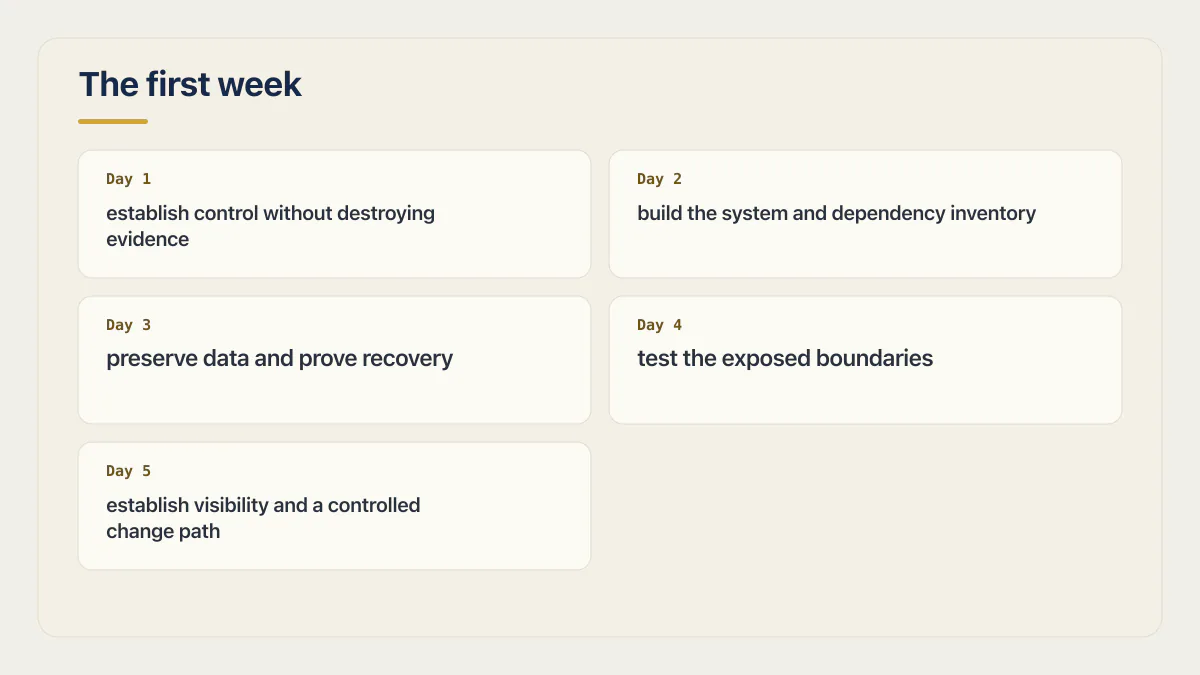
Day 1: establish control without destroying evidence
Start with account and asset ownership. Identify the business-controlled email, billing owner, recovery contacts, MFA methods, and administrators for every system. Grant the new maintainer a named account with the least privilege needed for the first phase. Avoid moving plaintext passwords or secret values through the transfer notes.
Do not immediately rotate every credential if doing so could stop production or erase attribution in logs. First preserve relevant audit and deployment records, identify which workloads consume each secret, plan the rotation order, and keep a tested recovery path. OWASP’s Secrets Management guidance treats provisioning, access, rotation, revocation, and metadata as one lifecycle.
Record what is running before attempting to improve it. Capture the deployment identifier or commit, runtime and package-manager versions, environment, domain and DNS setup, database project, storage buckets, background jobs, webhook endpoints, and third-party services. This baseline is the answer to “what changed?” if the first maintenance action causes a regression.
Day 2: build the system and dependency inventory
Map the app at three levels:
| Inventory | Questions to answer |
|---|---|
| Business flows | Which actions create revenue, change access, move data, or stop important work when broken? |
| Runtime systems | Which frontend, API, database, storage, queue, scheduler, identity, payment, email, and analytics systems participate? |
| Software components | Which direct packages, runtime versions, generated clients, native plugins, and deploy tools are actually in the build? |
A lockfile or manifest is a starting point, not the whole runtime. CISA’s SBOM minimum-elements guidance describes the dependency hierarchy an inventory needs to identify. For a small inherited app, a generated dependency list plus a manually checked services map is often more useful than claiming a perfect formal SBOM.
Mark unknowns explicitly. “Unknown owner,” “deployment source not identified,” and “production secret consumer not traced” are valid first-week findings. Guessing fills the document faster and makes the next decision less safe.
Day 3: preserve data and prove recovery
Identify which data is authoritative, which is cached or derived, and where files live outside the main database. Determine whether backups include the database, objects, authentication records, external provider state, and encryption material needed to use the restored copy.
Restore representative data into an isolated environment. Confirm the app can start against it and complete a read plus a reversible write. Record restore time, missing steps, and how much data would be lost under the current schedule.
Version control is not a database backup. Redeploying an old commit does not recreate rows deleted by a migration, restore overwritten files, reverse email already sent, or undo a payment event.
Day 4: test the exposed boundaries
Use OWASP ASVS as a verification vocabulary, then narrow the first pass to this app’s critical paths. Test what happens when the caller is logged out, uses an expired session, belongs to another account, has a lower role, changes a record identifier, replays an event, or exceeds a cost limit.
For multi-tenant data, create two accounts you control. Have account A create a record, then attempt the same read, update, delete, file access, and export as account B through the actual API or backend boundary. Do not stop at whether the interface hides the button.
In one multi-tenant app I audited, that exact move worked. A customer’s own wallet ID, visible in an ordinary API response, was accepted by a token-crediting function with no check on who was calling it. The function trusted the ID in the request, not the session making it. Account two could mint itself paid credits for free, and every credit it minted was a real charge on the app owner’s model bill.
Search source, history, built assets, deployment configuration, and logs for credential exposure. Start with a plain string search against the built output, sk_live, sk_test, service_role, and the key prefixes of whichever providers the app uses, then follow with tools that understand the relevant secret types. A plain prefix search can find obvious keys but cannot prove the absence of secrets. If a credential was exposed, determine what it can reach, preserve evidence, revoke or rotate it safely, and review usage.
Database policies also need path tracing. A PostgreSQL SECURITY DEFINER function executes with its owner’s privileges; whether it bypasses row-level security depends on the owner, table settings, and code path. Inventory such functions and views, then verify who may call them and how they derive user and tenant identity. Do not assume the attribute alone proves a bypass.
Day 5: establish visibility and a controlled change path
Trigger one safe application failure in a known test path. Confirm the response is honest, the event appears in logs, sensitive values are not recorded, and an alert reaches the new owner with enough context to act. Repeat for an important background job or webhook if the app depends on one.
Create a development or staging path separated from production data and credentials. Protect the release branch, record the exact build and deploy commands, and require a clean build plus a small critical-flow suite before production.
The first tests should pin behavior the business already depends on: sign-in, the main value-producing action, payment or entitlement where present, and recovery from an expected failure. They are a safety line for stabilization, not an attempt to reach an arbitrary coverage percentage in week one.
What the fixed audit cohort suggests, with limits
In AxonBuild’s selected June–July 2026 cohort, the shape of what an inherited AI-built app usually looks like is measured, not guessed:
| What you inherit | In the audit corpus |
|---|---|
| Zero working automated tests | at least 23 of 26 apps |
| One customer can read or write another’s data | 7 of 21 apps |
| Privileged endpoint with no authentication check at all | 11 of 21 apps |
| No error tracking anywhere | 17 of 21 apps |
| Ships straight to production with no deploy gate | at least 17 of 21 apps |
| Reliability and correctness score (worst of 12 pillars) | 31.4 / 100 avg across 21 third-party apps |
One contrast in that table frames the rest. Secrets handling is the pillar that scores well, averaging 84 out of 100 across the 21 third-party apps, because a leaked key is the failure every scanner already hunts for. Everything invisible, tests, alerting, tenant isolation, deploy gates, scores worse, because nothing about it looks wrong until someone specifically goes looking. Whatever you inherited, expect the invisible engineering to be thinner than the visible screens, because the visible screens are what the demo tested.
Nothing in an inherited vibe-coded app announces that a test, an alert, or a tenant boundary is missing. You find that out by checking, on your own schedule, or a customer finds it on theirs.
These are fixed study results, not estimates for every inherited or vibe-coded app. Use the numbers to choose what to verify first, not to assume the inherited app has the same defects. The correct result may be that a boundary already holds. Document that evidence too, because a takeover plan needs to preserve what works as carefully as it fixes what does not.
Week-one output: the stabilization brief
End the week with a short evidence ledger rather than a general code-quality verdict:
| Section | Required output |
|---|---|
| Current production | Running version, environment, owners, systems, and known drift |
| Critical flows | Reproduction result, dependencies, and failure consequence |
| Confirmed findings | Evidence, affected path, consequence, and immediate containment where needed |
| Unknowns | Missing access, untraced services, and checks that could not be completed safely |
| Recovery | Backup coverage, restore result, rollback path, and gaps |
| Stabilization plan | Ordered changes, owner, test, release condition, and retest date |
Name the fragile files and workflows plus the commands that must pass before they change; those are exactly the sections a rules file needs. Build the rules from evidence discovered during triage, not from whichever files happen to look complicated. The maintainability case for pinning behavior before touching it covers the mechanics.
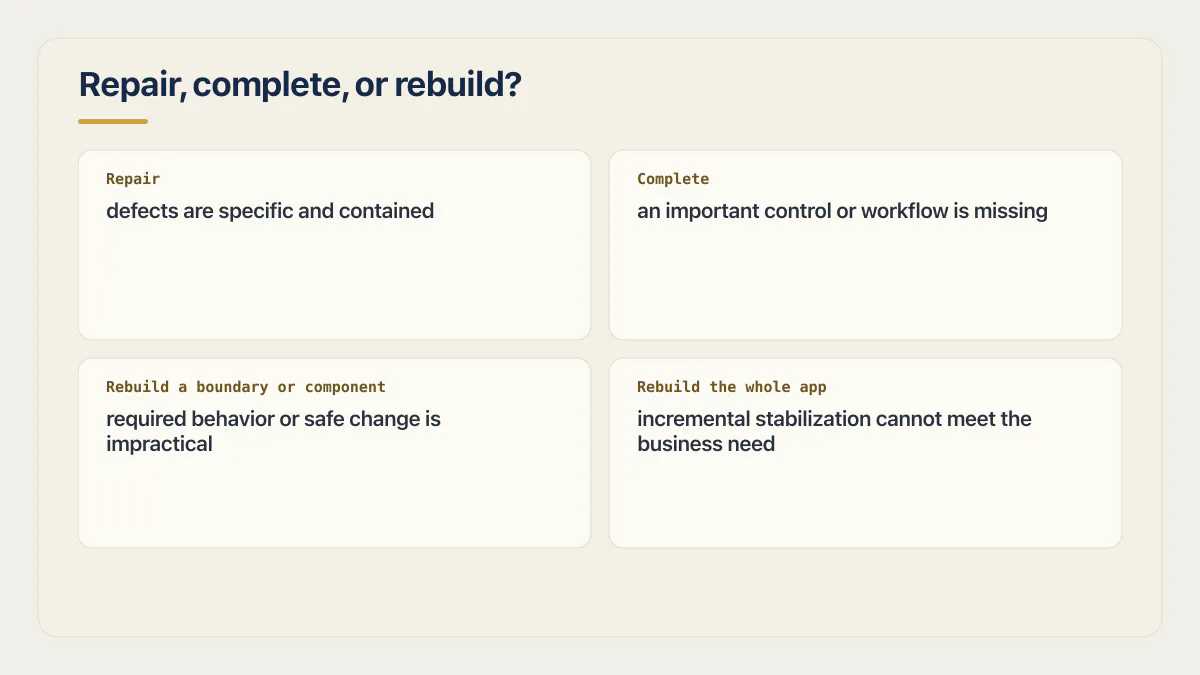
Repair, complete, or rebuild?
Do not decide from generated style, file length, or the absence of perfect tests. Decide from business behavior and changeability.
- Repair when the architecture and critical boundaries exist but the defects are specific and contained.
- Complete when an important control or workflow is missing but can be added without replacing the system’s foundation.
- Rebuild a boundary or component when its assumptions make required behavior or safe change impractical.
- Rebuild the whole app only when evidence shows incremental stabilization cannot meet the business need at reasonable cost and risk.
Write the alternatives and consequences before choosing. A rewrite introduces new defects, migration work, parallel-operation risk, and another body of code to understand. Keeping the current system also has costs. The stabilization brief makes that tradeoff inspectable.
Get the verdict from someone who has no reason to prefer a rebuild. Whether the app is actually ready to launch covers the wider decision, and when a security audit is worth paying for helps separate a useful review from a generic scan.
Common questions about inherited vibe-coded apps
What should I do first after inheriting a vibe-coded app?
Establish authorized account ownership, preserve the deployed version and logs, take an appropriate backup, and map the critical systems before changing anything. Then test the highest-consequence account, payment, data, and recovery boundaries safely.
Is vibe code legacy code?
Usually, yes. A legacy codebase is code the people responsible for it cannot change with confidence, because the context, tests, documentation and operational control needed to change it safely are not there. Age is not part of the definition, which is the part that surprises people. Steve Krouse’s 2025 essay on Val Town’s blog argues that code nobody understands is legacy code the moment someone has to maintain it, whatever generated it and however new it is. That’s close to right, and worth taking literally. An app built by prompt six weeks ago becomes a legacy codebase the instant its builder leaves, and stops being one, section by section, as week-one triage reduces the uncertainty one verified area at a time. Past week one, legacy code takeover sets out a first-month plan for the engineer who inherited a codebase nobody can explain.
What breaks first in production?
Whatever the demo never exercised. Reliability and correctness, the pillar where tests and error handling live, scored worst of the twelve at 31.4 out of 100, averaged across the 21 third-party apps, well behind every other area measured. Concretely: a flow nobody tested, often the payment or signup path, an error with nowhere to land, and a second account nobody tried logging in with. None of the three shows up on a walkthrough, because a walkthrough is one account clicking through the happy path.
Should I rotate all secrets immediately?
Rotate or revoke credentials that are exposed, unowned, or no longer needed, but plan the sequence. Identify consumers, preserve necessary logs, create replacement credentials, update workloads, verify operation, and revoke the old values. An unplanned bulk rotation can create an avoidable outage.
How much should I change in the first week?
Change only what is needed to contain a confirmed exposure, preserve data, restore visibility, or create a safe maintenance path. Defer feature work and broad restructuring until the baseline, critical flows, and recovery options are understood.
What if the previous developer is still available?
Use a planned hand over instead of cold triage. Ask them to demonstrate the production deployment, rollback, restore, alerts, critical workflows, and access map while the new owner performs each task. Treat verbal claims as leads to verify, not as substitutes for evidence. The full hand-over packet, item by item, is the list to work from.
Owning an app means being able to run it, change it and recover it without guessing. The sprint below leaves you with the runbooks and documentation to do that.
Built it with AI. Now it has to hold up for real customers.
The Production Hardening Sprint takes the app you already have and builds the production foundation underneath it. Authentication and access rules, payments that stay consistent, error handling, monitoring, backups, automated tests and a documented handover. Our engineers work inside your existing codebase for ten working days. All 123 deliverables are included, and you get the evidence for each one.
See the Production Hardening Sprint →  $2,500 fixed price · 10 working days · One codebase