When I pulled the top ten results for this question on 15 August 2026, four of them were Lovable’s own pages, and two of those four were Lovable’s phone app: the post announcing it, and its App Store listing. That app is a builder you prompt from your phone. It has nothing to do with getting the app you built onto anyone else’s phone, which is what almost everyone typing this wants.
Lovable cannot make a native mobile app. Its documentation says Lovable builds web applications and does not generate React Native projects, and publishing always ends at a web URL. Its docs name three routes onto a phone from there, and two of the three need a developer working outside Lovable.
Everything below is read from Lovable’s, Capacitor’s, Apple’s, Google’s and WebKit’s own documentation on 15 August 2026. I have not put a Lovable app through App Review, so nothing here reports on how a review went.
What Lovable gives you for mobile apps, checked 15 August 2026
Five capabilities cover the whole question. The middle three are where people get their hopes up.
| Capability | Lovable’s answer | Its documented wording, checked 15 August 2026 |
|---|---|---|
| A web app that works properly on a phone screen | Yes | ”Lovable builds web applications, and you can design them to be fully mobile friendly” |
| A published address people can open | Yes, a web address | ”publishing always deploys to a web URL (for example, yourproject.lovable.app or your custom domain)“ |
| Install to the home screen as a PWA | Yes, by asking Lovable for it | ”make your published app installable so users can ‘Add to Home Screen’ and launch it like a native app” |
| A native shell you can submit to a store | Documented as a path, not a feature | ”wrap your published app with a tool like Capacitor to submit it to the App Store or Play Store” |
| A React Native or native build | No | ”Lovable does not generate React Native projects” |
Wording read on 15 August 2026 from Lovable’s FAQ and its publishing documentation, which also states plainly that “There isn’t a built-in flow that packages and submits your project to the App Store or Google Play”.
So a Lovable mobile app, in the sense of a file a customer installs and opens without a browser, is not something publishing produces. Lovable is not unusual here: search for a Vercel mobile app or a v0 mobile app and you land in the same position, with the phone step left to whoever wants it badly enough. What a v0 web app still needs before launch is the v0 production-readiness check. The answer does change on some builders, which is why Base44 and Replit need their own pages rather than a line in this one.
Why does the App Store already list a Lovable app?
The Lovable app in the App Store is Lovable’s builder, the one you prompt from your phone or tablet. Lovable’s documentation introduces it as the app you use to build, prompt and review your projects from a phone or tablet. Installing it changes nothing about the app you built.
That page then sends anyone who wants to ship their own project to the publishing FAQ, which tells you how often the mix-up happens. Lovable’s mobile app documentation records that OAuth connectors including Slack, GitHub, Google Drive and Airtable cannot be connected from it, that the login screen only supports signing in, that detailed code review is still best on a wider screen, and that in-app purchases are not available yet on Android.
Most people typing lovable ios app want that download. The rest of this page is for everyone else.
How do you turn a Lovable app into a mobile app?
Four routes exist, and Lovable documents three of them: the PWA install, your own Capacitor shell, and rebuilding the screens in React Native outside Lovable. The wrapper subscription is the route its docs do not name.
| Route | Who finishes it | Ends in a store listing |
|---|---|---|
| A wrapper vendor’s subscription | The vendor, monthly | Yes |
| A PWA install | You, from a Lovable prompt | No |
| Your own Capacitor shell | A developer, in the exported code | Yes |
| A rebuild in Expo or React Native | A developer, from scratch | Yes |
Both middle rows are the Lovable-specific answer. The PWA is Lovable’s own first suggestion and the only route you can finish alone, so it has its own section below. The Capacitor shell is the route Lovable’s FAQ names, and its difficulty changed this year, which is the next section. On the rebuild, Lovable’s publishing page tells you to “use Lovable to prototype your app’s screens and flows in the browser, then rebuild them with React Native outside of Lovable”, against the same data, and what moving a Lovable database involves is the half people underestimate.
What each route costs, and which of them Apple sends back most often, is compared on the page covering all four routes side by side. If a store listing matters more than staying on Lovable, the builders that do document an app store path are a shorter list than you would guess.
Which Lovable stack you are on changes the wrap
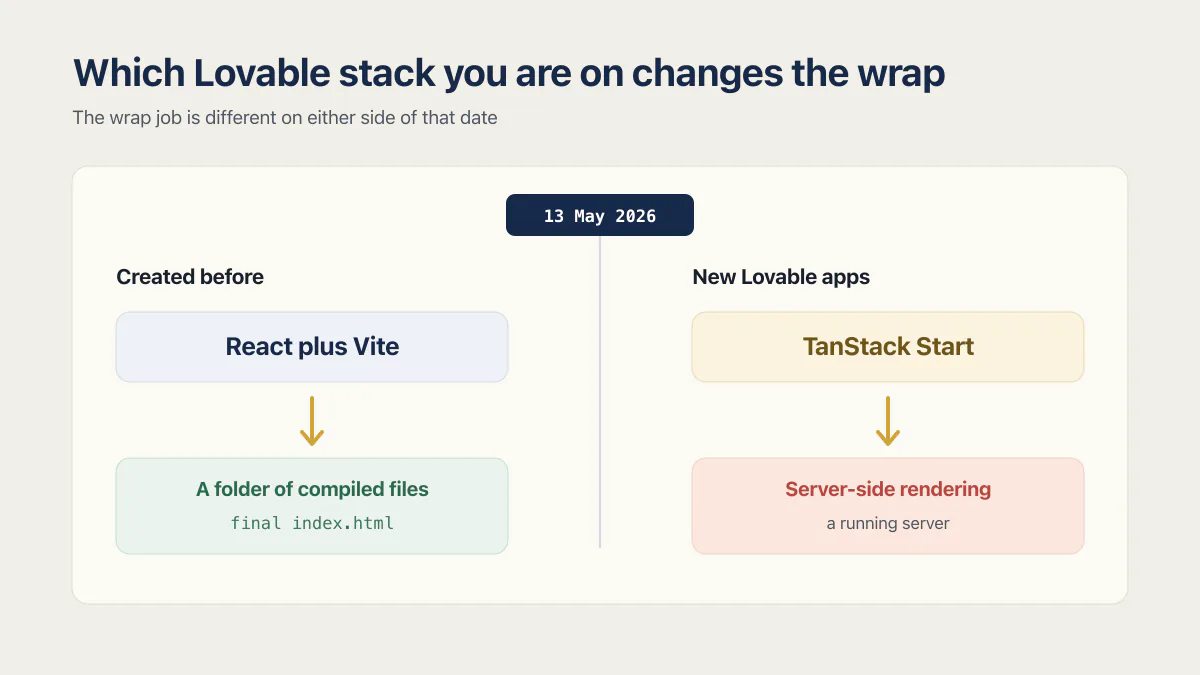
Nothing currently ranking for this question asks when your project was created, and that is the first thing worth knowing. Lovable changed its default stack in the middle of 2026, and the wrap job is different on either side of that date.
New Lovable apps created from 13 May 2026 use TanStack Start with server-side rendering. Lovable’s own upgrade page says TanStack Start “became the default for new projects on May 13, 2026, and for new Enterprise projects on June 22, 2026”. Anything created before that is React plus Vite.
Now read what Capacitor asks for. Capacitor’s configuration documentation defines webDir as “The directory of your compiled web assets. This directory should contain the final index.html of your app.” Its alternative, pointing the shell at a live address with server.url, is documented as “intended for use with live-reload servers” and carries the line “This is not intended for use in production.”
A React plus Vite build produces exactly that folder. Server-side rendering produces a running server, so there is no folder of finished files for Capacitor to point at.
A Lovable project created on 12 May 2026 and one created on 14 May 2026 are different jobs the moment Capacitor asks for a folder of compiled files (for Enterprise projects the line falls on 22 June 2026).
As of 15 August 2026, Lovable’s TanStack Start documentation does not document a static build, an SPA mode, or a prerendered output for those projects. That is an absence in the docs on that date, not a claim that it cannot be done. TanStack Start itself documents SPA mode. Its own wording is that for some applications it “may be desirable to ship” static HTML containing the “shell” of the application, which can then sit on a CDN. That work happens in the exported code, by someone who can run a build and read what came out of it.
Two things you can check without help: when the project was created, and what is in the code once it leaves Lovable, which is a job with traps of its own. Deploying a Lovable app to Vercel splits its settings by the same two stacks, for the same reason.
What a PWA gets you, and what it never gets you
The PWA is the honest recommendation for most people reading this, as long as you know what you are buying. Lovable’s publishing docs describe an installable app that users “Add to Home Screen” and “launch it like a native app, with offline support and a full-screen shell”, and call it the fastest path.
What you get:
- A home-screen icon and a full-screen launch, with no browser chrome around it.
- Offline behaviour, so the app opens when the signal drops.
- Push notifications on iPhone, but only once the user has added it to the Home Screen. WebKit’s announcement is specific: “Now with iOS and iPadOS 16.4, we are adding support for Web Push to Home Screen web apps”, and the permission request has to come from a direct tap on something like a subscribe button.
- Updates that go live when you publish, with nobody reviewing them.
What you never get:
- An App Store or Play Store listing.
- Store search, or the install button people are trained to look for.
- Store billing, subscriptions, or the trials that come with it.
This surface moves. Lovable’s changelog entry of 3 June 2026 says that when you ask it to “make your app installable, work offline, or send push notifications, it now picks the right setup for the request instead of applying the full PWA stack every time”. That change narrows what a prompt turns on, so check what yours produces today rather than trusting a screenshot from spring.
If a store listing is the actual requirement
Before any of this, the honest question is whether the app is ready for other people at all. Whether a Lovable app is production ready is cheaper to find out than an App Review rejection.
The account comes first. Apple’s own program page prices membership at “$99 annual membership” and lists inviting testers and managing beta builds with TestFlight among what that buys. The membership goes in your name or your company’s, not a contractor’s.
Then the guidelines. Apple’s App Review Guidelines put guideline 4.2 first: “Your app should include features, content, and UI that elevate it beyond a repackaged website.” Guideline 4.2.2 adds that “Other than catalogs, apps shouldn’t primarily be marketing materials, advertisements, web clippings, content aggregators, or a collection of links.” Neither line says a shell around a web app gets rejected. They describe what a reviewer reads the submission against, and a shell around a published web address is the shape those sentences are about.
If your app sells anything, read 3.1.1 before you build the shell. It says that to unlock features or functionality, “by way of example: subscriptions, in-game currencies, game levels, access to premium content, or unlocking a full version”, you “must use in-app purchase”, and that apps “may not use their own mechanisms to unlock content or functionality”. A checkout that works fine in a browser is a different conversation once the same pages are inside an iOS app.
Google’s side is looser on paper. Section 1 of its Functionality, Content, and User Experience policy, Limited Functionality and Content, says “We do not allow apps that only have limited functionality and content”, and the examples it gives are things like “Apps that are static without app-specific functionalities, for example, text only or PDF file apps”. As of 15 August 2026 that page does not name webview wrappers at all, so the common claim that Google bans them is not in the policy.
Past this point the questions change. Why App Store review rejects apps like this matches the rejection note to the fix. The upload path and the Mac question sit in the TestFlight page linked below.
Common questions about Lovable and mobile apps
Can Lovable build App Store apps?
Not on its own. Lovable’s publishing FAQ says there is no built-in flow that packages and submits a project to the App Store or Google Play, and its suggested route is to wrap the published app with a tool like Capacitor outside Lovable, then submit that shell yourself with your own Apple Developer Program membership.
Can Lovable make mobile apps in React Native?
No. Lovable’s FAQ states it directly: “Lovable does not generate React Native projects.” Anyone searching lovable react native is looking for something Lovable does not produce. A React Native or Expo version of your app means writing the front end again, outside Lovable, against the same backend.
Does Lovable do Flutter?
No. Lovable’s documented output is a web application built with React and Tailwind, on either TanStack Start or Vite depending on when the project was created. Flutter is not in that list, and nothing in Lovable’s docs on 15 August 2026 describes a Dart or Flutter target.
Can a Lovable app go on Google Play?
Only inside a native shell you build outside Lovable. Publishing gives you a web address, and Google Play accepts an Android package, so something has to turn one into the other. Section 1 of Google’s Functionality, Content, and User Experience policy, Limited Functionality and Content, is the one to read first, and as of 15 August 2026 it does not mention webview wrappers by name.
Is there a Lovable mobile app?
Yes, and it is Lovable’s builder rather than a way to ship your project. Its documentation describes building, prompting and reviewing your Lovable projects from a phone or tablet, and lists real limits: no OAuth connectors, sign-in only, code review still better on desktop, and no in-app purchases yet on Android.
Do I need a Mac to put a Lovable app on the App Store?
Not necessarily, but a macOS machine has to be involved somewhere in the build. A wrapped web app is an Xcode project underneath, so it needs a macOS runner, which can be a hosted service rather than a computer on your desk. Submitting an AI-built app to TestFlight walks through which stacks have a hosted path and which do not.
Can Lovable create a mobile app tied to my existing website and database?
It can build a web app against an existing database, and that app can be installed to a home screen. Lovable connects to its own Cloud backend, to Supabase, or to third-party APIs, so the data side is ordinary work. None of that changes the phone side: you still get a web address, and the store step still happens outside Lovable.
What are Lovable’s limits for mobile apps?
Three limits do all the damage. There is no native build, so no React Native and no store binary. There is no packaging or submission flow, so the store account and the review cycle are yours. And on projects created from 13 May 2026 (22 June 2026 for new Enterprise projects), the server-rendered default means the Capacitor route starts with build work in the exported code rather than a folder that is already sitting there.
Moving platforms is the moment the missing production pieces show up. The sprint below builds them into the codebase you land on.
Built it with AI. Now it has to hold up for real customers.
The Production Hardening Sprint takes the app you already have and builds the production foundation underneath it. Authentication and access rules, payments that stay consistent, error handling, monitoring, backups, automated tests and a documented handover. Our engineers work inside your existing codebase for ten working days. All 123 deliverables are included, and you get the evidence for each one.
See the Production Hardening Sprint →  $2,500 fixed price · 10 working days · One codebase