Your Vercel dashboard says Queued, the timer is running, and nothing else on the screen has changed for ten minutes. That looks identical to a deploy that has already failed, and the dashboard does not spell out which one you have. Underneath the search there are usually only two questions: is this broken, and are my customers seeing something different right now.
A queued Vercel build has not failed. It is waiting for a build slot, or waiting behind another build on the same branch, and your live site is still serving the last version that shipped. Three different things get called a stuck deploy, and each one has its own cause and its own control.
That gap catches people who did not write the code hardest. One designer described building a working frontend with an AI tool, pushing it to GitHub, then losing the night to deploy errors. A founder who moved a site across with an AI coding assistant told the same story from the other end: the build took a fraction of the usual time, and the hours saved came back as deploys that would not ship.
Every state, control and number below was read off Vercel’s own build, queue and limits pages, its knowledge-base answers and its own community forum on 25 August 2026, and the wording is quoted so you can hold it against what your dashboard says. No build was run here to test any of it.
The three states people call a stuck Vercel deploy
Work out which of these three you have before you press anything. They look similar on the deployments list and have almost nothing else in common.
| State | What the dashboard shows | What Vercel documents as the cause | What you can actually do | Does waiting help |
|---|---|---|---|---|
| No deployment appeared at all | Nothing new in Deployments after your push, and no failed entry either | A broken Git login connection, a commit author without team access, an Ignored Build Step, git.deploymentEnabled set to false, or a daily deployment limit already reached | Work Vercel’s own checklist for commits that do not trigger a deployment | No. Nothing was queued, so there is nothing to wait for |
| The deployment exists and sits on Queued | The deployment is listed, the status reads Queued, and there is no build log yet | Every concurrent build slot is in use, or another build is already running on the same branch | Force that one deployment with Start Building Now, or cancel a queued build that is stuck to free a slot | Sometimes. Queued builds are processed in chronological order, so it starts when a slot frees |
| The build started and then stopped | Status reads an error, and there is a Build Logs section you can expand | The Install Command or the Build Command exited with an error, or the build ran past the 45 minute maximum | Read the first error line rather than the last, and redeploy without the cache if the install is what failed | No. The build has already finished |
A build that never started has not replaced anything, so the version your customers are loading is still the last one that shipped.
That is the sentence most people in this state need first. A queued build is a deploy that has not happened yet, so whatever was serving traffic five minutes ago is still serving it and no visitor can tell anything is waiting. An app that is genuinely down, with customers hitting errors right now, is a different situation with a different order of checks, and the first hour of one is worth knowing before you need it.
Two nearby problems get searched with the same words and are not this. When the thing that will not finish is Lovable’s own Publish rather than a Vercel build, the button, the failure list and the repair are all different. And a build that sits waiting on Replit has its own controls, none of which are on this page.
One more distinction saves an afternoon later: a deploy that finishes cleanly and a site people can actually find are separate outcomes, and a site that ships fine and then cannot be found in a search engine fails for reasons that have nothing to do with the build.
Why a Vercel build sits in the queue
Vercel defines the state itself, and the definition is the reassuring part. From its build queues documentation, last updated 24 June 2026: “Build queueing is when a build must wait for resources to become available before starting. This creates more time between when the code is committed and the deployment being ready.”
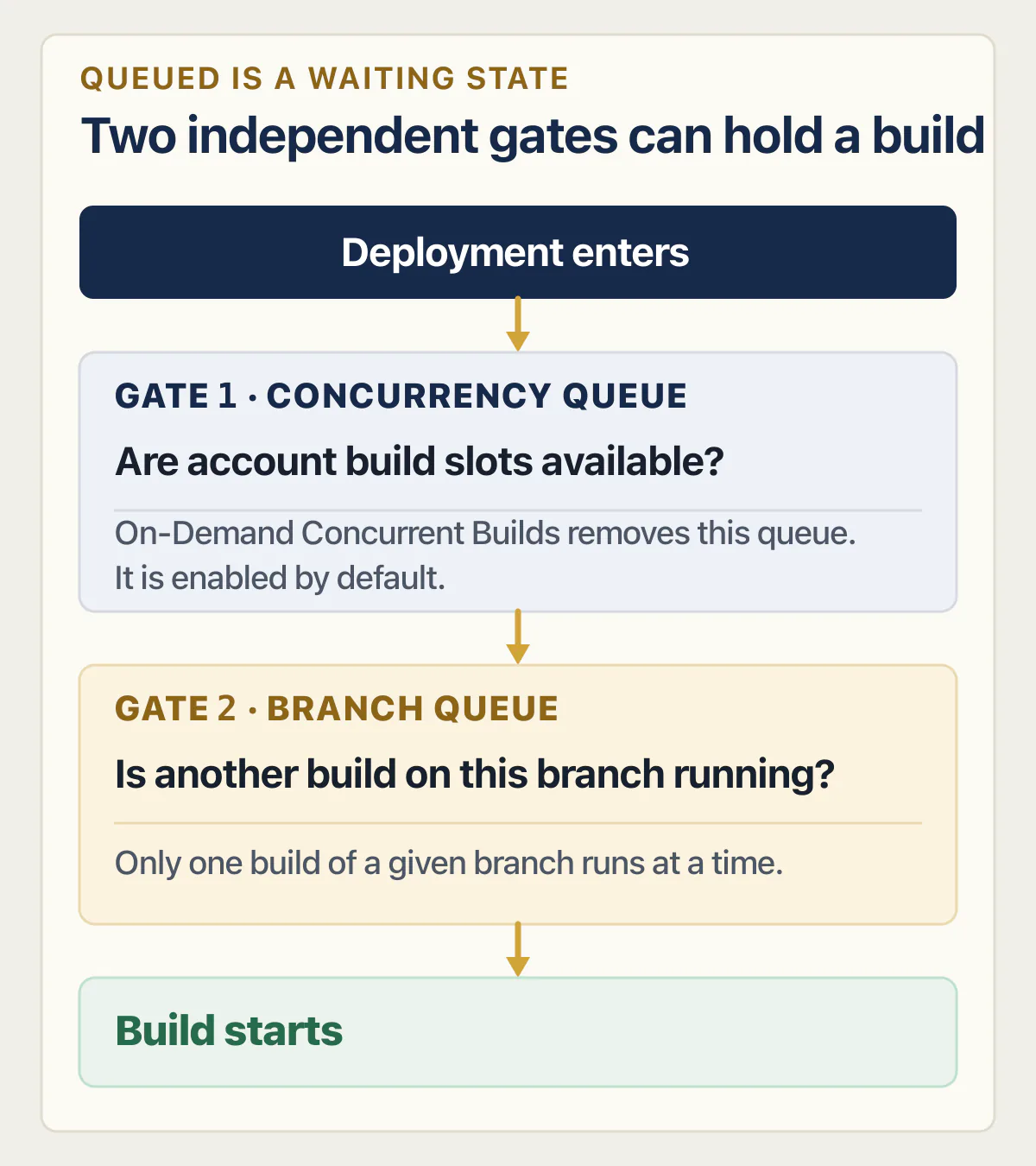
Nothing in that sentence is a failure. The same page splits the waiting into two queues. The concurrency queue is about how many builds your account may run at once: “If all concurrent build slots are in use, new builds are queued until a slot becomes available unless you have On-Demand Concurrent Builds enabled at the project level.” Vercel’s knowledge-base answer puts it plainer, that “it is possible for builds to get queued when making multiple deployments at the same time.” The branch queue is the one that surprises people: even with slots free, only one build of a given branch runs at a time.
How many builds each plan runs at once
These counts apply only when On-Demand Concurrent Builds is switched off, and they are counts of builds and nothing else. Vercel’s plan ladder and what each tier bills for belongs on the pricing page; every number here is a count of builds, never a price.
Vercel’s build queues page, read on 25 August 2026, says Hobby accounts allow one build at a time, that “Pro accounts include 3 concurrent build slots by default”, and that Enterprise accounts can have custom limits. Its managing builds page, last updated 31 July 2026, adds the on-demand condition: Pro gets “Up to 500 concurrent deployments with on-demand concurrency (3 if on demand is off).”
Check the source before you quote a number at anyone. Vercel’s knowledge-base answer on queued builds, last updated 10 November 2025, still lists Pro at 12 concurrent build slots. The two documentation pages agree with each other and disagree with that article; the figures above are the documentation ones, read on 25 August 2026.
One more line from the managing builds page changes the odds for most readers: “By default, projects have on-demand concurrent builds enabled with full concurrency.” If your project is on the default, the branch queue is the likelier answer.
The rule that makes deploys disappear
If you pushed four times and only two builds appeared, this is why. Vercel publishes it as three steps:
- The current build is completed first.
- Queued builds for earlier commits are skipped.
- The most recent commit is built and deployed.
Vercel adds the consequence: “This means that commits in between the current build and most recent commit will not produce builds.” Nothing broke. The middle commits were skipped on purpose so the newest code ships soonest. Where builds do queue, they come out in the order they went in, which the managing builds page describes as “chronological order”.
The two settings that stop the waiting
On-Demand Concurrent Builds removes the concurrency queue entirely. Vercel’s phrasing is that with it, “builds will never queue”, and it offers two modes in the Build and Deployment section of a project’s settings. Run all builds immediately: “All builds proceed in parallel without waiting. Your builds will never be queued.” Run up to one build per branch: “Limit to one active build per branch. New deployments to the same branch won’t be processed while there is an ongoing build, but builds to different branches proceed immediately.” Turning it on at project level also releases what is already stuck, because “any queued builds in that project will automatically be allowed to proceed.”
The second setting is for a production release waiting behind your own test branches. Vercel describes the case exactly: “If a build has to wait for queued preview deployments to finish, it can delay the production release process.” Prioritize Production Builds puts production first. It rests on the difference between what a preview deployment is and why it queues beside your production one, worth reading once if branch deploys are new to you.
When Vercel is not deploying at all and no build appears
This state has the least written about it and causes the most confusion, because from the front page of the dashboard it looks the same as waiting. There is no deployment, so there is nothing in a queue, and pressing refresh for another hour changes nothing.
Vercel publishes a diagnostic checklist for it. Its knowledge-base guide on commits not triggering deployments, last updated 28 July 2026, opens with the cause it calls commonest. These five are the items you can act on without help.
- 01 Check the Git login connection in Account Settings, then Authentication. Vercel calls this the most common cause and the fastest fix.
- 02 Check that the commit author has access to the Vercel team, and read the Activity log for any bot comment explaining the failure.
- 03 Check that the git config user.email on your machine matches the email registered on your Git provider account, including any plus-address variations.
- 04 Check the production branch name in Project Settings, Git. A push to a non-production branch should still create a preview deployment, so confirm the name is exactly right.
- 05 Look for an Ignored Build Step in Project Settings, Git, which is a script that can decide to skip a deployment on purpose.
Two more sit slightly deeper. Vercel names git.deploymentEnabled set to false in vercel.json as a reason commits stop producing deployments, and on the same page it ends the list with a limit: “On a Hobby plan, check whether the 100-deployments-per-day limit has been reached.”
A build can also be created and die before producing any log. Vercel’s build troubleshooting page says builds can fail without providing any build logs when the platform detects a missing precondition that stops a build from starting, naming an invalid committed vercel.json, an Ignored Build Step, and commits from a contributor who is not a team member. The error arrives as an overlay instead of a log.
The two rate limits that stop a deploy before it exists
Both are on Vercel’s limits page, last updated 3 August 2026, and both bite hardest on the free plan during the kind of afternoon where you push a fix every few minutes.
The daily one, in Vercel’s words: “You are able to deploy 100 times every 86400 seconds (1 day). Should you hit the rate limit, you will need to wait another day before you can deploy again.” The same page’s limits table gives Deployments Created per Day as 100 on Hobby, 6000 on Pro and Custom on Enterprise.
The hourly one is subtler: “You are able to build 100 Deployments every 3600 seconds (1 hour).” Vercel notes that using a framework to build your deployment counts as a build, each Vercel function also counts as a build, and hosting static files such as an index.html file does not.
A push that produced nothing and a deploy that is waiting look identical on the deployments list for the first few minutes, which is why the checklist above is worth running before you change settings that were never the problem.
What the command npm install exited with code 1 means
This line does one useful thing immediately: it names the step. Vercel runs an Install Command and then a Build Command, so an error attached to the install means the Install Command failed before the separate Build Command ran. Your application code was not compiled yet, but the install can still run your project’s own scripts (a prepare, postinstall or lifecycle script), so read the first error in the log, including any script output, before deciding it is a dependency problem.
The text people search for and the text Vercel prints are close but not identical. A poster on Vercel’s own forum on 11 March 2025 quoted theirs as Error: Command "npm install" exited with 1, alongside npm error Exit handler never called!. If your line names npm run build instead, you are looking at the build command failing on a Lovable import, which is a different half of the same log, and that page answers it.
Why an install fails on a commit that changed nothing
The hinge is the cache, and the ordering is documented. From Vercel’s build troubleshooting page, last updated 15 June 2026: “At the beginning of each build, the previous Build’s cache is restored prior to the Install Command or Build command executing.”
So the install starts on top of whatever the last build left behind, and which cache gets restored depends on seven inputs to the cache key: the personal account or team, the project, the Framework Preset, the Root Directory, the Node.js version, the package manager, and the Git branch. Change any one and you are on a different cache. That is the report that goes “it builds on main and fails on the branch”: Vercel says a new branch has no cache, so the last production deployment’s cache is used for the preview deployment instead.
Two more rules from the same page matter here. The build cache has a maximum size of 1 GB and is retained for one month. And at the end of each build step, “successful builds will update the cache and failed builds will not modify the existing cache”, which is why a broken build can keep failing the same way for hours.
What actually makes the install stop
| Cause | What Vercel documents | What it looks like |
|---|---|---|
| The lockfile picks the tool | Vercel reads the lock file and infers the manager: yarn.lock runs yarn install, package-lock.json runs npm install, pnpm-lock.yaml runs pnpm install, bun.lockb or bun.lock runs bun install | An author who used one tool and committed another tool’s lockfile |
| No lockfile at all | ”When no lock file exists, Vercel uses npm by default” | A repository exported from a builder without its lockfile gets npm install either way |
The lockfile disagrees with package.json | The manifest asks for one version, the lockfile pins an older one | A strict install refuses rather than guessing |
| An override install command | With an override such as pnpm install, Vercel “will use the oldest version of the specified package manager available in the build container”, and gives pnpm 6 as its example | An install that passes locally and fails on a much older version |
| A Root Directory pointing at the wrong folder | The Install Command “installs dependencies from package.json, including devDependencies”, and its path is set by the Root Directory | An install that fails before a line of your code is read |
Those rules come from Vercel’s package managers reference, last updated 1 July 2026, and its guide to configuring a build, last updated 15 July 2026. The first also documents that the lockfileVersion inside a pnpm-lock.yaml decides which pnpm major version reads it, which is how a lockfile committed a year ago selects an old tool today.
A reply on Vercel’s own forum, dated 11 March 2025, lists five common causes: “Dependency conflicts”, “Network issues”, “Permission problems”, “Corrupted cache”, and “Node.js version incompatibility”. Three of those five sit on the build machine rather than in your repository, which is the honest reason a rerun sometimes just works.
One example of the lockfile case, from an audit
Repo 02 of the AxonBuild audit corpus, a third-party AI-built repository health dashboard, is exactly this failure. Its manifest asked for a newer framework release than its lockfile pinned, the strict install failed outright, and the version that kept shipping carried 20 known advisories the intended upgrade was meant to escape. That is one app rather than a rate, from the 21 third-party apps AxonBuild audited in June and July 2026, each finding checked against the code itself rather than matched on a pattern. Nobody there was doing anything unusual. The manifest drifted ahead of the lockfile on its own and the install stopped.
The controls, in the order they are worth trying
Vercel documents three ways to build without the cache, and the first needs no terminal. Use the Redeploy button on that deployment in the project’s Deployments page and leave the Use existing Build Cache checkbox unchecked. On the command line, vercel --force builds and deploys without the build cache. The environment variable VERCEL_FORCE_NO_BUILD_CACHE set to 1 skips it on every build until you remove it.
If the failure survives all three, the next move is running a clean install and reading the first error rather than the last, which is where npm ci and the reproducibility rules behind it are covered properly.
When Queued is Vercel’s problem and not yours
The cheapest check is Vercel’s own status page, which was showing no open incident when it was read on 25 August 2026 and publishes 90-day uptime figures alongside its incident history. Read it before you change a setting. If an incident is open, nothing you press helps, and every change you make during one is a change you unpick afterwards.
Two occasions are documented publicly, and both were cases where waiting was correct.
On 20 March 2025, a thread on Vercel’s own community forum titled “Deploy stuck in queued status” reported every GitLab-connected project in a team stuck on Queued. The reply that resolved it said “This should be fixed now. Could you try deploying again and let us know if you are still experiencing this issue?”, and added a remedy that appears in none of Vercel’s documentation: “You may need to cancel existing queued build if they are already stuck to free up build slots.” The reporter confirmed it worked.
Earlier, in a GitHub discussion titled “Deployment stuck at queued” opened on 22 April 2023, the reporter wrote “I tried to redeploy, push new code to github, etc… but it just didn’t work”. Someone hitting the same thing pointed at the status page, which was showing degraded performance, and later posted “…the issue has fixed itself for me!”. That repository was archived on 20 December 2024 and is read-only now.
One number exists, and the one you want does not
Vercel publishes a hard cap on how long a build may run: “A Build can last for a maximum of 45 minutes. If the build exceeds this time, the deployment will be canceled and the error will be shown on the Deployment’s Build logs.” Its knowledge-base guide for that error, last updated 3 August 2026, gives the exact string, “Build step did not complete within the maximum of 45 minutes”, says the limit “is the same on the Hobby, Pro, and Enterprise plans” and “is fixed and can’t be raised on any plan”, and reads the cause bluntly: the error “almost always indicates too much work is happening during the build itself”.
Now the number that does not exist. As of 25 August 2026, neither Vercel’s build queues page nor its managing builds page publishes any maximum time a deployment may remain queued, and neither documents an automatic timeout for that state. Both were read and searched on that date. That is why “it has been queued since Tuesday” is a support case rather than a setting you have missed.
The cap above applies to the build, while a function that runs past its duration limit at request time fails after the deploy already succeeded, with its own error code and its own ceiling, and neither number moves the other.
Support publishes no number either. Vercel’s knowledge-base answer on support queue time, last updated 7 August 2026, says “Tickets are processed by the order in which they are received” and that “Our Pro and Hobby tiers are not covered by a support plan or SLA.” Open the ticket anyway, then carry on with the checks below while it waits.
What you can actually press, in order
Nothing new appears here. Every item is a control established above, ordered by how cheap it is and how little it can break.
- 01 Read the status page. If there is an open incident on the platform, stop here and wait.
- 02 Check whether another build of the same branch is already running. If one is, yours is behind it by design and will start when that one finishes.
- 03 Cancel a queued build that is stuck, which Vercel documents as a way to free up build slots.
- 04 Use Start Building Now on the single deployment that actually matters. Vercel says it proceeds regardless of the reason it was queued.
- 05 If the build starts and then fails at the install step, redeploy with Use existing Build Cache unchecked.
- 06 Only now change a setting: On-Demand Concurrent Builds if you queue constantly, Prioritize Production Builds if your release keeps waiting behind preview branches.
- 07 If the deployment never existed in the first place, leave the queue alone and work the never-started checklist instead.
Vercel documents the click path for the button most people never find. From the dashboard, select the project, open Deployments in the sidebar, and find the queued deployment using the Status filter. Either select the three dots to the right of it and choose Start Building Now, or open its detail page and click the same button there. A dialog asks you to confirm.
If what you actually need is not the new version but the old one, that is a different job: getting the last version that worked back in front of customers is faster than fixing a build under pressure, and it is usually the right first move when customers are waiting.
When to stop pressing and get somebody to read the log
Three signals say the thing in front of you has stopped being a five-minute dashboard problem.
The first is repetition with no change. The same commit fails the install every time, on a fresh cache, with nothing in the repository having moved. That is a dependency problem rather than a queue problem, and redeploying it again will not settle it.
The second is a wait with no floor under it. The queue has outlived a support reply that has no published response time behind it on your plan, and the status page is green, so there is nobody to wait for.
The third is the pattern rather than the incident. Every deploy this week has been a repair for the last deploy. One founder running a paid app put the cost of that pattern plainly in a public thread:
But then something breaks and I gotta drop everything to fix it before a customer notices.
The build queue is rarely the expensive part. The interruption is. When shipping has become something you brace for, the useful question is no longer which button to press.
Common questions about a queued Vercel build
Why is my Vercel deployment stuck on Queued?
Because it is waiting rather than failing. Vercel queues a build when every concurrent build slot on your account is in use, or when another build of the same branch is already running. Its build queues page defines the state as a build waiting for resources to become available before starting. With On-Demand Concurrent Builds switched on, builds are documented never to queue at all, so a queue usually means that setting is off or another build of the same branch is ahead of you.
How long can a Vercel build stay queued?
There is no published limit. As of 25 August 2026, neither Vercel’s build queues page nor its managing builds page states a maximum time a deployment may sit on Queued, and neither documents an automatic timeout for it. The cap Vercel does publish applies to a build that is running: 45 minutes, after which the deployment is canceled and the error appears in the build logs. A queue lasting hours with a green status page is a support case.
Should I cancel a queued build or wait?
Cancel it if several builds are stacked up and you only care about one. A reply on Vercel’s own forum in March 2025 said you may need to cancel queued builds that are stuck in order to free up build slots, and the documented way to push one deployment through is the Start Building Now button, which proceeds regardless of why the build was queued. Wait instead if the status page shows an open incident, because nothing you press during one changes the outcome.
Does a queued build mean my site is down?
No. A queued build has not replaced anything, so visitors are still being served the last deployment that finished successfully, and nothing about the queue is visible outside your dashboard. If the live site is failing at the same time, that is a separate problem running in parallel and should be diagnosed as an outage rather than as a build that has not started.
Why did my commit not create a deployment at all?
Because something stopped the deployment being created, which is a different failure from one that is waiting. Vercel’s checklist starts with the Git login connection in Account Settings, then Authentication, which it calls the most common cause. It then covers the commit author’s access to the team, whether your local git config user.email matches your Git provider account, the exact production branch name, any Ignored Build Step, git.deploymentEnabled set to false in vercel.json, and on Hobby, the 100-deployments-per-day limit.
How many times can I deploy on Vercel?
On the Hobby plan, 100 times a day. Vercel’s limits page states it as deploying 100 times every 86400 seconds, one day, and says that if you hit the rate limit you wait another day before you can deploy again. Its table lists Deployments Created per Day as 100 on Hobby, 6000 on Pro and Custom on Enterprise. A separate hourly limit allows 100 builds every 3600 seconds on the free tier, where a framework build counts and hosting a static file does not.
Why is Vercel not loading?
Three different things wear that sentence and only one is a build. The Vercel dashboard being slow or unreachable is a platform question for the status page. Your deployed site failing for visitors is an outage in your own app, diagnosed from logs and the last deploy. A build that will not leave the queue is neither, because your site is still up and the thing that is not loading is a version that has not started yet.
How long does Vercel support take?
Vercel publishes no number for Hobby and Pro. Its support queue guide says tickets are processed by the order in which they are received, that you wait for requests from customers on your own plan first, and that the Pro and Hobby tiers are not covered by a support plan or SLA. Guaranteed response times exist only with an enterprise support plan, so open a ticket early and work the checks yourself while it sits.
Is Queues the same thing as a queued build?
No. The same word covers two unrelated things, and searching for one turns up the other constantly. Vercel Queues is a separate product for sending messages between parts of an application, documented on its own pages, with nothing to do with a deployment waiting to build. If message queues were your search, Vercel’s product documentation is the place to go.
Deploy stuck and not sure what is live?
A deploy that sits waiting looks just like a failed one, and the real worry is whether customers see the old version or a broken one. On the audit, we walk through how your app gets released with you and flag what makes deploys stall or fail. You come away knowing what to set up first.
Book a free audit → Free · 30 minutes · No code access needed