Two people search for Vercel pricing. One is about to put an app somewhere and wants to know whether $0 is real. The other already has an invoice bigger than $20 and cannot find the sentence that explains it. Vercel publishes the answer to both, across five different documentation pages, and never assembles it in one place. This page does.
Vercel is $0 a month on Hobby and $20 a month on Pro, checked 16 August 2026. The $20 covers one deploying seat and $20 of usage credit. Past that, traffic, functions and images bill by the unit, and on Pro nothing stops automatically.
Every number here was taken from Vercel’s own docs on 16 August 2026. No paid Vercel account was used to produce these figures, so the worked example further down is arithmetic on published rates rather than a measured invoice. Prices and included allowances checked 16 August 2026.
Vercel pricing plans: what $0, $20 and Custom actually buy
Vercel’s pricing page lists three plans: Hobby at “$0/mo.”, Pro at “$20/mo.”, and Enterprise at “Custom”. The first two differ less in features than in what happens when you run out.
| Plan | Price | What the price includes | What stops you |
|---|---|---|---|
| Hobby | $0/mo | Personal projects, built-in CI/CD, preview deployments on every Git push, 100 GB Fast Data Transfer, 1,000,000 function invocations, 4 CPU-hrs Active CPU, 360 GB-hrs Provisioned Memory, 5,000 image transformations, 1 hour of runtime logs, 200 projects, 100 deployments a day | Vercel pauses the project once you pass the included usage, and in most cases you wait 30 days |
| Pro | $20/mo | A platform fee covering 1 deploying team seat and $20 of monthly usage credit, plus 1 TB Fast Data Transfer and 10,000,000 Edge Requests, unlimited projects, unlimited domains per project, 6,000 deployments a day | Nothing, unless you switch on Spend Management yourself |
| Enterprise | Custom | Custom limits, SAML SSO, isolated build infrastructure, dedicated account representatives, SLAs | Contract terms nobody outside the contract can verify |
Plan prices and allowances checked 16 August 2026 against Vercel’s plans documentation, the Hobby plan page and the Pro plan page.
The word that matters in the Pro row is platform fee. Vercel’s Pro documentation is precise about it: $20 a month buys one deploying seat and $20 in usage credit, and that is the whole of what the subscription covers. Usage above the included 1 TB of transfer and 10,000,000 Edge Requests draws down the credit first, then bills on demand. The credit is not a bank balance either. Vercel states that the credit and the allocations expire at the end of the month if they go unused, and reset at the start of the next one. A quiet March does not pay for a loud April.
The Enterprise row is deliberately thin. Vercel publishes “Custom” and nothing else, so any specific Enterprise number on a third-party page did not come from Vercel. The documented add-on price list applies to Pro and sits in the meters section below.
One reader should stop here. If the project is personal, has no payment on it, no advertising, and nobody is being paid to build or host it, Hobby is genuinely free and the rest of this page is insurance. Everyone else has a commercial project by Vercel’s own definition, and the next section decides their plan. Cost is only one axis of that decision, and it sits alongside how Vercel compares with the other places you could put the app.
Is Vercel free?
Hobby is free and stays free for personal projects. It is not free for anything commercial. Vercel defines commercial use as any deployment made for the financial gain of anyone involved, including a paid consultant who wrote the code. A site taking payments needs Pro.
That definition is the load-bearing sentence for most people asking the question, and it is stricter than the marketing copy implies. Vercel’s fair use guidelines state it plainly:
“Hobby teams are restricted to non-commercial personal use only. All commercial usage of the platform requires either a Pro or Enterprise plan.”
And then define the term:
“Commercial usage is defined as any Deployment that is used for the purpose of financial gain of anyone involved in any part of the production of the project, including a paid employee or consultant writing the code.”
Read that second sentence twice. The financial gain does not have to be yours, and it does not have to come from the site. Someone paid to write the code is enough. The same page lists the examples: requesting or processing payment from visitors, advertising the sale of a product or service, receiving payment to create, update or host the site, affiliate linking as the site’s primary purpose, and including advertisements such as an online ad platform. A separate note carves out one exception: asking for donations does not fall under commercial usage.
So the honest answer to “is Vercel free” is a conditional yes. A portfolio, a side project with no money attached, a demo you built for yourself: free, and generously so. A client site you were paid to build: not free, even if the client never pays Vercel a cent and the traffic would fit inside Hobby ten times over.
The second half of “free” is what happens when a free project gets busy. Vercel’s plans documentation is blunt about it: “Hobby plans will be paused when they exceed the included free tier usage”. The wait is not measured in hours. The Hobby plan page states: “In most cases, if you exceed your usage limits on the Hobby plan, you will have to wait until 30 days have passed before you can use the feature again.” Web Analytics is the one named exception with a shorter pause, resuming after 7 days.
Put those two halves together and the plan choice is a choice between two failure modes. On Hobby, a traffic spike is an outage that lasts a month. On Pro, the same spike is an invoice. Neither shape is safer than the other in the abstract. They just fail in different currencies, and it is worth knowing which one you signed up for before the day it matters. Cost is also separate from trust: whether Vercel itself is a safe place to put the app is answered somewhere else and answered differently.
Vercel documents four ways a project ends up paused: hitting a Spend Management amount, exceeding plan usage limits or quotas, breaching the Terms of Service or the fair use guidelines, and a wider platform incident. Unpaid invoices and billing problems are listed as less common causes. That list comes from Vercel’s guide on paused accounts and deployments, last updated 3 August 2026, and it matters here because three of the four have nothing to do with running out of money.
What Vercel actually bills you for
Everything below is metered. Included allowances differ by plan, and past the allowance the rate is a range rather than a single number, because Vercel prices most managed infrastructure by the region the request was served from.
| Meter | Included | On-demand rate |
|---|---|---|
| Fast Data Transfer | 100 GB on Hobby, first 1 TB on Pro | $0.15 to $0.35 per GB |
| Edge Requests | Up to 1,000,000 on Hobby, first 10,000,000 on Pro | $2.00 to $3.20 per 1,000,000 |
| Function Invocations | 1,000,000 on Hobby | $0.60 per 1,000,000 |
| Active CPU | 4 CPU-hrs on Hobby | $0.128 to $0.221 per hour, by region |
| Provisioned Memory | 360 GB-hrs on Hobby | $0.0106 to $0.0183 per GB-hr, by region |
| Image transformations | 5,000 a month on Hobby | $0.05 to $0.0812 per 1,000 |
| Image cache reads | 300,000 a month on Hobby | $0.40 to $0.64 per 1,000,000 |
| Image cache writes | 100,000 a month on Hobby | $4.00 to $6.40 per 1,000,000 |
| ISR reads | Drawn from the Pro credit | $0.40 to $0.64 per 1,000,000 |
| ISR writes | Drawn from the Pro credit | $4.00 to $6.40 per 1,000,000 |
| Runtime Cache reads | Drawn from the Pro credit | $0.40 to $0.64 per 1,000,000 |
| Runtime Cache writes | Drawn from the Pro credit | $4.00 to $6.40 per 1,000,000 |
| Fast Origin Transfer | 10 GB on Hobby | $0.06 to $0.43 per GB |
| Edge Request CPU Duration | Drawn from the Pro credit | $0.30 to $0.48 per hour |
| Blob storage size | Drawn from the Pro credit | $0.023 to $0.041 per GB |
| Blob simple operations | Drawn from the Pro credit | $0.35 to $0.56 per 1,000,000 |
| Blob advanced operations | Drawn from the Pro credit | $4.50 to $7.00 per 1,000,000 |
| Blob data transfer | Drawn from the Pro credit | $0.05 to $0.117 per GB |
| Global Config reads | 100,000 on Hobby | $3.00, unit not printed in the docs table |
| Global Config writes | 100 on Hobby | $5.00, unit not printed in the docs table |
| Builds | Standard machines bill only with on-demand concurrency or Elastic machines | $0.0035 per CPU minute |
| Web Analytics events | 50,000 a month on Hobby | $0.03 per 1,000 events |
| Speed Insights events | First 10,000 on Hobby | $0.65 per 10,000 events |
| Observability Plus | Not included | $1.20 per 1,000,000 events |
Rates checked 16 August 2026 on Vercel’s regional pricing table and its pricing overview. Blob is the only first-party file store there; Vercel’s storage documentation routes databases to Marketplace providers, so they are not Vercel meters. The two Global Config rows are printed exactly as Vercel prints them: the Global Config limits and pricing page lists a Pro price of $3.00 for reads and $5.00 for writes with no unit alongside either figure, so there is no basis for guessing whether that is per million or per something else.
Two things about this table are worth more than the table itself.
A rate quoted without a region is incomplete. Active CPU costs $0.128 an hour in Cleveland, Portland and Washington D.C., and $0.221 an hour in São Paulo. That is a 1.7x spread on the same code doing the same work. Provisioned Memory runs the same way, $0.0106 to $0.0183 per GB-hr across the same twenty documented regions. A compute number quoted without a region is right in at most one place. The regional Active CPU and Provisioned Memory tables live on Vercel’s fluid compute pricing page, which is also where the duration side of the same meters is documented for anyone chasing why a function stops before it finishes rather than what it cost.
Fluid compute also splits the meter in a way that surprises people building AI features. Vercel’s fluid compute documentation states it directly:
“Vercel bills Active CPU only while your code is actually running. If the request is waiting on I/O, CPU billing pauses but memory billing continues”
So a route that calls a language model and waits four seconds for the answer bills almost no CPU for those four seconds, and bills the full four seconds of Provisioned Memory for however much memory the instance holds. The CPU saving is real and it is the point of the model. The memory charge is the part nobody budgets for, and it scales with how long your slowest upstream takes rather than with how much work your own code does.
There is also a set of charges that are not metered at all.
| Fixed monthly item | Price |
|---|---|
| Additional deploying seat (Owner or Member) | $20 per month each |
| Viewer seat | Free, unlimited |
| SAML Single Sign-On | $300 per month |
| HIPAA BAA | $350 per month |
| Advanced Deployment Protection | $150 per month |
| Flags Explorer | $250 per month |
| Preview Deployment Suffix | $100 per month |
| Static IPs | $100 per month per project, plus Private Data Transfer |
| Web Analytics Plus | $10 per month |
| Speed Insights | $10 per month per project |
Add-on prices verified against the DX Platform table in Vercel’s pricing documentation on 16 August 2026 and corroborated on the Pro plan page. Hold on to this table for the next two sections, because these lines sit outside the spend cap entirely.
Why a $20 plan turns into a bigger bill
Nothing stops it by default. Vercel’s docs say Pro deployments are not automatically stopped at 100% usage, that setting a spend amount does not by itself stop usage, and that the spend check samples usage at intervals of a few minutes. The ceiling is opt-in, late, and an outage when it lands.
That answer is assembled from two documentation pages that never appear together, and the first one is the one people miss. On Vercel’s plans page, under the heading about reaching 100% usage:
“For Pro and Enterprise teams, when you reach 100% usage your deployments are not automatically stopped.”
Vercel is not hiding this. The same paragraph gives the reasoning, which is that staying up through a traffic spike is usually what a business wants. It is a deliberate design choice, stated openly. It is also the entire answer to “why was my bill $900”, and it sits on a page most people never open because they were reading the pricing page instead.
On Pro, the invoice is the only thing that grows automatically. Every mechanism that limits it is something you had to turn on first.
The second page is Spend Management, and it is where the opt-in ceiling actually lives. Three things about it change how much protection it is worth:
It is a notifier before it is a brake. Setting a spend amount enables notifications and can trigger a webhook, but pausing your production deployments sits behind its own toggle, off until someone deliberately turns it on. The whole feature is Pro-only and needs an Owner or Billing role, so on a team where one person holds billing and another holds the code, the person watching the meter may not be the person who can set it.
The check runs on a poll rather than a tripwire. Vercel reads spend on a cycle, not moment by moment, and says so:
“projects can keep serving traffic and accruing usage for several minutes after you cross the spend amount”
The docs go on to advise setting the amount below the absolute maximum you are willing to spend, which is the vendor telling you the number you type is a soft target. On a route that is being hammered, several minutes is a lot of invocations.
When it does fire, it is an outage with a manual reset. Visitors to a paused production deployment get a 503 DEPLOYMENT_PAUSED error. Recovery is one project at a time through the dashboard or the REST API, and raising the amount does not undo it:
“Projects won’t automatically unpause if you increase the spend amount, you must resume each project manually.”
Around that sit the details that determine whether you notice in time. Notifications fire at 50%, 75% and 100% of the spend amount, with SMS available only at 100%. Vercel enables spend management notifications for new customers at $200 per billing cycle by default, so a new Pro team has a warning it never chose. And Spend Management explicitly covers metered resources only. It does not include seats, Marketplace integrations, or the add-ons in the table above, all of which bill monthly regardless of what your cap says. If you set a $200 cap and run SAML SSO at $300 a month, the cap was never going to hold the total under $200.
None of this is unique to hand-written apps. An app published from v0 bills as a Vercel project on exactly these meters, with exactly this ceiling behaviour, which catches people who think of the builder and the host as one purchase.
What one unprotected route costs: the arithmetic
Rates on their own settle very little. Here is the multiplication, with every input labelled, so you can redo it with your own numbers.
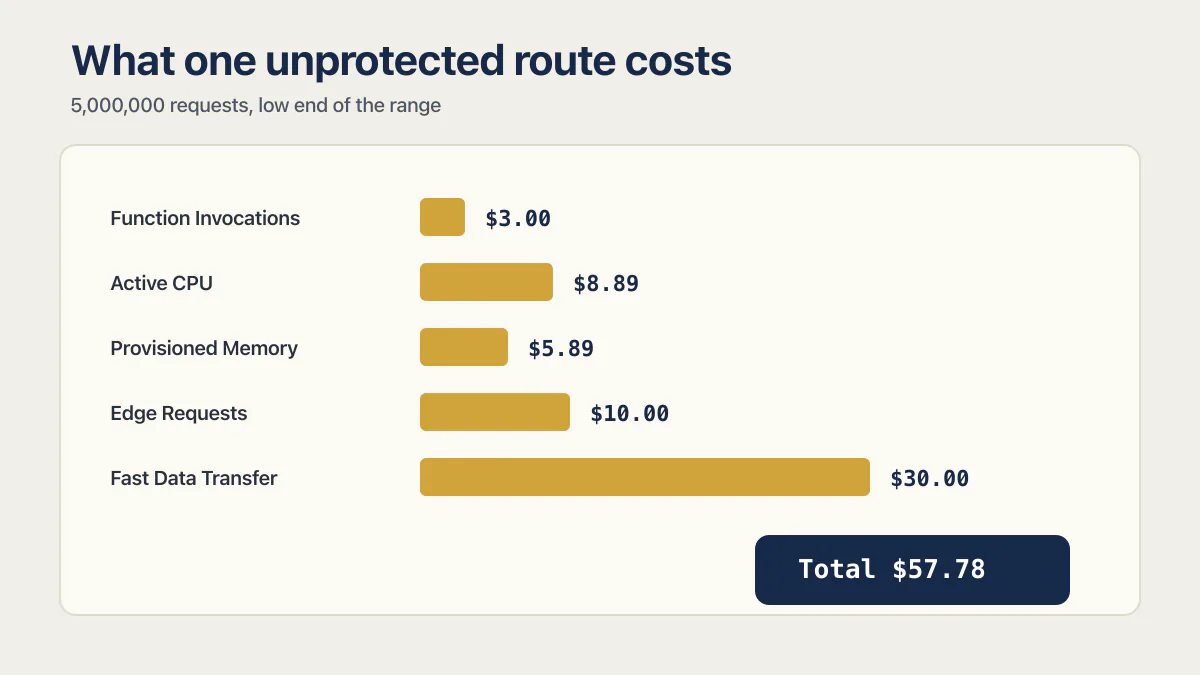
The event, stated as assumptions. One public API route on a Pro team gets 5,000,000 requests over a weekend, all of them above the included allowances. The function runs in Washington D.C. (iad1), where Active CPU is $0.128 an hour and Provisioned Memory is $0.0106 per GB-hr. The function is configured with 1 GB of memory. Each request burns 50 ms of active CPU and holds its share of an instance for 400 ms including the wait on an upstream call. Responses average out to 200 GB of Fast Data Transfer above the included 1 TB, and the 5,000,000 requests are also 5,000,000 Edge Requests above the included 10,000,000.
Those inputs are stated assumptions, not measurements from a real incident. iad1 is one of the three cheapest documented regions, so this is a floor.
| Meter | Working | Cost at the low end of the range |
|---|---|---|
| Function Invocations | 5,000,000 ÷ 1,000,000 × $0.60 | $3.00 |
| Active CPU | 5,000,000 × 0.05 s = 250,000 s ÷ 3600 = 69.44 hrs × $0.128 | $8.89 |
| Provisioned Memory | 1 GB × 0.4 s × 5,000,000 = 2,000,000 GB-s ÷ 3600 = 555.56 GB-hrs × $0.0106 | $5.89 |
| Edge Requests | 5,000,000 ÷ 1,000,000 × $2.00 | $10.00 |
| Fast Data Transfer | 200 GB × $0.15 | $30.00 |
| Total metered usage | $57.78 | |
| Less the $20 monthly credit | $37.78 billed on demand |
So the invoice is the $20 platform fee plus $37.78 of on-demand usage, or $57.78 for the month. That is a weekend of five million unwanted requests on the cheapest compute region Vercel documents, and it is not frightening.
Now run the identical event at the top of every published range, with the function in São Paulo (gru1) at $0.221 an hour for CPU and $0.0183 per GB-hr for memory:
| Meter | Cost at the high end of the range |
|---|---|
| Function Invocations | $3.00 |
| Active CPU (69.44 hrs × $0.221) | $15.35 |
| Provisioned Memory (555.56 GB-hrs × $0.0183) | $10.17 |
| Edge Requests (5 × $3.20) | $16.00 |
| Fast Data Transfer (200 GB × $0.35) | $70.00 |
| Total metered usage | $114.51 |
Same code, same traffic, same five meters, 1.98 times the money. That multiple only appears once you commit to a region, which is exactly what a table of ranges lets you avoid doing.
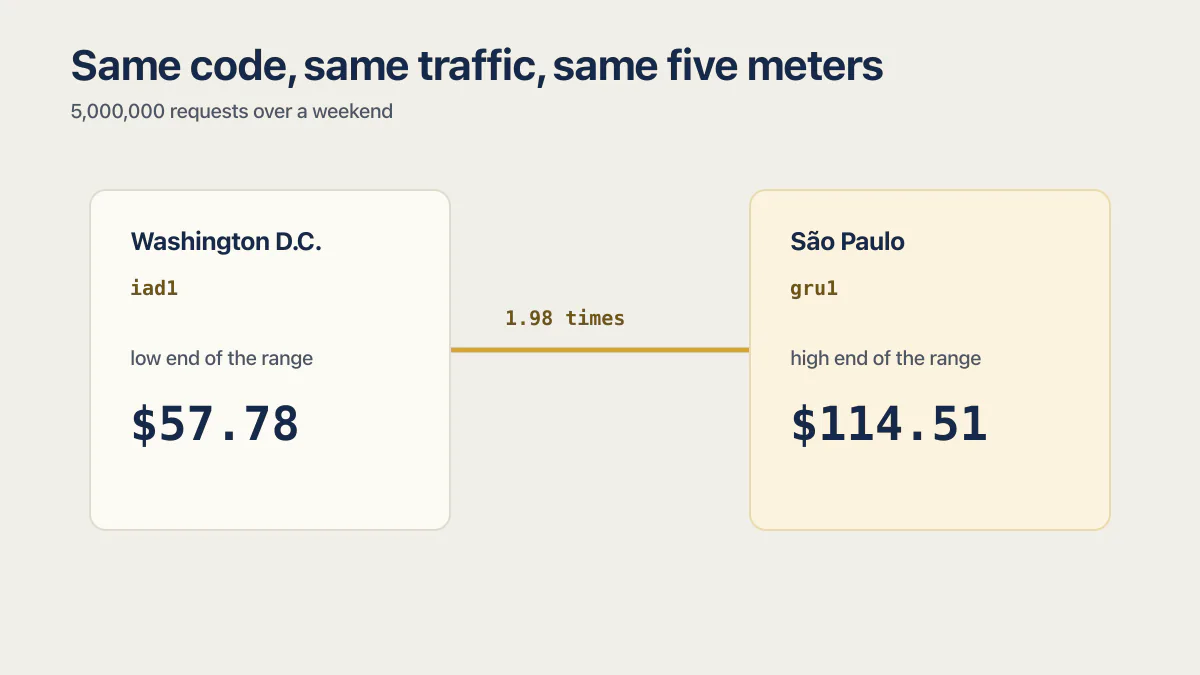
The mechanism is linear, which is the part that matters more than either total. Ten times that weekend costs about ten times the metered total: roughly $577.80 at the floor and $1,145.10 at the ceiling, minus the one $20 credit, which does not scale with anything. That is how a $20 plan produces a four-figure invoice. No individual rate has to be surprising. The request count does all the work.
The arithmetic method above is Vercel’s own. Its fluid compute pricing page works a single invocation: a 4 GB function in São Paulo using 4 seconds of active CPU across a 10-second instance life costs $0.0002456 of CPU plus $0.0002033 of memory, which is $0.0004489 for that one request. Everything above is that calculation carried out to a request volume and extended across the four meters the vendor example leaves out.
Four limits on the numbers, stated plainly. They are published rates rather than a measured bill. The floor row uses the cheapest documented region. Nothing here includes add-ons, seats, Marketplace integrations, or storage. And the true figure moves with region, function memory size, response size, and how much concurrency the instance achieves, since a fluid instance serving several requests at once spreads its memory charge across all of them and makes the per-request memory line smaller than the assumption above.
Then there is the cause, which is not a Vercel problem at all. The meter does not know whether the requests were wanted. A route that answers anyone who calls it costs the same per invocation whether the caller is a customer, a scraper, or a script someone pointed at your URL for the afternoon. That gap is common enough to plan for: across 21 third-party apps AxonBuild reviewed in June and July 2026, the endpoint that cost the most to answer was left uncapped in 13 of them. That is a description of the reviewed sample and not a claim about AI-built apps in general, but 13 is not a rounding error either.
One of those 21 shows the shape of it well. The app let anyone request login codes for any email address it was given, with no cap on how often. Every one of those requests was a function invocation, a share of an instance, and a message the owner’s email provider charged for. The app worked exactly as designed. It simply had no opinion about how many times a stranger was allowed to use it, and the meter has no opinion either. That is also the moment when the useful question stops being “what did this cost” and becomes what to do while the traffic is still arriving, which is a separate task run in a separate sequence.
What a small team actually pays per month
One word first, because Vercel uses it in a way that confuses the seat math. On Vercel, a team is an account object rather than a group of people. A solo developer with a free account is on a Hobby team of one. So “team pricing” here means the price of an account with more than one person able to deploy from it.
The Pro platform fee of $20 a month includes one deploying seat. Additional seats with the Owner or Member role are $20 a month each. Viewer seats, which give read-only dashboard access plus the ability to comment on preview deployments, are free and unlimited.
| Deploying seats | Platform fee | Additional seats | Fixed monthly total |
|---|---|---|---|
| 1 | $20 | $0 | $20 |
| 2 | $20 | $20 | $40 |
| 3 | $20 | $40 | $60 |
| 5 | $20 | $80 | $100 |
Seat prices checked 16 August 2026 on Vercel’s Pro plan documentation. Viewer seats add nothing to any row.
The honest caveat: this table is the only predictable part of a Vercel bill. Every figure in it is a fixed monthly charge you can forecast a year out. Everything in the meters table is a function of traffic you do not control, and the $20 of credit that comes with the platform fee is the same $20 whether you have one seat or five.
There is one genuine saving worth claiming. Paid Pro teams get one free first-year domain on an eligible TLD, specifically .online, .site, .space, .store, .tech or .website, one per team. New subscriptions claim it at checkout during the upgrade; existing Pro teams claim it from domain search in the dashboard. After the first year it renews at the standard rate, and the offer is not available during a Pro trial. No per-TLD price table appeared anywhere in Vercel’s published documentation on 16 August 2026, so treat “the standard rate” as something to check at renewal rather than a number you can plan around now.
And one trap on the way out, which nobody covering this topic mentions. Downgrading a Pro team back to Hobby removes every active member except the original owner. Connected Stores and Domains have to be transferred by hand before you start, because the downgrade flow will not move them for you. If the plan is to run Pro for a busy quarter and drop back afterwards, work through that sequence deliberately rather than pressing a button on the last day of the month.
Worth being clear about the boundary of this page: it prices one vendor. Vercel is usually the smallest line on a modern app’s bill, sitting under a database, an authentication provider, an email sender, and whatever model API the features call. What the whole app costs to run each month is a different sum with different inputs, and totalling it here would mean guessing at four vendors this page has not checked.
How to put a ceiling on it
Five steps, in this order, and each one is honest about what it does not do.
- 01 Turn Spend Management on. It is Pro-only and needs an Owner or Billing role on the team, so check who actually holds that role before assuming it is you.
- 02 Set the amount below the number you can absorb. Vercel reads usage at intervals of a few minutes, not moment to moment, and its own documentation advises setting the amount under your true maximum for exactly this reason.
- 03 Decide deliberately whether to enable pausing. Pausing is a separate switch. When it fires, visitors get a 503 and every project has to be resumed by hand, one at a time.
- 04 Know what the cap misses. Seats, Marketplace integrations, and every add-on in the fixed-cost table bill monthly and sit outside the spend amount entirely.
- 05 Then do the app-side work, because the platform ceiling is the last line rather than the first: authentication on any route that costs money to answer, a rate limit on the most expensive one, image sizes that match how the images are displayed, and caching on anything that recomputes the same answer.
The last item is where the money actually is. A spend cap decides how big the bill gets before someone notices. What the app allows decides how fast the meter turns in the first place, and that is a code question rather than a billing setting. A team that has done neither should still start with step one, because it takes four minutes.
Common questions about Vercel pricing
How much does Vercel cost?
Vercel costs $0 a month on the Hobby plan and $20 a month on the Pro plan, with Enterprise priced as “Custom”, checked 16 August 2026. The $20 is a platform fee that includes one deploying seat and $20 of monthly usage credit. Beyond the included 1 TB of Fast Data Transfer and 10,000,000 Edge Requests, usage bills against that credit and then on demand, at rates that vary by the region serving the request. Extra deploying seats are $20 a month each, and paid add-ons like SAML SSO run from $10 to $350 a month on top.
How much is Vercel Pro?
Vercel Pro is $20 a month for the platform fee, which covers one deploying team seat and $20 in monthly usage credit, checked 16 August 2026. That is the floor, not the total. Additional Owner or Member seats are $20 a month each, viewer seats are free, and any usage past the included 1 TB of transfer and 10,000,000 Edge Requests draws down the credit before billing on demand. The credit expires at the end of the month if unused and does not roll over.
Is Vercel free for commercial use?
No. Vercel’s fair use guidelines state that Hobby teams are restricted to non-commercial personal use only, and that all commercial usage requires either a Pro or Enterprise plan. Commercial usage is defined broadly: any deployment used for the financial gain of anyone involved in any part of producing the project, including a paid employee or consultant who wrote the code. Taking payments, advertising a product or service, being paid to build or host the site, affiliate linking as the primary purpose, and running ads all count. Donations are the one documented exception, carved out by a note on the same page.
Does Vercel charge per user?
Partly. Vercel charges $20 a month for each deploying team seat with the Owner or Member role, and the first one is included in the $20 Pro platform fee. Viewer seats, which can read the dashboard, view analytics, and comment on preview deployments but cannot configure or deploy projects, are free and unlimited. So a team of ten where three people deploy pays for three seats, not ten. Seats bill monthly and are separate from usage, which is metered.
What happens if I go over the limits on the free plan?
The project gets paused. Vercel’s plans documentation states that Hobby plans will be paused when they exceed the included free tier usage, and the Hobby plan page adds that in most cases you will have to wait until 30 days have passed before you can use the feature again. Web Analytics is the named exception, resuming after 7 days. There is no option to pay for overage on Hobby, so the only ways forward are waiting out the period or upgrading to Pro.
Can I stop Vercel from charging me past a set amount?
Only approximately, and only on Pro. Spend Management lets an Owner or Billing role set a spend amount that triggers notifications, a webhook, or a pause of production deployments. Pausing is a switch of its own that must be enabled. Vercel checks usage periodically, a few minutes apart, so traffic can keep accruing for several minutes past the amount, and paused projects must be resumed manually one at a time. The cap also excludes seats, Marketplace integrations, and add-ons.
How much does Vercel storage cost?
Vercel Blob is the first-party file store, priced regionally: $0.023 to $0.041 per GB stored, $0.35 to $0.56 per million simple operations, $4.50 to $7.00 per million advanced operations, and $0.05 to $0.117 per GB of data transfer, checked 16 August 2026. As of 16 August 2026, Vercel’s storage documentation lists Blob and Global Config as its own storage products and routes Postgres, key-value and NoSQL databases to Marketplace providers, so there is no first-party Vercel KV price to quote.
What are the disadvantages of Vercel on cost?
Three, in cost terms. Pro billing is usage-based with no default ceiling, so the only limit is the one you configure. The free tier is unavailable to any commercial project under Vercel’s own definition, which catches freelancers and client work in particular. And most rates are regional ranges rather than fixed prices, with Active CPU spanning $0.128 to $0.221 an hour across documented regions, so a budget built on the low end of every range can be almost double at the high end.
If you have a working app built with these tools and need it ready for real customers, this is what we do.
Built it with AI. Now it has to hold up for real customers.
The Production Hardening Sprint takes the app you already have and builds the production foundation underneath it. Authentication and access rules, payments that stay consistent, error handling, monitoring, backups, automated tests and a documented handover. Our engineers work inside your existing codebase for ten working days. All 123 deliverables are included, and you get the evidence for each one.
See the Production Hardening Sprint →  $2,500 fixed price · 10 working days · One codebase