Your Vercel function ran locally, then production returned a 504 with FUNCTION_INVOCATION_TIMEOUT. That error confirms one thing: the invocation exceeded its configured duration. A slow database or API call is common, but a missing response, infinite loop, runtime mismatch, or upstream failure can produce the same outcome. Check the active limit and time the handler before choosing a fix.
Vercel documents FUNCTION_INVOCATION_TIMEOUT as a 504 Gateway Timeout. Raising maxDuration helps only when the work has a known upper bound and the plan permits a higher value. Streaming changes when the user sees output, while a workflow or queue changes where long work runs.
Why your Vercel function is timing out
Every Vercel Function runs inside a wall-clock budget. If the handler has not completed when that budget expires, Vercel terminates the invocation. The limit includes time spent waiting for streamed output and external I/O, even though Fluid Compute billing distinguishes active CPU from waiting time.
Vercel made Fluid Compute the default execution model for new projects on April 23, 2025. The current Fluid Compute default is 300 seconds on every plan. Older projects can have Fluid Compute disabled and therefore use the legacy limits. Check Project Settings → Functions and any code or vercel.json override before trusting a number from a search result. With Fluid Compute enabled, 300 seconds is both the Hobby default and maximum, and on Hobby that budget is a wall you cannot move. The budget is one of several places the platform’s job stops, which is the wider question in what Vercel protects and what it doesn’t.
It’s also a different failure than an app stalling under a crowd. Why your AI app stalls at 100 concurrent users is a connection-and-query-shape problem that needs concurrency to show up. A function timeout needs none of that: it can fire on the very first request, from a single visitor, in a tab nobody else is using.
Read the error: what FUNCTION_INVOCATION_TIMEOUT actually confirms
When the clock runs out, Vercel answers the client with a 504 and logs the timeout. Depending on where you’re looking, the same event surfaces under a few different names:
| What you see | What it confirms | What to check first |
|---|---|---|
FUNCTION_INVOCATION_TIMEOUT in the response or Vercel logs | The invocation exceeded the active duration | Its request ID, elapsed time, and the last completed log or trace |
504 Gateway Timeout in the browser network tab | A gateway timed out; inspect the Vercel error code to confirm which one | Response headers, deployment logs, and the request ID |
Task timed out after 10.00 seconds | A legacy, pre-Fluid-Compute default, or an explicit low maxDuration someone set | Project Settings → Functions, and any maxDuration in code or vercel.json |
| The server returned 504 but the spinner continues | The frontend did not handle the failed response | Add an explicit error state and a client-side deadline |
That last row is its own quieter problem: a frontend that never notices the backend gave up is a failure that never reaches you. Once the Vercel error code confirms a function timeout, the useful question is which operation remained open when the duration expired.
The real cause in AI-built apps: a long call sitting inline
A generated demo may never trigger this failure. A short prompt returns quickly, an empty table has little work to do, and one tester creates no contention. Production can send longer prompts or meet a slow upstream API. At the same time, a query that returned five rows in testing returns fifty thousand once real customers show up. The same handler can then cross its duration limit.
That gap can sit in code, configuration, workload, or an upstream service. Time each database query, model call, and third-party request, then compare the slowest span with the active function limit. Deployment & Operations, the pillar that covers this kind of unchecked runtime behavior, averaged 37.0 out of 100 across the 21 third-party apps AxonBuild audited in June and July 2026; only two of the twelve scored pillars came out worse.
One of my own audits, a coaching backend, not part of that third-party set, scored 36 out of 100, the lowest in my own self-audit round. A shared LLM helper sat behind more than ten call sites with no timeout wired into any of them. Different host, that one ran on Azure, same gap: nothing in the code ever asked how long a call was allowed to run before something gave up on it.
A timeout proves the duration budget expired. Logs and timings show what consumed it.
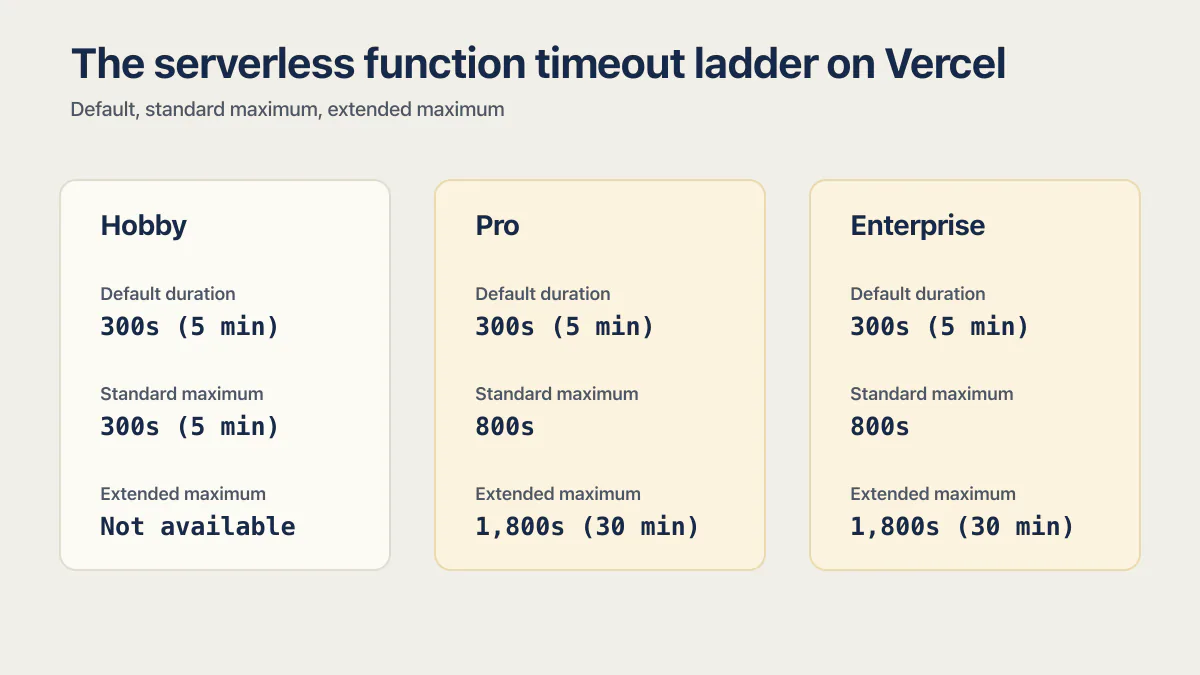
The serverless function timeout ladder on Vercel, plan by plan
Older answers often describe a 10-second Hobby default and lower paid-plan defaults. With Fluid Compute, Vercel’s documented defaults and standard limits are wider. Vercel also announced an extended 1,800-second beta for supported Node.js, Bun, and Python Functions on Pro and Enterprise:
| Plan | Default duration | Standard maximum | Extended maximum |
|---|---|---|---|
| Hobby | 300s (5 min) | 300s (5 min), same as default | Not available |
| Pro | 300s (5 min) | 800s | 1,800s (30 min), beta, set per function |
| Enterprise | 300s (5 min) | 800s | 1,800s (30 min), beta, set per function |
Two things follow from this Vercel timeout limit table. If your project predates April 2025, or Fluid Compute has been switched off in Settings → Functions, don’t assume any of these numbers apply to you until you’ve checked. And if you’re on Hobby, 300 seconds is the whole budget: there’s no higher ceiling to move it to. A call that needs longer than that has to move into a different execution model.
Fix 1: set maxDuration correctly, and know when you can’t
If a long but bounded operation needs more room and the plan supports it, set maxDuration. In a Next.js App Router route, it lives in the route file itself:
export const maxDuration = 60; // seconds

export async function POST(request: Request) {
  // ...
}
For runtimes and framework versions that do not support the code export, set it for the function path in vercel.json:
{
  "functions": {
    "api/generate.ts": {
      "maxDuration": 60
    }
  }
}
The honest caveat: this only moves the wall. A 45-second model call now fits comfortably inside a 60-second budget, but a request that’s slow because the model’s response time varied will eventually meet whatever number you pick, and on Hobby there’s no number higher than 300 to pick. Raising maxDuration fixes a call whose upper bound you actually know. It doesn’t help a call whose upper bound is a guess.
Fix 2: stop blocking the request
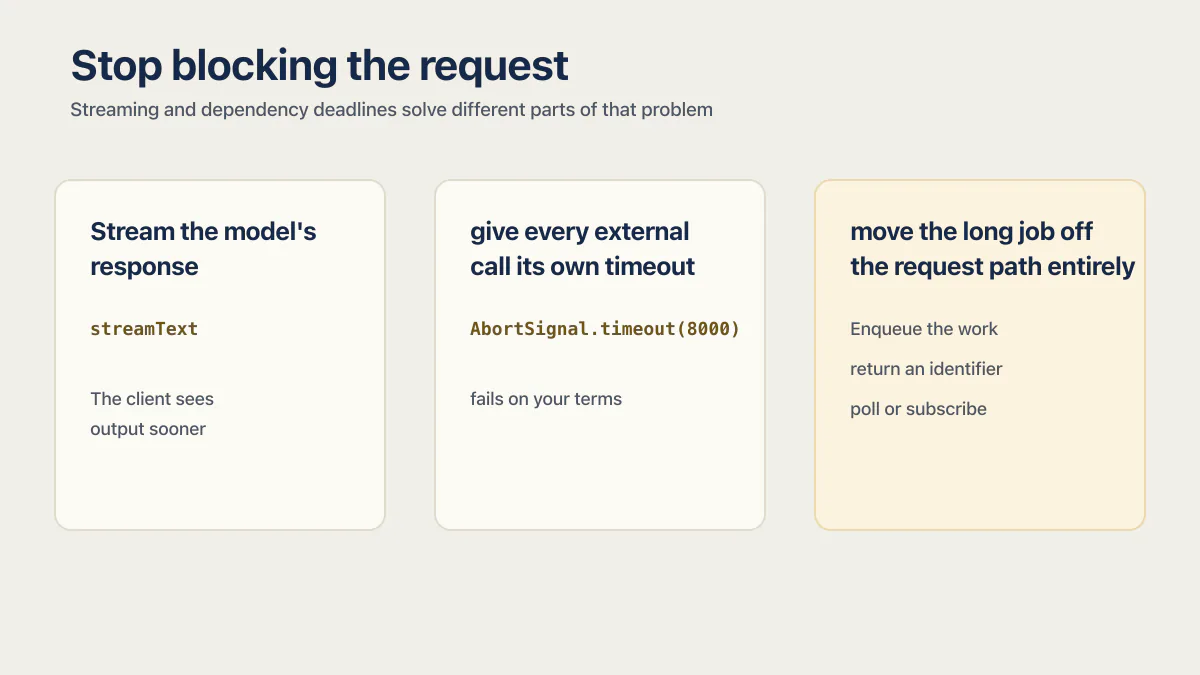
For a response that can be delivered progressively, stop making the client wait for the complete result before it sees anything. Streaming and dependency deadlines solve different parts of that problem.
Stream the model’s response instead of assembling it and sending it in one piece. Vercel’s recommended pattern uses the AI SDK’s streamText, which sends tokens the moment the model starts producing them:
import { streamText } from 'ai';

export async function POST(request: Request) {
  const { prompt } = await request.json();
  const result = streamText({
    model: 'openai/gpt-5.4',
    prompt,
  });
  return result.toTextStreamResponse();
}
The client sees output sooner, but streaming does not reset or extend the Function’s maximum duration. The invocation can still time out before the stream completes.
Second, give every external call its own timeout, so a slow dependency fails on your terms rather than the platform’s:
const res = await fetch(externalApiUrl, {
  signal: AbortSignal.timeout(8000), // give up after 8s
});
Without an application-level timeout, the platform duration can become the only deadline. Log the dependency name and elapsed time, return a controlled error, and retry only operations that are safe to repeat. How to set a timeout on fetch covers the same deadline for the AI, payment and email SDKs and the database as well.
Fix 3: move the long job off the request path entirely
Some jobs do not belong inside a request-response cycle: a report that takes minutes to build, a batch of documents to embed, or an agent chain running several model calls. Enqueue the work, return an identifier, and let the client poll or subscribe for the result. Vercel positions Workflows for durable tasks that suspend and resume without a Function duration ceiling. The request and the long-running job then have separate lifecycles. How to run long tasks in the background covers the parts every background job system needs and where the worker runs on each host.
Duration budgets are one narrow slice of the bigger question. Is your AI-built app actually ready to launch covers the rest of what a demo never tests.
Vercel function timeout: quick answers
How do I increase the Vercel function timeout?
First confirm Fluid Compute and any existing override. Then set maxDuration in supported framework code or for the function path in vercel.json. Pro and Enterprise have an 800-second standard maximum and a 1,800-second beta for supported Node.js, Bun, and Python runtimes. With Fluid Compute, Hobby is fixed at 300 seconds.
Why does my function only time out in production, never locally?
Production can differ in input size, row count, concurrency, region, credentials, upstream endpoints, and the active maxDuration. Reproduce the production input against safe test data, then compare per-operation timings and configuration instead of assuming traffic is the cause.
What’s the maximum Vercel function duration?
800 seconds, about 13 minutes, on Pro and Enterprise today, generally available. An extended maximum of 1,800 seconds is in beta for supported Node.js, Bun, and Python runtimes, configured per function. Hobby tops out at 300 seconds with no way to raise it. For work with genuinely no upper bound, Vercel’s own guidance is to move it out of a function entirely, into Workflows.
If you have a working app built with these tools and need it ready for real customers, this is what we do.
Built it with AI. Now it has to hold up for real customers.
The Production Hardening Sprint takes the app you already have and builds the production foundation underneath it. Authentication and access rules, payments that stay consistent, error handling, monitoring, backups, automated tests and a documented handover. Our engineers work inside your existing codebase for ten working days. All 123 deliverables are included, and you get the evidence for each one.
See the Production Hardening Sprint →  $2,500 fixed price · 10 working days · One codebase