Migrating from Lovable to Claude Code changes one part of your setup: who edits the code. Of the five parts a Lovable app is made of, Claude Code replaces exactly one. The hosting, the domain and the Cloud backend stay where they are until you move each one on purpose.
Two sentences on Lovable’s own ownership page explain why. It says the code is yours to take anywhere: “You can clone your repository, modify it outside Lovable, deploy it on your own infrastructure, or fully self-host without restriction.” The same page says the platform itself “cannot be self-hosted or deployed inside a customer VPC”. So the app is portable and the editor is not, and the editor is the vacancy Claude Code fills. Anthropic describes it as an agentic coding tool that “reads your codebase, edits files, runs commands, and integrates with your development tools”. Nothing in that list is a place for the app to run.
This page is built from Lovable’s and Anthropic’s current documentation, read on 15 August 2026, and no Lovable project was migrated to produce it. It assumes the repository already exists, because Claude Code opens files on a machine you control, and that you have already decided to stop prompting in the browser. Which of the four ways out of Lovable you eventually take is a separate decision. Nor is this an English-only question: one post in my research corpus asks, in Spanish, about “migrar un proyecto de Lovable a Claude Code”, which is this move.
Lovable to Claude Code: what gets replaced and what stays put
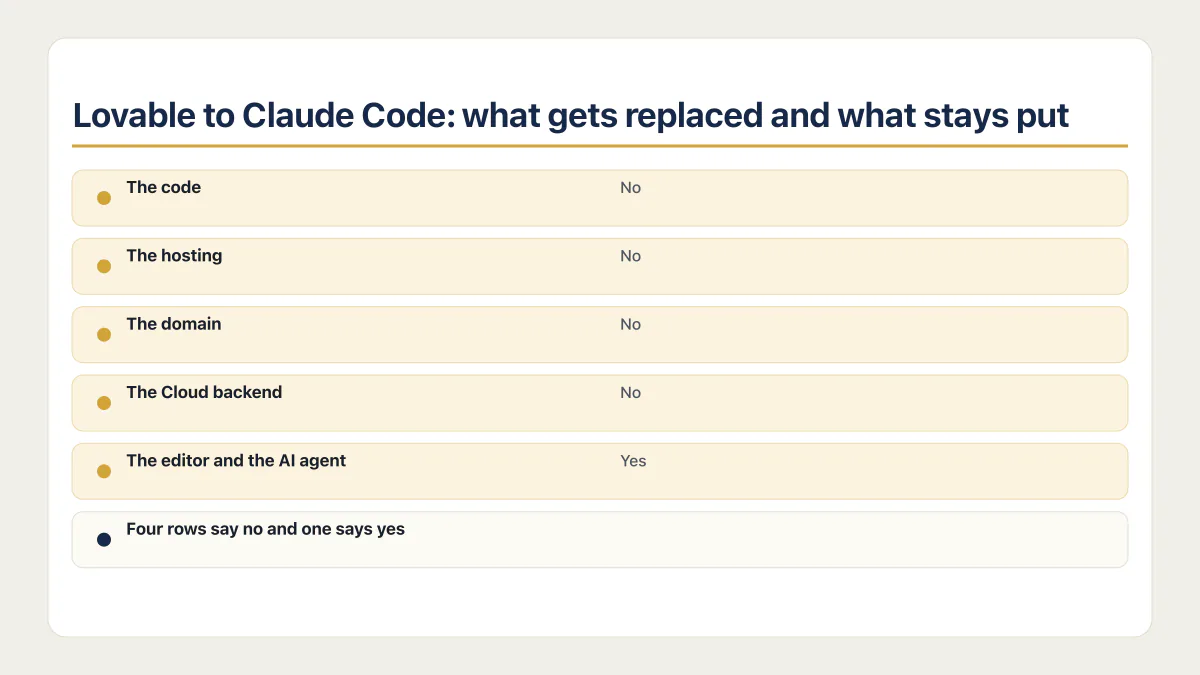
The phrase migrate Lovable to Claude Code covers two jobs that get run together and then blamed on each other: changing the tool that writes the code, and changing where the finished app runs. Claude Code is only the first one. The rows below set each part of a Lovable app against it, from vendor documentation read on 15 August 2026.
| Part of a Lovable app | What Lovable was doing for you | Does Claude Code replace it | What still has to happen |
|---|---|---|---|
| The code | Writing and storing it, synced to your GitHub repository | No | Nothing. The repository you already have is what Claude Code opens |
| The hosting | Building the app and serving it on a Lovable URL or your custom domain | No | The app keeps being served by Lovable until you deploy it somewhere else and repoint the build |
| The domain | Terminating DNS and the certificate for your custom domain | No | It keeps resolving to Lovable’s hosting. DNS and the certificate move only when the hosting does |
| The Cloud backend | Running the database, auth, storage and server functions | No | Every one of those keeps running, and keeps billing, on Lovable Cloud until it is migrated on its own |
| The editor and the AI agent | Turning your prompts into changes in the browser | Yes | Claude Code reads the repository, edits files and runs commands on your machine instead |
Four rows say no and one says yes. That is the whole shape of this move, and it is why people finish the switch, notice the app still works, and then find the Lovable invoice unchanged next month.
Day one: what you set up before you prompt anything
The repository comes first, and usually already exists. Searches for export Lovable to Claude Code almost always mean “get my project into a tool that runs on my machine”, which is a git clone of the connected GitHub repository rather than a download. What a Lovable code export actually contains, and which of the three routes leaves what behind, is its own question.
The sequence below is the one Anthropic’s quickstart and memory documentation publish, read on 15 August 2026, rather than a run reproduced here.
- 01 Clone the GitHub repository Lovable syncs to, so the project exists as files on your machine.
- 02 Install Claude Code, then run claude --version to confirm it. The command prints a version number followed by (Claude Code).
- 03 Log in. Claude Code requires an account: a Claude subscription on Pro, Max, Team or Enterprise, a Claude Console account, or access through a supported cloud provider.
- 04 Change into the project directory and start a session with the claude command.
- 05 Run /init, which reads the codebase and writes a starting CLAUDE.md with the build commands, test instructions and conventions it finds.
Step four is two lines in a terminal:
cd /path/to/your/project
claude
The login step trips people up, because a Lovable subscription buys none of it. Claude Code pricing, and what runs out on each plan, covers which plan matches which usage.
That leaves the file /init wrote. Anthropic’s memory documentation puts a project CLAUDE.md at ./CLAUDE.md or ./.claude/CLAUDE.md and targets “under 200 lines per CLAUDE.md file”. For an app whose entire history was written by somebody else’s agent, three lines are worth checking or adding by hand, because /init guesses the first from package.json and the config files and has to be corrected when it guesses wrong, and cannot establish the other two from local files at all:
- Which stack this is and how to tell. Lovable’s FAQ says “New Lovable apps created from May 13, 2026 use TanStack Start with server-side rendering (SSR)”, while “Older apps use React + Vite”. An agent that guesses wrong here writes routing code for the wrong framework.
- That the backend is still Lovable Cloud, so a schema or auth change is not a local file edit and should not be attempted as one.
- The build command that has to pass before any change counts as finished.
Everything else about what belongs in that file, how to phrase a rule so it gets followed, and why long ones get ignored is covered in what belongs in a CLAUDE.md.
One more thing gets checked on day one. Lovable’s external-hosting documentation states that “Environment variables prefixed with VITE_ are embedded at build time, not runtime”, so pointing the app at a different backend means a rebuild rather than a settings change. Why a VITE_ value is baked into the build explains the boundary that creates.
Can I use Claude Code with Lovable at the same time?
Claude Code and Lovable can run on the same project at the same time, and Lovable’s documentation describes two ways to do it: two-way Git sync on a single branch, and Lovable’s MCP server, which names Claude Code among five supported clients. Both carry a cost worth knowing first.
Git sync is the ordinary route and it runs in both directions. Lovable’s GitHub documentation says “Changes made in Lovable sync to GitHub” and “Changes pushed to the active GitHub branch sync back into Lovable”. A commit you push from your machine lands in Lovable’s copy of the project, so the browser editor keeps working on the same app you are editing locally.
The second route runs the other way round. Lovable exposes itself as an MCP server at https://mcp.lovable.dev, so a client can drive Lovable instead of the other way about, and its OAuth flow is “currently restricted to the following clients: ChatGPT, Claude (Claude Desktop on macOS and Windows, and claude.ai), Claude Code, Cursor, VS Code”. Anthropic’s tool is on the vendor’s own supported list. The documentation gives one command:
claude mcp add --transport http lovable "https://mcp.lovable.dev"Authentication is OAuth in a browser window, and the server is “available on all plans”, though it is “Disabled by default on Enterprise workspaces”. How MCP scopes and permissions work, and what you are agreeing to when a server gets added, belongs to Claude Code MCP setup, scopes and permissions.
Two costs come attached, and both are worth reading before the OAuth window opens. Lovable’s page says “Standard Lovable credits apply to create_project and send_message calls. Other tools are free”, so driving Lovable’s agent from a Claude Code session spends the same credits as typing into the browser. And query_database, one of the tools that server exposes, “runs SQL with your full database permissions. Read, write, and schema changes.” A connected client with that tool available is holding the same access to your production data that you have.
One branch, two agents: what two-way sync means in practice
The sync mechanism has one property that decides how the two tools coexist. Lovable’s GitHub page states that “Lovable only edits and syncs one branch at a time”, normally the repository default. That is documentation. What follows is reasoning from it rather than anything the vendor writes down.
A branch you create in a Claude Code session is invisible to Lovable until it is merged or Lovable is pointed at it, so branch work is where the two tools stay out of each other’s way. The reverse also holds: anything you merge into the synced branch becomes part of the project Lovable’s agent reads and edits the next time somebody opens the browser editor. There is one shared working surface, and both tools have write access to it. Decide deliberately which one is the source of truth for a given week, because the mechanism will not decide for you.
One fragile edge comes with it. Lovable’s documentation says a repository rename is tracked automatically, but deleting the repository, renaming your GitHub account or organization, or transferring it “breaks the sync, and Lovable won’t be able to update your project”.
Claude Code is not a host
As of 15 August 2026, Anthropic’s Claude Code documentation does not document any hosting, domain, database or application-backend service for the app you are working on. The surfaces it documents are the terminal, VS Code, JetBrains IDEs, a desktop app, the web, CI through GitHub Actions and GitLab, and chat. Every one of those is a place to run the tool, not a place to run your app.
So after the switch the app is still served by Lovable and still talking to Lovable Cloud until each is moved on purpose. The frontend move is deploying the app to Vercel or another host. The backend move is getting the database, auth and storage off Lovable Cloud, which is the longer of the two by a wide margin. Whether you want either move, or the full exit, sits above this page. So does what the move costs, whether you drive it yourself or hire it out, and what tends to break when an AI-built app is moved at all.
The results for this search do not make that separation easy. The GitHub repository that ranks for it is named lovable-to-claude-code and its README opens with “Stop paying for hosting. Deploy your Lovable site to Vercel (free) in minutes.” It is a Vercel guide driven by a Claude Code prompt, answering the hosting question rather than the editor one. Somebody who reads the repository name and stops there will believe the tool switch cancelled a hosting bill it never touched.
One post in my research corpus puts both halves in a single breath. It opens: “Hola! I created my management system on lovable. I’ve been disappointed with lovable lately.” The rest of the post asks about self-hosting the app and carrying on with an AI coding tool. A new place to run the app, and a tool to keep changing it, in that order, and those are genuinely two projects.
There is a second thing the tool change does not bring with it. In AxonBuild’s fixed June to July 2026 research cohort, at least 23 of 26 AI-built apps had zero working automated tests. An agent that can edit every file in a repository is a different proposition when nothing in that repository can tell you afterwards that the login still works. The tool swap adds no test, and what Claude Code can reach before it asks is worth reading before you widen its permissions on an app with no regression signal.
Common questions about moving from Lovable to Claude Code
How do I switch to Claude Code?
Clone the repository, install Claude Code, log in with a paid Claude subscription or a Console account, change into the project directory, start a session, and run /init to generate a starting CLAUDE.md. That is the whole documented setup. The part that takes longer is deciding what the browser editor keeps doing afterwards, because nothing forces you to stop using it.
How do I transfer my Lovable design into Claude Code?
There is nothing separate to transfer. A Lovable app’s design is already code in the repository: components, Tailwind classes and styles living in the same files as everything else. Once the repository is cloned, Claude Code reads and changes the design the same way it reads and changes anything else, with no export step and no separate design file in between.
Do I have to leave Lovable to use Claude Code?
No. Two-way Git sync keeps both tools working on the same branch, and Lovable’s MCP server lists Claude Code as a supported client, so you can drive Lovable from a Claude Code session over OAuth. Many people run the browser editor for quick visual changes and the terminal for everything that touches data or money.
Does Claude Code cost extra on top of my Lovable plan?
Yes. Claude Code requires its own paid Claude subscription or a Console account, and a Lovable plan covers none of it. If you also drive Lovable through its MCP server, create_project and send_message calls still spend Lovable credits, so that route is billed twice by design. What Claude Code costs and what runs out has the plan comparison.
Can Claude Code move my database off Lovable Cloud?
Not by itself, and not as a single prompt. Moving the backend means schema, data rows, storage objects, sign-in providers, every user’s password, OAuth redirects, secrets and scheduled jobs, most of which happen in two vendors’ dashboards rather than in your codebase. Claude Code helps with the code half. Moving off Lovable Cloud covers the rest of it.
Should I use Claude Code or Cursor for a Lovable app?
Both read a repository and edit files, and either one works on an app that came out of Lovable. The honest split is about how you prefer to review changes rather than anything Lovable-specific, which choosing between Claude Code and Cursor grades properly. Moving a Lovable app to Cursor specifically has its own answer.
Moving platforms is the moment the missing production pieces show up. The sprint below builds them into the codebase you land on.
Built it with AI. Now it has to hold up for real customers.
The Production Hardening Sprint takes the app you already have and builds the production foundation underneath it. Authentication and access rules, payments that stay consistent, error handling, monitoring, backups, automated tests and a documented handover. Our engineers work inside your existing codebase for ten working days. All 123 deliverables are included, and you get the evidence for each one.
See the Production Hardening Sprint →  $2,500 fixed price · 10 working days · One codebase