Anthropic’s Claude Code, the coding agent, is what people mean when they tell somebody with a working AI-built app to stop prompting in a browser and point a real tool at the code. For a founder who cannot code, that advice stops being obvious at the install.
Installing Claude Code is one command or one download, depending on which of four documented surfaces you choose, and Anthropic publishes every step, including a guide written for people who have never opened a terminal. What deserves a decision is the surface, what has to exist on your machine first, and what the install leaves untouched.
Everything this page says about the product is read out of Anthropic’s own Claude Code documentation on 2 September 2026, in raw form: the overview, the setup page, the quickstart, the terminal guide written for new users, the permission-mode page, and the environment variables page the permission-mode page points to for first-session behaviour. Nothing was installed to write it and no session was run, so where a step exists this page names the page that carries it and links there rather than printing a copy that goes stale. Where somebody is quoted, it is a builder talking about their own experience, unnamed and unlinked.
People ask it in those words. One thread in a builder community this year is titled “Moving to Claude Code - how to??”. Somebody else, in another thread, described the move they had already made:
I always start out in Replit and move to Claud code and idk why honestly I just always did that! I’m not a developer…
That is a habit rather than a decision, and the habit begins with an install nobody walked them through.
What “install Claude Code” actually means when you are not a developer
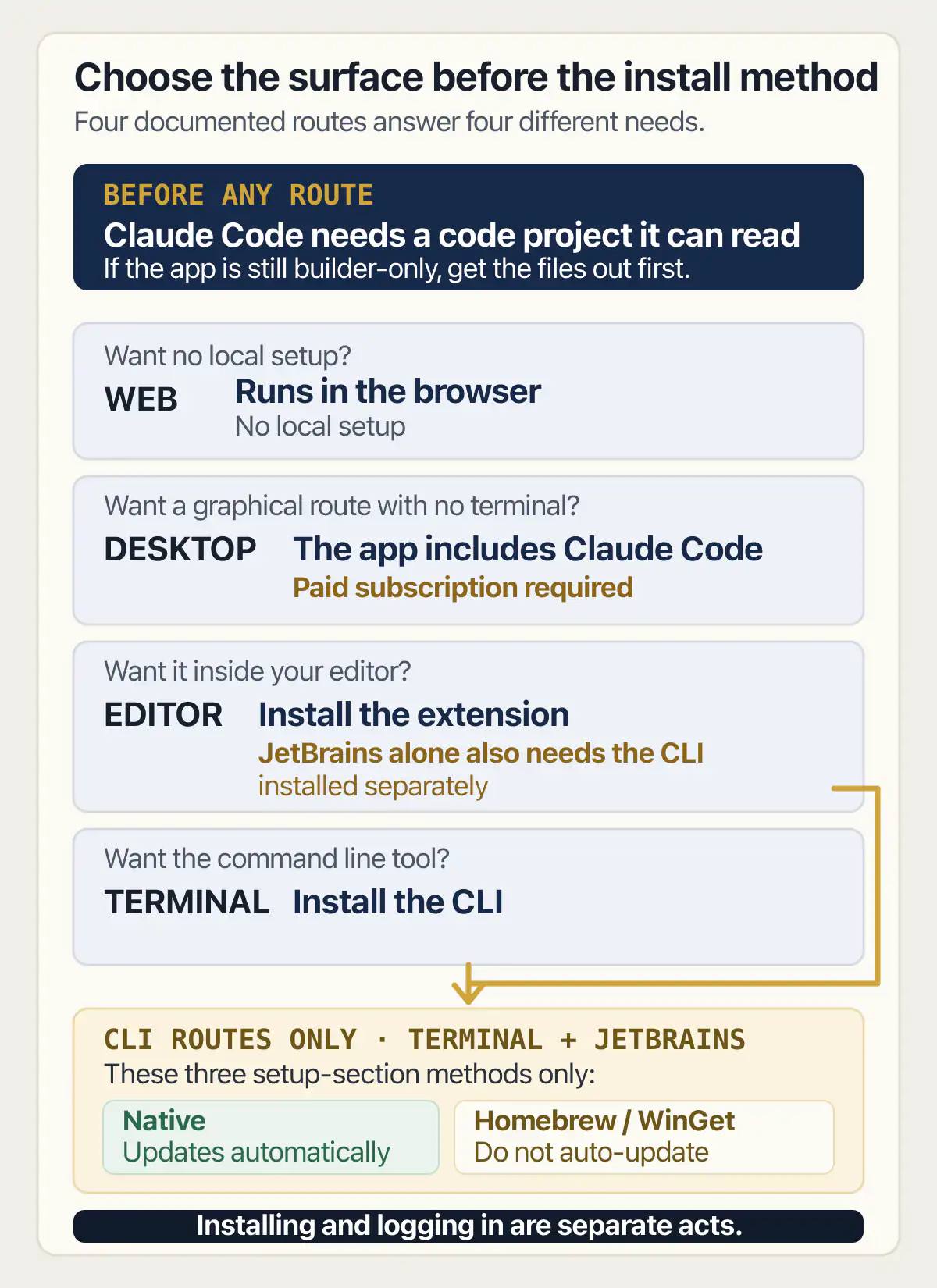
Four separate things travel under the word install, and picking between them is most of the work. Anthropic’s Claude Code overview states the premise plainly: “Claude Code runs on several surfaces: the terminal, IDE extensions, a desktop app, and the web.” Each row below is what the docs say about one of them, read on 2 September 2026.
| Surface | What you install | What the docs say it suits | What it still needs |
|---|---|---|---|
| Terminal | The command line tool | Editing files, running commands | A terminal, and a project |
| Desktop app | The Claude app, agent included | Skipping the terminal entirely | A paid subscription |
| Editor extension | An extension inside your editor | Inline diffs and plan review | JetBrains also needs the CLI |
| Web | Nothing on your machine | Long tasks, repos you lack locally | A browser |
The second row is the one that changes who this tool is for, and Anthropic says it twice in two different places. The overview’s desktop tab says “The app includes Claude Code, so you don’t need to install the CLI separately. A paid subscription is required.” The setup page says it again in a callout sitting above its own list of install methods: “Prefer a graphical interface? The Desktop app lets you use Claude Code without the terminal.”
So the terminal is a preference the vendor documents its own way around, and the desktop route exists for people who would rather not learn one. On the setup page that callout comes before the install methods rather than after them, which is the vendor putting the choice in front of the commands.
The fourth row is worth reading twice as well. The overview describes the web surface as running “in your browser with no local setup”, suited to kicking off long tasks and working on repositories you do not have on your own machine. Nothing gets installed at all there, which makes it the shortest possible version of this whole page for somebody who only wants to see what the agent does before committing a machine to it.
The third row carries the one trap in the table. The overview says the JetBrains plugin “requires the Claude Code CLI, installed separately”, so choosing an editor does not always mean skipping the command line tool. On the same page today, the Visual Studio Code tab carries no equivalent line.
Will it run on the computer you already have?
Claude Code’s documented requirements are modest: a processor architecture rather than a fast machine, an internet connection, and a location Anthropic supports. Nothing on that list asks for a developer setup, and the line that actually stops people is the geographic one.
Anthropic’s setup page publishes a system requirements list covering operating systems, hardware, network, shell and location. Three of its lines decide whether the machine in front of you qualifies at all: the hardware line names an “x64 or ARM64 processor”, the network line reads “internet connection required”, and the location line reads “Anthropic supported countries”. The memory figure and the operating system versions sit in the same list on the same page, in the vendor’s current wording.
Two prerequisites people expect to hit turn out to be softer than they look.
The first is search. The setup page lists ripgrep under “Additional dependencies” and describes it as “usually included with Claude Code”, pointing at search troubleshooting rather than at an install step, so it is not something to go and fetch first.
The second is Git, and only on Windows. The setup page says “Git for Windows is recommended on native Windows so Claude Code can use the Bash tool. If Git for Windows is not installed, Claude Code uses PowerShell as the shell tool instead.” The terminal guide for new users files the same thing as an optional step and adds the sentence that matters to this reader: “You won’t need to learn Git yourself.” Installing Git for Windows and learning Git are two different afternoons, and only the first one is being asked for.
There is one genuine version requirement, and it is attached to a single install route. The setup page states that “As of v2.1.198, the npm package requires Node.js 22 or later”, and that on an older Node.js version npm “prints an EBADENGINE warning during install rather than failing”, with the install completing anyway because the package downloads a native binary that does not use Node.js at runtime. That is the only place in the setup page where a runtime you may already have decides how the install behaves, which is a good reason for a non-developer not to start there.
Package installs go wrong in their own ways, and the product being installed has little to do with it. One person spent a night and most of the following day stuck on a package install that would not complete, and said so in the plainest terms available. That is the shape of the step this page exists to get somebody past, and the vendor’s own recommended route avoids the package manager entirely.
The one thing that has to exist before installing is worth it
The quickstart lists what to have ready before step one, and the middle item is the one a builder-app owner usually cannot tick. Under “Before you begin” it asks for a terminal or command prompt open, “A code project to work with”, and an account.
A code project to work with means files, somewhere the agent can read them. If the app you want fixed lives inside a builder and you have never connected it to a repository or pulled it down, then the install can complete and the agent can start and there is still nothing for it to open. That is why the quickstart puts it before step one rather than inside it.
This is the moment where the order matters most. Getting the code out of the builder and onto a machine comes first, the install comes second, and doing it the other way round produces a working tool and an empty afternoon. The vendor’s own sequence assumes the project exists because it is written for people whose projects always have.
The install methods differ in a way you only notice later
The setup page’s install section offers three methods and the difference between them shows up long after the install rather than during it. One of them keeps itself current and the other two do not.
Anthropic’s wording on the recommended route is direct: “Native installations automatically update in the background to keep you on the latest version.” The two package manager routes carry the opposite note, in near-identical sentences. “Homebrew installations do not auto-update.” “WinGet installations do not auto-update.” Both callouts then name an upgrade command to run yourself, and the WinGet one says to run it periodically, which is a thing somebody has to remember to do.
Two of the three methods in the setup page’s install section leave staying current to you, and the page says so in a callout on each of them.
There is a second layer under the Homebrew route. The setup page says Homebrew offers two casks, and that the one tracking the stable release channel is “typically about a week behind and skips releases with major regressions”, while the other receives new versions as soon as they ship. Somebody who picked a package manager because it felt tidier can end up a channel and an upgrade behind without ever choosing either.
For a person who cannot read a changelog and would not know which release fixed what, the version they are running decides which features exist for them at all.
Logging in is a separate step, and a builder subscription does not cover it
Installing and logging in are two acts, and only the first one is free. The quickstart’s second step says “Claude Code requires an account to use”, and describes being prompted to log in on first use once a session starts. Switching accounts later is a separate command inside a running session rather than a reinstall.
The account is where the money starts. The overview’s desktop tab attaches the same condition to the graphical route in one sentence: “A paid subscription is required.” The same page says most surfaces require a Claude subscription or an Anthropic Console account, and a subscription you pay somebody else for is neither of those.
Which plan the login step actually needs, and what runs out on each one, is a money question with its own page and its own check dates, so no figure appears here. Which Claude plan the login step needs is answered there, with dated figures the page keeps current.
Whether the subscription is worth adding at all is a question people answer for themselves in both directions. Another said they had got into the habit of opening the coding agent and building the small tool themselves rather than paying for one more subscription, which is the same arithmetic run the other way.
What installing it does not install
As of 2 September 2026, the body copy of Anthropic’s setup, quickstart and overview pages describes nowhere for your app to be served from, no domain to point at it, no managed database behind it and no backend service of Anthropic’s own. Every mention of hosting, domain, database or backend on the three pages is the site’s own page scaffolding, an example prompt about a project’s existing database schema, or, on the quickstart, an enterprise sign-in route rather than a place to run your app. That reading covers those three pages, in raw form, on that date.
What a builder app keeps running after the switch sets those parts out one by one, for the case where the app was built inside Lovable.
What to settle before your first session on an app somebody else’s agent wrote
Four things are worth deciding before the first prompt, and this page answers none of them. Each one has a page that does answer it, which is the honest arrangement for a setup door.
What the session is allowed to do without asking. This is a default rather than a choice, and the default depends on the plan. The quickstart states that “Auto mode is the built-in starting permission mode for interactive terminal sessions on Pro, Max, and Team plans: a classifier reviews actions instead of you, and Claude edits most files and runs most commands without asking you. On other plans, Manual mode is the built-in starting permission mode.” The permission modes page repeats the plan half of that in its own words. So two people installing the same product on the same day can get different behaviour on their first prompt, decided by what they pay rather than by anything they picked.
The first session is also the least predictable one. Anthropic documents a section titled “First session after an install or upgrade”, which today sits on the environment variables page and is linked from both the quickstart and the permission modes page. It says that in your first session after installing, or after upgrading to a version that adds a feature, a flag-gated feature can be missing and the session can start in Manual mode on a plan that otherwise starts in auto mode, with both arriving by the next session. Read that as the answer to the first confused question a new user asks, which is why the tool behaved one way on Monday and another way on Tuesday. What a session is allowed to touch before it asks you, and how to narrow that, is settled on the permissions page rather than here: what a session can reach before it asks you is the page for it.
The standing instructions file. A project file called CLAUDE.md is where the rules for your app live, and on an app written entirely by another agent it is the one place the agent reads your standing instructions before every session. What to put in the standing-instructions file the agent reads before every session begins, and how a rule has to be written before it gets obeyed, is a job of its own with a page of its own. The standing instructions file the agent reads first covers the format and the phrasing.
Connected servers, later. Connecting the agent to your other tools is a later decision than this one, and which servers are worth the reach they ask for is graded separately. Which connected servers are worth adding, and when is the page that grades them, and nothing about the install requires any of it.
Reading back what it changed. This is the hard half and it does not arrive with the install. Getting it running and reading back what it changed are two different skills, and the comparison between an agent and a chat product turns on the second one. Which product puts the change in front of you in the form you can actually check is a choice between two named tools, argued where those two are set against each other: where each one shows you the change it made is that argument.
Common questions about installing Claude Code
What do you need before you can install Claude Code?
Three things, per the quickstart’s own “Before you begin” list: a terminal or command prompt open, “A code project to work with”, and an account. The middle one is the item people arrive without. If your app still lives entirely inside a builder and has never been pulled down as files, the install will finish and the agent will have nothing to read. The requirements list names a processor architecture rather than a fast machine, an internet connection, and Anthropic supported countries.
Do you have to use a terminal to install Claude Code?
No. Anthropic’s setup page says “Prefer a graphical interface? The Desktop app lets you use Claude Code without the terminal”, and the overview says the desktop app includes Claude Code so the command line tool does not have to be installed separately, with a paid subscription required. The web surface goes further and runs in a browser with no local setup at all. The terminal is one of four documented surfaces rather than the price of entry.
Which Claude Code install method should you pick?
For somebody who does not want to maintain the tool, the difference that matters is updates. Of the three methods in the setup page’s install section, only the native one keeps itself current; both package manager routes carry a note that they do not auto-update and leave an upgrade command for you to run. The npm route, listed further down the same page, additionally requires Node.js 22 or later as of v2.1.198. The desktop app avoids the question by bundling the agent.
Whether a different agent suits you better, Codex included, is a field-level question answered on the page that grades the field, and the wider field of coding agents, Codex included is where OpenAI’s Codex sits beside the rest of them.
Do you need Git or Node installed first?
Not for the recommended route, and the Windows Git line is narrower than it sounds. Anthropic’s setup page says Git for Windows is recommended on native Windows so the Bash tool can be used, and that PowerShell is used as the shell tool instead when it is missing. The terminal guide lists that step as optional and says “You won’t need to learn Git yourself.” Node.js 22 or later applies only if you install through npm.
What happens the first time you start Claude Code?
You get asked to log in, and the session may behave differently from every session after it. The quickstart says Claude Code requires an account and prompts for login on first use. Anthropic’s section on the first session after an install or upgrade says a flag-gated feature can be missing that first time, and the session can start in Manual mode on a plan that otherwise starts in auto mode, with both settling by the next session.
Does Claude Code keep itself up to date?
It depends entirely on how it was installed. Native installations “automatically update in the background”, in Anthropic’s words. Homebrew and WinGet installations “do not auto-update” and each names its own upgrade command to run yourself, with the WinGet note saying to run it periodically. The Homebrew route splits again into two casks, one tracking a stable channel the vendor describes as “typically about a week behind” and skipping releases with major regressions, and one taking new versions as they ship.
Can you install Claude Code inside an editor you already use?
Yes, with one caveat by editor. The overview describes an extension providing inline diffs, plan review and conversation history inside the editor, and lists IDE extensions as one of the four surfaces. For JetBrains editors the overview says the plugin “requires the Claude Code CLI, installed separately”, so that route is an addition to the command line tool rather than a replacement for it.
If you have a working app built with these tools and need it ready for real customers, this is what we do.
Built it with AI. Now it has to hold up for real customers.
The Production Hardening Sprint takes the app you already have and builds the production foundation underneath it. Authentication and access rules, payments that stay consistent, error handling, monitoring, backups, automated tests and a documented handover. Our engineers work inside your existing codebase for ten working days. All 123 deliverables are included, and you get the evidence for each one.
See the Production Hardening Sprint →  $2,500 fixed price · 10 working days · One codebase