Keep the work you can check yourself by looking at the app. Pay a person for the work where being wrong is invisible until somebody else finds it. Should I hire an app developer is a question with a per-job answer rather than a yes or a no, and for most owners of a working AI-built app the honest answer is both.
This page is for somebody whose app already exists, or half exists. You built it with Lovable, Base44, Replit, Bolt, Claude Code or Codex, you are not a developer, and nothing has necessarily broken yet. You are trying to work out whether paying somebody is the next sensible move, or whether another week of prompting is.
The hire-or-build-it-yourself decision splits by job rather than by app. Eleven jobs sit in the table below, five on the keep side and six on the pay side, and three questions decide which side any new job lands on.
On 26 August 2026 the eight pages Google returns for this question were read and sorted by which reader each one answers, and the split below was then built job by job, with each row checked against what AxonBuild’s audits of 26 AI-built applications in June and July 2026 found the builders leave undone. No builder account was opened for this page, no repair was attempted, and nobody was hired.
The question the search results answer, and the one you asked
Every one of the eight pages ranking for this question on 26 August 2026 answers it for somebody whose app does not exist yet. They price a build from a blank page and treat the decision as one yes or no about the whole thing. Nobody splits the work by job.
Here is what is actually on that first page. Two results are marketplace category listings, from Upwork and from Fiverr’s professional service. Three are vendor and agency articles: adapty.io, a subscription-infrastructure vendor, dated 3 January 2026; cleveroad.com, an outsourcing development company, updated 2 January 2026; and adalo.com, a no-code app builder, updated 2 March 2026. Two are community threads, one on Reddit and one on Facebook, which Google lists but which could not be fetched on 26 August 2026, so only their titles and search-result snippets were available. The eighth is a Quora thread from close to a decade ago. Search the do-it-yourself phrasing instead, hire app developer or do it yourself, and four of the same pages come back on an eight-result page: the Reddit thread, the Upwork listing, adapty.io and adalo.com. What is new is a vendor article at anything.com dated 11 May 2026, a Medium post by an individual, a video from eight years ago, and a different Quora thread. Google reads both phrasings as one query.
Three of those pages were read in full on 26 August 2026, along with the anything.com article. None of them is linked here, because all four sell or funnel into the work this page is deciding about, and because the rates and project totals they print did not come from a first-party pricing page.
Read them in order and the pattern is hard to miss. adalo.com gives three routes and what to check on each, for a reader who has an idea. anything.com gives five gates for deciding, and the only builder it names is its own. adapty.io gives hourly bands by region and never discusses doing it yourself at all. cleveroad.com gives hiring models, interview questions and regional rates, and ends on why to hire Cleveroad. As of 26 August 2026, not one of them has a section for an app that already runs, or half runs.
Somebody standing at exactly this decision wrote it out in public:
So I’m looking at the site itself and trying to decide how much to spend on it. Option one is I rebuild the pages that matter myself …
Their traffic had dropped and they were working out how much to spend on the site, with rebuilding the pages that mattered themselves as the first option on the list. Notice what they did there. They did not ask whether to hire somebody for the site. They picked out the pages that mattered and asked about those, which is the same instinct as the split, arrived at by somebody with a real thing to protect and a budget to defend.
What changes the answer is whether you can tell for yourself that the job worked. Being able to afford a developer and needing one are separate questions, and the second one is answered job by job.
The split, job by job
Eleven jobs cover what an AI-built app still needs after it starts working. Five belong on your side because the app shows you the result. Six belong on somebody else’s side because the app looks identical whether the work was done right or done wrong. The third column is the test that put each row where it is.
| The job | Keep it or pay for it | The test that decides it |
|---|---|---|
| Screens, wording and layout | Keep | The change is on your screen the moment it lands, and you are the person who knows what it should say |
| Content, pricing copy and onboarding text | Keep | You read it back on the live page and either it is right or it is not |
| A new form that reads and writes data you already hold | Keep | Fill it in, then go and find the record where it was supposed to land |
| Store screenshots and listing text | Keep | The store shows you the listing exactly as a shopper will see it, before anybody does |
| Getting back to the version that worked after a bad edit | Keep | The older version either loads and behaves, or it does not |
| Who can see whose data once more than one person uses it | Pay | A second account either reaches the first account’s records or it does not, and your own screen never changes either way |
| What the server accepts when somebody sends it something odd | Pay | The app behaves identically whether the check exists or was never written |
| Turning on real payments | Pay | A test card that succeeds tells you nothing about a live card that fails on somebody else’s phone |
| The first failure nobody is watching for | Pay | You find out from a customer, or you do not find out |
| The libraries the app is built on, and which versions it uses | Pay | Version numbers appear on no screen the app will ever show you |
| Anything the tool has already failed at several times | Pay | Count the attempts; you already have that number |
Three rules produced that table, and they will sort a job it does not list.
Rule one: if the app itself shows you the answer, keep it. Every row on the keep side ends the same way, with you looking at the running app and knowing. That is a real advantage and it is worth defending. You know what the button should say. You know which record the form was meant to create. You know that the second step of signing up confuses people, because you have watched somebody get stuck on it. A developer would have to ask you all of that, then guess, then come back and check, and you would be paying for the asking as well as the doing. Handing over a job whose answer only you hold is the most reliable way to pay full price for something you could have done before lunch.
Rule two: if being wrong is invisible until somebody else finds it, pay for it. The defining feature of the pay side is missing feedback rather than difficulty. The screen looks the same, the app keeps running, and the thing that was supposed to stop a stranger reading your customers’ rows was either written or it was not. A second-account check from the front of the app gives partial evidence, and nothing you can do from the front will prove every access rule. This is also why the pay side resists the obvious workaround of asking the tool to check its own work: a tool with no way to observe the consequence will report that the job is done, in the same confident sentence it uses when the job actually is done.
Rule three: if the tool has already failed at it several times, more attempts are not the cheaper option. Attempts are not free even on a plan you already pay for, because each failed one writes changes on top of the original problem, and how a builder charges for the attempts you are already making is worth knowing before you start the fifth. What the next ten attempts at one bug that will not close actually cost is worked out attempt by attempt somewhere else. Putting real credit prices against the price of one repair, counted per stuck thing rather than per month, is arithmetic with a page of its own.
Keep the work the app itself can prove. Pay for the work where being wrong is invisible until somebody else finds it.
What to keep doing yourself
The keep side is most of the work, and it is not a consolation prize. People who have never written code ship real, working things on their own every week. A post title in r/NonProgrammerAI on 7 August 2026 says it plainly: I'm not a developer. I shipped an Android app that searches inside your files, and.... The answer to this page’s question is never “you cannot”.
Five kinds of work belong to you, and each one has a check you can run in about a minute.
Anything visible. Screens, layout, spacing, button labels, the order of fields in a form. The builder is genuinely good at this, and you are the only person in the room who knows what the app is supposed to look like. The check is the app itself, opened after the change.
Anything you can confirm from a second account in your browser. Sign up again with a second email you own, use the app as that person, and look at what the two accounts see. This will not tell you why something is wrong, but it will tell you loudly when a feature you just added does something different for a second person than it did for you. It costs a spare email address and about four minutes, and it is the single highest-value habit on the keep side. The checks a non-developer can run on their own app in an afternoon are a list of their own, and running them first makes this decision cheaper.
Wording and content. Pricing copy, onboarding text, error messages, the emails the app sends. These fail in public and they fail visibly, which makes them safe to iterate on. Send yourself every automated email the app can produce, in one sitting, and read them in a row: the welcome, the password reset, the receipt, the one that fires when something goes wrong. One of them is usually wrong in a way nobody notices until a customer reads it, and the repair is a wording change you can make yourself.
Small additions that only move data you already hold. A notes field on a customer record, a filter on a list you already show, an extra column in an export. The rule is in the sentence: if the job introduces no new person, no new permission and no new money path, the app will show you whether it worked. Add it, use it, then go and look at the record and confirm the thing you typed is actually sitting where it should be, rather than trusting the confirmation message.
Undoing a change that made things worse. Most builders keep a version history (a code agent only does if version control is set up), and going back to the last version that behaved is a skill worth practising while nothing is on fire. What comes back is the code; a database change or an email already sent does not come back with it. Do it once deliberately on a quiet afternoon so you know where the control lives, how far back the history goes on your plan, and what the app looks like mid-restore. Learning where that control lives during an outage is the expensive way to learn it.
Two honest caveats on all five. Keeping a job on your side of the line makes the result checkable, which is a smaller claim than making it correct. And a job can move across the line as the app grows: the filter on a list is a keep job until the list starts containing other people’s records. If you are trying to decide whether the whole thing is ready for customers rather than which jobs to hand over, the gates worth answering before you decide anything are a better place to start than this split.
What a person is actually for
Six kinds of work sit on the other side, and they have one thing in common. Another week of attempts does not converge on them, because nothing on the screen tells you whether the last attempt was right.
Who can see whose data. The moment your app has more than one user, something has to decide which rows belong to which account, and that decision lives in a place no browser displays. An app with this wrong looks exactly like an app with this right, until a customer notices somebody else’s name in their list. The uncomfortable part is that the tool will happily build you a screen that filters the list correctly while the data underneath it stays open to anybody who asks the server directly, and both of those live in the same feature you asked for.
What the server accepts. Every form your app shows sends a request behind the scenes, and that request can be sent again by hand, with different contents, by anybody who looks at it. The question is what the app does then: a price field that arrives as a negative number, a quantity of one thousand, an account identifier that belongs to somebody else. Checking in the browser is the easy half, and the tool tends to write that half and stop there. This is normal, documented, unglamorous work, and it is invisible from the front.
Money paths. The checkout button is the visible part and the part the builder gets right. Everything downstream of it is where money actually goes wrong: the message the payment company sends back, the payment that fails on the third of the month, the customer who cancels and keeps access, the refund that leaves the account still marked as paid. A test card succeeding is the easiest signal in the world to mistake for a working system, because the parts that go wrong go wrong later and on somebody else’s account.
The first failure nobody is watching for. Apps built this way tend to work well until they meet real numbers, and what starts breaking when more people arrive has its own shape. The job here is arranging to find out about a failure from something other than a customer email. Preventing failure altogether is not on offer from anybody, at any price. Setting up the warning is small, specific, and done once.
The libraries the app is built on, and which versions it uses. Every AI builder pulls in other people’s packages to make your app work, and each one carries a version number that appears on no screen your app will ever show. When a hole is published in one of those packages, nothing you can see changes: the same buttons work, the same pages load, and the only way to know is for somebody to read the versions your app is pinned to against what has been published since. Applying the update is usually one line in a file. Deciding which ones to touch, in what order, without breaking what already works, is the part you are paying for.
Anything the tool has already tried and failed at. By the fifth attempt the tool is working on four earlier attempts at your problem, all of which are still sitting in the app, rather than on the problem itself. The person you eventually pay has to read through those four before they can see what you originally asked for. That reading time is the part of the bill nobody predicts.
Three numbers make this half of the page readable without taking it personally. AxonBuild audited 26 real AI-built applications in June and July 2026, 21 of them built by somebody other than the founder, with every finding adversarially verified against the code rather than pattern-matched. Of the 26 applications in the study, 22 landed in the red band, which takes at least one confirmed critical finding, and not one of the 26 came out green. The sample itself, how the 26 audited apps were chosen and what the study measured, is published separately with its inclusion rules and its limits.
The best-scoring of the 26 scored 81 out of 100. It was a thin application whose findings were completion gaps rather than failures, and it still did not come out green.
The best-scoring app in the study still did not come out green. This is not a verdict on your prompting.
That is what the tools produce, including for people who are good at using them. It also explains why the honest first job is one named problem rather than a general clean-up. Somebody who starts by listing everything an audit would list will still be listing things next month, and you will have paid for the listing.
The second number says what you are actually buying. Across the 21 third-party applications in the study, the audits confirmed about 46 findings per application, and only a small minority of them were critical. Nobody is going to fix 46 things on your app, and nobody should. What a person is for is knowing which few of the 46 matter this month, and that judgement is the product. It is also the thing an unlimited number of prompting attempts will never produce, because the tool has no way to rank a list it cannot see the consequences of.
How to tell which side a job is on
Three questions sort any job, including one this page never listed. Can you see for yourself that it worked? Does it decide something for somebody other than you? Has the tool already failed at it more than a few times? A no to the first, or a yes to either other, puts it on the pay side.
Written out with its conditions attached, so it survives being carried to the next job:
- Can you see for yourself that it worked? The bar is a screen you can open that proves the thing you asked for is now true. An error message going away does not clear that bar. If no such screen exists, the answer is no.
- Does it decide something for somebody other than you? Anything touching what another person is permitted to see, what another person is charged, or an effect that cannot be undone. Public wording, layout and listing text reach other people too, but you can see them exactly as those people do, so they stay on the keep side.
- Has the tool already failed at it more than a few times? Count the attempts honestly, including the ones where it said it had fixed it. The attempt limit worth setting before you pay anybody is a number you choose once and then obey.
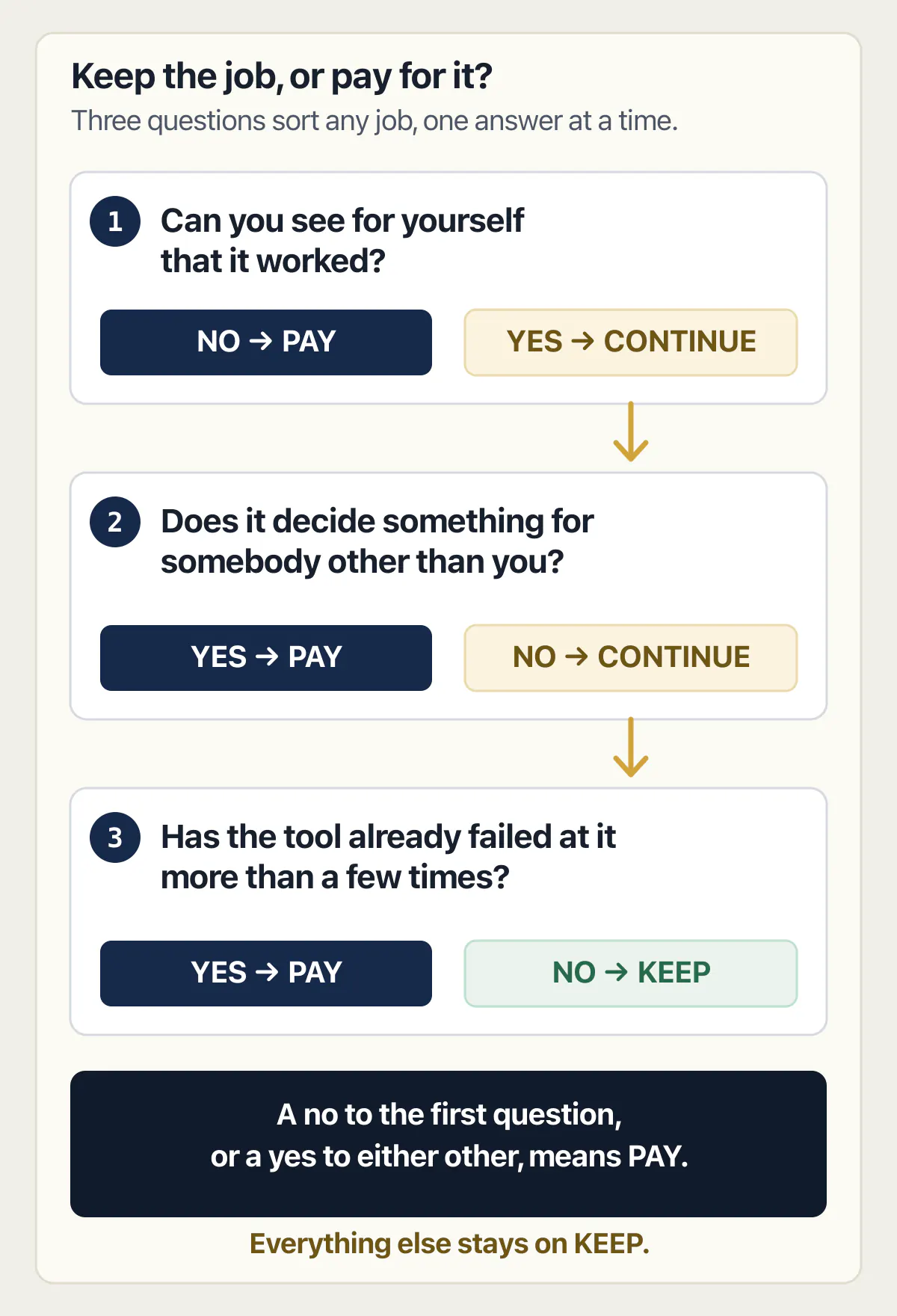
Two jobs through the test. First, adding a notes field to a customer record you already store. Question one: yes, you open the record and the note is there. Question two: no, you are the only person who reads it. Question three: no, this is attempt one. Keep it, and it will take twenty minutes.
Second, letting your customers invite a colleague into their own account. Question one: no. The invite arriving looks like success from where you sit, and whether the colleague can also reach a different customer’s records shows nothing at all on your screen. That single no settles it, and question two agrees, because the whole job is deciding what somebody else can see. Pay for that one.
The test has a boundary worth stating. It tells you which side a job is on. It does not tell you what that side costs, and it does not tell you when. The point in a business’s life when outside help stops being optional is a different question from which jobs to hand over, and it has its own answer.
If you decide to pay, what the first job looks like
A good first job is one specific problem you can name in a sentence, with a result you can watch happen in your own app. “Signed-in customers can see each other’s orders, and they should not” is a first job. “Have a look at the app” is not, and neither is a monthly arrangement agreed before anybody has seen the code.
Name the thing that is wrong, agree what working looks like in words you would use to a friend, and agree to be shown it working in your own app rather than told about it. If you cannot picture the moment where somebody shows you the result, the job is not defined yet, and the fix for that is one more sentence rather than a longer document.
Three practical things make a first job go well, and none of them requires any technical vocabulary. Give the person access to the app and to the accounts it depends on before the work starts, because waiting on a login is the easiest way for a three-day job to sit unstarted for a fortnight. Agree that they touch the one thing and tell you before touching anything else. And keep your own hands off that part while they are in it, so that the version you are looking at and the version they are looking at are the same version.
The next thing on the list can follow the same way. For the general question of what the same job costs on the open market, what each hiring route actually charges for the same job is priced there rather than here.
Three things sit just past the edge of this decision. Once the decision goes the other way, finding the person, agreeing what the first job is, and getting them started is a sequence of its own, and it begins where this decision ends. Paying somebody to finish the last fifth of an app nobody ever completed, the logins and the payments and the roles that were never built, is a bigger purchase than paying for one part of an app that already runs. And deciding to pay somebody leaves one more thing to work out, which is telling a good candidate from a confident one without reading a line of code.
Half the answer on this page is still “keep going”. That half does not become wrong the day you hire somebody for the other half.
Common questions about hiring a developer or building it yourself
How can I hire someone to build a mobile app?
For an app that does not exist yet, the routes are a marketplace, an agency or a personal referral, and every one of them prices a whole build. For a mobile app you have already made with a builder, the honest version of the question is smaller: name the one part that is stuck, and hire for that part.
Publishing an app you have already built is its own arrangement, separate from building one, and it is usually a much smaller job than the marketplace listings suggest.
Can you hire an app developer to work on an app you already built?
Yes, and it is a different purchase from hiring one to build an app. The code exists, the app runs, and the person is being paid to change or check one part of it. Say which part in the first message. That single sentence does more work than any brief you could write around it.
Searches for hire app developer vs developer are really asking which job title to look for. What decides it is whether the person can look at code you did not write and tell you what it currently does, and no job title guarantees that.
Where can I hire an app developer?
Marketplaces, agencies and referrals are the three places, and this page deliberately does not rank them, because where you look matters far less than what you ask for. Pick one job, describe it in a sentence, and the place you found the person stops mattering.
The related searches, where can I hire an app developer and how can I hire app developer, both want a list of destinations. The hiring process itself, from opening message to a start date both sides have agreed, is a longer answer than a list of places.
Can I hire somebody for one part of the app and keep the rest myself?
Yes, and for a working AI-built app that is usually the right shape. Hand over the parts where being wrong is invisible, keep the parts the app proves to you, and say out loud which is which before anybody starts. Splitting the work is normal, not a compromise.
The failure mode to avoid is the vague half. If nobody has said which jobs are yours, both sides will assume the other one is handling the awkward ones.
How many attempts should I give the builder before I pay somebody?
Pick the number before you are frustrated, not during. Three to five attempts at the same problem is a defensible line. Past it the tool is editing its own earlier attempts rather than the original problem, and every extra round makes the app more expensive to repair.
Write the number down while things are calm. The reason to decide in advance is that attempt eight never feels like a good moment to stop.
Do I need to understand the code to work with a developer?
No, and nobody should tell you otherwise. What you need is the ability to describe what is wrong in plain words and to recognise the result when you are shown it. Being able to say “this customer can see that customer’s orders” is enough to buy a fix for it.
What is worth insisting on is being shown the result in your own running app, rather than being told the work is done. That single habit substitutes for a lot of technical vocabulary.
What should I stop doing myself once somebody else is working on the app?
Stop prompting the builder on the same part they are working on. Two sets of edits landing on one area is how a straightforward job turns into an expensive one, and it is the most common way owners accidentally raise their own bill.
Everything on the keep side is still yours. Agree which files or screens are theirs for the duration, and carry on with the rest.
What if I decide to keep building it myself?
Keeping the build in your own hands is a real answer, and this page ends there for plenty of people. Keep going, run the visible checks yourself, and revisit the pay side when the app starts holding somebody else’s data, taking somebody else’s money, or failing at something the tool has already tried several times.
The decision is not permanent either. Nothing about keeping the work today stops you paying for one specific job in three months, and one specific job is the cheapest way to start.
Keep building it yourself, or pay for help?
Some jobs you can see working on screen, and some fail quietly until a customer finds them. An audit helps you tell the two apart: we look at the app with you and point out which parts carry hidden risk. Then you decide what to keep and what to hand off.
Book a free audit → Free · 30 minutes · No code access needed