If your agency builds software for other companies and you run that client work inside Lovable, the AI app builder at lovable.dev, two questions arrive together. One is what the vendor’s partner arrangement actually buys. The other is what your own account already decides about every client project inside it, where client means the company you build for rather than anything on the software side of that word.
Lovable’s workspace is the unit that decides all of it. One paid subscription covers one workspace, every project in it draws on one shared pool of credits, and Lovable’s own documentation states that workspace owners can open every project in the workspace, source code and chat history included.
The second question is not answered on either results page read for it. On 2 September 2026, across the fifteen organic results for lovable for agencies and lovable agency partner, six belong to lovable.dev, four are firms selling their own services (goodspeed.studio, lovableproduct.agency and thinkprofits.com among them), two are directory or marketplace listings (contra.com, aiagentstore.ai), two are threads on a forum platform whose pages return the same empty shell to either request shape, plain or browser-shaped, re-tested on 3 September 2026, and one is a named-profile post on a social network, readable only as a search snippet. Not one of the fifteen is an editorial page written for the agency.
Everything below comes from pages Lovable publishes itself, read on 3 September 2026: the partnership hub, the solution partner page, the public directory of partners, and the documentation covering workspaces, collaboration, project access, sharing, publishing, groups, branded app URLs and the plan tables. The ten questions on the partner page render as a closed accordion whose answers are not in the visible markup, so those answers were read from the FAQPage structured data the same page carries, and that route is stated rather than hidden. Pages here that already cover a Lovable failure or a plan limit are linked instead of retold, and one voice from the outreach corpus behind this blog is described in its own terms without a name. No account was opened, no program was joined, and nothing here was built, tested, hosted or run. Nothing here is legal advice or a verdict about anybody’s contract.
What does joining Lovable’s partner program get an agency?
The Lovable Solution Partner Program pays a firm for selling Lovable and places it in a directory. Reading Lovable’s own published benefit list on 3 September 2026, all six items are about credibility, support, credits or commission. Not one of them is about the code the firm ships to its client.
Start with the shape of the thing. Lovable’s partnership hub, read on 3 September 2026, shows three partnership tracks in its own grid, and only one is open. Solution partners carries an Apply now action. Government and Non-profit are both marked Coming soon on that date, which is a label a vendor can change without notice and should be read as of the day rather than as a plan. The same page lists three other ways to work with Lovable that are not delivery arrangements: affiliate partners, content creators and influencers, and events and hackathons. If you sell client builds, one track applies to you.
Inside the program, the tier does more than set a commission rate. Lovable’s solution partner page prints a short placement description next to every level: Registered is the default tier on join, Select is described as verified, earning and listed, Premier as a scaled producer with featured placement, and Elite as a strategic partner with hero placement. Where a firm appears in the directory follows from what it has sold, and featured and hero are placement words rather than quality words.
Lovable also publishes why it requires a Business plan, which is more revealing than the requirement. Answering its own question on 3 September 2026, the page calls the plan an investment that “sets a commitment standard”, names single sign-on and role-based access, and then names “the governance controls your clients expect” in a clause about what a partner has to have in place before a client’s data arrives. It adds that a partner needs those controls in place from day one and needs to understand the workspace level most of their clients will be operating in. That last clause is the vendor saying out loud that a partner’s own workspace configuration is part of the arrangement.
The published benefit list is short and worth reading as a list rather than as a pitch. Answering what partners get, Lovable names a partner badge described as market credibility, a dedicated partner support inbox, exclusive partner enablement resources, a listing in the partner directory, commission on closed-won Enterprise deals, and Lovable credits earned through the partner journey. Six items: selling, credibility, credits, support. Nothing on that list touches the app the firm delivers, which is what the client will judge it on.
Three more mechanics from the same page, all dated 3 September 2026. The joining sequence is apply with your company, your customers and your plans, then review the guide and policies and sign the agreement once approved, then use the partner portal, resources hub and playbook. On commissions, two details sit alongside the rate: payout locks in once the customer pays, and credits are earned per qualified lead and per closed deal on top of commission. On training, Lovable states that a training session and a hackathon-in-a-box kit are coming and that support scales with tier. Coming is the page’s own word, so read it as a stated future item.
One smaller fact rounds it out. On availability, Lovable’s answer is that it partners with businesses in countries where it sells its products and can legally process payouts. The application form asks for an employee size and notes that a solo freelancer selects one, so this is not shaped only for firms with a bench.
None of that is a recommendation to join or to stay out. What the vendor’s own partner arrangement contains, tier by tier, and what a firm has to show to get into it, is set out from the buyer’s side of the same table.
One workspace for every client, or one workspace each?
One workspace per client is the clean separation and the expensive one. On 3 September 2026 Lovable’s own workspace page puts it plainly: a paid subscription applies to one workspace only. A workspace for each client is a subscription for each client, and one shared workspace means one pool of credits for all of them.
Lovable’s workspace documentation sets out the rules that make this a real decision rather than a preference. Every project lives inside a workspace, and every member collaborating on a project reaches it through a workspace. Lovable prices a plan by the credits inside it rather than by the number of seats, so inviting more people does not change the subscription cost; what changes is how fast the group spends the shared credits, and every project draws from that same balance whoever sends the message. Lovable’s collaboration page adds the case that catches agencies out: a collaborator invited to one project spends credits from the project owner’s workspace, not their own.
Headcount is not the constraint most people expect. Free and Pro workspaces hold up to 200 members with an owner, admin or editor role, and viewers and external collaborators do not count toward that; Business and Enterprise workspaces have no member limit by default. Free plans have owner and editor roles but no admin role, so the finer controls below, the admin tier and the paid-only restrictions, only exist once somebody is paying.
The URL is where the choice stops being abstract. Lovable’s branded app URLs page, read on 3 September 2026, describes a workspace publishing every app under one shared pattern in place of the default your-app.lovable.app, in the form {app-name}.{workspace-subdomain}.lovable.app. Lovable’s own worked example uses a workspace subdomain of acme, giving dashboard.acme.lovable.app. There is one branded subdomain per workspace, derived from a domain the workspace has verified in its Identity settings, marked for Business and Enterprise plans and set by an admin or owner. Lovable’s page names client-facing deployments as a reason to use it.
Follow that through and the trade is documented rather than argued. One workspace holding eleven clients means one branded pattern for all eleven, carrying whichever domain that workspace verified. A pattern per client means a workspace per client, and a workspace per client means a subscription per client.
| The question | All clients in one workspace | A workspace per client |
|---|---|---|
| Subscriptions | One | One each |
| Credits | One shared pool, drawn by every project | Separate per client |
| Branded app URL | One pattern, one verified domain | A pattern per client |
| Who can open a project | Every workspace member, by default | Only that client’s workspace |
Neither column is right for everybody, and most agencies find out which one they wanted after the third client. How the credit meter is read covers usage by member. Which features arrive with a paid plan, including the badge on a published app and the per-member credit cap, is set out plan by plan.
Who can read a client’s project inside your workspace?
Everyone in the workspace, by default. Lovable’s project access page, read on 3 September 2026, says that since December 2025 every workspace defaults new projects to workspace access, and that workspace owners have full access to all projects in the workspace and can view and edit them. Restricting a project needs a Business or Enterprise plan.
Two settings here sound like one and are not. Lovable’s project access page states that project access controls who can open the project in the editor, including source code, chat history, work in progress and unpublished changes, while website access controls who can visit the published app. They are independent: publishing does not change one, and changing the other does not change publishing.
Project access is the one an agency with a confidentiality clause has to read. As of December 2025, Lovable states, all workspaces have their default project access set to workspace, which means every member can reach every new project. Restricting a project to its owner and explicitly invited collaborators is available on Business and Enterprise plans, set as a workspace default under Privacy and security or on a single project. And the sentence Lovable repeats four times on that page, read on 3 September 2026, is the one to read carefully: workspace owners have full access to all projects in the workspace and can view and edit them. Restricted keeps out the other members, not the owner.
The published permission tables fill in the rest, and they do not divide the way most people guess. Reading the two tables on Lovable’s collaboration page cell by cell on 3 September 2026:
| The action | Where the permission sits | What Lovable’s table shows |
|---|---|---|
| Transfer a project | Project | Owner only |
| Delete a project | Project | Owner only |
| Disconnect Supabase | Project | Admin and owner |
| Change project access | Project | Editor and above |
| Manage GitHub | Project | Editor and above |
| Add a custom domain | Project | Editor and above |
| Publish | Project | Editor and above by default |
| Add or remove an owner | Workspace | Owner only |
| Manage plans and billing | Workspace | Admin and owner |
| Manage single sign-on | Workspace | Admin and owner |
| Create projects | Workspace | Editor and above |
| Manage Supabase | Workspace | Editor and above |
Two rows are worth a second look if you employ people. Changing a project’s access setting and managing its GitHub connection both sit with editors rather than owners. The junior added as an editor so they could build can also decide who else opens the project, and can point its repository somewhere else.
Above the individual there are groups. Lovable’s groups page describes named collections of workspace members so access is granted to a group rather than person by person: a group can be given a project, given a folder so every project inside it follows, or used to restrict a published site to specific groups instead of the whole workspace. Groups sync from an identity provider through SCIM provisioning, are marked for Business and Enterprise plans, and are managed by admins and owners. For an agency running a team per client, that is what makes one shared workspace defensible.
Which of a client’s own signed-in users can reach another user’s records is a different layer entirely, decided by the permission model rather than by a workspace role, and the row-level rules a Lovable app runs on is where that sits. Where the sharing controls live in the interface, and what the workspace default does, is walked through where the exposure cases are.
How do you show the client without giving away the workspace?
Business and Enterprise plans carry an audience picker. Lovable’s publish page, read on 3 September 2026, says that someone outside the workspace can be given viewer access to an internally published app, naming a client or a contractor as the example, without adding them to the workspace and without making the site public.
Lovable’s publish page describes that route in its own steps: open the audience picker in the publish dialog, choose Custom, and invite the person by email address. They appear under Added, and the dialog notes how many external people the site is shared with. Project editors and above manage the website audience. Lovable also states that Security insights flags internally published projects with external viewers so admins can review who has access.
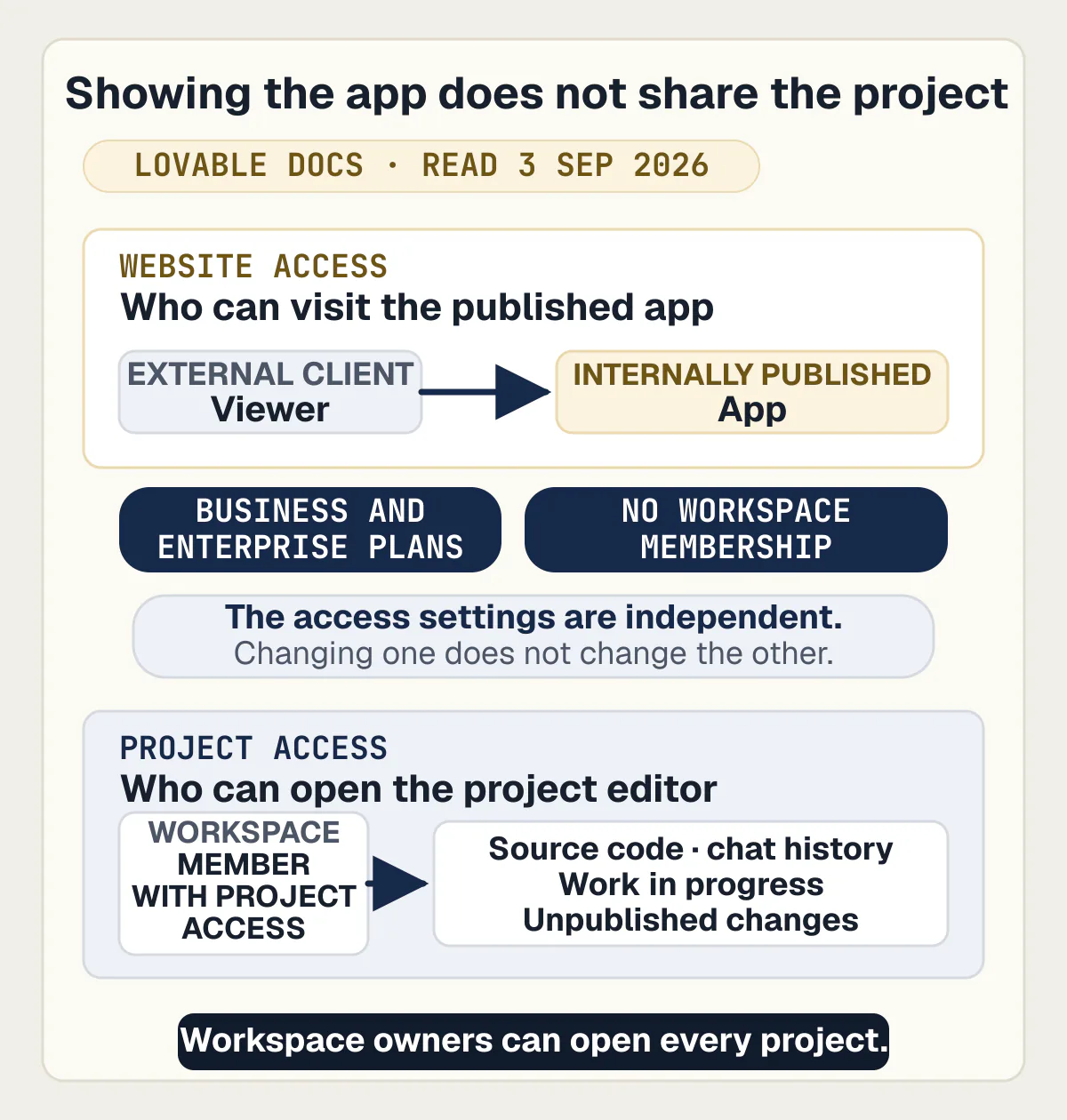
Publishing itself can be narrowed. On Enterprise plans, admins and owners can restrict who may publish externally to Editors and above, which is the default, or to Admins and owners, or to Owners only, and only a workspace owner can select Owners only or change away from it. Lovable’s plan tables, parsed cell by cell on 3 September 2026, put internal publish on Business and Enterprise, and publishing controls and sharing controls on Enterprise alone.
Outside collaborators have their own gate. Lovable’s share page states that workspace admins and owners control whether external collaborators are allowed at all and the highest project role they may hold, and that when single sign-on enforcement is on, external collaborators are blocked by default until an admin or owner allows them. It is worth knowing which way yours is set before a client’s own security team asks.
Invite links behave the way an agency wants, as long as somebody reads the terms. Lovable states that an invite link expires five days after it is created, that only one active link can exist at a time, and that changing a link’s access level generates a new link and stops the old URL working. The page’s own example use is giving a contractor time-limited edit access.
Shared preview links are a different mechanism with their own rules. What a shared preview link is, how long it lasts and what stops it working is answered in full on its own page. What the builder’s own checks reach before a launch, and what a plan lets you restrict about a published address, is covered where production is.
What moves at the end, and who is allowed to move it?
A project can be moved to another workspace from three places in Lovable’s own interface, and the person moving it has to be a member of the destination workspace with permission to create projects there. That is a different action from changing a project’s owner inside one workspace, which is what Lovable’s account-transfer answer covers.
The three routes, as the workspace documentation states them on 3 September 2026, are Project settings then Move workspace, the project card menu on the dashboard then Transfer to workspace, and selecting several projects and clicking Transfer in the actions bar. Workspace owners and admins can move any project in the workspace. A project owner can move their own, and on Enterprise plans that requires an Editor project transfers setting to be enabled. Moves can also be stopped by automated fraud checks, with a message saying the transfer was blocked due to suspicious activity.
That is the planned exit. The unplanned one is a person leaving, and it is documented in more detail than most agencies expect. When a member leaves, their membership ends immediately and they lose access to every project in the workspace, including projects shared with them directly, though their work is not deleted. Projects they owned are transferred automatically to the most senior remaining member, owners first, then admins, then editors. Projects whose access is set to Restricted are not transferred automatically. The person leaving cannot pick who inherits, and Lovable’s own advice is to move the projects to a named person before leaving rather than after. Lovable’s projects overview states the same rule in the same terms, including the Restricted exception, so two of Lovable’s own pages agree on it.
Read that against an agency’s staffing and the consequence is concrete. If a developer who owned four client projects resigns on a Friday, three land with whoever is most senior on the Monday, and the fourth, the Restricted one nobody remembered was Restricted, lands nowhere. There is a smaller trap at the top too: an owner can promote another member to owner, but you cannot leave a workspace if you are its only owner, or if it is your only workspace.
Handing a project to a different owner inside a workspace, and what that does not move with it, is answered where the built-in backend is, and what changing the owner of a project does and does not move sets it out. Moving a project between two separate logins is a different action from moving it between workspaces, and it has its own answer. How four different builders answer the same question about moving a finished app is compared side by side elsewhere. Which accounts have to carry the client’s name, one by one, is its own list. What actually has to pass to the client on the day, on any builder rather than this one, has a separate answer of its own.
What to settle before the client’s users arrive
The workspace machinery above decides who can reach the repository, the publish button and the data backend; what it does not decide is how the app holds up once its own users are inside it, which is the thing that decides whether the client keeps you. A Lovable build demos well, and the failures arrive in the week real people sign in, pay for something and go looking for their own data.
One agency owner described how their client work gets made now: the people write the instructions and check the result, and the tools produce the code. That division is efficient and it moves the whole risk to the checking. If nobody on the team can read a database rule, the review step is a demo, and a demo passes.
The specific things to check are already written up one at a time, so they belong here as a route rather than a retelling. The permission rules that decide who reads whose rows come first, because a client app that leaks between its own customers ends a relationship rather than costing a fix. What the builder’s own checks reach tells you what a clean publish dialog does and does not prove. Getting the database out is the demonstration to run before you promise a client anything about portability. Where a Lovable app can and cannot run answers the customer who wants it on their own infrastructure. If you are still weighing the builder itself, what Lovable is and where it stops is covered on its own review page.
It is neither an agency nor a partner platform, and it has not joined the program described above.
Common questions about running client work on Lovable
Is the Lovable Solution Partner Program worth joining for a small agency?
That depends on whether you sell Lovable or sell builds. Reading Lovable’s own published benefit list on 3 September 2026, the six things a partner gets are a badge, a support inbox, enablement resources, a directory listing, commission on closed-won Enterprise deals and credits. Every one is about selling Lovable, though the support inbox, the resources and the credits can help a delivery team in passing. If your revenue comes from client projects rather than from Lovable subscriptions, the program is mostly marketing, and the subscription condition the program attaches to that status is set out from the buyer’s side.
Should each client have their own Lovable workspace?
Only if you will pay for one subscription each. Lovable’s workspace page, read on 3 September 2026, says that a paid subscription applies to one workspace only, that all projects in a workspace draw from one shared credit balance, and that a branded app URL pattern belongs to the workspace rather than the project. A workspace per client buys separation on all three; one workspace for everybody buys one bill and one pool.
The middle path most agencies land on is one workspace with groups, which Lovable marks for Business and Enterprise plans.
Can a client see the project before it is finished?
Yes, in two ways, and they carry different risk. On Business and Enterprise plans, Lovable’s publish documentation states that someone outside the workspace can be given viewer access to an internally published app, naming a client or a contractor as its example, without adding them to the workspace and without making the site public. The other way is a shared preview link, which is view-only and grants no access to the editor, the chat or the source code.
Neither route gives the client the project itself, and the preview mechanics have their own page.
Who can read the source code of a client project inside a shared workspace?
Every member of the workspace, unless somebody changed the default. Lovable’s project access page states that since December 2025 all workspaces default new projects to workspace access, that project access covers source code, chat history, work in progress and unpublished changes, and that workspace owners have full access to all projects in the workspace and can view and edit them. Restricting a project to its owner and invited collaborators is a Business and Enterprise feature.
If a client contract says only named people see their code, that is a plan decision before it is a settings one.
Can a client project be moved into the client’s own Lovable workspace?
Yes, and Lovable documents three routes for it: Project settings then Move workspace, the project card menu’s Transfer to workspace, and a multi-select Transfer on the dashboard. Workspace owners and admins can move any project in the workspace, and a project owner can move their own, which on Enterprise plans requires an Editor project transfers setting to be enabled. The person moving it has to be a member of the destination workspace with permission to create projects there.
In practice, as that documentation states the requirement, the client’s workspace has to exist and the person moving the project has to be a member of it before the move rather than after.
What happens to client projects when the person who built them leaves?
They are reassigned automatically, and not to anyone’s choice. Lovable’s workspace documentation and its projects overview both state, on 3 September 2026, that a departing member loses access immediately and that projects they owned transfer to the most senior remaining member, owners first, then admins, then editors. Projects set to Restricted are not transferred automatically, and the person leaving cannot pick who inherits.
Lovable’s own advice is to move the projects to a named person before the leaving date.
Does a partner tier say anything about the quality of the work?
It says what the firm has sold. Lovable’s solution partner page prints a placement description next to every level, describing the second tier as verified, earning and listed, the third as a scaled producer with featured placement, and the fourth as a strategic partner with hero placement. Directory placement follows from them.
What each tier requires, and what a firm has to show to qualify at all, is set out from the buyer’s side.
Does the client need a Lovable subscription of their own?
Not to see the app, and yes to own the project. Lovable’s collaboration page states that a collaborator invited to a single project spends credits from the project owner’s workspace, so a client added to your project costs you rather than them. A paid subscription applies to one workspace only, so once the project moves into a workspace of the client’s own, that workspace needs its own plan for any paid feature or credit allowance the app depends on; a Free workspace can own the project, with Free limits.
Owning an app means being able to run it, change it and recover it without guessing. The sprint below leaves you with the runbooks and documentation to do that.
Built it with AI. Now it has to hold up for real customers.
The Production Hardening Sprint takes the app you already have and builds the production foundation underneath it. Authentication and access rules, payments that stay consistent, error handling, monitoring, backups, automated tests and a documented handover. Our engineers work inside your existing codebase for ten working days. All 123 deliverables are included, and you get the evidence for each one.
See the Production Hardening Sprint →  $2,500 fixed price · 10 working days · One codebase