A white-label app, in software delivery, is one company’s product sold under another company’s name, and a client here means the business an agency sells to, not a piece of software making a request to a server. It is not the supermarket-shelf trade that borrowed the same two words first, and it is not white-label WordPress, white-label SEO or white-label crypto, which are separate businesses that happen to share the phrase.
The question arrives in one of two shapes. Either you have a client asking for something you would have to build, and somebody tells you the cheap route is to put your own name on a product that already exists. Or you have a first version standing, made on an AI builder without hiring anybody, and a second client has just asked for the same thing with their logo on it.
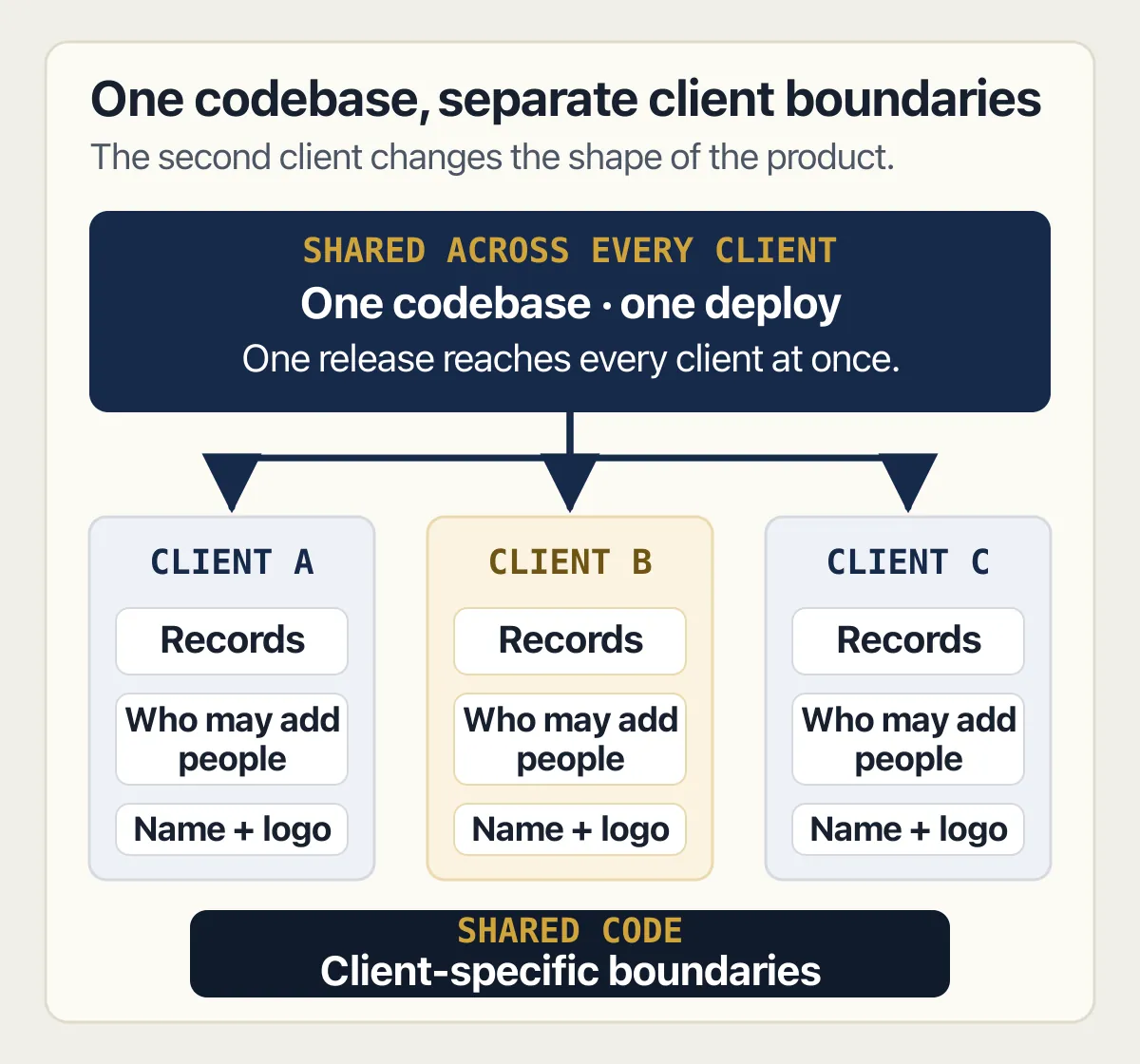
A white-label app is a finished product one company builds and another sells under its own name. The buy-or-build decision turns on four jobs that arrive the moment a single product carries more than one client’s name: keeping each client’s records apart, sign-in, branding, and one release reaching every client at once.
Every fact on this page is read off a published seller page. Four companies that sell a rebrandable product define the term on their own sites, and one of them documents, in its own product documentation, what happens when a rebranded app reaches a phone. Every page was read on 3 September 2026 as raw markup, navigation and footers included, and each one is credited where its fact appears. Nothing was bought, resold, rebranded or run to write this, no platform account was opened and no app was made. The tenancy decision and the policy layer belong to two other pages on this site: the policy layer is linked where it comes up, and the tenancy decision is named rather than linked, because its page is not yet live. No platform, vendor or route is rated, scored or recommended below.
There is no price below, from me or from a seller. Every number published in this category is one company’s own licence fee, and a licence fee answers a different question from the one a second client makes you ask.
What do the companies selling these products say a white-label app is?
White-label app sellers agree on one sentence and disagree about everything after it: one company builds a finished product, a second company puts its own name on it, and the people using it never learn the first company exists. Four vendors’ own pages, read on 3 September 2026, say versions of exactly that.
Zoho Creator answers the question in its own words on its white label app builder page, in the FAQ at the foot of it. A white-label app, that FAQ says, is a generic application built by a company to resell it to another business that, in turn, can rebrand it as their own. The same FAQ defines the verb a line earlier: white label products and services are items produced by one company to be rebranded and resold by another to their end consumers. Two sentences, one from each side of the arrangement, and between them they cover the whole of it.
Mighty Networks, whose encyclopedia entry ranks for the mobile version of the phrase, adds the detail that decides how much of the work is left. A white-label mobile app, on its encyclopedia page at www.mightynetworks.com/encyclopedia/white-label-mobile-apps read the same day, is a native application running directly on iOS or Android, built by a third party and offered under your own brand. Its explanation of why that route is quicker is the useful part: the backend of the app, how it functions and its essential appearance, is already established, so what the buyer changes is the branding, the visual design, and which features are turned on. That is a precise description of the seam. Everything above the seam is yours to set. Everything below it is somebody else’s product.
Knack’s guide at knack.com/blog/white-label-app-development/, read the same day, describes the same shape from the agency’s side: one company partners with another that has already built the app foundation, then customises and resells it. Its own drawbacks section names three, and two of them are not about money. The first is limited customisation of core functions, because the base framework is built as a general-purpose solution. Second on its list is the risk that several businesses end up with similar-looking apps, because they are all standing on the same template. The third is hidden costs, which its own text attaches to premium features and to ongoing support and maintenance.
AltexSoft’s glossary entry at altexsoft.com/glossary/white-label-app/, written for the travel trade, states the hinge of this whole page in one clause. Its downside list gives limited functionality and no access to the backend for customers, which in turn means less control and fewer scaling or customisation opportunities. The backend is the part you are renting, and renting it is exactly what makes the app cheap.
The mobile phrasing, and why it changes the answer
Most people typing this phrase type it about a phone. A white-label mobile app, or a white-label mobile application, is the same arrangement with one extra party in it: Apple or Google now stand between the product and the person using it. Web software can be rebranded with a logo, a colour and a domain name and shipped the same afternoon. White-label mobile applications have to be built into a binary, signed, submitted and approved, and every one of those steps belongs to an account that somebody owns.
What does a white-label app builder actually hand you?
A white-label app builder gives you a rebranded copy of its own application and a set of jobs it does not do for you. Retool’s own documentation, read on 3 September 2026, sets out two ways a rebranded app reaches a phone, and both of them end at a store account somebody has to own.
Start with the mechanism, because the marketing on this category is written to make it disappear. Retool’s documentation page on White-label mobile apps states that eligible organisations can request White-label Apps, described there as a custom-branded version of the Retool Mobile app, and that Retool can manage distribution to users in the organisation through the iOS App Store and Google Play, or the organisation can self-manage that process. To create one, the page says, you provide Retool with the necessary provisioning resources; Retool then generates a custom version of the mobile app and uploads it to the store. That is the category in one paragraph. The product is the vendor’s, the branding is yours, and something has to be provided before a build exists.
The two routes differ in who carries the store, and the difference is the whole cost.
On the Retool-managed route, the same page states, Retool publishes and distributes the apps on your behalf, manages updates and store reviews, and the apps are visible only to users in the organisation. The requirements it lists for that route are enrolment in Apple Business Manager on iOS and the Managed Play Store on Android, plus a third-party mobile-device-management or enterprise-mobility-management solution. Read as a buyer, that route is for staff phones inside one company, not for a product sold to the public.
On the self-managed route, the page states that the organisation is responsible for publishing and distributing the apps, that Retool uploads app binaries to your Apple or Google Developer account, and that you then submit the app for review. Its requirements are the ones worth reading twice: enrolment in the Apple Developer Program or the Google Android Developer Program, providing Retool with login credentials for a Developer Access level role, and providing a service key for interacting with the App Store or Play Store APIs. A company that sells you a finished product is asking for a login to your developer account and a key to the store’s programming interface. That page is tagged for the Enterprise plan, and readers who are not on it are told to book a demo; the plan is a name here and this page prints no price for it.
AppMachine’s reseller page at appmachine.com/reseller, read the same day, describes the promise from the other end. It states that the apps are white labelled without any AppMachine branding in them, and that the reseller’s own customers will not know an app-building platform produced them. Its plans are counted in apps rather than in seats or users: one plan carries five, the next carries thirty. That counting is the most honest thing on the page, because it names the unit of this whole category: one app per client, which means what you are buying is copies.
Zoho Creator’s own page sets out the same journey as four steps, and the order is instructive. Choose whether the application is internal, with employees as its primary users, or external, for people outside the organisation. Pick the deployment route, meaning Google Play, the App Store or a private device-management channel, and meet its prerequisites. Complete the iOS or Android code-signing process, which the page describes as digitally signing the executable so the software cannot have been altered after it was created. Then publish.
The same fact surfaces in all three sources. The account that submits, the signature that proves the binary is yours, and the review that lets it in are either your job or a third party’s, and never the platform’s alone. What the store itself says about which developer account the app is submitted from decides whether a rebranded app is allowed in at all.
As of 3 September 2026, the documentation address tried for Adalo’s white-label feature, help.adalo.com/integrations/premium-integrations/white-label, returned a 404 to both a plain request and a browser-shaped one. That is a statement about one address on one day rather than about whether Adalo documents the feature, so nothing about that company is claimed here.
Three different purchases share the phrase white-label app development
Type white label app development into a search box and the results answer three different questions at once, because three different purchases go by that name. Two of them leave you with a bill you can predict, and the third leaves you with a product to run.
The first is renting a rebrandable product. You configure a platform’s application, put your name on it, and pay to keep using it. The second is paying a company to build a product under your name, which is white label application development in the older sense of the phrase, closer to subcontracting than to licensing. The third is building one yourself, which nobody sells and therefore nobody writes about.
| What you are buying | Who holds the code | Who the client’s contract is with |
|---|---|---|
| A rebrandable product you configure | The platform | You, with the platform’s terms underneath |
| A product built for you under your name | Agreed in the arrangement, and often nobody checks | You |
| A product you build yourself | You | You |
The middle row is the one that gets bought without being read. Buying that second route, somebody who builds under your name rather than a product you rent, is a separate transaction with checks of its own, and the questions worth asking before you sign are about the repository, the accounts and the day the arrangement ends rather than about features. That is a commercial question rather than a definitional one, and it is answered elsewhere.
Row one has a quieter version of the same problem. Your client’s contract is with you, and your ability to keep that promise sits on a platform agreement you did not write and cannot change. That is comfortable until the first time your client asks for something the platform does not do, because the answer then stops being a question of effort.
Row three is the rest of this page. It is the only row where the code can be yours, when the contract says so, and the only row where the work is too, and the reason people pick it is almost always the same: a first version already exists. Something was built for one client, it works, and a second client wants it. At that point the buy-or-build question has already half-answered itself, and the remaining question is about what the second client costs rather than about what a licence does.
One footnote on the phrase itself, because it saves time. Sellers use white label app development and white label application development interchangeably, and the pages ranking for both phrases are largely the same pages; where one of them is written by a company selling one of the three purchases above, which is nearly all of them, the drawbacks section is the part worth reading, because it is the only part written against the seller’s own interest.
What does building one yourself cost in work rather than in money?
Building a white-label app yourself costs four jobs rather than one price: keeping each client’s records apart from every other client’s, deciding who inside a client may add the next person, putting a different name and logo on every copy, and shipping one change that lands on all of your clients on the same day.
One public thread from August 2026 puts the demand in its plainest form, under the title “How to build a custom client portal with user logins without coding?” The person asking is not a developer and is not shopping for a platform. They are describing the second row of that table from the inside, and the four jobs below are what the answer to their question actually contains.
Keeping each client’s records apart. The first job is the one every seller’s marketing skips over, because the rented product has already made the choice for you. Deciding what a record belongs to, once your customer is a company and not one person, comes before all of this, and that decision has a page to itself. At the layer below that decision, what a row policy can and cannot settle once the records belong to different companies is worked through on the row level security page, and neither the decision nor the mechanics are repeated here. The rented route answers this for you in a way you cannot inspect; the built one leaves it open until you close it.
Deciding who inside a client may add the next person. Every client will eventually want to add somebody without asking you. The moment they can, you have two kinds of administrator in one product: the one who runs your business and the one who runs theirs, and the second one must never be able to see the first one’s view. That split, and what it does to invitations and roles, is settled on the page about accounts and permissions in a subscription product.
Putting a different name on every copy. This is the job the category is named after and the one nobody writes down, so it is worth being specific. A client’s brand lands in more places than a settings screen suggests: a logo in the application, a colour and typeface that have to survive every screen including the ones you rarely look at, a domain or subdomain the client can point at, an address that outgoing email is sent from, the sender name on that email, the text of every notice the app sends on the client’s behalf, the icon and screenshots in a store listing if there is one, the name of the app itself on a phone’s home screen, the wording of any error page a stranger might reach, and the small print at the bottom saying who runs the service.
Each of those is a place a client’s name can appear wrong in public, and they fail in different ways. A logo that has not been swapped is embarrassing and obvious. An email sent from the wrong sender address is worse, because it is invisible to you and visible to your client’s customers, and because a sending domain that has not been set up for the client will quietly land in spam folders rather than bounce. A store listing under your own company name tells every one of your client’s customers who really built the product, which is the exact thing the arrangement was bought to prevent.
The rented route settles most of this with a configuration screen, which is a real advantage. The built route settles it with work, and the work grows with the number of places a name can appear, not with the number of clients.
Shipping one change that reaches every client at once. This is the job that separates a product carrying several clients’ names from a set of separate apps, and it has no equivalent in ordinary single-customer work. There is one codebase and one deploy, so a change made on a Tuesday afternoon arrives for every client on that Tuesday afternoon.
One codebase means a release stops being a private act. It is something every client’s business experiences at the same moment, whether or not any of them asked for it.
Three consequences follow, and none of them is obvious from a price list. You cannot give one client a feature without deciding what the others see, so every request turns into a settings question. You cannot fix one client’s data problem with a change to the code, because the code is shared and the data is not. And you cannot test a release against one client’s setup any more; the useful test is against the client whose configuration is furthest from the default, which is usually the largest one.
The honest arithmetic here is short. A first version is genuinely cheap now, and an AI builder will produce something a client can look at faster than any procurement process could approve buying one. The second, third and eleventh client are what that price never covered, because each of them adds a copy of the branding job, a share of the isolation job, and one more business that feels every release you make. Buying the rented product is a way of paying somebody else to carry those four jobs; building is a way of carrying them yourself. Both are defensible and neither is free.
There is a fifth cost that only shows up later, and it belongs to whoever inherits the thing: the day somebody else has to read a codebase they did not write is harder when that codebase is quietly serving several companies at once.
Whose name is on the accounts when the app carries your client’s
Two people describing this exact product, publicly and in their own words, show how ordinary the request has become. One person said plainly what they were doing: building, from nothing, the kind of client-facing portal an agency puts its own name on. Another described the whole thing as one instruction: somewhere the client signs in, sees where their work has got to, looks at what they owe and pays it.
Neither of them mentioned an account, and accounts are what the arrangement eventually turns on. A product wearing your client’s name still runs on infrastructure registered to somebody, and the honest question is which name is on each piece.
The developer account is the sharpest one, because it is visible from the outside. If a store listing is published from your account, the store’s records say your company publishes it. If it is published from the client’s account, they can remove you from it, and you need their cooperation to ship anything.
The domain is the second. A client-branded application on a subdomain of yours is your property with their name painted on it, and a client-branded application on their own domain is one they control at the door, with your product answering the request; who owns the application itself is still whatever the contract says. Which of those you have decides what happens when they leave.
The database is the third, and it is the one nobody thinks about until it matters. If every client’s records sit in one database you run, none of them can be given back without extracting them, and extracting one company’s records out of a shared table is a job somebody has to do carefully rather than a button.
The sender address is the fourth. Email that goes out under your client’s name has to be authorised by whoever controls their domain, which means the client has to do something for it to work at all, and it will keep working only while they keep doing it.
One disclosure, since this page describes three ways to buy the same thing. I am not a party to any of them: it sells no rebrandable product, resells nobody’s platform, and recommends none of the companies named above. Nothing here is a recommendation and no option above is being sold to you.
The agency that ships client work on one of these builders runs into the same order of trouble every time, which is a subject of its own. So is what the two companies write down between them, which decides whether the arrangement survives a disagreement.
Common questions about white-label apps
Can you buy a white-label app off the shelf?
Not in the way the phrase suggests. Every platform page read for this page on 3 September 2026 describes a product you configure and rebrand for as long as you keep paying, rather than a finished application sold once and given to you as an asset, and white label apps for sale is the phrase people type when looking for the second kind. The distinction matters because the two arrangements end differently: a configured product stops when the arrangement stops, while a purchased one carries on.
What is the difference between a white-label app and a custom app?
A white-label app starts from a finished product and lets you change the parts the vendor exposes; a custom app starts from nothing and lets you change everything the contract and the licences allow, which is usually most of it. AltexSoft’s glossary states the trade in one line: white-label apps win on cost and speed to market, and lose on limited functionality and no access to the backend, which means less control and fewer customisation options. Knack’s guide names the same limit from the other side, warning that core functions may resist sizeable changes.
How does white-labelling actually work?
White-labelling works by taking a product somebody else finished and changing the parts it allows you to change. Zoho Creator’s own page reduces the whole thing to four steps: pick the audience, pick where the software will be installed and satisfy that channel’s prerequisites, sign the build so it can be proved unaltered, then publish. Two of those four steps run through accounts and obligations belonging to a company rather than to the platform, which is the part that surprises buyers.
Can you white-label an app you have already built?
The vendors say yes for their own products. Zoho Creator’s FAQ, read on 3 September 2026, answers directly that you can turn a custom app carrying your business workflows and processes into a white-labelled one. For an application you built yourself, on an AI builder or anywhere else, rebranding it is the easy half; the work is in the four jobs above, and in finding every place your own name currently appears, which is always more places than you remember.
What is the difference between white label and private label in software?
The two phrases are used differently in retail and in software, and the software sellers do not draw the line at all. None of the six seller and documentation pages read in full for this page on 3 September 2026, navigation and footers included, uses the phrase private label anywhere. In software the term in general use is white label, and the arrangement it names is the one on this page: one company’s product, another company’s name, an end user who never meets the first company.
Does a white-label app need its own app store listing?
Only if it is a mobile application meant for the public. A rebranded web application needs a domain and nothing else, while a native one needs a listing wherever its users install it from. Retool’s documentation shows both shapes: its Retool-managed route publishes apps that are visible only to users in the organisation, which suits staff phones, while its self-managed route uploads binaries to your own developer account for you to submit publicly.
The store’s own rules on which developer account the app is submitted from decide whether a listing under one company’s name for another company’s business is accepted, and that page works through the rejection notes one at a time.
How much does a white-label app cost?
No number on this page, and be careful with the ones you find elsewhere, because sellers price three different purchases under the same phrase. A platform licence, a build under your own name and a product you build yourself are not comparable amounts, and a figure quoted for one of them tells you almost nothing about the others. The only comparison that holds is the one above: what each route asks of you in work.
Do your clients find out somebody else built the app?
Usually not from the application itself, and often from somewhere else. AppMachine’s reseller page states plainly that its apps carry no AppMachine branding and that a reseller’s customers will not know an app-building platform produced them, which is accurate about the software. The places a client’s end users can still find out are the ones outside the product: the company named on a store listing, the address system emails are sent from, the registrant of a domain, and the small print at the foot of a page.
How the arrangement between the two companies is actually written down, and who invoices whom, is the other half of the same subject. What the agency owes the client at the end, when the thing it shipped was built with these tools, is a separate list again.
If you have a working app built with these tools and need it ready for real customers, this is what we do.
Built it with AI. Now it has to hold up for real customers.
The Production Hardening Sprint takes the app you already have and builds the production foundation underneath it. Authentication and access rules, payments that stay consistent, error handling, monitoring, backups, automated tests and a documented handover. Our engineers work inside your existing codebase for ten working days. All 123 deliverables are included, and you get the evidence for each one.
See the Production Hardening Sprint →  $2,500 fixed price · 10 working days · One codebase