One owner, writing publicly about the invoicing tool they built for themselves over a month of sessions with an AI assistant, ended on seven words:
Now I made my own invoicing app … Cost me $30 and is always mine.
“Always mine” is a higher standard than it sounds. It survives the assistant changing its pricing, the person who helped disappearing, and a company deciding your project broke a rule you never read. Most owners of an app somebody else built cannot say that sentence yet.
Ownership splits in two. Copyright in the code is a contract question and usually settles your way. The nine accounts the app actually runs on are a separate question, and each one is yours only where your name is on it. Nine checks, each under a minute, settle that half without help from the person who built it.
The nine checks below were read off each company’s own role and ownership pages on 26 August 2026: GitHub’s repository transfer documentation, Cloudflare’s registrar transfer guide, Supabase’s access control page, Vercel’s account management page and its team ownership guide, Stripe’s user roles page, SendGrid’s domain authentication guide, Resend’s domains guide, Apple’s app transfer overview, Google Play’s app transfer help page, and Google Analytics’ access management page. Each check is written from what those pages say the top role can do that the roles below it cannot. No account was signed into for this page, no screen or menu is described beyond what those pages print, and where a company’s own page does not answer a question the row says so.
One consequence of that split is worth stating before the list. A lawyer settles the code half, on a timescale and at a cost you do not control. You settle the accounts half this afternoon, for nothing, and it is the half that decides whether the app keeps running next month.
Who owns the code you paid for
Copyright in code written for hire sits where your written agreement puts it, and where nothing was agreed in writing, the person who typed it generally holds it. That is a question for a lawyer in your country. Whether you can keep the app running next year is a separate question, and nothing here is legal advice.
In the United States the starting position is that the author of a work holds the copyright unless something in writing moves it. Most competent contracts for custom software do move it, which is why every result on page one for who owns the code i paid for tells you to go and read yours. That advice is correct, and it is where those pages stop.
The AI tools have written their own answer down, and it is shorter than people expect. Lovable’s terms, effective 15 August 2026, say that as between the two of you, “you own your Customer Data, including the applications, websites, or other projects you build using the Services”, and go further: “you also own any AI Output generated for you through the Services, subject to any third-party rights in the underlying models, training data, or outputs”. Base44’s terms of service, effective 22 June 2026, say “the Customer owns all rights, title and interest in the code and applications generated by the Platform”, while section 4.2 grants Base44 a broad, perpetual licence back over that same material for running the service and training models. Anthropic’s consumer terms, effective 8 October 2025, say the company assigns to you “all of our right, title, and interest … in Outputs”. GitHub’s terms of service, last updated 27 April 2026, put it in one line in section J: “GitHub does not claim ownership of your Input or Output.”
Replit is the interesting silence. Replit’s terms of service, last updated 3 August 2026, leave your rights in whatever you put into the service with you. As of 26 August 2026 that document does not separately state who owns the AI-generated output, which is worth knowing because it is easy to assume the opposite.
Two wrinkles sit underneath that. A company assigning you its rights in an output cannot conjure rights that never existed, and the US Copyright Office addressed the copyrightability of generative-AI outputs in Part 2 of its Copyright and Artificial Intelligence report, published on 29 January 2025. The second wrinkle is licensing rather than ownership: GitHub’s terms say the output “may contain material that resembles code or content in the model’s training data or that is subject to third-party copyrights or open source license terms”, and place the duty on you.
None of that is checkable this afternoon, and none of it settles a dispute with a person you paid. What changes about the code itself because a machine wrote most of it is a separate question, and it does not change who the accounts belong to.
The nine things that have to be in your name
Someone shopping for a developer set out what they were buying and put ownership on the list unprompted:
My priorities are polished design, SEO, performance, easy future updates, and long-term code ownership…
That is the right list with the mechanism missing. Long-term code ownership comes down to nine accounts you hold. Each row below names one, says what the top role on it can actually do, gives you a test that takes under a minute, and says what a no means.
| What it is | What being the owner actually means | The check, under a minute | If the answer is no |
|---|---|---|---|
| The code repository | Administrator access to it, which is what a transfer requires | Could you move the repository into a different account today? | Someone else decides who reads and copies your code |
| The domain name | The registrar account it sits in is one you can sign into | Can you produce the transfer authorisation code for it? | Your address can be pointed somewhere else, or allowed to lapse |
| The DNS | The records the internet reads are in an account you hold | Can you add a record today without asking anybody? | Email, subdomains and the site itself move without you |
| The database | Owner, not Administrator, of the organisation the project sits in | Can you add another owner to that organisation? | Your customer data lives at somebody else’s discretion |
| The payment account | The one role allowed to change the account owner | Can you change who the account owner is? | Your revenue lands in an account you cannot direct |
| The email sender | A verified sending domain you own, in an account you hold | Is your from-address on a domain verified under your account? | Your customer email stops when their account does |
| The store listing | The account holder of the membership the app is published under | Are you the account holder, not an invited member? | Updates ship under their membership, and only they can move the app |
| The environment secrets | The keys are stored in an account whose top role is yours | Can you read and change a key yourself today? | Somebody else can read every service your app pays for |
| The analytics property | Administrator at account level | Can you remove another person from the property? | Last year’s numbers leave with whoever holds it |
Take the list into the conversation with the person who built the app before the last payment goes out. The same rows are worth raising with a developer you have not hired yet, where the useful part is knowing what a good answer to each one sounds like.
One framing to keep while you go down the list. Every check is a capability test rather than a login test, because a login proves almost nothing. If you cannot do the thing the top role does, you do not hold the top role, whatever the dashboard shows you. The reverse holds less well: a delegated editor can add a DNS record or rotate a key without holding the account, so where a row’s test is an edit, also check that the recovery email, the billing identity and the power to remove other people are yours.
The two that decide everything: the repository and the domain
Lose one of the other seven and you have an expensive week. Lose the repository or the domain and the app is somebody else’s, whatever the invoices say.
The repository check is administration rather than visibility, because read access proves nothing about who holds it. GitHub’s repository transfer documentation states the requirement plainly: “To transfer a repository you must have administrator access to the repository.” For code sitting under a company account, the same page adds that you need “permission to create repositories in the receiving organization, and to transfer repositories out of the origin organization”. So the test takes fifteen seconds: could you move this repository into an account of your own today, without asking anyone? If not, someone else decides who reads your code and whether it stays where it is. Separately, whether you can get a copy of the code out at all is worth knowing before you need it.
The domain is two questions that people merge into one, and merging them is how owners get surprised. Whose registrar account the domain sits in is the first. Whose DNS the records live in is the second, frequently a different company entirely: bought at one registrar, pointed at another company’s name servers, with the records that decide where your site and your email go sitting in that second account.
Both have a one-minute test. For the registrar, ask for the transfer authorisation code. Cloudflare’s registrar transfer guide explains what that string is and what it proves: it “is also called an auth code, EPP code, authinfo code, or transfer code”, and the receiving registrar “uses this code to verify that the transfer is authorized by the domain owner”. Somebody who can produce it on request holds the account. Somebody who cannot is asking a third party for permission to move your own address. The same page records the timing rule that catches new businesses: the domain must have been “registered at least 60 days ago and has not been transferred in the last 60 days (ICANN requirement)”, and authorisation codes are usually only valid for a limited period.
For DNS the test is smaller still. Add a record, any harmless one. If you can sign in and change what the internet reads about your domain, you hold at least an editor’s seat, and the account is yours when its recovery email and billing details are yours too and you can remove the other people who edit it. If you would have to message somebody, your email delivery, your subdomains and your site all sit behind a door you do not hold the key to.
Domain worry is common and usually aimed at the wrong thing. One founder’s thread on 20 July 2026, captured by AxonBuild’s keyword alert, was titled “Have I made a mistake buying .xyz domain for my SaaS?”. They were second-guessing the ending of a domain they owned outright, which is a marketing question, reversible in an afternoon. Whose account it sits in is neither.
The two that hold your customers: the database and the payment account
This is where “I have a login” and “I hold the account” come apart hardest, because both platforms hand out a role that looks total and stops one notch short of it.
On Supabase the roles are named and the boundary is printed. Supabase’s access control page describes the Owner as having full access to everything in organisation and project resources, and the Administrator as having the same full access “except updating organization settings, transferring projects outside of the organization, and adding new owners”. Both roles can update the billing email, the subscription, the billing address and the payment methods, which is the detail that makes an Administrator seat feel total. The test is the thing the page says the Administrator cannot do: can you add another owner to that organisation? If the option is not yours to use, you are a very well provisioned guest in somebody else’s organisation, and your customer records are sitting in it.
Two things follow from a no. Getting your own copy of the database becomes urgent rather than tidy, and if the project lives inside a builder’s bundled backend, moving the database off the builder’s own cloud turns the answer from no to yes.
Payments are stricter and better documented. Stripe’s user roles page introduces the Administrator as the role “for anyone who needs similar access as the account owner”, able to “see and manage almost everything”, and then draws the line in the next sentence: “They can’t delete the default bank account, or change the account owner.” The Super Administrator, the role Stripe says is assigned to the creator of a business account, carries the same restriction in its own list of what it cannot do. Even the IAM Administrator, whose whole job is inviting and removing people, has “Change the account owner” among the things it cannot touch.
So the payment test is a single question: can you change who the account owner is? A developer who set the account up and gave you an Administrator seat handed you almost everything and kept the one permission that decides whose business this is. Your revenue lands in it either way, which makes this the row people find hardest to raise and the row worth raising first.
The three that speak to your customers: the email sender, the store listing, the analytics
These three are quieter than the first four, and they go wrong when you need to reach a customer, ship a fix, or prove what happened last quarter.
Start with email, the one item on the list where ownership is asserted in the vendor’s own words. SendGrid’s domain authentication guide says the DNS records you publish make four assertions on your behalf, and the first two matter here: “You own the domain that sent the email message” and “You permitted the sending email server to send email on behalf of the domain.” That claim only holds because those records sit in DNS you control, which is why the email row and the DNS row are the same row wearing different clothes. Resend’s domains guide states the same premise as a product requirement: “Resend sends emails using a domain you own (i.e., not a shared or public domain)”, and “You must add and verify at least one domain to send emails with Resend.”
The test: look at what your app’s password resets and receipts arrive from. If the from-address is on a domain verified inside an account you can sign into, that is yours. If it is on a shared sending domain, or on your domain but verified in somebody else’s account, your customer email survives exactly as long as their relationship with that vendor does.
The store listing has a named role too, and only one person holds it. Apple’s app transfer overview puts the start of any transfer with the membership’s Account Holder, and the acceptance with the receiving one. Being invited into somebody’s developer account, even with generous permissions, does not make you the Account Holder, and the Account Holder is the only person who can start moving the app anywhere. On the other store, Google Play’s app transfer help page sets a plainer bar: “both Google Play developer accounts need to be registered and active”, and “You’ll need the registration transaction ID for your account and the target account.” A developer account you never opened has no transaction ID you can produce.
So the store test is whether the app is published under a membership you pay for and hold. Inside a contractor’s developer account an invited role can still be allowed to submit updates, but every update ships under their membership and stops when it does, and moving the app out is the Account Holder’s alone. Updates are not optional: the platforms move their requirements, and an app that cannot be resubmitted stops being available.
Analytics is the one people forget until they need last year’s numbers for a bank, a buyer or an argument. Google Analytics’ access management page sets the bar: “To delete user accounts or user groups, you need to have the Administrator role at the account level”, and, as a safety measure, “if you are the last user who has the Administrator role, you cannot delete yourself.” That second half does more work than it looks. The last remaining Administrator is the floor of the account, and if that person is somebody else, they are the floor of your history. The test is whether you could remove another person from the property today. If you cannot, a year of traffic, signups and conversion data belongs to whoever can.
The one nobody checks: your environment secrets
Environment secrets are the row that breaks the pattern, because on this one the AI builders mostly get the storage right and the ownership wrong.
The keys your app uses to talk to its payment provider, its database, its email sender and its AI vendor are normally kept in environment variables rather than pasted into the code, and the audit evidence says that is the healthy end of the picture. Of the twelve pillars scored in the study these numbers come from, AxonBuild’s fixed study of 26 AI-built applications audited in June and July 2026, secrets and credentials came out on top, with a mean of 84.4 on a hundred-point scale measured over the 21 third-party apps in that study’s findings ledger. Most owners’ keys really are where they should be. If that storage is new to you, what an environment variable actually is covers it in a page.
The ownership question sits one level above the storage question, and nobody asks it: whose account can read those values. On a hosting platform that is a team role, and the top one is again named. Vercel’s team ownership guide says “A team can’t be left without an Owner”, which is why handing a team over means promoting a second Owner first and demoting or removing the original afterwards, in that order. Vercel’s account management page states the same rule from the other side: you cannot leave a team while you are the last remaining owner. Whoever holds that role reads the keys, and whoever reads the keys can charge cards through your payment account, read your database directly, send email as you, and spend your AI vendor’s credits, without ever touching the repository.
The test is direct. Open the place your app’s keys live and change one you can safely rotate, or ask yourself honestly whether you could. Reading them and changing them are two different permissions, and only the second gets you close; a delegated member can rotate a key too, so the account is yours when you hold the team’s Owner role, the one that can add and remove everybody else.
A no here is easier to fix than a no anywhere else on the list, because keys can be rotated. If this row is no while the service accounts themselves are yours, you can issue new keys from each service, put them where you control them, confirm the app works on the new ones, and then revoke the old keys in each provider’s dashboard. Until they are revoked or expire, the old copies still work wherever they are. It is the one row whose remedy needs nobody’s cooperation.
What to do when one of them is not in your name
Say two rows came back no. The routes out are three, in order of cost.
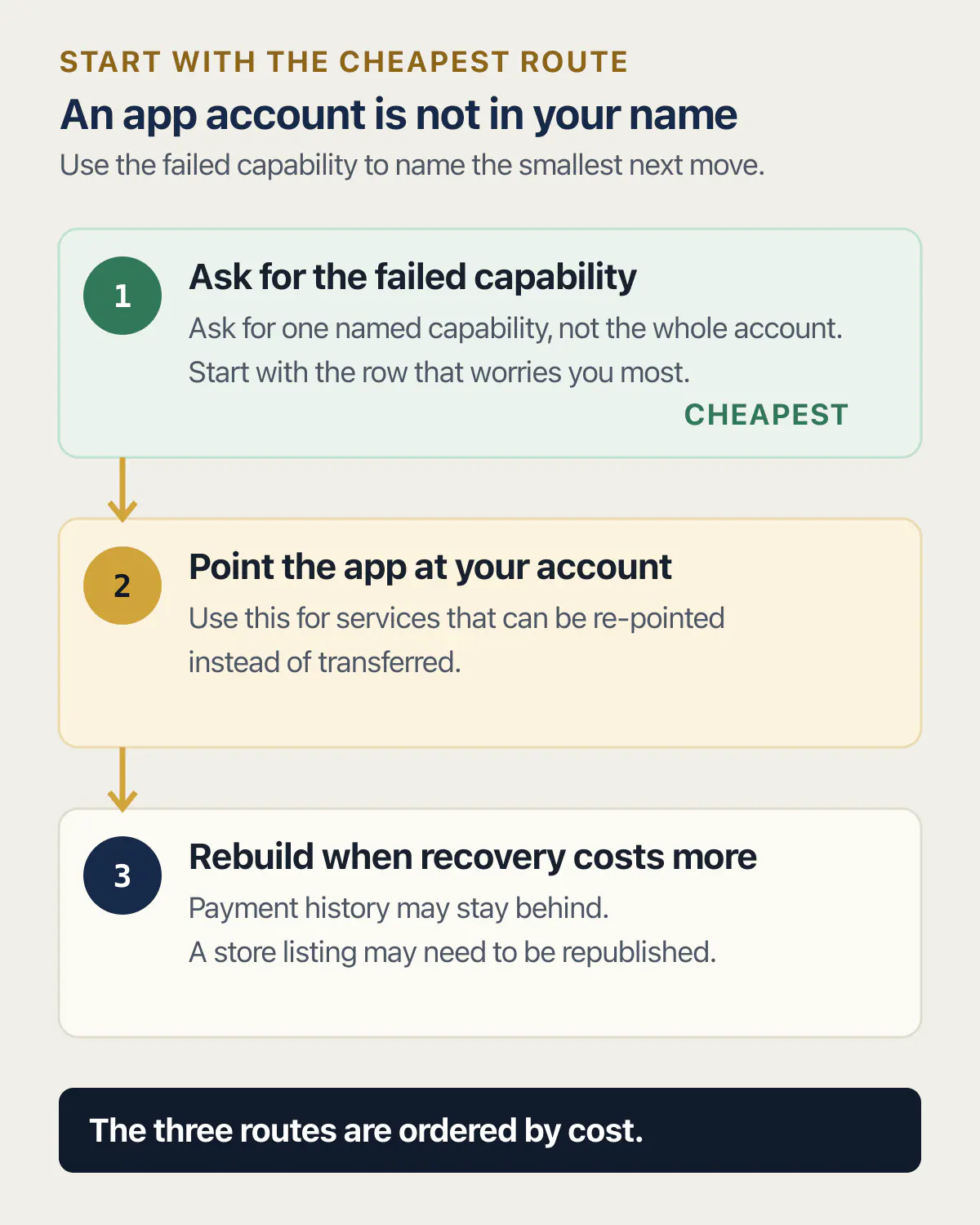
The first and cheapest is to ask for the one capability the check failed on, and only that. Every row above is a capability test, so a no on it has a name: you could not add another owner to the database organisation, or you could not produce the domain’s authorisation code, or you could not remove a person from the analytics property, or you could not read a key. Ask for the capability rather than the account, and ask for one at a time starting with whichever row worries you most. A request that small is answerable in two minutes by somebody who still holds the seat, needs no discussion of the relationship, and leaves a record of what was asked and when. Where the person holding it has stopped answering, the company that runs the account is the only party left with a rule about moving it, and that rule is published.
The second route is to open your own account and point the app at it. This works for anything re-pointable rather than movable: your own database project, email sending account, analytics property, hosting team, and your own keys in all of them. The re-pointing itself costs a day or so of somebody’s attention, and the dependency ends only once what lived in the old account has moved with it: a new database needs the schema and the rows migrated and the app’s connection tested against them, a new sending domain starts with no reputation, a new analytics property starts with no history, and every integration that pointed at the old account needs re-pointing. Budget for those checks separately from the day. Where the code is what you are trying to free, how the code leaves Base44, how it leaves Lovable and how it leaves Replit cover those mechanics platform by platform. Once the code is out, how to self host an exported app covers getting it into a repository and hosting account you own, with no step that still needs the builder.
Accepting that some accounts are cheaper to rebuild than to recover is the third route. A payment account opened in another person’s name, against their bank details, is usually not coming to you, and a new one means your historical payment records stay where they are. A store listing inside somebody else’s membership sometimes has to be republished. Find that out before you commission any more work on the app, not after.
Whoever picks the app up next does not need any of these accounts in their own name. Each of them needs a named seat you granted and can take back. Say that at the start rather than later. If that is where you are heading, the packet a developer taking over actually needs is a different list from this one. Somebody you pay to read the code needs read access and nothing with a card attached. Not holding the accounts is also the single thing that moves a price the most, because nobody can quote finishing an app they cannot get into.
Losing an account is not a vibe-coding problem, which is why it is worth taking seriously: a thread captured on 26 July 2026 in a Roblox support community was titled “I’ve lost access to my account thanks to the support chatbot”. The version that reaches businesses looks like this, from an owner locked out of the platform their clients’ sites ran on:
with zero help from support going on 4 days, with clients websites taken offline and no access to my account for days on end. I’m left with no choice but to migrate off replit.
The detail that makes that an ownership story is the plural. One account held the access for several businesses, so one lockout took all of them down together. Where the conclusion is the same as theirs, when the answer is to leave the builder entirely and paying somebody to move it for you cover what that involves.
What this page does not settle
Nine checks tell you where you stand. They do not tell you what you are owed, and they are not a legal position.
This page does not give legal advice and cannot settle a contract dispute. If a written agreement says the code is yours and the person who wrote it disagrees, that is a matter for a lawyer in your jurisdiction, and the checks above are evidence for that conversation rather than a substitute for it. They also say nothing about whether the app is any good: every one of the nine can be in your name on an app that falls over under ten users.
The vendor facts here are dated on purpose. Every role name, quoted sentence and terms page carries the date it was read, because roles get renamed and terms get rewritten. Buying an app from a stranger asks the same nine questions in a harder order, because none of the accounts are yours yet, and it adds two this page does not ask: is the revenue real, and can the product move to a new owner at all.
One thing genuinely stays open. Nothing on this list proves that nobody else still has a copy. Somebody who held administrator access to your repository last year may have cloned it, and no amount of ownership today reaches backwards to that. Making sure the current keys are new ones is the smallest useful version of closing a door you cannot see.
Common questions about owning the app you paid for
Who owns the code created by AI?
Ownership of AI-generated code is answered in two places that can disagree: the vendor’s terms, which usually assign whatever rights the vendor has to you, and copyright law, which may find there were no rights to assign. Lovable’s terms, effective 15 August 2026, say you own the AI output generated for you, subject to third-party rights in the models, training data or outputs. Anthropic’s consumer terms, effective 8 October 2025, assign you the company’s right, title and interest in outputs. The US Copyright Office addressed the copyrightability of generative-AI outputs in Part 2 of its Copyright and Artificial Intelligence report, published 29 January 2025.
Does AI own your code?
No vendor in this group claims ownership of what its tool produces for you. GitHub’s terms of service, last updated 27 April 2026, state in section J that “GitHub does not claim ownership of your Input or Output.” Lovable and Base44 both put ownership of generated applications with the customer. What several of them do take is a licence back over your material for running the service and training models, worth reading in the terms of whichever tool built your app.
Is it legal to code with AI?
Using an AI assistant to write software is not restricted by any vendor terms reviewed for this page, and the vendors sell the capability openly. The live question is licensing rather than legality. GitHub’s terms warn that output “may contain material that resembles code or content in the model’s training data or that is subject to third-party copyrights or open source license terms”, and place the duty on the user: “You are responsible for determining whether your use of Output requires a third-party license and for complying with any such license.”
What do OpenAI’s app developer terms cover?
This page cannot tell you, and the honest reason matters more than a guess. Both openai.com/policies/developer-apps-terms/ and openai.com/policies/terms-of-use/ refused an automated fetch on 26 August 2026, returning HTTP 403, so nothing here is quoted or characterised from either page. Read them yourself before relying on any summary. What this page can answer is the part that decides whether the app is yours: whichever AI vendor your app calls, the account holding the API key and the card behind it is one of the nine rows above, and if that account is in somebody else’s name your app stops the day they close it.
Do I own my Lovable app?
Lovable’s own documentation and its terms both say yes. Lovable’s hosting documentation states “You own your code and data, and you can host parts or all of your app outside Lovable”, and the terms effective 15 August 2026 say you own your Customer Data, including the applications, websites or other projects you build using the service, along with the AI output generated for you. What that does not cover is the accounts. A Lovable project running on a database, a payment account and a domain held by somebody else is a Lovable app you own inside an app you do not.
My app was built inside somebody else’s account. Is it still mine?
The code and the design work can be yours by agreement while the running app sits in accounts you do not hold, and those two facts do not resolve each other. What you own is what the contract says plus whatever you can reach. The useful move is to ask, row by row, which of the nine you can administer today. That turns an argument into a short list of specific requests, each with a documented rule behind it, which is much easier to get somebody to act on.
Can I check all nine of these without the person who built it?
Yes, which is the point of writing them as capability tests rather than questions to ask. Each row is answered by checking whether the top role’s action is yours to take, without taking it: whether the repository transfer option is open to you, whether you can produce the domain’s authorisation code, whether the add-owner control exists in the database organisation, whether the payment account owner setting is yours to change, whether your sending domain is verified in your own account, whether you are the store account holder, whether you can read a key, and whether you could remove somebody from analytics. Adding a harmless DNS record is the one safe live test; transferring anything, adding owners, rotating keys or removing people is a planned change with its own consequences, so inspect the control rather than pull it. None of the checks needs anybody’s cooperation.
Do I need a lawyer to sort this out?
For the accounts, no. Every row above is a permission question settled by what a vendor’s own documentation says a role can do, and none of it turns on interpretation. For the code it depends on what is in dispute: a written agreement that clearly assigns the work rarely needs one, and a disagreement about what was agreed usually does. Do the nine checks first either way, because a lawyer’s first question will be what you currently control.
What if a company suspends the project the whole app lives in?
Suspension is the failure mode that ignores the contract entirely, because the account holder and the company are the only two parties to it, and a suspended project takes the code, the database and the people using it down together. The defence is boring and it works: keep your own copy of the code somewhere that is not the builder, keep your own copy of the database on a schedule you control, and hold the domain in your own registrar account. None of that prevents a suspension, but all of it decides how long you are down for.
Are the accounts behind your app in your name?
Owning the code means little if the domain, repository or payment account sits with someone else. In an audit, we go over which services your app depends on with you and point out the ones most at risk of locking you out. You leave knowing what to transfer first.
Book a free audit → Free · 30 minutes · No code access needed