A multi-tenant SaaS, as this page uses the words, is a subscription software product that already has paying customers and holds more than one customer’s records inside one running application. A tenant here is one customer’s company, not somebody renting a flat. The moment this page is about is the one where a paying customer stops being a person and turns into five people who all need to sign in.
Your product already answered this question. It was answered the day somebody typed add login, and the answer touches four things: whose records are whose, who may invite the fourth person, what the word admin covers, and what you are counting when you charge. Working out which answer you got takes no code.
Two words posted publicly in August 2026 carry the whole problem, in a thread titled “Multi-tenants advices”. Somebody is living this and does not yet have the words for it. One owner said their product ended up serving a set of separate organisations, each with its own people inside it, and that they had not written any of the code. That is the reader this page is for.
Everything below is read from published pages rather than from a build. Four tool makers’ own documentation on how they create users and permissions, read raw and dated on 2 September 2026 with each page named in the sentence that uses it, one platform vendor’s own architecture guidance for what the words mean, and the pages on this site that already own the policy layer, linked rather than repeated. No account was opened, no app was built, and no permission model was set up, tested or run for this page. Nothing here rates, scores or recommends a builder, a vendor or a way of storing your customers.
No price appears anywhere below. The rules themselves, the ones written against your database, belong to the pages that own them, and this page stops one level above, at the decision that settles which rules you need.
The week one customer turned into five logins
It arrives as an ordinary message and rarely sounds structural. A customer asks whether their colleague can have a login too. Or an invoice goes out to one person and comes back with a note asking for it in the company’s name, because three people there use the product now. Or somebody signs up with a work address, gets in, sees an empty screen, and writes to ask where the data their colleague entered has gone.
Those are one event in three sets of clothes. A customer that used to be one person has become a company, and the product has no idea companies exist.
What you typed, months ago, was add login. Every builder in this market answers that instruction well, and answers it as a question about people: you got a list of people, a way for each to prove who they are, and a rule that each reaches their own things. Nothing in the instruction mentioned a customer that contains people, so nothing in the result has one.
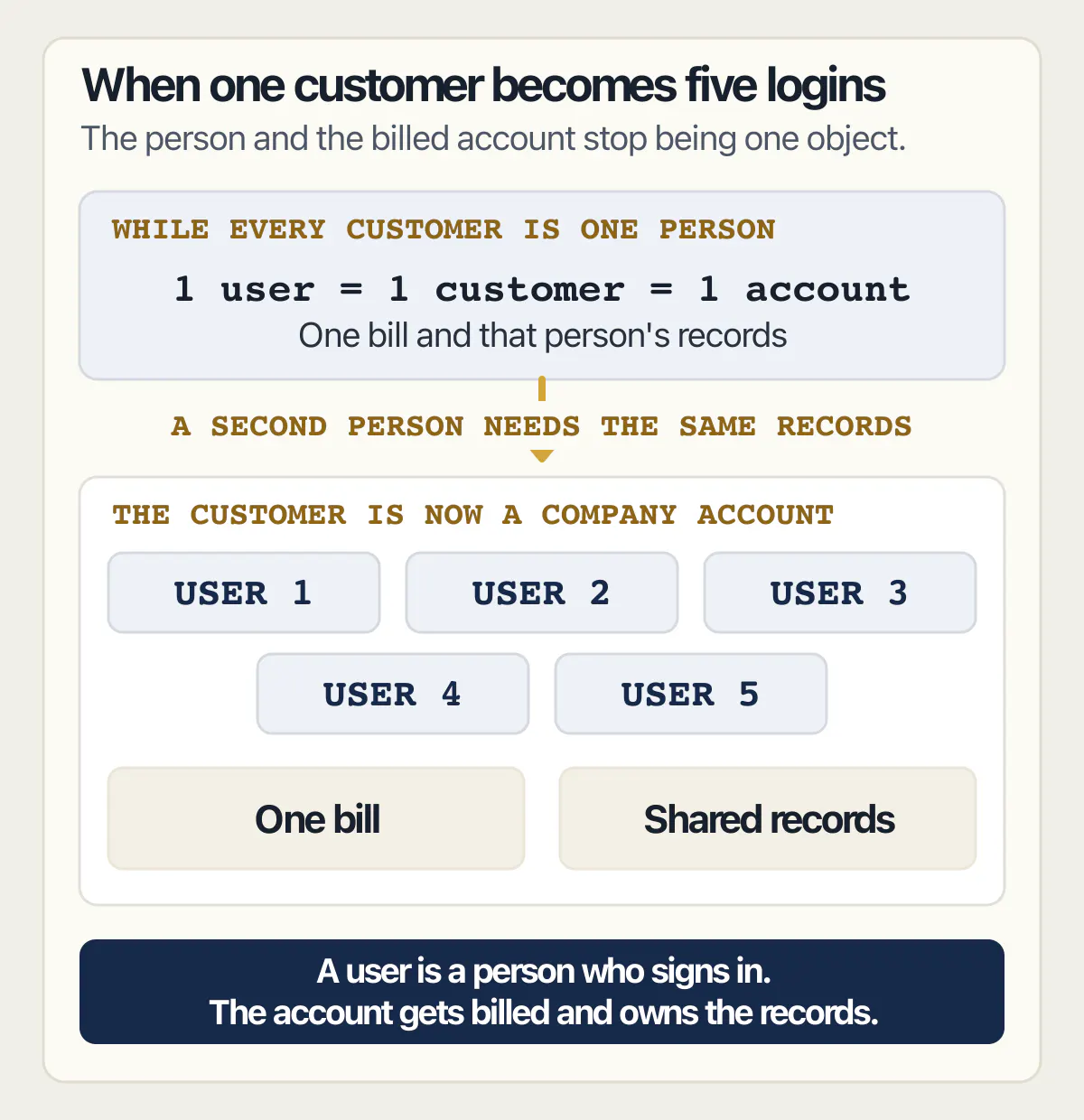
While every customer was one person, the person and the customer were the same object and the product was right about the world. The first time they come apart, four separate things start giving wrong answers at once, and they give them quietly: nobody sees an error, they just see the wrong screen or the wrong bill.
It also hurts to find late because the correction is not a screen. Adding a company to a product that has none means changing what every existing record belongs to, and the work tracks how much data is already in there.
A customer asking to sign in with their own company login is a different request from a customer needing five people inside one account, and the single sign-on page answers that one. This page stays on the second, because it is the one that changes what your product is.
Owning a subscription product after it launches is a wider job than this one decision, and that page holds the whole of it.
What is the difference between SaaS and multi-tenancy?
SaaS is how the software is sold and multi-tenancy is how it is put together. Microsoft’s own architecture guidance keeps the two apart in a single sentence, and the version that matters to an owner is that they answer different questions: what you charge for, and how many customers sit inside one running copy of your software.
Microsoft’s guide to SaaS and multitenant solution architecture, read on 2 September 2026, puts it plainly: “SaaS and startups are business concepts, and multitenancy is an architecture concept.” The same page defines the second one without the vocabulary that usually comes with it. “Multitenancy is a way of architecting a solution to share components between multiple tenants, which usually correspond to customers.”
Two more sentences cut off the wrong conclusions an owner draws. The first: “Multitenancy doesn’t imply that every component in a solution is shared. Instead, it implies that at least some components are shared across multiple tenants.” The question is never all or nothing, and a product that keeps one thing apart per customer and shares everything else is a normal shape rather than a broken one.
The second: “How you define a tenant and choose a tenancy model depends on whether your business model is B2C SaaS or B2B SaaS or you’re a large organization.” That says the definition of a tenant follows from who you sell to, so if who you sell to has changed, the definition you are running is out of date.
Which is where most readers of this page are. Search the phrase and you get architecture guidance written for somebody choosing a design before a product exists: shared against separate databases, per-customer compute, routing by subdomain, noisy neighbours. You are not choosing. You have a product with money coming into it, and the only live question is which shape you are already running and whether it still matches what you sell.
One of the eight applications read at the code level on the examples page is a business dashboard whose customers shared a single table; that page describes what was found in it, and this one describes the decision that leads there.
The four things that break when a customer becomes a company
Four things move at once, which is why this is a product decision rather than a technical preference. Sold as a feature the bundle is usually called organization accounts, or teams, or workspaces. Set out as user roles and permissions it looks like a settings screen. Set out as what the customer now expects against what the product actually does, it looks like this.
| What the customer now expects | What a product built for one person does |
|---|---|
| Their three people see the same records | Each person sees only what they put in |
| Their office manager adds and removes their own staff | Only you can create a login |
| One of them is in charge, the others are not | Everyone signed in has the same powers |
| One bill for the company, sized by how many of them use it | One subscription attached to one login |
Every row in that table is a decision you make and somebody else writes down. None is a setting you can turn on, and none is a question anybody outside your business can answer for you.
Data separation
The rule your product is almost certainly running is that each person reaches the things they created. It is the right rule for a product sold to individuals, and the first thing to break, because the point of a company account is that two people reach the same thing without either having created it.
Replacing it means naming what a record belongs to, which is a different question from who made it. Once a record belongs to a customer company, who may see it becomes a question about which company that person is in, with a different answer for every record already in the product.
There is a second consequence owners find surprising. If a person’s own account carries the marker saying which customer they belong to, anything that lets them edit their own account details is also a way to change which customer’s records they reach. That is why the belongs-to question has to be settled somewhere the person cannot get at.
Whether a rule attached to a table is the right place to enforce the separation, and what such a rule cannot decide once it is written, is settled on the page about row level security; this page stops at the product question of who a record belongs to.
When the customer is a company rather than a person, an export request arrives from somebody inside it, and who is entitled to which records is answered on the user-data export page.
Invites
Somebody has to be allowed to add the fourth person. If that somebody is you, every new colleague at every customer becomes a message in your inbox for the rest of the product’s life. If it is the customer, you have to decide which of their people may do it.
The builders have already made a version of this choice for you. Base44’s documentation on choosing who can access your app, read on 2 September 2026, ties invite permissions to the app’s visibility: on a private app only admins can invite people and choose whether the new person is a user or an admin, while on a public app admins can invite and choose roles, and “People with the user role can invite other users.” That is a real decision about who may grow somebody else’s account, made in a setting.
The other half of invites is what becomes of somebody’s work when they leave. The records they created are the company’s and the login is theirs, and those two claims pull opposite ways the day they are removed.
Removing one person without removing the work their colleagues still need is a deletion question with its own page and its own order of operations.
Roles
Admin of what. That is the whole question, and the two answers are miles apart: an admin of your product sees every customer, while an admin inside one customer’s account sees that customer and nothing else. Products that get this wrong usually have exactly one kind of admin, and find out when a customer asks for a manager who cannot see the billing.
Base44’s page states the starting position without ambiguity. “Roles control what each person can do on your live app. By default, every app includes 2 roles”, named Admin and User, with Admin able to manage the areas restricted to admins on the live app and User able to view and use it with no special permissions. Read as an owner, that is two roles spanning the whole product, and neither sits inside one customer’s account. Extra roles are something you ask for.
The vocabulary is worth fixing early too, because “admin” said by a customer and “admin” said by your product usually mean different people.
Billing per seat
Counting people instead of accounts changes what a subscription is attached to. It stops belonging to a login and starts belonging to a company, and the number driving it is how many of that company’s people are active. That number has to come from somewhere the product actually knows, which means the seat count and the list of people who may sign in are the same list.
The failure here comes from keeping two lists, one deciding who may sign in and one deciding what the customer pays, and letting them drift apart until somebody notices the company removed two people last spring and kept paying for them.
What happens to somebody’s access when the money stops is a payments question with its own page, and no version of its mechanism is repeated here.
What your builder set up while you were not looking
In each of the four documentation sets read for this page on 2 September 2026, what the tool ships is a single flat list of people, and a customer company is a thing the owner has to define. That is the honest default for a product whose first hundred users are individuals, and it decides whether yours can hold a customer company at all.
| Documentation page, read 2 September 2026 | What it says the tool sets up for the people who use your app |
|---|---|
| Lovable, “Users and authentication” | Sign-up and login pages wired to the backend, plus a Users view holding a signups chart and a searchable list of every user |
| Base44, “Managing data permissions” | Data permissions set up automatically as the app is built, adjustable in chat or by hand |
| Bolt, “Database: User Management” | A sign-ups graph, the most recently added users, invitations by email, creating and deleting users, and search by email or ID |
| Supabase, “Auth” | User data kept in the project’s own database, connected to your tables by work somebody does |
Lovable’s Users and authentication page is the clearest statement of what the instruction actually buys. “Ask Lovable to add login, and it generates the signup and login pages, wires them to your backend, and protects user data with row level security.” Its Users view shows a signups chart and a searchable list of every user, an Add user control offering either “Send invitation” or “Create new user”, and, on any one user, their user ID, their sign-up and last sign-in timestamps and login methods. Every one of those is a fact about a person.
Lovable’s separate page on security best practices for Lovable apps is where the customer company finally appears, as a pattern you can ask for rather than a thing you have. It names four access patterns that most apps on the tool fit: personal data, team-based access, public content with ownership, and organisation-based access. Team-based and organisation-based access are the shapes that hold a company, and neither is what you get by default.
Base44 documents the permission side in more detail than the others. Its page on managing data permissions states that “Base44 automatically sets up data permissions as you build your app”, then names four rule types: All Users, Creator Only, Entity-User Field Comparison and User Property Check. Creator Only is “A person can only access records they created”. Entity-User Field Comparison is “A person can only access a record if a field on that record matches their account details”. The way they combine is one line: “If a person matches any one rule, they get access.”
Read that as an owner. Creator Only is per person. The comparison rule can carry a customer company, and Base44’s own worked example for a multi-tenant app does exactly that, but only once somebody has put a company marker on every record and on every account. Neither rule knows what a company is until you supply one.
Supabase’s own Auth documentation explains why roles feel harder than logins. It draws the line first: “Authentication means checking that a user is who they say they are. Authorization means checking what resources a user is allowed to access.” Then it says the people live in the project’s own Postgres database, kept apart from your product’s data, and that “You can connect this data to your own tables using triggers and foreign key references.” Sign-in is supplied. The connection between the person and your records is work.
Supabase’s page on custom claims and role-based access control finishes the thought: building role-based access there means creating your own tables to track which people hold which roles and which roles carry which permissions, plus a hook that runs before a sign-in token is issued so the role travels with the person. That is a product built inside your product, not a switch.
Every one of the four documents how a person gets into your app. Only one shows how a company is held, and only as something the owner sets up.
Four things are worth stating precisely, because each is true of a named page on a named date rather than of a whole product.
As of 2 September 2026, Bolt’s Database: User Management documentation page describes individual users only: a sign-ups graph, a list of recently added users, invitations by email, creating and deleting users, and search by email or ID. It names no customer organisation, team or role object in its own body copy; the team and workspace entries beside it in the documentation navigation are about your Bolt account, not your app’s users. That is a statement about the body copy of that one page, not about everything Bolt documents.
As of 2 September 2026, Lovable’s “Users and authentication” page documents, in its body copy, individual users, their sign-in methods and the controls on who may sign up, and names no object for a customer company inside your app; the workspace it does name is your own Lovable workspace, and the other pages beside it in the documentation navigation have their own subjects. Organisation-based access appears on the separate “Security best practices” page as one of four patterns a builder can be asked for. That covers the body copy of those two named pages.
As of 2 September 2026, Base44’s “Managing data permissions” page documents the customer-company case only as a thing the owner sets up. Its worked example, headed “Multi-tenant app (for example, a SaaS platform or school system)”, uses Entity-User Field Comparison to match a company field on each record against the same field on the signed-in person’s account, so that “Each person only sees records that belong to their company”, and says admin access within a group is that rule combined with a User Property Check on the admin role. No rule type does any of it on its own: the company marker goes onto every record and every account first. That covers that one page.
As of 2 September 2026, the two roles Base44’s “Choosing who can access your app” page says every app includes by default, Admin and User, are roles across the whole live app rather than roles inside one customer’s account. Sharing an app with a whole group is stated on the same page as an Enterprise feature. That covers that one page.
Lovable’s security page also carries the line that decides how urgent any of this is: “Lovable sets up basic RLS policies automatically, but you should review and adjust them early in development”, and “RLS is much easier to change before real data exists…” Every customer you add before deciding what a record belongs to is another row somebody has to move later.
How much more checking a product with roles and separate customers needs before it is ready is set out on the Lovable readiness page, and this page never repeats its counts.
How to tell which one you already have
You can find out which shape your product is running without reading a line of it. Four questions do it, all four answered from the outside, by looking at the product the way a customer does.
What does the sign-up screen ask for. If it asks for an email address and a password and nothing else, the product’s idea of a customer is a person. If it asks for a company name, or asks the second person to enter a code or accept an invitation, somebody has already built a container for people. Which of those you see is the fastest single indicator there is.
Can anybody be added to somebody else’s account. Open the product as a customer would and look for the place where an existing customer adds a colleague. If there is no such place, every colleague is a separate customer with a separate pile of data, whatever your billing says. If there is one, look at who may use it.
What is the invoice addressed to. A subscription attached to a person and a customer that is a company will disagree the first time the person leaves. If the paying record names an individual and the account holds three individuals, you already have the mismatch, and it surfaces the day one of the three asks to take the account with them.
What happens on the second login. Create a second account against the same customer, however you would do it today, and see what it can reach. Reaching everything means the two accounts are sharing with every other customer too. Reaching nothing means colleagues cannot work together. Where it reaches exactly that customer’s records, somebody has already built the container and you can stop worrying.
That last check has a formal version, and it is not this page’s job. Proving the separation holds is a test with two accounts and a procedure of its own, written out on the testing page; what this page decides is which two accounts you should be testing with.
When a much larger customer sends a form asking whether one of their people can reach another customer’s records, the page about answering that form takes it row by row. It is the same question as the second check above, arriving with a deadline attached.
How long each of those records is kept, once they belong to a company rather than to a person, is the retention page’s job. Keeping the accounts straight is one item on a longer standing list of technical jobs an owner of a subscription product cannot skip, and the hub page for running one without a developer holds the rest of that list.
Is multi-tenancy good for a SaaS you did not write?
The question is already settled, and you settled it. Every subscription product with two paying customers is running one of these shapes, so the live question is whether the version you have still matches what you sell. Where the two have come apart, the gap is a list of specific decisions, never a verdict on a design.
Nothing in the ranked guidance on this phrase changes that. Those pages weigh isolation against cost for somebody at a whiteboard. You have customers, records and a bill going out, so the only version of the question you can act on compares two things you can observe: what you sell, and what the product currently believes a customer is.
Three states are worth telling apart. Selling to individuals with a product that treats a customer as a person is the state where nothing is wrong and nothing needs doing. The mismatch this whole page describes is the second state, where the customers are companies and the product still thinks in people, and it gets more expensive with every record added. Third, and commoner than anyone plans for, is selling to both, which means the product has to hold two shapes at once and get the rules right twice.
None of that answers whether the mismatch is worth fixing yet. That depends on how many of your customers have more than one person in them, and on what the largest of them is about to ask for. Both are numbers you have and nobody else does.
How do you build a multi-tenant SaaS when you are not a developer?
Four decisions are yours: what a record belongs to, who may add and remove people inside a customer, what admin means in your product, and what you count when you charge. Nobody can make them for you and no builder will infer them from a chat message. Writing them down is the part you buy.
Take them in that order, because each constrains the next. What a record belongs to comes first, since every other decision assumes an answer to it. Who may invite comes second, because it decides whether you or the customer runs their user list. Admin comes third, because it means nothing until there is a customer to be admin of. Counting comes last, because it reads from the first three.
Write each as a sentence about your business rather than about software. “A record belongs to the company that bought the plan, not to the person who typed it in.” “The person who signed the account up can add and remove their own colleagues, and nobody else can.” “An admin manages their own company’s people and settings, and sees nothing outside it.” Those are more use to whoever does the work than any diagram, and you can write them today.
Paying somebody to add company accounts to a product that already sells to individuals is a buying decision with its own page, and what to ask for before anyone starts is set out there. The short version: ask for a plan covering the records that already exist, because this is a data change wearing a settings screen.
Expect the first attempt to surface errors rather than silence, and treat that as the system working. The message an app returns when a write is refused has its own page and its own list of causes; it is a symptom of the rules being wrong, never a way to choose them.
Common questions about SaaS accounts and permissions
What does multi-tenant mean in software?
Multi-tenant, in software, means one running application serving several separate customers whose data is kept apart from each other, and it has nothing to do with renting property. The customers are called tenants. Microsoft’s architecture guidance defines it as sharing components between multiple tenants, which usually correspond to customers, and adds that it does not mean everything is shared, only that at least some of it is. For an owner, the working meaning is that a customer is a container holding people, and the container either exists in your product or it does not.
Do I need a separate database for each customer?
Almost certainly not, and it is the most expensive answer available. A database per customer means separate copies of every change, separate backups, separate restores and separate versions of everything that goes wrong, which is a heavy job for a small product and a permanent one. The common shape is one database where every record carries the customer it belongs to and the rules refuse anything else. Where one customer contractually demands their own copy, that is a commercial conversation about that customer rather than a design for the product.
Can one customer’s admin see another customer’s data?
They should not be able to, and whether they can depends on what your product means by admin. If admin is a role across the whole product, an admin created for one customer can reach everything, which is the mistake to look for. If admin is a role inside one customer’s account, they see that customer only. Base44’s documentation shows both halves of this. Its two default roles are stated as roles on the live app rather than roles inside one customer, so an admin made for one company is an admin of everything until the second meaning exists. Its data permissions page documents that second meaning as something you set up: an admin inside one customer is the field comparison rule combined with a check on the admin role.
What is the difference between a user and an account in a SaaS?
A user is a person who signs in. An account is the thing that gets billed and owns the records. While every customer is one person the two are the same object, and nothing forces you to tell them apart. The first company that buys separates them permanently: five users, one account, one bill, one shared set of records. Products that never make the split end up with five accounts pretending to be one.
Should invites go through me or through the customer?
Through the customer, in almost every case, once you have more than a handful of them. If invites go through you, every staff change at every customer arrives as a support message and the product cannot grow past your inbox. The real decision is which of the customer’s people may send invitations, and the builders differ on what they hand you. Base44’s documentation, read on 2 September 2026, ties it to visibility: on a private app only admins can invite, while on a public app people holding the plain user role can invite other users.
What happens to a customer’s records when one of their people leaves?
The records stay and the login goes, which is only simple if the records belong to the company rather than to the person who created them. Where the product says each person reaches what they created, removing a person hides their work from colleagues who still need it, which is how deletions turn into emergencies. Settle what a record belongs to first and this answers itself. The order of operations for actually removing somebody who has also asked to be erased is a separate procedure with its own page.
Does charging per person need a different setup from charging per company?
It needs one more thing: a count you can defend. Charging per company only requires knowing which company. Charging per person also requires knowing how many are active right now, held in the same place as the list of who may sign in, so the two never disagree. That is why seat counting is a data question before it is a pricing one.
Can I add company accounts to a product that already has individual users?
Yes, and the cost tracks how much data is already in there rather than how complicated the feature sounds. Every existing record belongs to a person today and has to be given a company to belong to, which means deciding what happens to people who are their own company, to records nobody claims, and to two people at the same firm who signed up separately. That list of decisions is the work.
If you have a working app built with these tools and need it ready for real customers, this is what we do.
Built it with AI. Now it has to hold up for real customers.
The Production Hardening Sprint takes the app you already have and builds the production foundation underneath it. Authentication and access rules, payments that stay consistent, error handling, monitoring, backups, automated tests and a documented handover. Our engineers work inside your existing codebase for ten working days. All 123 deliverables are included, and you get the evidence for each one.
See the Production Hardening Sprint →  $2,500 fixed price · 10 working days · One codebase