Single sign-on, in the sense this page uses it, is the login requirement a business customer sends you, not the government office or the online game that share the same three letters. SaaS here means a subscription software product of your own that already has paying customers. The moment is an email from somebody at a company that buys from you, asking whether your product supports single sign-on, and expecting an answer this week.
Three different requests hide inside that one phrase, and they cost different amounts on different meters. Before you price anything or promise anything, send two questions back: which identity provider their staff sign in with, and whether anybody needs accounts created and removed automatically.
One owner in the middle of a conversation with a much larger customer listed what that customer was asking for, and said the tool the product was built on could not do any of it. That account belongs to the page about the owner whose large customer asked for things the builder could not produce, and it is not retold here. The request arrives attached to a deal, which is why the honest answer beats the fast one.
Every figure and mechanism below comes from a raw read of the identity vendors’ own pricing pages and product documentation, and of two AI builders’ own documentation, on 2 September 2026, rather than from any summary of them. The corpus voices are given in their own words with no name and no address attached. Where another page on this site already owns a figure or a mechanism, it is linked rather than restated. Nothing here was built, integrated, configured, tested or run for this page, no vendor account was opened, and no product was scored, ranked or recommended.
What does a customer mean by SaaS single sign-on?
One of three things, and they are not the same size. An identity provider login over SAML or OIDC is the one the vendors meter per customer. A social login with a work Google or Microsoft account is often something your product already offers. Automatic creation and removal of staff accounts is a separate product with its own meter.
The first request is the one the phrase was invented for. WorkOS puts the mechanism plainly in its own single sign-on documentation: “This service is compatible with any IdP that supports either the SAML or OIDC protocols.” The identity provider is the software your customer’s IT team already uses to decide who works there. Okta, Microsoft Entra ID and Google Workspace are the names you will hear. When this request is granted, your product stops deciding whether a person at that company is allowed in, and asks their employer instead.
The second request is a social login. Somebody at the customer wants to press a button that says continue with Google and get in with the work account they already have open. It looks identical to the first one from the outside, and on the vendor pages read for this article it is the one that carries no connection charge. The next section separates them.
The third request is automatic provisioning, and it usually travels under the name SCIM. WorkOS defines it in its Directory Sync documentation as “an open standard for managing automated user and group provisioning”, and defines provisioning as creating a user and setting attributes for them inside an app, with deprovisioning as removing one. In plain terms: when the customer hires somebody, an account appears in your product without anyone asking you, and when that person leaves, it disappears the same way.
Somebody who had built a product without being a developer listed what theirs needed, and single sign-on sat in the middle of the list like any other feature:
I vibe coded a local delivery platform… invite users, single sign on, chat, upload image proof, real time notification.
That is exactly how the phrase reaches most owners. It is one item on a list, sitting between a chat window and a push notification, with no hint that it is metered by the customer rather than counted as one more thing built.
Two words from the vendors’ own glossaries are worth having before you reply, and both come from Supabase’s SAML 2.0 documentation. A NameID is described there as “A unique ID (usually an email address) that identifies a user at an Identity Provider”. An Assertion Consumer Service URL is where the identity provider sends its answer back to, and the same page calls it “the URL where Supabase Auth will accept assertions from an identity provider”. If a customer’s IT contact asks you for those two things and you have never heard of either, that is a sign the setup happens between two systems and both halves have to be filled in, rather than a sign the request is beyond you.
So the reply that saves the most time is short. Which identity provider do your people sign in with, and does anyone need accounts created and removed automatically when staff join and leave? The first answer tells you whether this is the metered request. The second tells you whether a second one is hiding behind it.
The version most customers mean, and why it barely costs anything
Ask the two questions and one answer that comes back is: our people all have work Google accounts, can they just use those. If that is all they mean, it is a social login, your product may already offer it, and turning it on for one more customer is a check rather than a project. If they mean their IT team holding the switch, it is the metered request, and the rest of this page applies.
The vendors themselves draw the line in money. WorkOS publishes a go-live checklist for single sign-on, and one item on it settles the whole question of which request you received: “Only enterprise connections in your Production environment will be charged. OAuth connections in Production will be free.” Read on 2 September 2026, that is one vendor separating the two things your customer might have meant, with one of them carrying no charge at that vendor.
The panic that follows the email is usually about the wrong request. A customer whose staff use Google Workspace and who says single sign-on may want the enterprise connection, with their IT team holding the switch. They may equally want the button, in which case the product already does it and the next step is to check that your sign-in screen shows the option to a first-time visitor from their domain.
One person described building a company’s whole internal system from nothing, with a single company-wide login on the front of it. That shape is now ordinary. The catch for a non-developer is that the ordinary version and the metered version reach you in exactly the same words.
What SSO for SaaS costs, and what the meter is counting
At WorkOS the enterprise request is metered by the customer rather than by the person, and the other vendors below add monthly-active-user caps and base tiers to that count. WorkOS answers the question directly in the frequently-asked block on its own pricing page: “A connection represents the relationship between WorkOS and any group of end users. Each enterprise customer you support with SSO or Directory Sync is counted as one connection.” The follow-up answer removes the other assumption people arrive with: “No, each connection at WorkOS is billed the same, regardless of the identity provider (IdP), directory service used, or the total number of end users.” Both read 2 September 2026.
That reverses the intuition. On that ladder your largest customer and your smallest customer are the same line on the bill, so the first customer who asks carries the entire cost of the capability and the tenth costs the same as the first. WorkOS prints the ladder on the same page: connections 1 to 15 at $125 / ea, 16 to 30 at $100 / ea, 31 to 50 at $80 / ea and 51 to 100 at $65 / ea. Its Directory Sync product, which is the automatic provisioning half, is priced on an identical ladder starting at $125 / ea, so SCIM is a second meter rather than something included with the first.
Other vendors put the same capability in a different place on the ladder, and where they put it is the useful comparison. Auth0’s pricing page, in its B2C view, gives a Free tier at $0 / month for up to 25,000 monthly active users, and lists 1 Enterprise Connection, Self-Service SSO and SCIM inside it. The two paid consumer tiers above it, Essentials at $35 / month and Professional at $240 / month, both cap at 500 monthly active users and both carry the same footnote: “Upgrade to B2B to continue using EC, Self-Service SSO, and SCIM.” Paying more, on that view of that page, removes the thing the free tier had.
Frontegg’s pricing page puts five of them in the free tier: Pay as you go at $0 /month, always including 7,500 Monthly Active Users and 5 Enterprise Connections (SSO/SCIM). Descope’s page starts at Free Forever $0 with 7,500 monthly active users, 3 SSO connections and 1 Federated app (OIDC), then Pro from $249 /mo billed annually with 5 SSO connections and an additional connection fee of $50, then Growth from $799 /mo with 10 SSO connections. On that page SCIM provisioning appears in the Growth list and in neither Free nor Pro, which is the same pattern as the WorkOS ladder in a different shape: automatic provisioning sits one step above the login itself. Clerk’s pricing page includes 1 Enterprise connection on its Pro plan and prices further ones at Additional $75/mo each.
Every figure below is that vendor’s own published wording at the tier named, read raw from its own pricing page on 2 September 2026. Prices checked 2 September 2026. Nothing here is a ranking, none of these five is recommended over another, and the fourth column is worth reading first.
| Vendor, as it names itself | Free or entry tier, for enterprise logins | A further connection | Where automatic provisioning first appears |
|---|---|---|---|
| WorkOS | Free to build in staging; only production connections are charged | Connections 1 to 15 at $125 / ea | Directory Sync, its own ladder from $125 / ea |
| Auth0 (B2C view) | Free tier lists 1 Enterprise Connection, Self-Service SSO, SCIM | Not published on this view | SCIM listed on Free; the paid B2C tiers above it footnote an upgrade to B2B to keep it |
| Frontegg | Pay as you go at $0 /month includes 5 Enterprise Connections (SSO/SCIM) | Not published; the tier above is Custom | Bundled into the same connection count |
| Descope | Free Forever $0 includes 3 SSO connections | $50 per extra connection on Pro | SCIM provisioning, first listed on Growth |
| Clerk | Hobby: enterprise connections not included. Pro: 1 Enterprise connection | Additional $75/mo each | Not named anywhere on that pricing page |
That last cell is a documented absence and nothing more: read raw on 2 September 2026, the Clerk pricing page carries no occurrence of the letters SCIM in its readable text. The claim covers that one page on that day, and says nothing about Clerk’s documentation elsewhere.
If your product’s login sits on a platform you already pay for, that platform may meter this itself, and the number belongs to the page that already carries it: what Supabase’s own auth meter charges for SAML. For contrast, what Vercel charges for its own SAML sign-on prices your deploy team’s access to Vercel, the other kind of single sign-on described further down, and says nothing about your app’s customers. Neither figure is repeated here.
One question this section does not answer is what somebody would charge to do the work of wiring it in, which is a different number from the running price and moves for different reasons. That question belongs with the rest of what one more feature costs on a product that is already live, and the page that breaks a build price down feature by feature is the place it gets answered.
What changes in an app that was built with AI tools
The answer depends on what your product runs on, and the documentation is specific enough to check for yourself.
If the login lives on Supabase, the capability exists and has two conditions in front of it. Supabase’s enterprise single sign-on documentation states that “Supabase Auth supports building enterprise applications that require Single Sign-On (SSO) authentication with SAML 2.0”. Its SAML 2.0 guide then names the prerequisites: “This guide requires the use of the Supabase CLI. Make sure you’re using version v1.46.4 or higher”, with the supabase sso subcommands used to manage the configuration. The same page states that “SAML 2.0 support is disabled by default on Supabase projects” and that “SAML 2.0 support is offered on plans Pro and above”. Both read 2 September 2026. For a non-developer that is the sharp bit: it cannot be switched on from a settings screen, because the vendor routes it through a command-line tool, and the project has to be on a paid plan first. Which outside providers Supabase documents first-class support for is a separate list, and it sits inside the guide to writing Supabase’s own row-level security policies.
If the product is a Base44 app, Base44’s own single sign-on documentation describes a different protocol and a different gate. It says single sign-on lets people sign in with an external identity provider that supports OpenID Connect, naming providers “such as Google, Microsoft, GitHub, Okta, Apple, or Kakao”, and states that “Single sign-on (SSO) is available for Base44 apps on the Elite plan or higher”. It also puts the account work on you: creating and managing the client ID, the client secret, the redirect URI and any other credentials happens inside the identity provider’s own dashboard rather than inside Base44. One more line on that page is the sort of thing that produces a confusing first test: “By default, an SSO login runs through app.base44.com even when your app has a custom domain”, and keeping the login on your own domain requires a verified custom domain before the option can be turned on. All read 2 September 2026, and what each Base44 plan costs is on the page that tracks the price list.
If the product was built on Lovable, its documentation now separates the two audiences on purpose. The page for app end users opens by saying it lets end users of your app “sign in with their company identity provider, such as Okta, Microsoft Entra ID, Google Workspace, or any SAML 2.0 IdP”, and adds a limit worth knowing before you promise anything: “Service provider (SP)-initiated sign-in only. Users must start sign-in from your app.” A customer whose IT team expects a tile in their own dashboard can still have one, as long as the tile links to the sign-in start in your app; what that page rules out is the identity provider sending an unsolicited sign-in to your app. The same page also warns that your sign-in screen still needs an entry point that starts the flow, which is the step that makes a correct setup look broken to the first person who tries it. Read 2 September 2026.
What a builder’s own published controls settle, and what your own app still has to answer for, is worked through row by row on the read of one builder’s published compliance material.
None of this touches the other half of what a business customer usually wants. Letting a company’s identity provider decide who gets in says nothing about which records each of those people may then see, and who may read which records is settled somewhere else entirely. If what the customer really needs is several of their staff inside one account, with invites, roles and a per-person bill, that is a change to what your product is rather than a change to its front door, and the page about a customer turning into a company with several logins is the one that works it through.
What happens to the people already signed in
Three things change for the customer whose staff already have accounts, and none is obvious from the outside.
The first is the existing password account. WorkOS answers this on its go-live checklist, and the answer is reassuring: the emails are usually the same for both ways of signing in, so you can match on the email address and carry the person across rather than making them start again, provided the address arrives from that customer’s own identity provider and the link is made only inside that customer’s tenant. The same page adds the consequence: “Once SSO via WorkOS is enabled, you can restrict users to sign in with only SSO.” That is a choice rather than a default, and it is the choice your customer’s IT team is actually asking you to make, because the point of the request is that leaving the company should end access to your product too. Ending it means two further checks of your own: sessions that are already open have to be closed, and the password route for those accounts has to be shut.
The second is everybody who has not signed in yet. WorkOS names three provisioning strategies in its just-in-time provisioning documentation: self-registration, provisioning through Directory Sync, and just-in-time provisioning through single sign-on. It defines the last one as follows: “Just-in-time user provisioning creates a user in an app when the user attempts to sign in for the first time.” So an account can exist the moment somebody arrives, which is usually what you want, and it also means your user count can move without anybody signing up. Read 2 September 2026.
The third is the stored password itself, which does not travel the way people expect when a login provider changes underneath a product. That is a whole subject on its own, and what happens to stored passwords when the login provider changes is the page that holds it.
Sign-in is one of several purchases that turn a working demo into something taking real money from strangers, and [the page listing the rest of them in order](/blog/before-you-turn-on-payments/) is worth reading before this becomes the only thing on your list. If the symptom is instead that people cannot get in today, that is a different page again: [the one about what a builder’s own login does and does not cover when customers are locked out](/blog/users-cant-log-in/).
The single sign-on on your builder’s price list may not be the one your customer means
This is the correction most likely to save you a wasted week. Open the pricing page of any builder, host or code tool and single sign-on is somewhere on it, usually near the top of the most expensive plan. What that line covers is not fixed. On some tools it governs how your own team signs in to the tool, which is a real thing to want and a different purchase from the one your customer is asking for. On others it is what your own app can offer the people who use it, which is the request. The price list itself rarely says which.
Lovable documents the split explicitly, which makes it the cleanest evidence available. Its workspace single sign-on page describes itself as covering workspace-level access to Lovable itself and points readers who want the other thing at a separate page for app end users, and it states outright: “Both are different features.” The same page says “Single sign-on (SSO) is available on Business and Enterprise plans”, which is a plan requirement for your team’s access to the tool and has nothing to do with your customer’s staff. Read 2 September 2026. A reader who sees only the price list, and not the two documentation pages behind it, has no way to tell those apart.
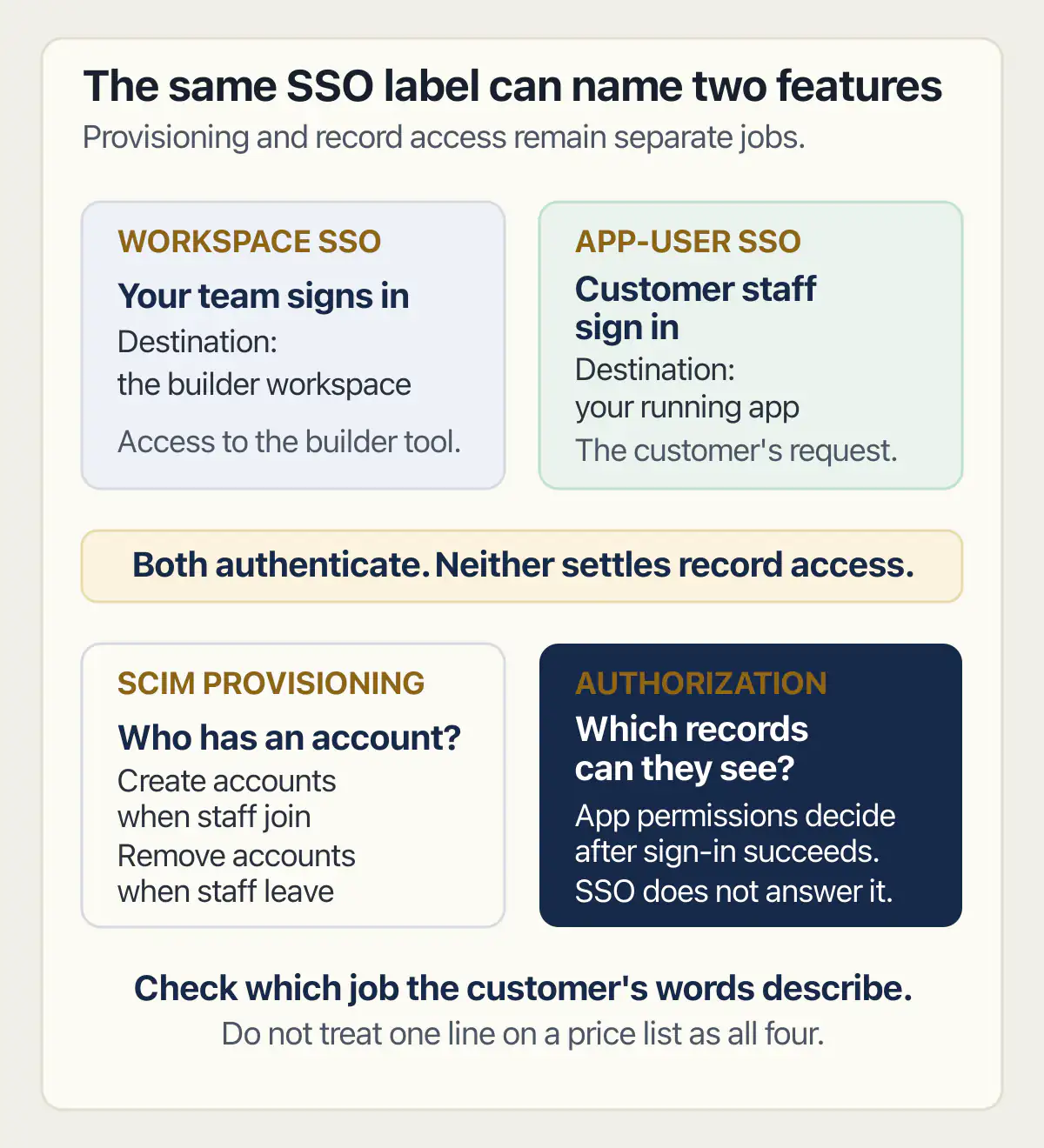
The same trap sits on the hosting side, where the line item covers the people deploying the product rather than the customers using it. A requirement from one customer is also the commonest reason owners start wondering whether the builder itself is the problem, and whether a customer’s requirement is a reason to leave your builder at all is settled on its own page, more often with a no than owners expect.
So the honest reply is often not yet, and it does not have to cost the deal. Say which of the three requests the product supports today, name the one it does not, give a date you will decide by rather than a date you will ship by, and offer the social login now if that is what their people need. Deals are lost by a vague yes far more often than by a specific no. When the request arrives buried in a longer list of questions sent by the customer’s own procurement team, the rest of that list has a page to itself, and this one covers only the row about signing in.
I do not sell single sign-on, do not act as an identity vendor, and am not one of the options on this page.
Two things worth knowing sit just outside this page. The full set of requirements a first enterprise customer tends to arrive with, of which the login is only one, is its own subject, as is the customer who asks for the product to run on their own servers rather than yours. Both change the shape of a deal more than a login does.
Common questions about adding single sign-on to your SaaS
What is single sign-on for a SaaS product?
It is an arrangement where a business customer’s own identity system decides which of their people may get into your product, instead of each of those people holding a password you issued. WorkOS describes the mechanism as authentication through an organisation’s identity provider, compatible with any provider that supports the SAML or OIDC protocols, read 2 September 2026. For the owner of a subscription product, the practical effect is that access is granted and removed at the customer’s end, once your product also closes open sessions and any other way of signing in for those accounts.
Is SSO the same thing as letting people log in with Google?
No, though the two look identical to whoever is pressing the button. A social login authenticates one person through a consumer account. An enterprise connection ties your product to a whole company’s identity system, which is why vendors price it per company. WorkOS states the split in money on its go-live checklist for single sign-on: only enterprise connections in production are charged, and OAuth connections in production are free, read 2 September 2026.
What is the difference between SAML and SSO?
Single sign-on is the outcome, and SAML is one of the two protocols used to produce it. The other is OIDC, which is built on OAuth. Which one you need is decided by your customer’s identity system, not by you: Supabase’s enterprise documentation covers SAML 2.0, while Base44’s own single sign-on documentation describes OpenID Connect, both read 2 September 2026. When a customer’s IT contact names a protocol, they are telling you which of the two their side speaks.
Do I need SCIM as well, or is single sign-on enough?
Only if the customer wants accounts created and removed automatically as staff join and leave. Single sign-on decides who may get in right now; SCIM keeps the list of who exists in step with the customer’s own records. WorkOS defines SCIM as an open standard for automated user and group provisioning and prices it as a separate product on its own connection ladder, read 2 September 2026, so it is a second decision with a second cost.
The wider question of several people from one company sharing one customer account, with invites, roles and a bill that counts seats, is a different subject with its own page.
What does adding single sign-on to a SaaS application usually cost?
At WorkOS, Clerk and Descope the running price is set per enterprise customer connected rather than per person signing in; Auth0 and Frontegg instead cap monthly active users on the tiers that include the connections. On their own pricing pages read 2 September 2026, WorkOS lists connections 1 to 15 at $125 / ea, Clerk includes one enterprise connection on Pro and prices further ones at Additional $75/mo each, and Descope charges $50 for an extra connection above the five included on Pro. Auth0 and Frontegg both include enterprise connections in a zero-cost tier. What somebody would charge you to wire it in is a separate number, and the page that prices a build one feature at a time is where that belongs.
Will my existing customers have to create new accounts?
Usually not. WorkOS states on its go-live checklist that a person who already has a username and password account can be carried across by matching on the email address, which is normally the same for both ways of signing in, and that sign-in can then be restricted to single sign-on only, which is the step that closes the old password route. Read 2 September 2026. The people who have never signed in can be created at their first arrival, which WorkOS calls just-in-time provisioning.
My builder’s pricing page already lists SSO. Is that the same thing?
Not necessarily. The same three letters cover two different products: your own team signing in to the tool, and your app’s users signing in through their employer. Your customer is asking about the second. Lovable documents the two as separate features on separate pages, one for workspace access to Lovable itself and one for the end users of an app, read 2 September 2026. Check which of the two a price list is describing before you assume you have already paid for it.
Can I tell a customer not yet without losing the deal?
Yes, and a specific no travels better than a vague yes. Name which of the three requests your product handles today, say plainly which one it does not, and give a date by which you will have decided rather than a date by which you will have shipped. If what they need is the work-account button, offer that now, because it is the request without a connection charge, and it may be all they meant.
Answering a form like that for the very first enterprise customer, rather than the tenth, has a rhythm of its own, and it is worth reading up on before the form arrives.
Where this leaves you
Read the email again before you reply, because the three requests inside it are worth very different amounts and the phrase does not distinguish them. Send the two questions back the same day. Then check what your own product runs on, and which of the two things your builder is selling, before you agree to anything with a date on it.
Fixing the bug in this guide gets you past today. If you would rather have the whole foundation checked and built in one go, that is what the sprint below is for.
Built it with AI. Now it has to hold up for real customers.
The Production Hardening Sprint takes the app you already have and builds the production foundation underneath it. Authentication and access rules, payments that stay consistent, error handling, monitoring, backups, automated tests and a documented handover. Our engineers work inside your existing codebase for ten working days. All 123 deliverables are included, and you get the evidence for each one.
See the Production Hardening Sprint →  $2,500 fixed price · 10 working days · One codebase