A post on a builder community at the end of August 2026 opened with the title “My MVP is up and running”. That is a real state, and it is also further from a paying customer than it sounds. An application that runs is an application that runs for you, on your machine, with your account already signed in. Between that and a stranger typing a card number sits a list of things somebody has to buy, and the list is longer than most owners expect because none of it looks like work. It looks like admin. Owners usually meet the list one item at a time, in the worst possible way, which is by finding out that the next item was missing.
Moving an MVP to production is a sequence of purchases, not a single job. Eight things have to be bought between a working demo and a paying customer, and the application decides the order rather than you. Two of the eight cannot be skipped. The other six can be deferred, each at a cost you can see in advance.
What “MVP to production” means when a tool wrote the code
Production, on this page, means the version real strangers use and pay on. It does not mean a stage in a delivery framework. It is unrelated to the most valuable player in a sports league, and unrelated again to the ad-blocking hosts file that dominates one of the nearby searches.
If the thing was assembled in Bolt, Lovable, Replit, Base44 or Claude Code and it works when you press the button, this page is about everything between that and money. The going-live half of the phrase “MVP launch” is the half this page serves. Telling people it exists, and the calendar that runs backwards from the parts you cannot hurry, is a different job from getting it able to take a customer, and the launch itself, and the week after it is where that half is worked through.
Somebody put the whole shape of this page into a question on a builder forum, without meaning to:
I’ve created a PoC with solid business logic using Claude, and am trying to migrate it to Lovable to (i) improve UX/UI, and (ii) turn it into a shippable product, incl. Login, backend, Supabase, etc. Anyone tried?
Read past the product names and what is left is the structure of the problem. Something demonstrably works. What has to be true before it can be sold is a named list, and they are reciting it. Nobody in that thread disagreed about the list. The disagreement, then and now, is about the order.
That is also the gap on the search results for this question. The ranked pages divide into three groups: glossaries defining the term, community threads asking how long the move takes, and agency essays about scaling a validated product into a bigger one. Two of the ranked essays were read end to end on 1 September 2026. Cobe’s piece at cobeisfresh.com/blog/from-mvp-to-full-product-how-to-scale-your-minimum-viable-product runs through re-evaluating what you learned, defining the full product, stabilising the code, building a team, measuring better and staying focused. Codebridge’s at codebridge.tech/articles/mvp-vs-full-product-when-to-scale-up-and-how-to-do-it-right gives four signals that say scale up and six areas to work on. Neither names a single thing to buy. Both are named here rather than linked, because both companies sell development services.
Where the AI tools get you, and where they stop, is the map underneath all of this, and finishing an unfinished MVP is the wider job this list sits inside. MVP development as a whole subject is bigger again, covering what to put in one and how to test whether anybody wants it. This page is the going-live slice of that subject and nothing else. If the honest question is instead whether the builder you used can carry a real product at all, that is tool-specific: whether Lovable is production ready has its own answer, and so do its competitors.
The order the application forces: what you buy, and when
Eight purchases, in an order the application sets rather than you. Each row becomes possible only once the one above it is done, which is why this sequence survives contact with a real week better than any framework does.
| What you buy | What it actually is | Who sells it | How you know it is closed |
|---|---|---|---|
| 1. The code, in your account | A repository and a builder project owned by you, not shared with you | Your code host, and the builder | You can add and remove people yourself |
| 2. Somewhere to run it | A host serving the app at an address you control | A hosting platform. Which one is a real decision | The builder’s preview can go dark and the app stays up |
| 3. A name people can type | A domain, and the certificate that stops the browser warning | A registrar | The address loads on a phone, on mobile data |
| 4. Accounts that survive strangers | Sign-in, sessions, and rules about who may read whose rows | An accounts vendor, or your database platform | A second account cannot reach the first one’s data |
| 5. A way back to yesterday | Backups you have actually restored once, and somewhere to test changes | Your database host | A restore happened and the app ran on it |
| 6. Money you can take | A payment account out of test mode, with the live keys swapped in | A payment processor | A real card paid a real amount and it settled |
| 7. Finding out it broke first | Error recording, plus something checking the app answers at all | An error tracker and an uptime checker | A deliberate error arrived somewhere you read |
| 8. A person who answers | Somebody named and reachable who can change the running app | A developer, on some arrangement | You know who to contact and they have access |
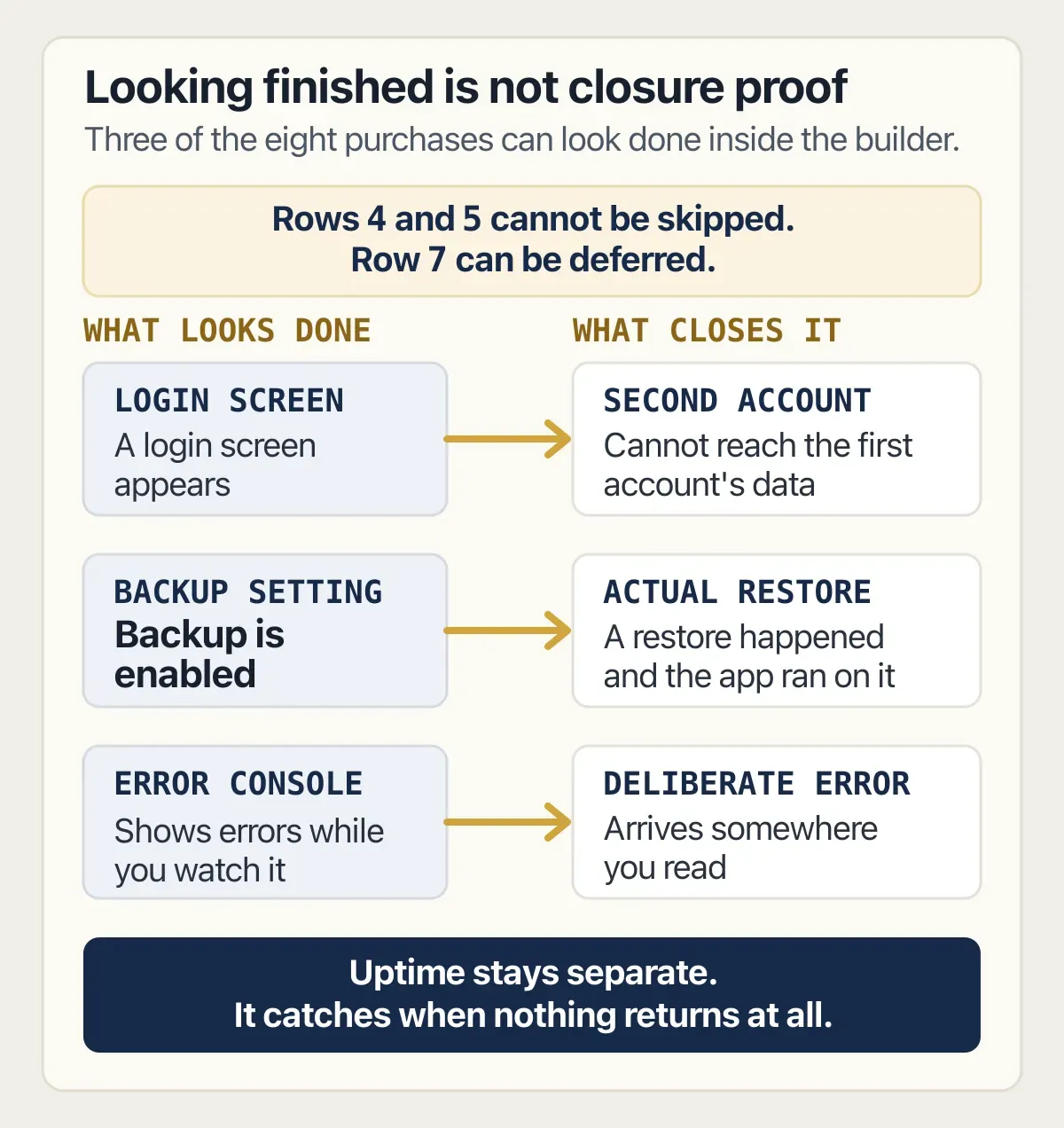
Two of the eight cannot be skipped: number 4 and number 5. Everything else on the list fails visibly and recoverably. Those two fail invisibly and permanently. A permissions gap does not announce itself, and once one customer has read another customer’s rows you cannot un-read it for them. A missing backup costs nothing at all until the afternoon it costs you everything, and no amount of money spent afterwards buys back a table that was never copied. Both of them also look finished from inside the builder, and that is what the section below is for.
The other six can be deferred, and the price of deferring each one is knowable before you decide. Skip number 3 and you live with an ugly address, which costs you trust and nothing else. Skip number 7 and your first report of a broken checkout arrives as a complaint rather than an alert, so the cost is measured in the hours between the break and the complaint. Skipping number 2 means you inherit the builder’s outages as your own. Without number 1 you have not lost anything yet, only made the eventual move slower and more expensive. Skip number 6 and there is nothing to protect, because there is no revenue. Leave number 8 open and nothing about the running application can change until you have found somebody, which is the one deferral whose bill arrives on the day something is already broken.
Row 1 is the one owners hear least about and regret most. Which accounts have to end up under your own name, taken one service at a time, has a specific answer for each, and that answer is rarely the default the builder set up. Row 3 is the shortest of the eight in effort and the most commonly botched in practice; getting the thing onto an address of your own, and the four things that usually break the first time, is walked through step by step elsewhere.
Row 6 deserves its own warning. Switching the payment account on is the smallest part of that row. The conditions that have to hold before a first card is charged make a longer list than the switch does, and reading that list before you flip the switch costs less than reading it after the first refund request.
The three steps an AI builder makes look finished
Rows 4, 5 and 7 share a property that makes them dangerous rather than merely undone. Inside the builder all three look done: a login screen, a backup setting somewhere in a database dashboard, a console showing errors while you watch it. None of that is the same as the purchase being made.
The audit notes behind that corpus record a shape that explains why. Across the third-party applications in AxonBuild’s fixed June and July 2026 study of 26 real applications, controls turned up written into the code and connected to nothing that runs. Read the files and the control is there. Run the application and it has never once executed. The audit index records that shape by example with no count attached to it, so this page prints no percentage for it, and the cohort and method behind that study live on the page that owns both. What the pattern does to a purchase decision is the part that matters here. An owner reading their own repository, or asking the builder whether the thing is handled, gets a true answer to the wrong question.
Row 4 is where this bites hardest, because sign-in is the part of an application that most looks like a solved problem. A login screen appearing is evidence that a login screen exists. It is not evidence that the second account cannot read the first account’s rows, which is a separate rule living in a separate place. Somebody trying to buy exactly this described where it lands:
Can I have a production SSO that handles google at least, but ideally facebook and apple? … It’s been giving me endless problems and circular logic.
That is one item on the sequence refusing to close, and notice that the person is not confused about what they want. They can name it precisely. The thing will not finish.
Row 5 is the quietest of the three. A backup setting that is switched on is a promise, not a restore. The purchase closes when a copy has been pulled back into a running application and the application worked on it, which is a thing you do once and then know. Until then the row is open, whatever the dashboard says.
Row 7 splits into two products that owners often think are one. Error recording catches the failures that happen inside a request that otherwise returned normally. An uptime check catches the case where nothing returns at all. Neither sees what the other sees. Whether this one is worth buying yet, at the size you are, has its own answer, and the honest version of that answer is not always yes.
What the phrase means about the code itself, as opposed to what it means about the purchases on this list, is answered separately. What production-ready code actually means is the code half of the question, and this page is the buying half.
Who runs it, and who answers when it breaks
Rows 2 and 8 are the pair owners most often buy as one thing. One is a machine that serves the application. The other is a human being who can change it after something goes wrong. They are priced differently, they fail differently, and no invoice that covers the first covers the second.
Renting the first does not get you the second, and no host has ever claimed otherwise. One owner sizing up the same move wondered aloud whether the person who put the thing on a server ought also to be the person on call for whatever needed changing later. Another wrote the request out as one line of shopping: take what the builder produced, get it in front of real customers, and stay with it once it is there. Both are describing a bundle, and both bundles come apart the moment you try to price them, because the first half ends and the second half does not.
The second half is the harder purchase, and it is harder because it has no natural end. A host bills a meter. A person is an arrangement, and arrangements need a shape agreed in advance: who is reachable, on what days, for what class of problem, and what happens when the answer turns out to be bigger than a same-day fix. The after-part has roughly four honest shapes, and picking the right one for your size is a decision in its own right. Whether a monthly arrangement is even the right way to buy it is a separate question again, worth settling before you agree to one rather than after three quiet months of paying for nothing.
Giving the entire application to one person who runs it from that day on is a different purchase from anything on this list, and it is bought differently too. Handing the whole project over is a decision about who owns the thing, not about which item to close next.
Once all eight are bought, somebody has to be named against each of them, and that assignment has a page to itself. Naming somebody against each row is what turns eight purchases into an application that keeps working while you sleep, and nobody sells you that part, because it is not a product.
What the sequence costs, and the prices this page does not print
The fixed monthly part of this sequence is the smallest part of it. The rows with a published price start free at the size an early application actually is, and what grows later is metered by traffic rather than billed at a flat rate. Everything else is one-off spending, or a person’s time.
Every price below was read off the seller’s own pricing page on 1 September 2026. Where a page builds its prices with a script instead of printing them, the figure came from the plan data inside that page and the sentence says so. The order of the list is AxonBuild’s own reading of what a working application forces its owner to buy next, taken from documented analysis of the 26 applications audited in June and July 2026 rather than from any seller’s published stages.
Two of the eight rows have published prices you can read today: accounts on row 4, and both halves of row 7, which are sold by different companies.
For row 4, Clerk’s pricing page on 1 September 2026 lists a Hobby plan at Free, with no credit card required and a stated limit of 50,000 monthly retained users per app. Its Pro plan is printed on that same page as $25/mo, or $20/mo billed annually, and the Pro card states that 50,000 monthly retained users are included per app with additional users at $0.02/mo each. The free tier is named first because most MVPs never leave it. The paid one is named because the features an owner actually needs on row 4, once real strangers arrive, tend to sit above the free line.
For the error half of row 7, Sentry’s pricing page on 1 September 2026 lists a Developer plan at $0 for one user, with 5k errors on its plan-comparison table. The Team plan is printed at $26/mo when billed annually with default pre-paid data, with 50k errors, and Business at $80/mo on the same annual basis.
For the uptime half, UptimeRobot’s pricing page does not print its plan prices into the plain HTML. As of 1 September 2026, that page ships its plan data as escaped JSON and paints the numbers with a script, so the figure here was read out of the page’s own embedded plan data rather than off the rendered page. In that data the Solo plan’s first tier, 10 monitors, is priced at $10 a month billed monthly and $9 billed annually, and carries a 60 second monitoring interval. The plan below Solo is free, and for an application at this stage the free one is usually the honest answer.
Four other prices belong on this list and are deliberately absent from it.
The machine bill is the first. Hosting, the database, transfer and every other meter the running application spins are not priced here, because they are metered rather than fixed and they change with your traffic. What the running application then bills you every month, once all of this is switched on, is its own arithmetic with its own meters, and it deserves to be read as one number rather than eight. The card-processing fee sits in the same place. That fee is worth knowing about, and it never decides whether row 6 closes. Switching the account on does.
The second is the paperwork. Terms, a privacy notice and whatever your payment processor asks to see before it lets you take live cards are a real step and this page states no figure for them, because the sellers in that market price the same tier differently depending on who is reading the page.
The third is a domain, which is cheap, permanently recurring, and priced by the letters after the dot rather than by anything you decide.
The fourth is labour. What a seller charges to do this work on your behalf is a published number on several pages, sold by the package, and it is worth reading beside this list rather than instead of it. What an MVP costs to have built in the first place is different again from all of these, and what a developer costs by the hour is a third question with a third answer.
One seller’s published sequence is worth setting beside this one, because from a distance it resembles this page’s list. It begins where somebody outside first opens the codebase and ends where the application is live, it attaches a length to every step, and every step is sold as a package. That sequence answers a different question: what it costs to have somebody else do the work, measured in one company’s labour. This page runs on another axis entirely. It is the order in which a single application forces its own owner to make purchases, and several of those purchases are not labour at all. Row 5 is a habit somebody keeps. Row 8 is a relationship. Both sequences can be true at once and neither is a version of the other.
Work of that size gets a price only once the code has been looked at, because the eight rows above arrive in a different state in every application. One stuck row in an application that already runs is the natural first job.
Where this list stops
Being live is not being finished, and the list above deliberately stops at live. It says nothing about whether anybody wants the product, whether the workflow it exists for holds up under a second user, or whether the code underneath will still be changeable once somebody new has to change it.
Whether what you have clears the bar for real users at all is decided by evidence you can produce for each of seven separate gates, and that verdict is worked out in one place rather than repeated here. That question and this one get confused constantly, and they point opposite ways: the gates ask whether the thing is good enough, and this page assumes it already is and asks what is still unbought.
One founder whose demo was already public said the next thing they wanted to buy was somebody senior enough to turn it into a real product other software could connect to. That is a fair description of where the eight rows leave you, and also of what they do not cover. Closing them buys you the right to be judged on the product rather than on the plumbing. It does not buy you the judgement.
Common questions about moving an MVP to production
What is an MVP in production?
An MVP in production is the first version of a product, running where real strangers can reach it, on infrastructure and accounts that belong to the owner rather than to the tool that built it. The word production describes where the software lives and who depends on it, not how complete the feature list is. A minimum viable product can be in production while still being minimal; what changes is that failures now reach other people.
What do I need to buy before I can launch my MVP?
Close the eight purchases above first, then announce it. The table’s order is the one the application forces, and two rows in it cannot wait: accounts that hold up under a second user and a backup you have restored, because those two fail silently. The domain, the monitoring and the payment account can be prepared alongside them, and everything else on the list can go out imperfect and be improved in public.
Announcing it, including the calendar that runs backwards from launch day and the first week afterwards, belongs to the separate page on launching an app.
What does “MVP launch” mean?
The phrase is used for two different events. One is going live: the software moving from a preview only you can reach to an address anybody can. The other is going public: telling people it exists, posting it, and getting the first users through the door. The two rarely happen on the same day, and confusing them is why owners announce a product that cannot yet take a payment.
Is my MVP ready for real users yet?
Readiness is a separate judgement from this list, decided on evidence rather than on feeling, and there are seven of those gates to clear. This page assumes a yes and asks what is still unbought. If you genuinely cannot tell yet, settle that first, because buying eight things for an application that is not ready is an expensive way to discover it.
Where should I run an MVP once it leaves the builder?
Anywhere that serves it at an address you control and stays up when the builder does not. The real decision is between staying on the platform’s own hosting, which is simplest and couples your availability to theirs, and moving to a general host, which is more setup and separates the two. Either answer is fine while the app is small; what is not fine is not knowing which one you are on.
Do I have to move the code out of the builder first?
No, and for row 2 you often should not. What you do have to do is own the account the code sits in, which is a different thing from moving it. Ownership means you can add and remove people, change the billing, and export without asking anybody. Plenty of applications run happily on a builder’s own hosting for a long time; almost none survive the owner not controlling the account.
How long does moving an MVP to production take?
It depends almost entirely on how many of the eight rows are already partly done, and the two that cannot be skipped are the two most likely to be nowhere. Rows 1, 3 and 6 are mostly pressing buttons in dashboards you already have accounts for. Rows 4, 5 and 8 are the ones that stretch, because each of them ends in a check that either passes or sends you back, and a check that sends you back is what turns a short item into a long one.
Can I keep taking money while I do this?
Yes, if row 6 is already closed and you are working on the others around it. The risky version is the reverse: opening payments while row 4 or row 5 is still open, which means you are holding other people’s money and card details on an application whose permissions and recovery have not been checked. The conditions that should hold before a first card is charged are worth reading as their own list.
What does the whole sequence cost?
Less than owners expect in fixed monthly fees and more than they expect in attention. All three vendors named above publish a free tier that an early MVP fits inside, which covers accounts, error recording and the uptime check. The costs that actually accumulate are the metered ones, which scale with traffic, the domain on row 3, which recurs for as long as you hold it, the restore habit on row 5, and the human one on row 8, which is the only item on this list that needs a relationship rather than a setting.
If this checklist left you with more open items than you expected, the sprint below works through all of them in ten working days.
Built it with AI. Now it has to hold up for real customers.
The Production Hardening Sprint takes the app you already have and builds the production foundation underneath it. Authentication and access rules, payments that stay consistent, error handling, monitoring, backups, automated tests and a documented handover. Our engineers work inside your existing codebase for ten working days. All 123 deliverables are included, and you get the evidence for each one.
See the Production Hardening Sprint →  $2,500 fixed price · 10 working days · One codebase