A customer who says the app has to run on their own servers means infrastructure their company controls: a cloud account their finance team pays for, or hardware standing inside their own building. It is not the home-lab sense of self-hosting, where somebody runs software on a spare machine at home because they enjoy it, and it is not your servers under a politer name. The sentence usually arrives in the middle of a deal that was going well, written by somebody in procurement for whom it is a routine line and who may assume it is routine for you.
That one sentence is doing five different jobs, and which job it is doing depends entirely on who typed it. Some readings are a setting you change this afternoon and a paragraph you write back. One reading is a different shape of business. The phrase itself does not say which arrived, and the distance between the cheapest reading and the most expensive one is wide enough that answering before you know is the worst move available.
“On our servers” usually means one of five things: the buyer’s cloud account, a dedicated copy, their own building, a named region, or software they install and run themselves. Two, the region and the dedicated copy, may need no move, when the data already sits in the right region and the isolation already exists. The other three put a copy of your product somewhere you do not control. Find out which before you answer.
Nothing on this page was tested, hosted or moved for it. The vendor facts come from two platform region pages and from the deployment glossaries that enterprise infrastructure vendors publish about their own model, each read in full on 3 September 2026, each carrying its read date where it is quoted. Legal advice appears nowhere below, and no line here rules on whether your app satisfies a contract somebody else drafted.
The five things a customer can mean by their own servers
Procurement language is not standardised, and the same requirement arrives in five different phrasings depending on who typed it. The enterprise infrastructure vendors who sell one of these shapes publish glossaries defining it, so the words have settled meanings even when the email does not.
| The phrase in the email | What it asks for | What it asks of an app built with AI tools | Where the answer sits |
|---|---|---|---|
| In our own cloud account, or bring your own cloud | Your product running inside infrastructure they pay for and control | A repeatable install of the whole stack, not one deploy somebody clicked | What agreeing puts on you, below |
| Single tenant, or a dedicated instance | Their data and their copy kept apart from every other customer’s | Either one deploy per customer, or isolation you can already prove inside one copy | What needs no move, below |
| On premises, or inside our network | The software installed on machines they run, behind their own network | Every hosted piece needs a form that can be installed elsewhere | What can move, below |
| Our data has to stay in a named region | The records stored somewhere they can name in a contract | A region setting, or the platform’s own rule for a project that already exists | What a region promises, below |
| Self-hosted | Them running your product, with your instructions | A working copy you can hand over, and somebody on their side to run it | What can move, below |
Start with the one the sellers have written most about. Bring your own cloud, usually shortened to BYOC, has published definitions because several infrastructure companies sell it. Confluent’s explainer of the model, read on 3 September 2026, defines it as “a deployment model where organizations host applications and data in their cloud accounts, instead of in vendor’s accounts”, and Confluent sells a product in exactly that shape, so read the definition and the sales case separately (confluent.io/learn/bring-your-own-cloud/). Northflank, which also sells the model, defines it on its own post, published 23 January 2025 and read on 3 September 2026, as letting “enterprises deploy software directly within their own cloud infrastructure instead of vendor-hosted environments” (northflank.com/blog/bring-your-own-cloud-byoc-future-of-enterprise-saas-deployment). Both definitions describe a copy of your product running where the customer, not you, holds the account.
Single tenant is a narrower ask and it is often the one hiding inside the others. A buyer who says it usually wants to know that their rows cannot be reached from another customer’s login, and a dedicated copy is the crudest way of proving that. It is worth asking whether they mean a copy of their own or an assurance about the one you already run, because those are separate pieces of work with separate answers.
On premises is the literal reading, and it is the one that asks most of a product that has only ever run in one place. Confluent’s same page describes the self-managed alternative as customers “installing and managing the software on their own hardware or cloud infrastructure”, with what it calls full operational responsibilities on the customer. If that is genuinely the ask, the question is not whether you are willing but whether an installable form of your app exists at all.
A named region is the reading with an answer sitting in a dashboard. It is also the setting easiest to misread from either side, and the next section takes it apart.
Self-hosted is the phrase people reach for when they mean any of the other four, which is the whole problem with it. The self-hosted phrasing assumes you can hand a working copy over, so what comes out of each builder decides whether you can promise one.
Which of the five you can answer without moving anything
Two of the five can be answered without moving anything: a region is a setting for a new project, though an existing project in the wrong region may need a migration, and a single-tenant question is often a description of the product you already run, provided the dedicated copy already exists or can be provisioned. The other three all end in a copy of your product running somewhere you do not control, and even then only part of the system goes.
A named region is a control in a dashboard on most managed platforms, and the section below reads two of those platforms’ own pages on what the control does. A single-tenant question is often satisfied by explaining, in writing, how one customer’s records are kept off another’s, which is a description of the product rather than a change to it. Whether one running copy of your product can hold two customers apart is a decision about your own product, and it is settled separately from where the servers sit.
Two lines that travel with this request are not about servers at all, and both get answered elsewhere. One of them is not about servers in any sense, because what the model vendor keeps after your app calls it is a separate term with a separate answer, settled with that vendor rather than with your host. The other is the buyer’s paperwork: a report, a questionnaire or a signed agreement, none of which moves a single byte. The servers question rarely arrives on its own, and the rest of the list a first enterprise buyer sends has an order of play of its own.
What a region setting actually promises
A region control says where a project normally runs. On the two platform documents behind this section, that is what the vendors themselves say it is: a primary location, chosen by you or chosen for you inside an area, with published behaviour for the day the location is unavailable.
On the database side the choice comes in two strengths. Supabase’s available regions page, read on 3 September 2026, lets a project name an exact AWS region, or pick one of three broad areas and let the platform place it inside that area according to the capacity it has that day. The page is direct about the difference. A broad area can put the project somewhere that does not match a jurisdiction named in a contract, so the page tells anyone with a residency requirement to name the region instead of the area.
The application usually runs on a different platform from the database, and the second half of the answer lives there. Vercel’s global network and regions page, stamped “Last updated August 11, 2026” and read on 3 September 2026, sets out what happens when a region stops answering: “In the event of regional downtime, application traffic is automatically rerouted to the next closest region.” Next closest is a published list rather than a guess. The page prints a priority order behind a region selector, and for the region functions run in unless somebody changed it, that order works through four more North American regions before it crosses to Ireland and on into Europe. The page adds one line for the top plan: “For Enterprise customers, Vercel functions can automatically failover to a different region if the region they are running in becomes unavailable.”
That is resilience, documented in public, rather than a defect, and most buyers would rather have it than not. It is also exactly what a residency sentence written by somebody who has never opened a hosting document fails to anticipate, and it lands much better raised by you in the reply than found by them in a review.
So the sentence to send back is a narrow one. A region setting names where the project normally runs, and the platform publishes where the work goes when normal stops. Whether the contract wants the first, the second or both is a question for whoever wrote the contract, and asking it in those words costs one email. The buyer who wants a promise about every location and the buyer who wants a setting in a dashboard send the same sentence.
What can move, what cannot, and where that is already written
Most of the mechanics of an actual relocation are worked through elsewhere on this site, and repeating them here would only make them staler.
Before you agree to anything, it is worth knowing the layers of a builder-made app, and which one stays a managed service, because only some of them can follow the app into a customer’s account. The pattern holds beyond one builder: the running application and the data under it are portable in a way the tool you write in is not.
If the answer does turn out to be a move, the rows, the files, the secrets and the passwords all behave differently, and what an export carries and what somebody rebuilds by hand is where that is set out. The short version is that the schema and the code travel, exported rows and files can be restored, and the accounts, the secrets, the passwords and anything tied to the old platform’s own services have to be recreated.
This request is the one buyer demand that sometimes forces a move and usually does not, and whether this trigger requires leaving the builder at all is settled against the other triggers rather than on its own.
Three questions to send back before anything changes
The reply that saves the most work is three questions, and all three are about the deal rather than the technology.
-
Which specific records have to sit where, and who inside your company decided that? The answer separates a contract term somebody can quote from a preference somebody assumed. It also tells you whether the requirement covers the database, the files, the logs, the backups, or all four, which are four different pieces of work.
-
Do you mean a copy that runs in your environment, or the existing product with your data kept apart from other customers? This is the single most useful question on the list, because the two readings sit at opposite ends of the work. It is also the question a buyer can answer from their own requirements, because the answer is already written down there.
-
Who operates it afterwards, and who do you call at three in the morning when it stops? A copy inside a customer’s account is a copy somebody has to patch, restart and restore. If neither side has said out loud who that is, the deal carries an obligation nobody has counted, and each party is assuming it belongs to the other.
Send the three, and wait. A buyer who cannot answer the first question may be relaying a requirement from a colleague, and that colleague is the person you actually need. A buyer who answers all three in one reply has told you, in their own words, which of the five phrasings they meant.
What agreeing to it puts on you afterwards
Agreeing to run your product in somebody else’s cloud account moves the operational duties as well as the software. The vendors who sell the model say so on their own pages, which is the most useful thing about their glossaries.
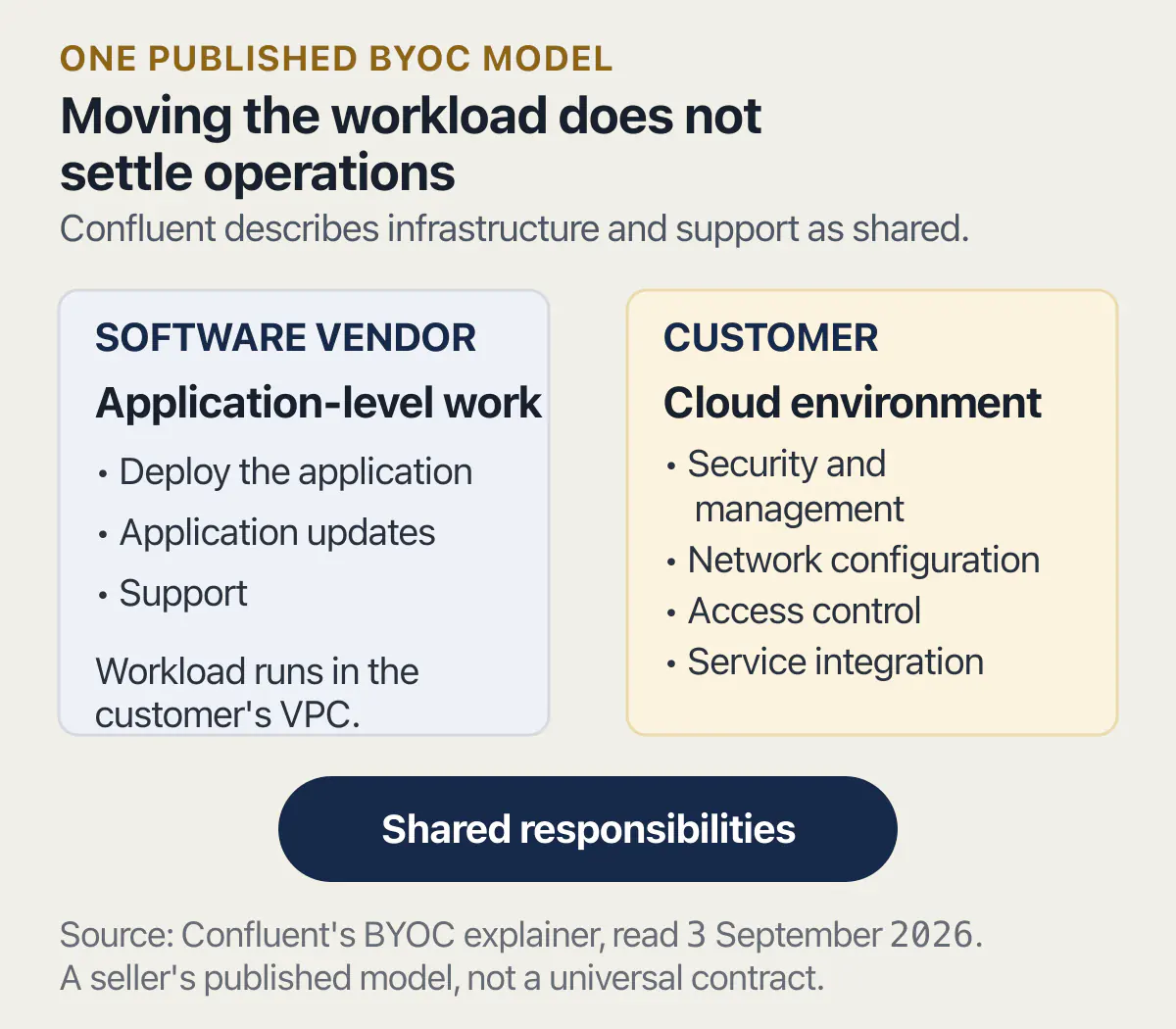
Confluent’s explainer, read on 3 September 2026, splits deployment three ways: self-managed software, deployed on the customer’s premises, with what it calls full operational responsibilities on the customer; bring your own cloud, where the vendor “deploys on customer VPC with shared infrastructure and support responsibilities”; and fully managed software, which it describes as “offloading all operational and security burdens to vendor”. The middle option is the one your buyer is asking for, and the word doing the work in it is shared.
The same page is specific about which half is theirs. While the vendor handles application-level tasks such as updates and support, it says, the customer “is responsible for the security and management of the cloud environment, including network configuration, access control, and ensuring the proper integration of services”. Read that as a list of things somebody at the customer has to agree to do before your product works, and as a list of things that will be blamed on your product when they are not done.
One more line from the same seller is worth quoting because it argues against the model it is defining. Confluent writes that “A common flaw with most BYOC solutions is that they often allow vendor permissions into your VPC and your data for monitoring and troubleshooting cases”, which it says defeats the promise of data sovereignty. Confluent sells a product built to close that gap, so treat the observation as a description of how these arrangements usually work rather than as neutral analysis. It matters for your reply because a buyer who has read the same class of material may ask what access you keep, and the answer is easier to give before you have built anything than after.
If the part the buyer cares about is the database rather than the application, running the data layer yourself as a product choice compares that against the managed options, including the duties that arrive with it.
When the request is really a different product
Some versions of this request are a request for a second version of your business rather than a deployment setting, and the vendors’ own pages describe it in those terms.
Northflank’s post splits the model into two shapes. In the first, the vendor keeps the control plane while the workload runs in the customer’s cloud, which the post describes in two implementations: sharing cloud credentials with the vendor, which it says brings credential rotation and access management with it, and permanent cross-account links, which it presents as the more current approach. In the second shape, the customer holds both the control plane and the runtime. The post describes that as a self-managed or air-gapped model for organisations with the strictest isolation requirements, naming banking, defence and healthcare as the industries that ask for it.
The distance between those two shapes is the distance between a configuration option and a second product. One control plane running many customers’ installs is a system somebody has to build, staff and version. A copy handed over to run alone needs an install process, a way to ship changes to it, and a way to find out it broke. Neither is impossible and neither is one afternoon, and both are described by the companies that sell them as a category of product rather than a deployment flag.
That is the honest reason to ask the three questions before quoting anything. One of the five phrasings puts you in a different business, and it looks exactly like the other four in an email.
Common questions about a customer asking for their own servers
What does bring your own cloud mean for a small SaaS?
Bring your own cloud means your product runs inside the customer’s own cloud account rather than yours. Confluent’s explainer, read on 3 September 2026, defines it as organisations hosting applications and data in their own cloud accounts instead of the vendor’s, and describes the arrangement as sharing infrastructure and support responsibilities between the two sides. For a small product it means an install that a stranger can repeat, and an agreement about who fixes what.
Is single tenant the same as self-hosted?
No. Single tenant describes who else is inside the copy your customer uses, and self-hosted describes who runs it. A single-tenant copy can run perfectly well in your own account, on your own platform, with nobody else’s data in it. A self-hosted copy runs in the customer’s environment and brings their operations staff into the picture. Isolation proven inside one shared copy is a third thing again, so a buyer who accepts that assurance is not getting a dedicated copy, and the offer should say which of the two it is. Buyers use the two words interchangeably, which is why the reply asks which one they meant.
Can I keep a customer’s data in one region without moving the app?
Usually, if the platform holding the data offers a region control. Supabase’s available regions page, read 3 September 2026, calls the region a project runs in its primary region, picked either by naming an AWS region or by choosing a broad area the platform fills for you. Whether an existing project can be moved to another region afterwards is a platform question, and it is answered in that platform’s own documentation rather than here.
Does picking a region satisfy a data residency clause?
That depends on what the clause says, and no platform setting decides it for you. Supabase’s available regions page, read on 3 September 2026, tells anyone with a residency requirement to name an exact region rather than take a broad area, because the platform picks inside a broad area on the day and the result may sit outside the jurisdiction somebody had in mind. The setting decides where the project is placed. The clause decides what you promised.
The privacy half of that question, including what one vendor’s own data-protection documents say about the same choice, is answered on the page that reads those documents rather than here.
What is the difference between on premises and a private cloud?
On premises means the software is installed on hardware the customer owns and runs, in their own building. A private cloud is still cloud infrastructure, usually rented, but dedicated to one organisation. Confluent’s page groups both under a self-managed model, describing customers installing and managing software on their own hardware or cloud infrastructure with full operational responsibilities on their side. For your product the practical difference is small: both need an installable form.
Who patches the servers if the app runs in my customer’s cloud account?
The customer, in both published versions of the model this page reads, and it should be written down before anyone starts. Confluent’s explainer, read on 3 September 2026, says the vendor takes care of application-level tasks such as updates and support while the customer is responsible for the security and management of the cloud environment, including network configuration and access control. Everything not named in your agreement will be assumed to belong to whoever answers the phone first.
What happens to support when the app runs somewhere I cannot see?
It gets harder, and the vendors who sell this say so. Confluent’s explainer describes coordination between the two parties as one of the complications of the model, and says most implementations of it grant the vendor some permission into the customer’s environment for monitoring and troubleshooting. Decide in advance what access you need to diagnose a fault, because a customer who bought isolation may refuse the access that makes support possible, and that conversation goes better before signature.
How do I find out which of the five my customer means?
Ask which records have to sit where and who decided it, ask whether they mean a copy they run or your copy with their data kept apart, and ask who operates it afterwards. Three questions, one email. Buyers answer them quickly because the answers already exist inside their own requirements, and the reply tells you whether you are changing a setting or taking on a second version of your product.
Owning an app means being able to run it, change it and recover it without guessing. The sprint below leaves you with the runbooks and documentation to do that.
Built it with AI. Now it has to hold up for real customers.
The Production Hardening Sprint takes the app you already have and builds the production foundation underneath it. Authentication and access rules, payments that stay consistent, error handling, monitoring, backups, automated tests and a documented handover. Our engineers work inside your existing codebase for ten working days. All 123 deliverables are included, and you get the evidence for each one.
See the Production Hardening Sprint →  $2,500 fixed price · 10 working days · One codebase