Somebody in a public app community, writing in the corpus of AI-app owners this page draws on, put the whole purchase in two sentences:
After two years of asking Visible for a better trends section of the app, I’m giving up and I’m going to hire a freelancer to make one for me. I’ve probably spent 20 hours on and off trying to work with my CSV data.
They are not shopping for an app. They use one every day, and there is one thing inside it that is not there. Two years of asking the vendor produced nothing, so the next move is to pay a person to build that one thing outside it, from the data the app exports. An owner of an AI-built app is in the stronger position: the code is yours, so the feature can go inside the app rather than beside it, and the rest of this page is about that purchase.
Adding one feature to a working app is a job somebody prices after reading the code. The screen is the visible half. The other half is an account, a rule in the database, another company’s review, or an endpoint that spends money per request. Five additions below, one question each.
To write this page I read the current platform documentation behind three of the five additions below, on 26 August 2026: Supabase’s row level security guide for logins and roles, Apple’s help page for creating a private key and Firebase Cloud Messaging’s overview for phone notifications, and Meta’s access levels page for posting to social accounts, and turned each one into a question you can ask before you agree a price. Nothing here was run against a live app.
What you are paying for when you add something to an app that already works
Almost everything written for this search answers a different question: what a whole app costs to build from nothing. That is not the question. You have an app. Real screens work. Somebody uses it. You want one more thing in it, and you want to know whether that is a job you hand to a person, what the person has to do, and how you would know when it was done.
Five additions cover most of what owners actually pay for. Three of them have platform documentation behind the invisible half, which is where the table below comes from. The AI row rests instead on what the guides written for that search leave out, and payments is the one this page keeps short, because it has enough moving parts to need its own page.
| What you want added | What it touches past the screen | Can the builder still do it | The question that proves it is finished |
|---|---|---|---|
| A paid tier | A live account with a payment company, a record of who paid for what, and a path for the card that fails three weeks later | Partly. The checkout is the easy half | Show me one payment failing, and what the app did next |
| Logins with roles | A rule in the database about which rows each signed-in person may read and write, not only which screen they are shown | Partly, and this is where partly hurts most | Sign me in on a second ordinary account. What can it reach? |
| Notifications on a phone | A key created inside a developer account by somebody with the right role, plus a server the app does not currently have | Rarely | Send one to my phone from a machine that is not your laptop |
| An AI feature | A metered endpoint that spends money per request, plus a decision about who may call it and how often | The call yes, the ceiling no | Who is allowed to call it, and what stops one person calling it a thousand times? |
| Posting to social accounts | Another company’s permission review, plus a business identity check, before ordinary users get the feature at all | No | Which permission, at which access level, and has the review been passed? |
The pattern in that middle column is the thing worth carrying away. Every one of the five has a part that lives where you cannot see it, and none of those parts show up in a screenshot. That is why a person who has not read the code cannot give you a real price, and why the ones who give you one anyway are guessing.
The demand is real and it looks the same wherever it turns up. One hiring post in the same set of AI-app conversations was an organisation advertising for a senior developer to work on new features in an app it already ships. Another wanted part time help from a full stack developer to work on top of an app that had only just launched. Neither was hiring somebody to start anything. Both had a working product and a list of things that were not in it yet.
A paid tier, or payments
Wiring up payments on an app that already works is the one addition with a second set of moving parts behind it: the test to live switch, the record of what was paid, and the card that fails on a Tuesday. The screen where somebody types a card number is the part builders handle well. What happens after the money moves is the part that gets quoted separately, and it is the reason this addition is rarely one job.
Three things sit behind that screen. Something has to record that this person paid, in a place the app trusts when it decides what they can see. Something has to hear back from the payment company when a card is declined later, or a subscription lapses, and change what the app shows. And the whole thing runs in a test mode first, where fake cards succeed and nothing is real, then in a live mode where it is.
An app can pass every visible check in test mode and still take no money in live mode. It can also take money and never mark the account as paid, which is worse, because the person paid you and the app says they did not.
That is the whole of it here. The failure modes have already been written up in detail: how a working checkout still leaks money covers what goes wrong once real cards are involved, and there is no reason to list them twice.
Logins, accounts, and who is allowed to see what
Most owners think of logins as a screen with an email box on it. The screen is the small half. The half you are paying for is the rule about which rows in the database each signed-in person may touch, and that rule is separate from the screen in every way that matters.
Supabase’s row level security guide, read on 26 August 2026, is blunt about the shape of the problem. Its instruction is to enable row level security on every table in an exposed schema, because “A table in an exposed schema without RLS is readable and writable by any role with a grant on it.” Turning it on is not the finish line either: “Once RLS is enabled, no data is accessible through the API when using a publishable key, until you create policies.”
Two separate checks run, and the guide names both. “Postgres runs two checks before a client touches a table. Grants decide whether a role can run an operation on the table at all. Policies decide which rows that operation applies to.” The same page adds a piece of advice that is easy to skip and expensive to skip: “Always name the role a policy applies to, using the to clause.”
Read that as an owner and you get one useful sentence. Adding roles to an app means writing rules about rows, in a place with its own vocabulary, and a screen that hides a button is not one of those rules.
This is the part AxonBuild’s audit corpus is loudest about. The cohort is fixed: 26 real applications audited in June and July 2026, 21 of them somebody else’s, with 958 confirmed findings across those 21, all counted from the findings ledger, not estimated. Across the 14 of those apps where authorization applied at all, the authorization pillar averaged 42.1 out of 100, the fifth worst of the twelve pillars measured. That is the fuller picture of what the audits found across the 26 apps, and the short version is that the rules about who may see what are where AI-built apps are thinnest.
If you want the rules themselves rather than the buying decision, how row level security policies are written is the how. This page stops at the question you ask before you agree a price, and the question is the one in the table: sign me in on a second ordinary account, and show me what it can reach.
Notifications, by email and on the phone
Email and phone notifications get asked for in the same breath and they are not the same job. Email is the cheaper half. A phone notification is the expensive half, and the expense is not the code.
Two facts decide it, and both are documented by the platforms.
The first is an account fact. Apple’s help page on creating a private key states the requirement flatly: “Required role: Account Holder or Admin.” A private key is what lets a server authenticate with Apple Push Notification service, and the same page warns what happens when the file goes missing: “Save this file in a secure place because the key is not saved in your developer account and you won’t be able to download it again.” So the person you hire either has that role inside your developer account, or somebody who does has to create the key and get it to them, once, carefully, with no second chance at the download.
The second is a server fact. Firebase Cloud Messaging’s documentation lists what an implementation requires, and one of the items is “A trusted environment such as Cloud Functions for Firebase or an app server on which to build, target, and send messages”, alongside a client app that receives the messages. The app does not send to itself either: “You can send messages using the Firebase Admin SDK or the FCM server protocol.”
Put plainly, “add notifications” usually means: get access to a developer account at the right role, create a key that can only be downloaded once, and stand up a piece of server the app did not have yesterday, then write the part that decides who gets a message and when. The developer account itself is a separate matter with its own costs and its own owner, and it belongs in your name rather than theirs.
Ask for one thing to prove this one is finished: send a notification to my phone, right now, from a machine that is not your laptop. Shipped code that nobody has watched deliver a message to a real handset has proved nothing.
Adding an AI feature to an app you already have
Adding an AI feature is the request that sounds smallest and behaves largest. The visible part is a box somebody types into and an answer that appears. The part you are buying is a call to somebody else’s model, from your account, on your money, and the decision about who is allowed to make that call.
Three things make up the addition. There is the call itself, which is the part every guide covers. There is the question of who may trigger it, which is an authorization question wearing a different hat. And there is the ceiling: what stops one visitor, signed out, running it in a loop until the bill arrives.
As of 26 August 2026, the two page-one guides on adding AI to an app that were read in full for this page, Bubble’s and Eleken’s, walk an owner through picking a use case, prototyping it and testing it, and neither one names an authorization check on the AI feature or a per user limit on it. That is a documented absence on those two pages on that date, not a claim about everyone. It is also why the question in the table is worth asking out loud before the work starts, because nothing in the buyer-facing material will ask it for you.
The audit corpus points the same way. Across the 14 third-party apps in the June and July 2026 cohort that had an AI surface at all, the AI and LLM risk pillar averaged 38.4 out of 100, the fourth worst of the twelve, computed the same way from the same ledger. An open meter is the common shape of that score.
Running cost is its own subject and belongs with the numbers: what an AI feature costs to run once real people use it has the arithmetic. The phrase you will meet on vendor pages, ai augmented feature development, describes the tool the developer uses, not the job you are buying, and it is worth ignoring when you read a quote.
Two boundaries around this one. An AI feature that answers in the preview and then hangs for real users is a separate failure with a separate cause, and it is worth knowing about before you agree the feature is finished. And hiring somebody whose whole job is AI features is a different search from hiring somebody to add one to the app you already have.
Can you connect your app to your social accounts?
Connecting an app to social accounts splits in two. A button that sends somebody to your profile is small work. Posting or reading on a user’s behalf goes through Meta’s access levels, which means a business identity check and a review before ordinary users can use it at all.
That split is the whole answer, and Meta’s access levels page, read on 26 August 2026, is where the second half of it comes from. Permissions come at two levels. “Permissions with Standard Access can only be requested from app users who have a role on the requesting app.” That is the level a demo runs at: it works for you and for the people you added to the app, and for nobody else. The level real users need is the other one. “Permissions with Advanced Access can be requested from any app user, and features with Advanced Access are active for all app users.”
Getting there is a process rather than a setting. “Business Verification is required to get Advanced Access.” On top of that, “In some cases additional App Review on an individual permission and feature basis might be required”, so the answer to a question like “can you add Instagram posting” depends on the permission rather than on the app as a whole. And it does not end at launch: “Apps that have Advanced Access for a permission or feature must complete Data Use Checkup, which is an annual process to certify that the app accesses Facebook APIs, products, and data in compliance with our Platform Terms and Developer Policies.”
So when somebody asks for social media integration on a website or an app, the honest first reply is a question back: which half? Icons and share links that hand the visitor off to another site are a small piece of front end work, and any builder can do them. Website and social media integration in the other sense, where your app posts, reads, or acts on a person’s account, is a permission review at another company, on their timetable, with a business identity check standing in front of it. That work is real, it is quotable, and none of it is the developer’s to promise a date for.
Which connections a Lovable app can make from inside the builder, and which need somebody writing code on the other side, is its own list, and it changes more often than this page does.
Which of these can your builder still do itself?
Your builder can usually do the screen and the straightforward half of the wiring. It cannot create an Apple key inside a developer account, pass another company’s permission review, or decide for you who is allowed to call a metered endpoint. It can write the limit once you have decided, and that limit still has to be shown working. Those three decisions sit outside the chat box, whatever the prompt says.
Row by row, honestly. The paid tier: the checkout screen, often yes; the record of who paid and the handling of the card that fails later, usually not without help. Logins with roles: the sign in screen yes, the rules about rows only sometimes, and you cannot check the difference by looking. Phone notifications: no, because the key and the sending server are outside the builder entirely. An AI feature: the call yes, the ceiling no. Social posting: no, because no builder can pass a review on your behalf.
Owners are already asking their builders for the missing piece rather than asking a person, which is the step before this page. On 12 August 2026 a post in the Base44 community asked its members, “If Base44 could launch ONE missing feature tomorrow, what would you pick?” That is a community asking a vendor to build the thing, which is exactly the conversation the person quoted at the top of this page gave up on after two years.
The useful test asks whether the part you cannot see got made at all. Producing something that looks right is the easy half, and it is the half the builder is best at.
Is this one job or five?
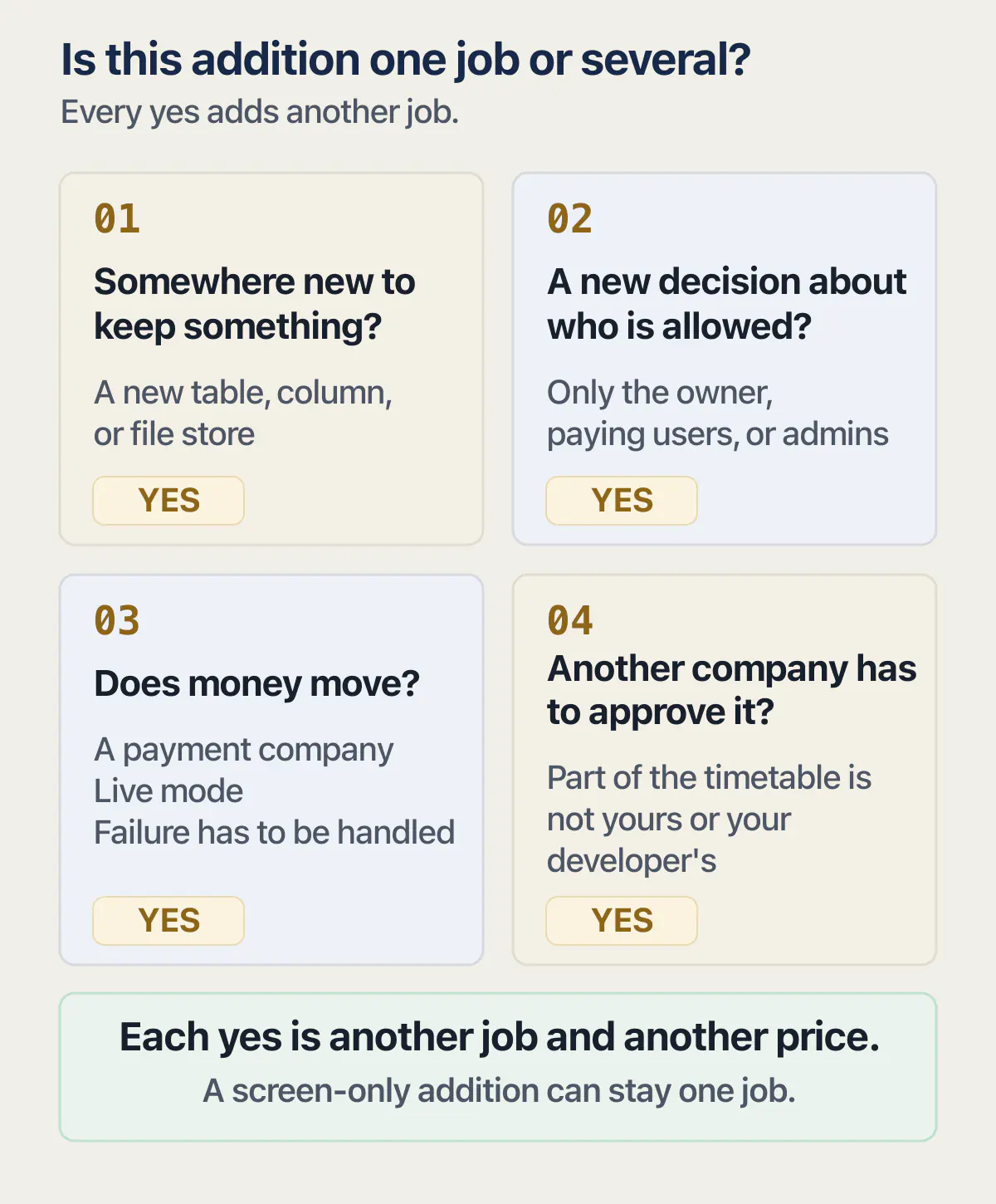
One addition is one job when it changes a screen and nothing else. It becomes several when it needs a new place to store something, a new decision about who is allowed, money to move, or another company’s approval. Each yes is another job, and another price.
Four questions decide it. Start from the job you think you are buying, and every yes below adds another job to it.
Does it need somewhere new to keep something? A new table, a new column, a new file store. That is a change to the shape of your data, and everything already sitting on that shape has to keep working.
Does it need a new decision about who is allowed? If the answer involves the words “only the owner” or “only paying users” or “only admins”, you are back in the row rules from earlier, and the cost of that is not in the screen.
Does money move? Then a payment company is involved, a live mode is involved, and failure has to be handled somewhere the user never sees.
Does another company have to approve it? Then part of the timetable is not yours or your developer’s.
There is a reason each addition after the first costs more on an AI-built app than on a hand-written one. At least 18 of the 21 third-party apps in AxonBuild’s June and July 2026 audits had no working test anywhere, a count taken from the findings ledger for that fixed cohort. With no test in the app, nobody can change one part and know the other parts still work, so every addition means re-checking by hand what the last addition already proved. The mechanism behind that is set out in why each change to an AI-built app costs more than the last, and the related ceiling, where a new feature works fine for you and falls over once the app is busy, is covered in the ceiling a new feature meets when the app gets busy.
Money question, answered once and pointed somewhere better: no honest number exists before somebody has read the code. What it costs to hire an app developer is where the pricing question is actually worked out.
If what you want added is really the part that was started and never finished, you are buying something different from a new feature, and the money question is worked out differently.
What to send the person who will price it
Short, and none of it needs a document. What a developer needs from you before they can put a price on any of this is a short list, and it is the same list whichever of the five you are asking for.
What the app is, in one sentence a stranger would understand. Where it lives, which means the builder or platform it was made in and where it runs now. What the addition is, in plain words, described as what somebody should be able to do that they cannot do today. Who currently holds the accounts: the builder account, the database, the payment company if there is one, the developer account if there is an app in a store. Whether anybody is using it right now, and roughly how many. And what already broke, if anything did.
That is six things, all of them answerable from memory in about ten minutes, and all of them things a person has to know before the word “price” means anything. Nobody needs a written brief from you, and nobody should ask you to fill in a template to get a number.
How to tell the feature is actually finished
The failure this page exists to prevent has a name in AxonBuild’s audit notes: built but not wired. The control exists in the repository, and nothing running ever reaches it. Across that same fixed 26-app audit corpus the shape turns up repeatedly. Error boundaries were written and never mounted, so the screen meant to catch a crash was never in the path of one. Rate limit buckets were built and never attached to a route. Each of those looks finished from the outside. Each one does nothing.
A new feature fails the same way, and more quietly, because it is new and nobody has a habit of using it yet. The screen appears. The button clicks. The part behind it was never connected, and you will find out the first time it matters.
Five checks, none of which needs you to read code.
| What was added | What you do yourself |
|---|---|
| A paid tier | Ask to watch one payment fail, and see what the app shows the person afterwards |
| Logins with roles | Sign in on a second ordinary account and try to open something that belongs to the first |
| Phone notifications | Ask for one, sent to your own phone, from a machine that is not the developer’s |
| An AI feature | Ask what stops one signed out visitor calling it a thousand times, and ask to be shown that limit working |
| Social posting | Ask which permission it uses, at which access level, and whether the review has been passed |
Every one of those is a thing that either happens in front of you or does not. That is the point of them. You are not being asked to judge code you cannot read, you are being asked to watch the feature do the thing you paid for.
Common questions about paying someone to add features
What does “feature development” mean when somebody quotes you for it?
Feature development is a process term borrowed from software teams: planning, designing, building, testing and shipping a new piece of an application. It describes how the work is organised, not what you are buying, which is why the phrase tells you nothing useful about price. When you see the feature development process or the feature development life cycle named in a quote, ask the more specific question instead: what does this addition touch beyond the screen, and what will you show me to prove it works.
How much does it cost to add a feature to an app?
Nobody can tell you before reading the code, and any number offered without that is a guess dressed as a quote. The honest sequence is that somebody reads what is there, sees how many of the four triggers your addition sets off, and then prices it. Published figures for this search are almost all whole-build numbers for apps that do not exist yet, which is a different purchase from adding one thing to an app that already runs.
Can I just ask the AI builder to add it?
Sometimes, and it depends which half of the addition you mean. Builders are good at screens and at the straightforward wiring behind them. They cannot create a key inside your Apple developer account, pass Meta’s permission review, or decide for you who is allowed to call a metered endpoint; a sending server or a rate limit they can generate, and each still has to be wired in and shown working. If your addition is only a screen, ask the builder first. If it crosses into any of those, asking the builder alone produces something that looks finished until somebody tests it.
How do I know the feature is working and not just visible?
Watch it do the thing, on something that is not the developer’s machine, using an account that is not yours. That single sentence covers most of it. A screen that renders proves the screen renders. A payment that fails and is handled, a second account that cannot reach the first account’s data, a notification that arrives on your phone: those prove the part you cannot see was actually connected.
Do I have to hand over my accounts to get a feature added?
Usually somebody needs access, and it should be access rather than ownership. Apple’s help page on creating a private key states that creating one requires the Account Holder or Admin role, so a developer either holds that role in your account or you create the key and pass it to them once, because the same page warns the file cannot be downloaded a second time. The accounts stay in your name. Where you can, grant access that can be withdrawn rather than handing over the login itself.
How long does one addition take?
The parts inside your app are the parts a developer can put a date on. The parts outside it are not. Where an addition needs another company’s approval, such as Meta’s App Review on an individual permission, the timetable belongs to that company and any date promised to you is somebody guessing on their behalf. A fair answer separates the two: here is what I control, here is what I do not.
Can somebody add a feature to an app they did not build?
Yes, and it is the normal case for an AI-built app, because the original build usually had no person on it at all. What changes is the first step: they have to read what is there before they can price the addition, since they are inheriting decisions nobody wrote down. Expect the reading to be part of the job rather than something thrown in free, and expect a better price once it is done than before.
What if the feature I asked for turns out to need three other things first?
That is a normal finding and it is better to hear it early than to find it after paying. It usually means the addition set off one of the four triggers: it needs somewhere new to store something, a new decision about who is allowed, money to move, or another company’s approval. Ask which of the three prerequisites are genuinely required for your addition and which are the developer improving things while they are in there, then decide what you are paying for now and what waits.
Want to add payments or logins to your app?
A new feature touches more than the screen you see, and a quote without that full picture rarely holds. On the audit, we look over your app with you, then point out what each addition will reach, so you can brief a developer clearly.
Book a free audit → Free · 30 minutes · No code access needed