A Claude Code MCP server connects the agent to an external tool or data source. The connection may expose issue trackers, monitoring data, a database, a browser, or an API. Safety depends on four choices: the server you trust, the credential you give it, the Claude Code tools you permit, and the scope where its configuration is stored.
Use remote HTTP for a hosted server and stdio for a local process. Prefer local scope while testing. Use project scope only when the team should share and review the configuration in .mcp.json. Keep credentials in environment variables or OAuth, grant the narrowest remote permissions, and inspect the server’s tool list before approving calls.
The commands and behavior below were checked against Anthropic’s Claude Code MCP documentation on 5 August 2026.
Claude Code, MCP, and MCP servers: which is which
Claude Code is the client, the agent you run in your terminal. MCP (Model Context Protocol) is the open protocol it speaks. An MCP server is a separate program, usually written by somebody else, that Claude Code talks to over that protocol. Connecting one costs nothing extra on your plan, but it changes what the agent can reach.
Three different things get called a connector, and they are not interchangeable:
| Name | What it is | Who it is for |
|---|---|---|
| Claude Code MCP server | A server you add with claude mcp add, running locally or at a remote URL | Anyone using the terminal agent. This post |
| Messages API MCP connector | A Claude API feature that connects to remote servers over HTTP. Local stdio servers cannot be connected to it | Developers calling the API from code |
| claude.ai connector | A server you added in claude.ai that also appears in Claude Code | Anyone signed in with a claude.ai subscription account |
The third one matters more than it sounds. claude.ai connectors load into Claude Code automatically when your active login is a subscription account, and they stop loading when ANTHROPIC_API_KEY, ANTHROPIC_AUTH_TOKEN, apiKeyHelper, or a third-party provider is active instead. That is one reason /mcp sometimes lists servers you never added on this machine, and another reason it sometimes lists none.
What MCP gives Claude Code access to
Model Context Protocol standardizes how an AI client discovers and calls tools. An MCP server publishes tool names, input schemas, and results. Claude Code can then decide to call those tools during a session, subject to its permission rules and any required user interaction.
The protocol name does not describe the reach of a particular server. A documentation server may return public reference text. A database server may run SQL using the role embedded in its connection string. A source-control server may read or change every repository granted to its token. A browser server may inherit whatever session or profile it launches with.
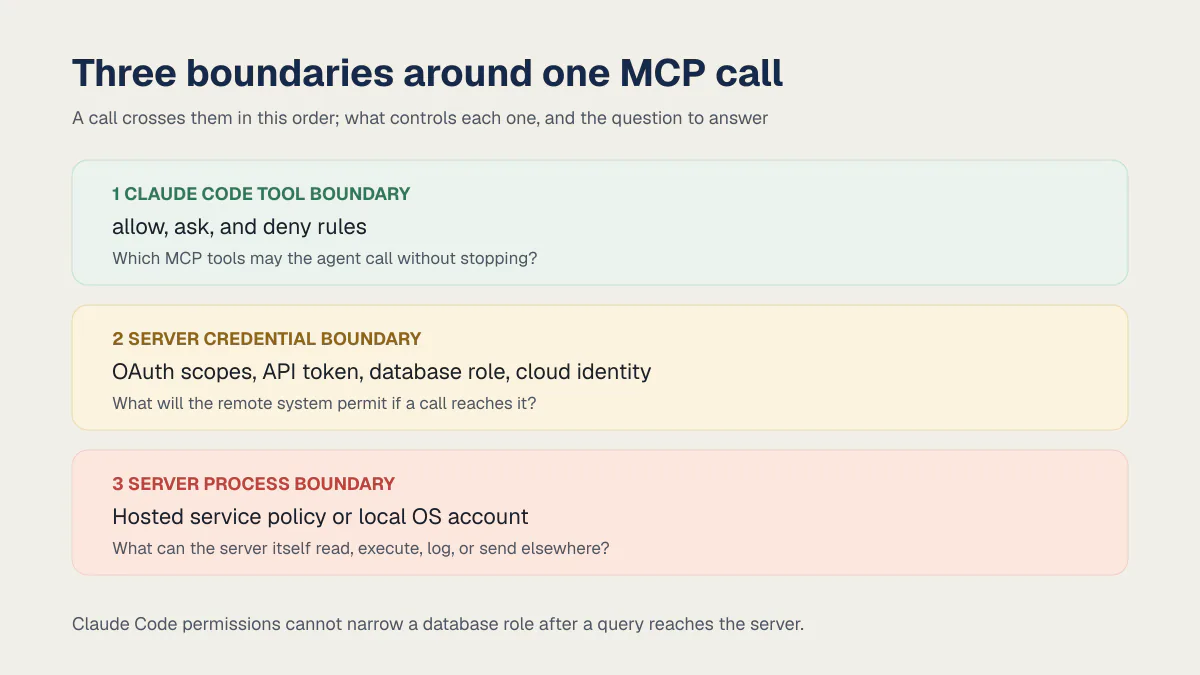
Treat each connection as the combination of three boundaries:
| Boundary | What controls it | Question to answer |
|---|---|---|
| Claude Code tool boundary | allow, ask, and deny rules | Which MCP tools may the agent call without stopping? |
| Server credential boundary | OAuth scopes, API token, database role, cloud identity | What will the remote system permit if a call reaches it? |
| Server process boundary | Hosted service policy or local OS account | What can the server itself read, execute, log, or send elsewhere? |
Claude Code permissions cannot narrow a database role after a query reaches the server. The database must enforce that boundary. A read-only role, repository-scoped token, or test account is more dependable than asking the agent to avoid a dangerous operation.
How to add an MCP server to Claude Code
Claude Code supports four transports: remote HTTP, deprecated remote SSE, local stdio, and remote WebSocket. Anthropic recommends HTTP for hosted services. Use SSE only when the provider has not migrated its endpoint.
The MCP specification calls the HTTP transport Streamable HTTP, so that is the phrase you will see in most server documentation. In a JSON config the type field accepts streamable-http as an alias for http, which means a snippet copied from a vendor’s page works unmodified. WebSocket is the odd one out: --transport does not accept ws, so you configure it in .mcp.json or with claude mcp add-json, and it authenticates by header only.
These are terminal commands:
# Remote HTTP server
claude mcp add --transport http sentry https://mcp.sentry.dev/mcp

# Local stdio server. Everything after -- belongs to the server command.
claude mcp add --transport stdio database -- \
  npx -y @bytebase/dbhub --dsn "$READ_ONLY_DATABASE_URL"
Run /mcp inside Claude Code after adding a server. Confirm that it connects, inspect the available tools, and complete OAuth when the remote service requires it. From the terminal, claude mcp list lists configured servers and claude mcp get <name> shows one server’s details. Connection and pending status appear in /mcp.
The -- separator matters for stdio. Arguments after it are passed to the server process instead of being interpreted as Claude Code flags. Review the package, replace floating package versions with a tested version where the ecosystem permits, and avoid a production database during the first connection test.
For a hosted server with a fixed authentication header, Claude Code supports --header. OAuth is preferable when the provider supports narrow scopes and revocation because you do not have to paste a long-lived token into the command history or configuration.
To read a server’s tool list before you point it at a real session, use the MCP Inspector:
npx @modelcontextprotocol/inspectorIt connects to a server over SSE or Streamable HTTP, lists what the server exposes, and can walk the OAuth flow so you see which scopes the consent screen asks for. Anthropic’s own documentation uses it to obtain a test token. Running it is the difference between “inspect the tool list” as advice and actually doing it.
Claude Code MCP commands: add, list, remove, and disable
Every MCP operation is a subcommand of claude mcp, and there are only a handful of them. Three of the four things people go looking for map to a command. The fourth, disabling a server, does not.
| Command | What it does |
|---|---|
claude mcp add [options] <name> ... | Writes a new server entry and prints an Added ... line to confirm |
claude mcp add-json <name> '<json>' | Same thing from a whole JSON definition, headers and OAuth fields included |
claude mcp add-from-claude-desktop | Imports servers from Claude Desktop through an interactive picker, on macOS and Windows Subsystem for Linux only |
claude mcp list | Lists configured servers with a health status next to each one |
claude mcp get <name> | Shows one server’s entry, including the WebSocket servers list leaves out |
claude mcp remove <name> | Deletes the entry |
claude mcp login <name> and claude mcp logout <name> | Runs a configured server’s OAuth flow from your shell, or clears its stored credentials |
claude mcp reset-project-choices | Clears the approval decisions you made for project servers |
claude mcp serve | Runs Claude Code itself as a stdio MCP server |
Two things claude mcp add refuses. Adding a name that already exists at the same scope fails with a message like MCP server sentry already exists in local config instead of overwriting, so replacing an entry means removing it first. And several names are reserved for Claude Code’s own built-in servers: workspace, claude-in-chrome, computer-use, Claude Preview, and Claude Browser. A configuration file that defines one of those is skipped at load time with a warning to rename it, and claude mcp add rejects it outright.
There is no claude mcp disable. You toggle a server off in the /mcp panel, and Claude Code records that choice per project in ~/.claude.json, in one of two lists that cover different sets of servers. disabledMcpServers is the opt-out list for servers that default to on, which is nearly all of them. enabledMcpServers is the opt-in list for built-in servers that default to off, such as computer-use. Claude Code reads exactly one of the two for any given server, so putting an ordinary server in enabledMcpServers does nothing at all. Neither list is disabledMcpjsonServers, the settings key that rejects a project server outright; that one is about approving what .mcp.json contains, not about switching a server you already trust on and off.
The command that matters most for security is the one that does the least. claude mcp remove deletes a configuration entry. The token, OAuth grant, or database role you handed that server keeps working exactly as before until you revoke it at the source, so removal is a tidy-up step, not a revocation.
Local, project, and user MCP scope
Scope controls where the server loads and whether its configuration enters version control.
| Scope | Stored in | Loads in | Good use |
|---|---|---|---|
| Local (default) | ~/.claude.json, under the current project | Current project only | Personal credentials, evaluation, experimental servers |
| Project | .mcp.json in the repository root | Current project for everyone who trusts the config | Shared team server definitions without embedded secrets |
| User | ~/.claude.json | Every project for that user | A personal utility you genuinely need everywhere |
Add an explicit scope when the default is easy to forget:
claude mcp add --transport http docs --scope local https://example.com/mcp
claude mcp add --transport http shared-docs --scope project \
  https://example.com/mcp
claude mcp add --transport http personal-tool --scope user \
  https://example.com/mcp
Project-scoped servers prompt for approval before Claude Code uses them. claude mcp reset-project-choices clears those decisions. This protects someone who clones a repository containing an unfamiliar .mcp.json; it does not establish that a server remains trustworthy after approval.
When a name exists in several scopes, Claude Code uses one complete definition. Precedence is local, project, user, plugin-provided server, then a claude.ai connector. Fields are not merged. If a shared project entry appears to have no effect, inspect claude mcp get <name> for a local definition with the same name.
Where the Claude Code MCP config file lives
There is no single mcp.json. Definitions land in one of two files depending on the scope you chose, and the one people cannot find is ~/.claude.json, because a local server is buried inside it under the project’s own path rather than sitting at the top.
| Scope | File | Where the entry sits inside it |
|---|---|---|
| Local (default) | ~/.claude.json | Under projects, then the absolute path of the project, then mcpServers |
| Project | .mcp.json in the repository root | Top-level mcpServers |
| User | ~/.claude.json | Top-level mcpServers |
A local-scoped add run from /path/to/your/project writes this:
{
  "projects": {
    "/path/to/your/project": {
      "mcpServers": {
        "stripe": {
          "type": "http",
          "url": "https://mcp.stripe.com"
        }
      }
    }
  }
}
Project scope writes the same mcpServers object at the top level of .mcp.json, and user scope writes it at the top level of ~/.claude.json. That is the whole layout.
The trap is the word local. MCP local scope means ~/.claude.json in your home directory. Local settings mean .claude/settings.local.json inside the project. Server definitions live in the first file, permission rules and the .mcp.json approval keys live in settings files, and editing the wrong one is the ordinary reason a change appears to do nothing. ~/.claude.json also holds the per-project on and off toggles, so a server can be defined in one part of that file and switched off in another.
How to keep MCP credentials out of .mcp.json
Project scope is designed for version control, so the file should carry server definitions and variable names. Claude Code expands ${VAR} and ${VAR:-default} in the command, arguments, environment, URL, and headers.
This block belongs in .mcp.json at the repository root:
{
  "mcpServers": {
    "internal-api": {
      "type": "http",
      "url": "${INTERNAL_MCP_URL}",
      "headers": {
        "Authorization": "Bearer ${INTERNAL_MCP_TOKEN}"
      }
    }
  }
}
The token remains outside git, but it still reaches the server when Claude Code connects. Store it in the operating system’s credential tooling or an approved secret manager, give it a short lifetime where possible, and scope it to the smallest useful set of resources.
If a referenced environment variable is absent and has no default, the configuration still loads. Claude Code reports a missing-variable warning for that server in claude mcp list and passes the literal ${VAR} text through, so the server usually fails at connection time instead of at parse time. Use ${VAR:-default} only when the fallback is deliberately safe, and run claude mcp list after setup to confirm the server loaded and connected.
If a real secret ever enters .mcp.json, removing the line from the latest commit is incomplete. Rotate the credential, inspect git history, and follow the same recovery process used for a committed environment secret.
This failure is common enough to have numbers. In AxonBuild’s 26-app audit corpus, 6 of 21 third-party apps shipped a real secret, and 3 of those secrets sat permanently in git history: a webhook signing secret in one, a live AI-provider key in another, a Stripe test key and webhook secret in a third. The AI-provider key case is worth walking through because the tidy-up did the damage. An early version wrote the key into the app’s own config file and committed it. The project later moved to a .env and deleted the config, and a working key stayed readable in several past commits, because deleting a file does not delete what git already recorded. .mcp.json is a file the documentation encourages you to commit, which makes it a fresh candidate for the same mistake. The counterweight: secrets was the strongest-scoring area in that corpus at 84 out of 100, so this is a habit most builders already have, pointed at one more file.
Which MCP servers founders connect, and what each one can reach
The same handful of servers fills every “best MCP servers for Claude Code” roundup: GitHub, Postgres or Supabase, Playwright, Context7, Stripe, Sentry, Linear, Slack, Notion, Filesystem, Exa, Sequential Thinking, and Shopify’s Dev MCP server. Those roundups rank on popularity and stop at the install command. What each one reaches is the column to read.
| Server | Install command | What it reaches |
|---|---|---|
| GitHub | claude mcp add --transport http github https://api.githubcopilot.com/mcp/ --header "Authorization: Bearer YOUR_PAT" | Issues, pull requests, and repository contents, scoped to whatever the token allows |
| Postgres or Supabase (DBHub) | claude mcp add --transport stdio db -- npx -y @bytebase/dbhub --dsn "$READ_ONLY_DATABASE_URL" | Every table the connection string’s role can read |
| Playwright | claude mcp add playwright npx @playwright/mcp@latest | A real browser session |
| Context7 | claude mcp add --transport http context7 https://mcp.context7.com/mcp | Library documentation, fetched live from an external service |
| Stripe | claude mcp add --transport http stripe https://mcp.stripe.com | Your Stripe account, at whatever the API key permits |
| Sentry | claude mcp add --transport http sentry https://mcp.sentry.dev/mcp | The errors your applications report to Sentry, via OAuth |
| Linear | claude mcp add --transport http linear-server https://mcp.linear.app/mcp | Issues and projects in your Linear workspace |
| Slack | claude mcp add --transport http slack https://mcp.slack.com/mcp | Search, messages, canvases, and users, within the scopes you granted |
| Notion | claude mcp add --transport http notion https://mcp.notion.com/mcp | Pages and databases your Notion account can open |
| Filesystem | claude mcp add --transport stdio filesystem -- npx -y @modelcontextprotocol/server-filesystem /path/you/allow | Only the directories you pass as arguments |
| Exa | claude mcp add --transport http exa https://mcp.exa.ai/mcp | Web search results fetched from Exa |
| Sequential Thinking | claude mcp add --transport stdio sequential-thinking -- npx -y @modelcontextprotocol/server-sequential-thinking | Nothing outside the session. It structures reasoning steps |
| Shopify Dev MCP | claude mcp add --transport stdio shopify-dev-mcp -- npx -y @shopify/dev-mcp@latest | Shopify’s developer documentation, API schemas, and code validation, locally, with no authentication |
Some of these reach something live, some reach documentation, and the install command looks identical either way. Reach is not the only thing an install spends: what MCP servers cost you in tokens is the other column those roundups leave out.
Picking which of these to install first is a separate question from knowing what each one reaches, and it deserves its own answer rather than an install count.
What running several MCP servers actually costs you
Less than the older advice assumes. Tool search is on by default in Claude Code, so only tool names and each server’s instructions load at session start, and a full tool schema loads when Claude searches for it. An idle server costs very little context, and Claude Code sets no fixed per-server tool cap. The practical limit is your context budget, not a number in the docs.
Four settings decide how much loads and when:
| Setting | Effect |
|---|---|
ENABLE_TOOL_SEARCH unset (default) | All MCP tools deferred and loaded on demand |
ENABLE_TOOL_SEARCH=auto | Schemas load upfront if they fit inside 10% of the context window, and the rest defer. auto:5 sets a 5% threshold instead |
ENABLE_TOOL_SEARCH=false | Every MCP tool loads upfront, no deferral |
"alwaysLoad": true on a server | That server’s tools always load at session start, and startup waits for it to connect, capped at the 5-second connect timeout |
The cost you will actually notice is tool output, not tool definitions. Claude Code warns when a single MCP tool result passes 10,000 tokens, and caps results at 25,000 tokens by default. Raise the cap with MAX_MCP_OUTPUT_TOKENS=50000 when a server legitimately returns large output, such as a full schema dump. The warning threshold itself is fixed and does not move with the cap.
Two things to know before you tune any of this. Tool search needs a model that supports it (Claude Sonnet 4.5, Haiku 4.5, Opus 4.5 and later), and Claude Code turns it off when ANTHROPIC_BASE_URL points at a non-first-party host, because most proxies do not forward the blocks it depends on. Inside a session, /mcp shows the tool count next to each connected server, which is the quickest way to find the server that is quietly the biggest one you have.
Can you connect Claude Code to Shopify?
Claude Code connects to Shopify through the Shopify Dev MCP server, which runs locally, needs no authentication, and reaches three things: Shopify’s developer documentation, its API schemas, and code validation for GraphQL queries, Liquid templates, and extensions. It never touches a store.
claude mcp add --transport stdio shopify-dev-mcp \
  -- npx -y @shopify/dev-mcp@latest
The @latest tag is how Shopify’s own snippet writes it; pin a tested version once the server becomes part of your workflow. Store management is a separate path with a separate credential. Per Shopify’s Dev MCP documentation, the toolkit can prepare and run supported store-management tasks through Shopify CLI’s authenticated store context, with you choosing when to execute them. Keep that distinction in mind, because the phrase “the Shopify MCP server” gets used for both. The path that can reach an order runs under credentials you granted the CLI on a different day, for a different reason.
Can I use Claude Code in GitHub?
Yes, and two different things go by that name. One is connecting the GitHub MCP server to the agent in your terminal, the top row of the table above: issues, pull requests, and repository contents, scoped to whatever token you handed it. The other is running Claude Code inside GitHub itself, a separate product called Claude Code GitHub Actions. There you mention @claude in an issue or pull request comment and a workflow runs the agent on GitHub’s runners.
Setup for the second one is one command, run from a Claude Code session in the repository:
/install-github-appPer Anthropic’s GitHub Actions documentation, that installs the Claude GitHub App on the repository and then walks you through adding the workflow file and your API key as a repository secret. The App asks for read and write on Contents, Issues, and Pull requests, so it follows the same shape as every other install in this post: one approval screen, a standing grant, and a credential that keeps working until you remove it. Two meters run as well: the workflow spends GitHub Actions minutes, and every @claude reply spends API tokens.
The part that differs from the terminal case is that nobody is at a keyboard during a workflow run. --mcp-config is a documented claude_args argument, so a whole server list can load inside a job with no prompt to answer and no one to answer it. Weigh that before pointing this path at anything holding production credentials; the narrower default is to keep MCP servers on your machine and let the Action do repository work.
There is a third route, GitHub Code Review, which posts findings inline on pull requests without anyone typing a trigger phrase. Its documentation places it in research preview on Team and Enterprise plans, so it is not the one a solo founder starts with.
Can Claude Code itself be an MCP server?
Yes. claude mcp serve starts Claude Code as a stdio MCP server that another application connects to, which is the reverse of everything above. This is the direction people mean when they search for “Claude Code MCP server” and land on a GitHub project instead of the docs.
claude mcp serveThe command prints nothing when it starts. A stdio server talks over stdin and stdout, so a silent, blocked terminal means it is running and waiting for a client. Do not kill it because it looks stuck.
To use it from Claude Desktop, add this to claude_desktop_config.json:
{
  "mcpServers": {
    "claude-code": {
      "type": "stdio",
      "command": "claude",
      "args": ["mcp", "serve"],
      "env": {}
    }
  }
}
If claude is not on your PATH, the client fails with spawn claude ENOENT. Run which claude in a terminal and put the full path in the command field.
The security point is the part people skip. This server exposes Claude Code’s own tools, including View, Edit, and LS, to whatever client connects. Claude Code is not asking you for permission in this direction; the connecting client is responsible for confirming individual tool calls, and not every client does that well. Everything else in this post is about narrowing what an outside server can reach through Claude Code. This is the one command that points the arrow the other way, so treat the client on the far end with the same suspicion you would give a server.
How to restrict Claude Code MCP tools
MCP tools appear in permission rules as mcp__<server>__<tool>. A broad deny can remove every MCP tool, while allow rules must name a literal server before using a wildcard for its tools. Both blocks below belong in a settings file, either ~/.claude/settings.json or the project’s .claude/settings.json.
{
  "permissions": {
    "deny": ["mcp__*"],
    "allow": ["mcp__github__get_*"]
  }
}
Do not copy that exact combination expecting the allow rule to override the deny. Claude Code evaluates deny before allow, so the broad deny wins. Use one of these policies instead:
{
  "permissions": {
    "allow": ["mcp__github__get_*"]
  }
}
The first version is useful when you want every MCP tool unavailable. The second lets the named read-oriented GitHub tools run without a prompt while other calls follow the active permission mode. An unanchored allow such as mcp__* is skipped with a warning because Claude Code requires the server segment to be literal.
Use /permissions to inspect the final rule set. Managed settings can also allow or deny MCP servers across an organization, and an administrator’s deny policy cannot be reopened by a project rule.
When an MCP server will not connect
claude mcp list prints a health status next to each server. A failure status means Claude Code could not reach that server, not that the list command failed. Here is what each one means and what to do about it.
| Status | What it means | Next step |
|---|---|---|
✔ Connected | Claude Code reached the server and read its tool list | Nothing. Check the tools in /mcp |
! Needs authentication | The server answered 401 or 403 and you have not signed in | Run /mcp and complete OAuth, or run claude mcp login <name> from your shell |
✘ Failed to connect | The server was reachable as a configuration but refused or never answered | Check the URL and the credential. Authentication and not-found errors are never retried; 5xx responses, connection refused, and timeouts retry up to three times first |
⏸ Pending approval (run claude to approve) | A project server from .mcp.json is waiting for you to approve it | Run claude in that folder, accept the workspace trust dialog, then approve the server |
✘ Rejected (see disabledMcpjsonServers in settings) | A settings entry is blocking the server | Remove it from disabledMcpjsonServers, or run claude mcp reset-project-choices to start the approval over |
No URL configured for this server | A remote entry has an empty url, usually a plugin placeholder | Set the entry’s url. Claude Code does not treat this as an error |
The pending case catches people on a fresh clone. Claude Code reads a repository’s own approval settings only after you trust the workspace, so an enableAllProjectMcpServers or enabledMcpjsonServers value committed to the project’s .claude/settings.json is ignored in an untrusted folder and the server sits at pending. Approvals from your user settings, from managed settings, and from a --settings file still apply. That is the intended behavior: a cloned repository cannot approve its own servers.
Two more facts worth knowing before you debug the wrong thing:
- Remote servers reconnect on their own. If an HTTP or SSE server drops mid-session, Claude Code retries with exponential backoff, up to five attempts starting at a one-second delay and doubling each time, and marks the server failed after that. Stdio servers are local processes and are not reconnected automatically, so a crashed local server stays down until you restart the session.
- WebSocket servers never appear in
claude mcp listat all. Check them withclaude mcp get <name>or in the/mcppanel.
The other ways a server ends up connected
Every command so far assumed you typed claude mcp add on purpose. Servers arrive four other ways, and each one skips some part of that deliberate review:
claude mcp add-json <name> '<json>'pastes a whole server definition, including headers and OAuth fields, in one command. It is how most people install a server someone handed them. For a WebSocket entry, use this command or define the same JSON in.mcp.json, becauseclaude mcp add --transportdoes not acceptws.claude mcp add-from-claude-desktopimports servers you already configured in Claude Desktop, with an interactive picker. It works on macOS and Windows Subsystem for Linux only.- Plugin-bundled servers arrive with a marketplace install. A plugin can define MCP servers in its own
.mcp.json, and enabling the plugin starts them. You add or remove them by installing or uninstalling the plugin, not through/mcp. - claude.ai connectors load automatically when your active authentication is a subscription login, as described at the top of this post.
Only the first two show you what you are agreeing to at the moment you agree to it. For the other two, /mcp is the audit: open it after any plugin install or login change and read the list rather than assuming it matches what you configured.
The main Claude Code MCP security risks
Excessive credentials
A database connection string is a database role. A GitHub token carries repository and action scopes. A payment API key may permit refunds or customer reads. Give each server a dedicated credential and remove write, admin, and cross-project access unless the server’s specific task needs it.
Pin the OAuth scopes a server can request
For an OAuth server, the narrowing happens before the consent screen. Set oauth.scopes in the server’s .mcp.json entry to pin exactly what Claude Code asks for, as a single space-separated string:
{
  "mcpServers": {
    "slack": {
      "type": "http",
      "url": "https://mcp.slack.com/mcp",
      "oauth": {
        "scopes": "channels:read chat:write search:read"
      }
    }
  }
}
That value wins over both an authServerMetadataUrl you configured and whatever the server advertises at its /.well-known endpoints. Two failure signals tell you the pin is doing something. Ask for more than the identity provider will grant and the authorization request comes back with an invalid_scope error, which is the pin being too wide rather than too narrow. Ask for too little and a tool call returns a 403 insufficient_scope; Claude Code re-authenticates with the same pinned scopes, so nothing improves until you widen oauth.scopes yourself.
For servers on an internal SSO, Kerberos, or short-lived tokens rather than OAuth, headersHelper runs a command at connection time and merges its JSON output into the connection headers, which keeps the credential out of the config file entirely. It executes a shell command. In an interactive session, a project- or local-scope helper waits for workspace trust. In a non-interactive claude -p session, the same trust rule allows the helper to run in a folder you have never trusted, so review that executable configuration before automation starts.
Untrusted or mutable server code
A local stdio server runs as a process on your machine. Review its publisher, source, install script, dependencies, and version before launch. A package fetched with an unpinned @latest can change between sessions without a corresponding change in your repository. Founders already score badly in exactly this area: across the 20 third-party apps in the audit corpus that could be scored on it, dependencies and supply chain averaged 34.5 out of 100, the second-weakest of the twelve readiness areas, and an unpinned MCP server is a dependency holding a live connection to real data.
For hosted servers, check the domain, operator, privacy terms, authentication method, and data retention. Anthropic states that Directory connectors are reviewed against listing criteria, while Anthropic does not security-audit or manage every MCP server.
Anthropic reviews connectors against its listing criteria before adding them to the Anthropic Directory, but does not security-audit or manage any MCP server.
Prompt injection in tool output
A server that fetches issues, web pages, email, or documents can return attacker-controlled text. Claude Code includes prompt-injection defenses and permission prompts, but Anthropic still advises trusting each server and treating external content as risky. Keep write-capable calls behind review when the preceding input came from an untrusted source.
Tools are not the only thing a server exposes
The tool list is the part everyone reviews. A server can hand you two more surfaces:
- Resources, pulled into a prompt with an @ mention in the form
@server:protocol://path. Type@and connected servers appear alongside your files.@github:issue://123attaches that issue;@postgres:schema://usersattaches that schema. The content is fetched and included, so a resource is another place attacker-controlled text can enter the conversation. - Prompts, which appear in your slash menu as
/mcp__servername__promptname, for example/mcp__github__pr_review 456. The result is injected straight into the conversation. This is a third party writing into your command palette.
Both lists can change without a reconnect. Claude Code supports MCP list_changed notifications, so a server can swap its own tools, prompts, and resources mid-session and Claude Code refreshes them automatically. The tool list you reviewed at install time is not a fixed contract, which is exactly why the next risk matters.
Configuration approved once and forgotten
A project-scoped server asks for trust when introduced. Later changes to its URL, command, package version, or credential scope deserve a fresh human review even if the interface does not make the change feel like a new integration. Put .mcp.json changes through ordinary code review and keep an owner for each entry.
Non-interactive sessions
Anthropic’s security documentation says new MCP server trust verification is disabled when Claude Code runs non-interactively with -p. Running Claude Code with permission prompts skipped entirely deserves an isolated environment and a separately reviewed configuration. Automation should supply explicit permissions and must not discover arbitrary project servers while holding production credentials.
A review worksheet for each MCP server
- 01 Record the publisher, source repository or service operator, exact version or endpoint, and the date reviewed.
- 02 List every tool the server exposes and classify each as read, write, destructive, or externally visible.
- 03 Create a dedicated credential with the smallest resource set and shortest practical lifetime.
- 04 Choose local, project, or user scope deliberately. Keep personal tokens and experiments out of project scope.
- 05 Store variable names in .mcp.json and credentials outside git. Check shell history when a token was passed on the command line.
- 06 Set Claude Code permission rules for the named server and verify the effective result with /permissions.
- 07 Connect to a test resource, call one read tool, inspect the result, then test revocation before widening access.
- 08 Re-review changes to the endpoint, package version, command, tool list, or credential scope.
The worksheet is deliberately server-specific. A browser, source-control token, and database role fail in different ways, even though all three appear under the same /mcp menu.
Common questions about Claude Code MCP
What is Claude Code MCP?
Claude Code MCP is the way Claude Code connects to outside tools and data through Model Context Protocol servers: each server exposes something the agent can then reach, such as an issue tracker, monitoring data, a database, a browser or an API. How safe a connection is depends on four choices, the server you trust, the credential you give it, the Claude Code tools you permit and the scope where its configuration is stored, checked against Anthropic’s documentation on 5 August 2026.
What’s the difference between Claude Code and MCP?
Claude Code is the client, the agent you run in your terminal. MCP is the open protocol it uses to talk to outside tools, and an MCP server is the separate program on the other end that holds the actual access, to a repository, a database, or a browser. You install Claude Code once. You connect MCP servers one at a time, and each one widens what the agent can reach.
What is the safest MCP scope in Claude Code?
Local scope is the safest starting point because it applies only to the current project and stays out of version control. Project scope is appropriate for reviewed team configuration that contains variable references instead of secrets. User scope creates the widest automatic availability and should be reserved for a trusted personal utility.
Can an MCP server read my code or .env file?
A local stdio server runs under your operating-system account and may be able to read files that account can access, depending on the server’s implementation and environment. A remote server sees the data sent through its tool calls. Review server behavior, keep secrets outside the working path, and use Claude Code file permissions plus operating-system isolation for sensitive repositories.
Does .mcp.json belong in git?
Yes, when it contains project-scoped definitions the team should share and review. It should not contain actual tokens, passwords, or production connection strings. Use environment-variable expansion or OAuth. A referenced variable that is not set and has no default does not stop the file loading; Claude Code warns about it in claude mcp list and the server fails when it tries to connect.
Is an MCP server from the Anthropic Directory security-audited?
Anthropic says it reviews connectors against Directory listing criteria but does not security-audit or manage every MCP server. A listing is a discovery and eligibility signal. You still need to review the operator, permissions, credentials, and data access for your use case.
Can I disable all MCP tools in Claude Code?
Yes. A deny rule containing mcp__* removes MCP tools. Because deny rules take precedence, add that policy only when you intend a complete block. To permit selected tools automatically, use server-specific allow rules without the broad deny and leave other calls to the active prompt policy.
How many MCP servers should I run?
The smallest set that covers the work you actually do, which for most founders is one or two. Tool search means idle servers cost very little context, so the real limit is not speed but blast radius: every connected server is another standing credential and another source of text the model will read. Add the third server when you hit the problem it solves, not because a roundup listed it.
Do MCP servers slow Claude Code down?
Not by much. Tool search is on by default, so only tool names and server instructions load at session start and the schemas load on demand. What you will notice instead is a local stdio server’s startup time and oversized tool results: Claude Code warns when one MCP tool result passes 10,000 tokens and caps results at 25,000 tokens by default, adjustable with MAX_MCP_OUTPUT_TOKENS.
Is the MCP connector the same as Claude Code MCP?
No. The MCP connector is a Claude Messages API feature for people calling Claude from code, and it reaches remote servers over HTTP only; local stdio servers cannot be connected to it directly. Claude Code MCP is the terminal agent connecting to servers you configure with claude mcp add, local stdio ones included. A third thing, the claude.ai connector, shares the same word again.
Can Claude Code run as an MCP server?
Yes. claude mcp serve starts Claude Code as a local stdio MCP server that another client, such as Claude Desktop, can connect to. It prints nothing on start, because a stdio server communicates over stdin and stdout, so a blocked terminal means it is working. It exposes Claude Code’s own tools, including View, Edit, and LS, and the connecting client is responsible for confirming individual tool calls.
If you have a working app built with these tools and need it ready for real customers, this is what we do.
Built it with AI. Now it has to hold up for real customers.
The Production Hardening Sprint takes the app you already have and builds the production foundation underneath it. Authentication and access rules, payments that stay consistent, error handling, monitoring, backups, automated tests and a documented handover. Our engineers work inside your existing codebase for ten working days. All 123 deliverables are included, and you get the evidence for each one.
See the Production Hardening Sprint →  $2,500 fixed price · 10 working days · One codebase