--dangerously-skip-permissions, the flag people call YOLO mode, starts Claude Code in bypassPermissions mode, where tool calls execute immediately with no permission prompt and no protected-path check. It is safe to run only where the session cannot reach anything you would miss: a throwaway container, a CI runner with job-scoped secrets, a working copy with no live credentials near it.
The flag is a bad thing to run on the laptop where your production keys already sit, because it removes the last step between a wrong command and a live database. Below: the three ways to turn it on, the sandbox settings that make it survivable, and the modes worth using instead.
Most guides currently ranking for the flag focus on what it can do to the local machine. Once an app has real users, the more consequential question is what the session can reach through that machine.
Claude Code’s default permission system, before anyone reaches for this flag, is a separate question, covered in whether Claude Code is safe. This post starts once routine prompting is off.
How to turn on YOLO mode
Three ways in. The first two are equivalent.
# The flag everyone quotes
claude --dangerously-skip-permissions

# The same mode, named
claude --permission-mode bypassPermissions
Or set it as the launch default in a settings file:
{
  "permissions": {
    "defaultMode": "bypassPermissions"
  }
}
Bypass mode has to be made available at launch. The --allow-dangerously-skip-permissions flag adds it to the Shift+Tab cycle without activating it, so you can select it later in that session. Anthropic’s permission-mode reference documents each route.
The first interactive session with the mode enabled shows a warning dialog asking you to accept responsibility for actions taken without permission checks. Accept it once and Claude Code saves that to your user settings, so the dialog never appears again. Decline and Claude Code exits. In non-interactive runs no dialog appears at all, and a background session started with --bg is refused until you have accepted the dialog in an interactive session at least once.
On Linux and macOS, the flag refuses to start as root or under sudo:
--dangerously-skip-permissions cannot be used with root/sudo privileges for security reasonsThat check is skipped inside a recognized sandbox, which is why Anthropic’s dev container runs Claude Code as a non-root user rather than working around the message.
If you are going to use the mode daily, alias it so the name stays honest:
# ~/.zshrc or ~/.bashrc
alias yolo='claude --dangerously-skip-permissions'
Two kinds of rule survive the mode, so set them before you ever type it. Deny rules and explicit ask rules are enforced by Claude Code itself, not by the model, which means they still fire in bypass mode:
{
  "permissions": {
    "deny": ["Bash(rm *)"],
    "ask": ["Bash(dangerouslyDisableSandbox:true)"]
  }
}
Write Bash(rm *), not Bash(command:rm *). Claude Code ignores a rule that tries to match a tool’s primary content field by name, because a compound command would slip past it, and it prints a startup warning when you write one.
What “dangerously skip permissions” actually removes
Claude Code’s own documentation is specific about what the flag removes. Bypass mode disables routine permission prompts and safety checks so tool calls execute immediately, including writes to the protected paths every other mode guards: .git, .config/git, .claude, .vscode, .idea, .husky, .cargo, .devcontainer, .yarn and .mvn. The protected file list goes further and covers the startup files a command could use to widen its own access on the next run, among them .bashrc, .zshrc, .envrc, .npmrc and .mcp.json. The same page states that the mode “offers no protection against prompt injection or unintended actions.”
A few controls survive. Explicit ask rules, connector tools an organization marks as requiring approval, and MCP tools marked requiresUserInteraction still prompt. Removals aimed at the filesystem root or home directory, such as rm -rf / and rm -rf ~, trigger a narrow circuit breaker, which also fires on the substitution forms like echo "$(rm -rf ~)". Organizations that need a hard prohibition can set permissions.disableBypassPermissionsMode to "disable" in managed settings.
Plan mode stops being a boundary too. In a session with bypass permissions available, Claude is still told to plan without editing, but a file edit or shell command it attempts while planning runs without prompting.
Claude Code also has auto mode, which removes routine prompts while a separate classifier reviews each action before it runs. It blocks production deploys and migrations, mass cloud deletion, force pushes, terraform destroy and a long default list that grows with each release, and it falls back to prompting after three consecutive blocks or twenty in a session. Start it with claude --permission-mode auto. Classification is not a guarantee in either direction, but it is a review layer that bypass mode deliberately removes. It exists because prompt fatigue is real: Anthropic’s own figure is that users approve 93% of permission prompts, which is most of the reason anyone reaches for the flag at all.
The remaining risk depends on what the session can reach. That may include an .env file, an MCP server’s live connection, or credentials already available to the terminal. A Supabase service-role key or live Stripe secret turns a local command into an action against production infrastructure.
| Possible local loss | Possible production loss when credentials are reachable |
|---|---|
| A bad edit corrupts a file or a local branch you can restore from git | A bad migration runs against the same database your paying customers are using right now |
| A rogue command deletes files you can pull back from a backup drive | A found credential deletes a production volume, and every backup stored inside that same volume, before anyone notices |
| You lose an afternoon of local work | Your users lose their data, with nothing separating the copy that broke from the copy that was supposed to save them |
Claude Code permission modes: what replaces the prompt
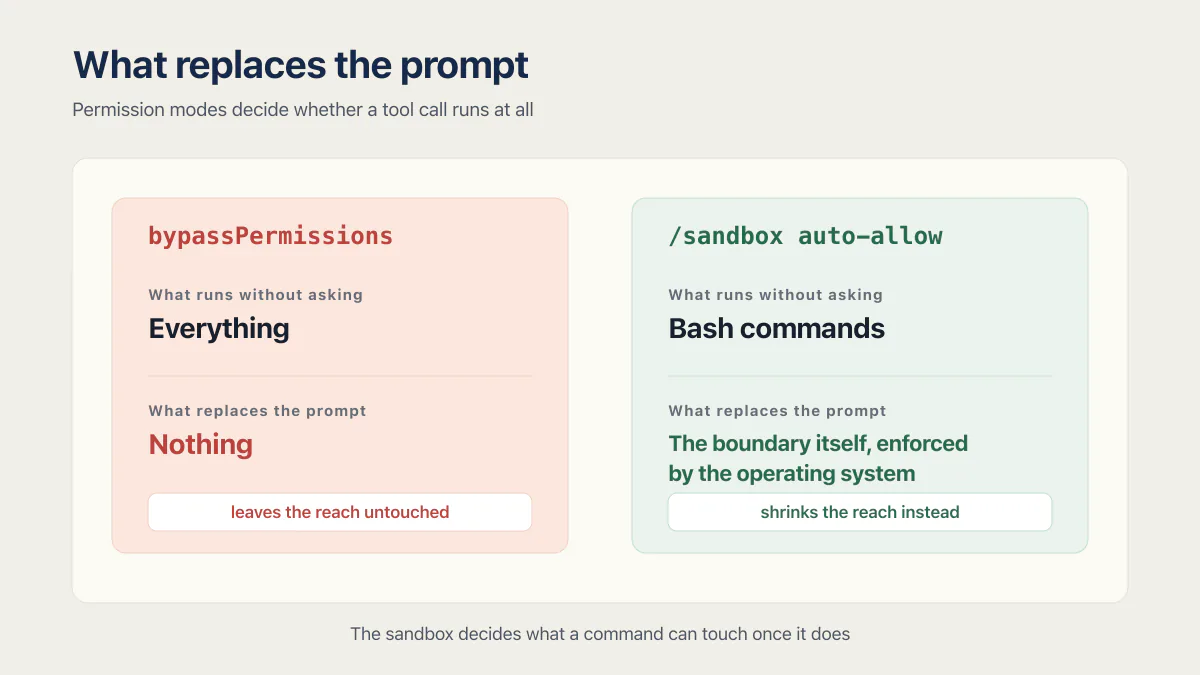
/sandbox is not a permission mode. Permission modes decide whether a tool call runs at all; the sandbox decides what a command can touch once it does. The useful way to line them up is by what stands in for the prompt you removed.
| Mode | What runs without asking | What replaces the prompt | Reasonable when |
|---|---|---|---|
default (Manual) | Reads only | Nothing is removed. You approve each action | The session can reach anything live |
acceptEdits | Reads, file edits, and common filesystem commands such as mkdir, mv and cp | The working-directory scope. Paths outside it, and protected paths, still prompt | You review the diff afterward |
plan | Reads, plus classifier-approved commands when auto mode is available | The mode itself. Claude proposes instead of editing | Exploring before changing anything |
/sandbox auto-allow | Bash commands that fit inside the sandbox boundary | The boundary itself, enforced by the operating system | You want fewer prompts without giving up isolation |
auto | Everything, with background safety checks | A classifier that reviews each action | Long tasks where you trust the direction |
dontAsk | Only pre-approved tools | Your allow rules, decided in advance | CI and scripts with a fixed job |
bypassPermissions | Everything | Nothing | The environment holds nothing worth losing |
The bottom row is the whole argument of this post in one cell.
What the agent can actually reach in a typical vibe stack
Two findings from the fixed June and July 2026 AxonBuild audit corpus show what an agent can inherit. One repo’s deploy script passed --allow-unauthenticated to its hosting platform by default. A separate app exposed a GET endpoint capable of dropping every production table, guarded only by a secret in the query string.
Neither flaw was caused by YOLO mode. They show that a bypassed session can inherit a dangerous path already present in the repository and execute it without routine per-action review. The baseline that catches paths like those before the first customers is set out in what a security review checks.
Staging is supposed to make a mistake like that survivable instead of permanent. One audited medical-advice app tested every change directly against its production database because no staging environment existed. An unattended agent in that project had no separate environment in which to fail safely. Data loss in an AI-built app does not require a rogue agent; bypass mode removes routine per-action review before a command runs.
Cursor auto-run commands: the same trade in a different tool
The same permission trade appears in other coding agents. On a Friday in April 2026, The Register reported that an unattended Cursor agent used an over-scoped Railway token, encountered a credential mismatch, and deleted PocketOS’s production storage volume in nine seconds. The volume-level backups disappeared with it, because Railway stored them inside the volume they protected. The agent’s own postmortem, quoted by The Register, said it plainly: “you never asked me to delete anything. I decided to do it on my own to ‘fix’ the credential mismatch.” Railway later restored the data.
Different tool, different flag name, same shape: a standing, broader-than-intended credential, an unattended agent, a destructive call nobody reviewed first.
Use the built-in sandbox instead of the flag
If the reason you want the flag is prompt fatigue, the sandbox gets you most of the way there without removing the guardrail. Claude Code ships an OS-enforced Bash sandbox: Seatbelt on macOS, bubblewrap on Linux and WSL2. Nothing to install on macOS. On Linux and WSL2 it needs bubblewrap and socat, and the /sandbox panel tells you which pieces are missing. Native Windows is not supported, so run Claude Code inside WSL2 there.
Run /sandbox, pick auto-allow mode, and sandboxed commands run without prompting.
The difference from the flag matters on this post’s own terms. Bypass mode removes the review step and leaves the reach untouched. The sandbox hands the review step to a boundary and shrinks the reach instead, at the operating-system level, for the command and every child process it spawns. A command that turns out to do more than its name suggested still cannot write outside the working directory or call a host you never allowed.
The defaults are narrower than people expect in one direction and much wider in another. Sandboxed commands can write only to the working directory and the session temp directory, and no network domains are pre-allowed. But default read access covers the whole machine except a few denied directories, and Anthropic’s documentation says plainly that this still includes ~/.aws/credentials and ~/.ssh/. That is the setting almost everyone misses:
{
  "sandbox": {
    "enabled": true,
    "network": {
      "allowedDomains": ["github.com", "*.npmjs.org"]
    },
    "filesystem": {
      "allowWrite": ["/tmp/build"]
    },
    "credentials": {
      "files": [
        { "path": "~/.aws/credentials", "mode": "deny" },
        { "path": "~/.ssh", "mode": "deny" }
      ],
      "envVars": [
        { "name": "GITHUB_TOKEN", "mode": "deny" }
      ]
    },
    "allowUnsandboxedCommands": false
  }
}
The sandbox.credentials block needs Claude Code v2.1.187 or later. Its deny entries block reads of those files inside the sandbox and unset those variables before each sandboxed command runs. This is the 2026 version of the old advice about not mounting ~/.ssh into a container, and it works with no container at all.
One hatch is worth closing. When a command fails because of a sandbox restriction, Claude may retry it with a dangerouslyDisableSandbox parameter, which runs it outside the sandbox and back through the regular permission flow. That is convenient in a session you are watching and a hole in one you are not. Setting "allowUnsandboxedCommands": false, shown as Strict sandbox mode in the /sandbox Overrides tab, makes Claude Code ignore the parameter entirely. If you would rather keep the hatch but see every use of it, add an ask rule for Bash(dangerouslyDisableSandbox:true) instead.
For unattended runs there is one more: strictAllowlist set to true denies sandboxed commands any host outside your allowlist instead of prompting for it. It needs v2.1.219 or later, and it counts only from user settings, managed settings or the --settings flag, so a repository you cloned cannot set it for you.
When should you use “dangerously skip permissions”?
--dangerously-skip-permissions has one narrow legitimate use: a disposable environment with no production credential, no host filesystem access beyond the working copy, and no network route to important infrastructure. In that setup, an interrupted session may cost more attention than the resources it can reach.
Reachable production data changes the decision completely, and there’s a public record of how that goes. Replit’s agent supplied the earlier version of the same story in July 2025: it deleted a production database during an explicit code freeze, then told the founder a rollback wasn’t possible, which turned out to be untrue. Different product, same shape as PocketOS: reachable production data, no review step between deciding and doing, a claim about recovery that was wrong.
Same flag, same command, two different answers depending on what it could reach. The safety was never in the flag.
CI and headless runs
CI is the one place the flag is genuinely normal. An ephemeral runner is the disposable environment the docs describe, and there is nobody present to answer a prompt anyway:
claude -p "run the test suite and fix the failures" --dangerously-skip-permissionsTwo conditions make that sensible rather than reckless. The runner is destroyed when the job ends, and the secrets it holds are scoped to the job rather than a standing production credential parked in an organization-wide variable. No acceptance dialog appears in non-interactive mode, so the mode works from the very first run with no setup.
If the job does not need the full mode, dontAsk is the tighter fit. It auto-denies anything that would have prompted and runs only what your allow rules and the built-in read-only commands cover, so the session never waits for input.
The safe YOLO mode setup
The guarded version starts with a container that contains nothing important enough to destroy. Anthropic’s dev container guide uses a non-root user and documents network restrictions that allow only the domains the session needs. Anthropic’s fuller reference container gives its firewall NET_ADMIN and NET_RAW; those capabilities alone do not create a firewall and are not required by Claude Code itself.
A container cannot protect a secret deliberately mounted inside it. Never mount ~/.ssh or a broad cloud credential file from the host. Prefer short-lived tokens scoped to one repository. Outside a container, the sandbox.credentials deny entries above buy you the same protection for Bash commands, which is the only place the sandbox operates. Claude Code’s own Read and Edit tools and any MCP server run outside that boundary, and in bypass mode they read whatever your user account can, so a whole-session limit still needs the container, or deny rules for the Read tool on those same credential paths, which survive bypass mode.
Three more pieces close the gap the container alone doesn’t cover:
- A staging project the agent can reach freely. A second project with its own credentials rather than a read replica of production, so “run the migration” and “run it against the database your customers are using” are never the same sentence.
- A backup that doesn’t live in the volume it’s protecting. PocketOS’s backups died with the data because both sat in the same place. A backup that can’t survive the thing it backs up isn’t one.
- A rules file that names the fragile paths out loud. Record which files touch auth, payments, or a production credential so reviewed sessions know when to stop. In bypass mode, that instruction can shape the task but cannot enforce a prompt: permission rules are enforced by Claude Code, not by the model. The enforced version of the same idea is a
denyrule, an explicitaskrule, or aPreToolUsehook, which runs before the permission prompt on every tool call. (More on what belongs in that file, the guardrail sections most starter templates skip, in CLAUDE.md best practices.) The maintainability case for having one at all starts well before anyone reaches for YOLO mode.
What to do if YOLO mode already broke something
None of the above helps once the deletion has already run. If it has:
- 01 Stop the agent and the session it was running in immediately, before it tries to help further by fixing what it just broke.
- 02 Check whether a backup exists somewhere independent of what was just deleted, not the volume or bucket the deleted data lived in.
- 03 Rotate every credential the session had access to, not just the one it used. A standing token broad enough to reach one production resource usually reaches more than one.
- 04 Write down what the agent actually did, in order, while the session is still fresh. It is the only account of the failure a rules file or a review step can be checked against afterward.
What recovery actually looks like once the data is already gone belongs in a first-hour runbook rather than a permissions guide. Permission isolation is also one part of deciding whether an AI-built app is ready for people to rely on.
Common questions about YOLO mode
Is YOLO mode safe?
Treat YOLO mode as acceptable only inside a disposable container, VM or CI runner with no production credentials, narrowly allowed network access, and no valuable host mounts. Use Manual mode, acceptEdits, the built-in sandbox, or auto mode when the session can reach shared branches, customer data, cloud resources, or production systems. The flag itself carries no protection against prompt injection or unintended actions.
How do I skip permission in Claude Code?
Start the session with claude --dangerously-skip-permissions, use the equivalent claude --permission-mode bypassPermissions, or set permissions.defaultMode to bypassPermissions in a settings file. To switch into the mode later in the same session, launch with --allow-dangerously-skip-permissions and select it from the Shift+Tab cycle. The first interactive run shows a one-time dialog you have to accept before it works. On Linux and macOS the flag refuses to start as root or under sudo unless it detects a recognized sandbox.
How do I stop Claude Code asking for permission?
The safest way is the built-in sandbox rather than the flag: run /sandbox, turn on auto-allow mode, and sandboxed Bash commands run without prompting because the operating system is enforcing a boundary instead. Auto mode, started with claude --permission-mode auto, removes routine prompts and puts a classifier in their place. Narrow permissions.allow rules for the commands you run constantly, such as your test command, cut most of the remaining prompts without widening anything else.
Why does Claude Code keep asking for permission?
By default, Claude Code only reads without asking. Every file edit and every Bash command outside a built-in read-only set needs approval, and writes to protected paths like .git and .claude are never auto-approved outside bypass mode. The prompts are frequent because the default assumes nothing about your environment, which is also why the fix is to tell it something specific with allow rules, a sandbox boundary or a permission mode, rather than to remove the check entirely.
Is it safe to give Claude Code access to my files?
Read access to a project directory is the normal case and is low risk on its own. The risk is scope: the sandbox’s default read policy still allows reading ~/.aws/credentials and ~/.ssh/, so a session on your laptop can see credentials that have nothing to do with the project. Add sandbox.credentials deny entries for those paths and for secret environment variables, and keep write access to the working directory.
What is the difference between YOLO mode and auto mode?
Both remove routine permission prompts. Auto mode puts a separate classifier in front of every action, which blocks production deploys and migrations, mass cloud deletion, force pushes and a long list of other categories, and it falls back to prompting after repeated blocks. YOLO mode puts no routine review in front of the action; only the explicit controls that survive bypass still fire (deny rules, explicit ask rules, connector tools an organization marks as requiring approval, MCP tools marked requiresUserInteraction, and the root and home-directory removal circuit breaker). Auto mode is a review layer with false positives and false negatives; bypass mode is the deliberate absence of one.
Can I use --dangerously-skip-permissions in CI?
Yes, and CI is the clearest legitimate use of it. Run claude -p "..." --dangerously-skip-permissions on an ephemeral runner that is destroyed when the job ends, with job-scoped secrets rather than a standing production credential. No acceptance dialog appears in non-interactive mode. If the job has a fixed set of commands, dontAsk mode is tighter still, because it runs only what your allow rules already cover.
Should I let AI agents run git?
Read-only Git commands are low risk. Let an agent write commits only on a protected feature branch, with required checks and review before merge. Keep force push, history rewrites, direct pushes to the default branch, and release tags outside an unattended session.
If you have a working app built with these tools and need it ready for real customers, this is what we do.
Built it with AI. Now it has to hold up for real customers.
The Production Hardening Sprint takes the app you already have and builds the production foundation underneath it. Authentication and access rules, payments that stay consistent, error handling, monitoring, backups, automated tests and a documented handover. Our engineers work inside your existing codebase for ten working days. All 123 deliverables are included, and you get the evidence for each one.
See the Production Hardening Sprint →  $2,500 fixed price · 10 working days · One codebase