Yes, row-level security can slow a Supabase query, and it can do that while the policy is completely correct. Supabase’s own benchmarks run from a 20x penalty on a 100,000-row table to a policy that took 178 seconds and dropped to 12 milliseconds after one change. The common causes are a fixed identity function evaluated for many rows, a useful policy column with no supporting index, an expensive join inside the policy, or an application query that makes PostgreSQL consider far more rows than the user needs.
The fixes are workload-dependent. Wrap functions such as auth.uid() only when their result stays fixed for the statement. Add an index only when the plan and data distribution show it helps. Keep RLS as the security boundary while giving the query planner the same user or tenant filter in the application query.
Two pointers before the fixes. If the question is whether the policies are correct rather than whether they are fast, the best-practices side of RLS is the better starting point: coverage, roles, and write rules are a different set of decisions from the ones below. And if tables with no policies on them are slow too, RLS is not the cause, and general Supabase slowness triage starts with connection limits, missing indexes, region distance, and compute size.
Costs like these are a large part of why Performance & Scale sits at a 53.3 average out of 100 across the 21 third-party apps in the AxonBuild corpus: the expensive decisions live in the schema, where a demo account never has enough rows to surface them.
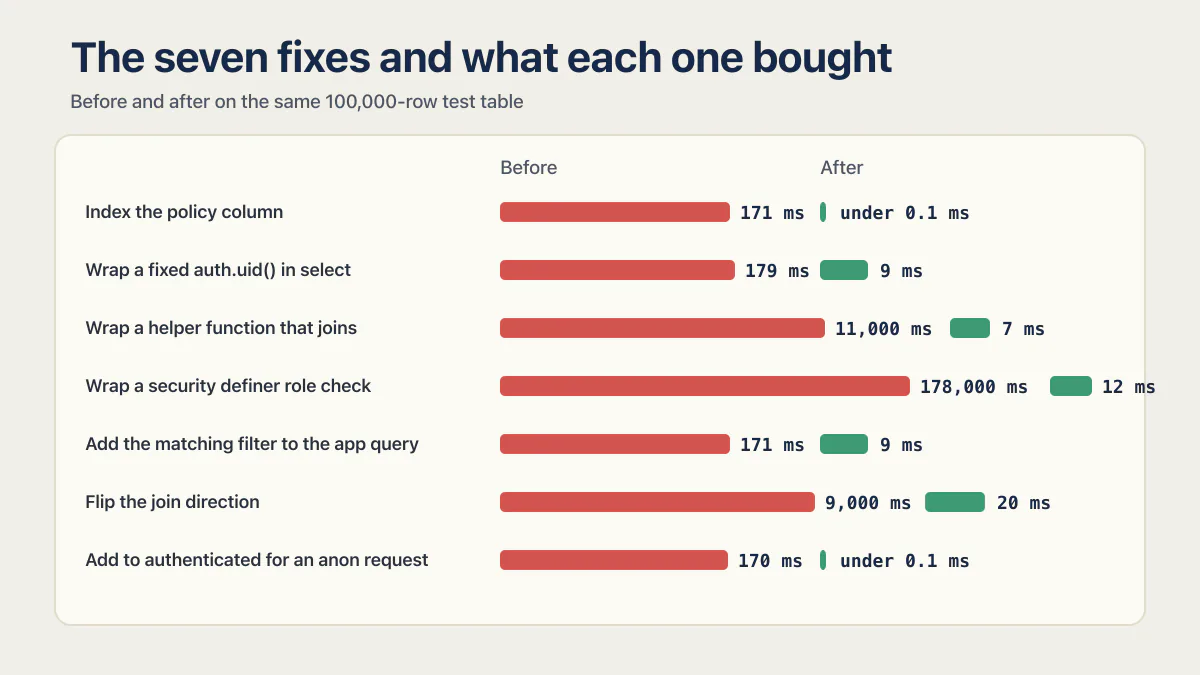
The seven fixes and what each one bought
| Fix | Before | After | Improvement |
|---|---|---|---|
| Index the policy column | 171 ms | under 0.1 ms | over 99.9% |
Wrap a fixed auth.uid() in select | 179 ms | 9 ms | 95.0% |
| Wrap a helper function that joins | 11,000 ms | 7 ms | 99.9% |
Wrap a security definer role check | 178,000 ms | 12 ms | 99.99% |
| Add the matching filter to the app query | 171 ms | 9 ms | 94.7% |
| Flip the join direction | 9,000 ms | 20 ms | 99.8% |
Add to authenticated for an anon request | 170 ms | under 0.1 ms | over 99.9% |
Every number above comes from Supabase’s RLS performance guide, updated July 7, 2026, measured on the same 100,000-row test table. They show the mechanism rather than a promise for every table. Your table’s row count, data distribution, and query shape decide how much of that improvement you actually get, which is why the last section of this post is about measuring rather than guessing.
Wrap fixed auth calls in select: why (select auth.uid()) is faster
Wrapping a fixed function call in select lets PostgreSQL build an initPlan and reuse the result for the statement. A bare auth.uid() inside a policy may otherwise be evaluated repeatedly while the policy filters rows.
-- Repeated function evaluation is possible.
create policy "read_own_orders"
on public.orders
for select
to authenticated
using (auth.uid() = user_id);
-- auth.uid() is fixed for this statement, so cache it once.
create policy "read_own_orders"
on public.orders
for select
to authenticated
using ((select auth.uid()) = user_id);That is the 179 ms to 9 ms row in the table above, a 95% cut from one pair of parentheses.
The warning beside Supabase’s recommendation matters: wrap a function only when its result does not depend on the current row. A function that accepts a row’s team_id, price, or state cannot be cached once and reused safely across different rows.
Index the policy column: when an RLS column earns an index
An index is worth testing when the policy compares a selective column such as user_id, tenant_id, or team_id and the column is not already covered by a primary key, unique constraint, or suitable composite index. PostgreSQL can then find candidate rows without scanning the whole table.
create index orders_user_id_idx
on public.orders using btree (user_id);
btree is the default index type and the right one here. An RLS policy that compares a column to one value with = is exactly the equality lookup btree is built for, and btree also serves the range and sort work that usually sits beside it in the same query. Reach for a different index type only when the policy does something btree cannot serve, such as an array containment or a full-text match.
In the same 100,000-row benchmark, indexing user_id reduced the test query from 171 milliseconds to under 0.1 milliseconds. Supabase also says these recommendations are broad and an index should be backed out when measurement shows no benefit and the workload does not otherwise use it.
Indexes carry write cost and storage cost. A boolean column with two values may be a poor standalone index. A multi-tenant query that uses an equality filter on tenant_id and then orders or ranges by created_at may benefit from a composite index beginning with tenant_id. Use the actual filter, row counts, and query plan to choose the index instead of creating one for every name that appears in a policy.
| Looks optimized | Evidence it is optimized |
|---|---|
| The policy uses auth.uid() | A fixed auth.uid() call is cached with select and the plan no longer repeats it across rows |
| The policy column has an index | EXPLAIN shows the index serves the real query and the added write cost is acceptable |
| RLS limits the result to one user | The application query also filters by that user or tenant so PostgreSQL starts with fewer candidate rows |
Why an RLS policy that was fine at 100,000 rows times out at a million
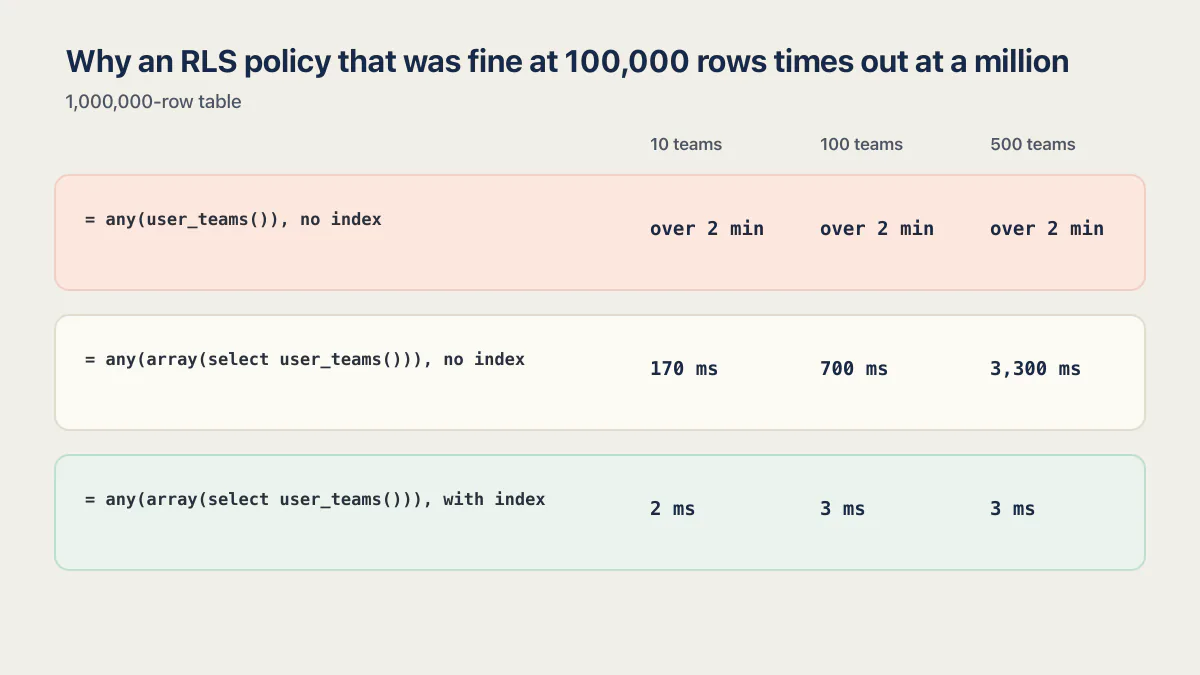
Because the cost of a per-row function call grows with the row count and with the size of the set that function returns, so a policy can sit inside its timeout for months and then cross it in a week. Supabase ran a second benchmark on a 1,000,000-row table with a policy checking team membership, at 10 teams, 100 teams, and 500 teams per user. The unwrapped form never finished.
-- Times out past two minutes at 10, 100 and 500 teams.
using (team_id = any (user_teams()));
-- Materializes the team list once, then lets the index do the work.
using (team_id = any (array(select user_teams())));create index orders_team_id_idx
on public.orders using btree (team_id);| Policy form | 10 teams | 100 teams | 500 teams |
|---|---|---|---|
= any(user_teams()), no index | over 2 min | over 2 min | over 2 min |
= any(array(select user_teams())), no index | 170 ms | 700 ms | 3,300 ms |
= any(array(select user_teams())), with index | 2 ms | 3 ms | 3 ms |
Two things fall out of that table. The array(select ...) wrap is what stops the function being re-evaluated per row, and the index is what stops the result degrading as the user’s team count grows. You need both. With the wrap alone, 500 teams costs nearly 20x what 10 teams costs. With both, the team count stops mattering.
The “over 2 min” figure is a database-side cap. Through the API you hit a shorter one first. Supabase’s timeouts guide sets a default statement_timeout of 8 seconds for the authenticated role and 3 seconds for anon, so an app query hits its ceiling long before the SQL editor does. That is why the same query can look merely slow in the dashboard and fail outright in the app. Load testing a web application covers modeling one real user journey, ramping past your peak traffic, and recording p95 latency and errors.
Repeat the filter in the query: why the app should send the same user filter
RLS decides which rows the caller may access. It should not be the only filter telling the database which rows the screen wants. Supabase recommends adding a matching application filter because it gives the planner a narrower starting set while RLS continues to enforce authorization.
const { data, error } = await supabase
  .from("orders")
  .select("id, status, created_at")
  .eq("user_id", user.id)
  .order("created_at", { ascending: false })
  .limit(50);
The client-supplied user_id remains untrusted. A caller can change it, so the policy must still compare the row against (select auth.uid()). The explicit filter improves the query shape without taking over the authorization job. In Supabase’s benchmark that one .eq() took the test query from 171 milliseconds to 9 milliseconds, a 94.7% cut, with no policy change at all.
Flip the join direction: how membership lookups multiply work
Policies that consult membership, roles, or another table can multiply work across every candidate row, the policy-side cousin of the N+1 query problem. Supabase recommends reorganizing the check so the policy compares a row column against a fixed set for the current user, for example team_id in (select team IDs for this user), instead of joining each policy row back to the membership table by the row’s value.
A fixed helper function can also be cached:
using ((select is_admin()) or team_id in (select private.user_teams()))Supabase’s benchmark for that exact wrap is the most dramatic number in the whole guide: a policy calling an unwrapped helper, has_role() = role, ran their test query in 178 seconds. Wrapped as (select has_role()) = role, the same query ran in 12 milliseconds.
The helper itself is the part most posts describe and never show. Here is the whole thing, in a schema PostgREST does not expose, so nobody can call it directly over the API:
create schema if not exists private;

create or replace function private.user_teams()
returns setof uuid
language sql
stable
security definer
set search_path = ''
as $$
  select tm.team_id
  from public.team_members tm
  where tm.user_id = (select auth.uid());
$$;

revoke execute on function private.user_teams() from public, anon;
grant execute on function private.user_teams() to authenticated;
create policy "read_team_orders"
on public.orders
for select
to authenticated
using (team_id = any (array(select private.user_teams())));Three details in that function body are load-bearing. security definer is what lets it read team_members without recursing into that table’s own policies. set search_path = '' is required by Supabase’s database-function guidance, which is why every relation inside is schema-qualified. And execute is granted only to the role whose policy calls it, so anon cannot reach it at all.
This pattern needs a security review alongside the performance review. A SECURITY DEFINER function runs with its owner’s privileges, so a loose body hands out that privilege to anyone who can invoke it. A function that depends on each row cannot be wrapped once. A function returning thousands of team IDs may also need a different data model or query shape.
The durable rule is narrower: move invariant work out of the per-row path, then measure the resulting plan. Avoid replacing a visible join with a privileged function whose behavior nobody tested.
One more reason to fix the table with subscriptions first. Supabase’s Realtime RLS announcement puts it plainly: if your policy is slow, all access to that table will be slow. Realtime evaluates the policy per broadcast message, so a policy that costs 20 milliseconds on a page load costs it again on every change event the table emits.
Can a JWT claim replace the membership lookup?
Often, yes, and it is the cheapest version of the fix because the policy stops querying a second table entirely. auth.jwt() returns the caller’s token, and anything stored in the user’s raw_app_meta_data column is readable from it. Compare two values already in memory instead of joining to a membership table.
create policy "read_tenant_orders"
on public.orders
for select
to authenticated
using (
  tenant_id = ((select auth.jwt()) -> 'app_metadata' ->> 'tenant_id')::uuid
);
The hard rule that goes with it: app_metadata (raw_app_meta_data) cannot be updated by the user, so it is safe to base an authorization decision on. user_metadata (raw_user_meta_data) can be updated by the authenticated user through supabase.auth.updateUser(), so a policy that reads it lets any user grant themselves whatever they like. Supabase’s row-level security guide calls this out directly, and the database advisors ship a lint for it, rls_references_user_metadata.
The same trick covers step-up auth. A claim check like (select auth.jwt()->>'aal') = 'aal2' restricts a table to sessions that completed a second factor, with no extra table read.
The honest tradeoff is staleness. A claim is baked into the access token when it is issued, so removing someone from a tenant does not take effect until their token refreshes. If revocation has to be immediate, keep the membership lookup and pay for it with the array(select ...) wrap and an index. If a short delay is acceptable, the claim is faster and simpler.
Name the role with to authenticated
A policy with to authenticated is skipped for the anon role. Supabase recommends this instead of making auth.uid() alone exclude logged-out requests. The explicit role both documents intent and avoids evaluating the rest of that policy for a role that can never satisfy it.
create policy "authenticated_users_read_own_orders"
on public.orders
for select
to authenticated
using ((select auth.uid()) = user_id);
Role scoping does not improve the signed-in user’s query by itself. It removes unnecessary policy work for other roles and reduces the chance that a permissive policy accidentally applies more broadly than intended. Supabase’s benchmark for adding that one clause: an anonymous request that previously spent 170 milliseconds evaluating the policy anyway dropped to under 0.1 milliseconds, because Postgres skips a policy entirely once the calling role does not match the one it names.
Measure the plan: how to tell whether RLS is the cause
Start by naming the symptom, because a slow policy has a small set of recognizable faces. The query is cancelled with canceling statement due to statement timeout, SQLSTATE 57014. The dashboard or the app returns a 504. A list screen spins and never renders while the rest of the app stays fast. One table is slow and its neighbors are not. Those are what a policy problem looks like from the outside, and none of them prove RLS is the cause on their own.
Measure with representative data in a local or staging environment. Supabase explicitly says to compare RLS-on and RLS-off behavior only outside production. The production database should keep its access controls intact.
Start with the real authenticated context and query:
begin;

set local role authenticated;
set local request.jwt.claims to
  '{"role":"authenticated","sub":"5950b438-b07c-4012-8190-6ce79e4bd8e5"}';

-- Confirm the impersonation took before you trust any timing below.
select auth.uid();

explain (analyze, buffers)
select id, status, created_at
from public.orders
where user_id = '5950b438-b07c-4012-8190-6ce79e4bd8e5'::uuid
order by created_at desc
limit 50;

rollback;
Run that select auth.uid(); line and confirm it returns the uuid, not null. A misconfigured claim makes every policy fail to match, the query returns nothing, and the resulting plan looks wonderfully fast for entirely the wrong reason. Supabase’s current guide uses the JSON request.jwt.claims form shown above; the older singular request.jwt.claim.sub setting is the usual cause of a silent null.
Read the plan for sequential scans, repeated subplans, rows removed by filters, buffer reads, and actual time. Here is the shape of a plan that blames the policy, with the two lines that matter called out:
Limit  (cost=... rows=50) (actual time=171.402..171.409 rows=50 loops=1)
  ->  Sort  (actual time=171.401..171.404 rows=50 loops=1)
        Sort Key: created_at DESC
        ->  Seq Scan on orders  (actual time=0.041..170.882 rows=50 loops=1)
              Filter: (user_id = (SubPlan 1))
              Rows Removed by Filter: 99950   -- read 100k rows to return 50
              SubPlan 1                       -- function re-run per row
                ->  Result (actual time=0.001..0.001 rows=1 loops=99950)
              Buffers: shared hit=1042 read=8311
Planning Time: 0.184 ms
Execution Time: 171.455 ms
Rows Removed by Filter: 99950 means PostgreSQL read the whole table to return one screen, which is the index fix. loops=99950 under SubPlan 1 means the function ran once per row, which is the select wrap fix. When the wrap works, that block becomes InitPlan 1 (returns $0) with loops=1. Whether the Seq Scan also becomes an Index Scan using orders_user_id_idx is the planner’s separate choice, which depends on the index existing and on how selective the filter is, so read the two lines as two results.
Then apply one change and run the same statement again. Testing one change at a time tells you whether the wrapped function, index, query filter, or policy rewrite earned its place.
For an isolated baseline, compare against a privileged local connection or a server-only secret-key client with no signed-in user session. Supabase applies the signed-in user’s RLS context even when the client was initialized with a service key. Never put a secret key in a browser, mobile build, test recording, or client-side environment variable. Similar plans and runtimes point to the underlying query. A large gap points back to policy work or tables consulted by the policy.
The comparison can also come back clean, which is worth knowing before the policy takes the blame. In one sports-analytics app in the corpus, row-level security was enforced exactly as intended on every table involved, and the slowest screen in the app had nothing to do with any policy: the query behind it pulled every row of a user’s history in one request, then did all the aggregation in the browser. The two plans on a query like that come back nearly identical, and that near-match is itself the diagnosis. The policy carried none of the cost; the unbounded query carried all of it. When the query itself is the cause, how to analyze a Postgres query covers finding the slow queries, reading EXPLAIN ANALYZE, and adding the indexes that actually help.
How to read the plan without leaving Supabase
If you built the app with Lovable, Base44, or Claude Code and have never opened a SQL client, three paths in the product get you the same evidence.
Start with the Query Performance report in the dashboard, which is where you find out which query is slow before you know RLS is involved. It ranks statements by total and mean time, so you arrive at EXPLAIN already knowing what to explain.
Next, use the SQL editor’s user impersonation control. The role selector lets you run a statement as anon or as a specific signed-in user, which mints the right token for you and removes the whole set local dance above. It is the fastest way to reproduce a slow query exactly as a real user hits it.
Third, get a plan straight from the client library. The .explain({ analyze: true }) modifier returns the plan through PostgREST, but it is off by default and has to be enabled first:
alter role authenticator set pgrst.db_plan_enabled to true;
NOTIFY pgrst, 'reload config';
const { data } = await supabase
.from("orders")
.select("id, status, created_at")
.eq("user_id", user.id)
.explain({ analyze: true });Turn the flag back off when you are done (alter role authenticator set pgrst.db_plan_enabled to false; then the same NOTIFY). Leaving it on exposes your query plans through the API, and a plan tells an attacker about your schema. Do this on a staging project rather than production wherever you can.
Multiple permissive policies on one table
PostgreSQL combines applicable permissive policies with Boolean OR. Several overlapping policies can add work, especially when their expressions call expensive functions. PostgreSQL does not guarantee expression order or that every branch will be evaluated, so do not infer a fixed cost from policy count alone. Read the real query plan.
Consolidating them into one policy per role and per command can be a real performance fix when the plan shows duplicated work. The database advisors flag this as multiple_permissive_policies, and it is the check most teams ignore because each individual policy looks correct in isolation.
The Supabase Advisors also flag unwrapped auth functions through auth_rls_initplan and unindexed foreign keys through unindexed_foreign_keys. Those checks identify candidates. EXPLAIN (ANALYZE, BUFFERS) on the real query decides which candidate matters.
| Candidate | Evidence to look for | First change to test |
|---|---|---|
| Fixed auth or role function | Repeated function or subplan work | Wrap the fixed call in select |
| Selective policy column without an index | Sequential scan and many rows filtered | Add the workload-appropriate index |
| Broad application query | Many candidate rows before RLS removes them | Add the same user or tenant filter to the query |
| Membership join inside the policy | Repeated join work per candidate row | Compare against a fixed set or carefully designed helper |
| Membership set that grows per user | Fine at 10 teams, slow at 500 | Wrap the set in array(select ...) and index the column |
| Several permissive policies on one table | Advisor flags multiple_permissive_policies, plan shows stacked filters | Consolidate into one policy per role and command |
| Policy applied to irrelevant roles | Work for anon that can never succeed | Add to authenticated or another specific role |
RLS performance improves when the planner can compute identity once and reach the permitted rows without scanning the rest.
Keep the fix safe: how to stop an RLS optimization from weakening security
Run the performance plan and the authorization suite together. After every policy change, prove that user A can still access its fixture, user B still receives no row, owner-changing updates fail, and callable functions respect the same boundary. The Supabase RLS testing procedure covers the database and application layers.
Some neighboring symptoms need different diagnoses. A write can fail with the database refusing a write outright with “new row violates row-level security policy.” That result means the request failed a policy condition; it does not show a slow plan. Whether a policy fully covers roles, functions, and server paths is a question, one the security side of this cluster answers on its own.
A missing index behind a slow RLS policy and a missing index on an ordinary foreign key produce the same symptom, but EXPLAIN shows which filter or join is doing the work. Keep the cause with the migration so a later cleanup does not remove an index whose purpose is no longer obvious.
RLS performance fixes, in order
-
Every fixed function call in a policy is wrapped,
(select auth.uid())notauth.uid(), and the plan showsInitPlanwithloops=1rather thanSubPlan. -
Every selective policy column has a btree index that
EXPLAINactually uses, and no index exists that measurement could not justify. -
Every application query sends the same user or tenant filter the policy enforces, so the planner starts narrow.
-
Any membership set is materialized with
array(select ...)and the compared column is indexed, tested at the largest team or tenant count you expect. -
Every policy names its roles with
to, and no table carries overlapping permissive policies for the same role and command. -
The advisors are clean on
auth_rls_initplan,multiple_permissive_policies, andunindexed_foreign_keys, or each exception is written down with its reason. -
The authorization tests still pass after every performance change: user A sees its rows, user B sees none, and owner-changing writes fail.
Common questions about Supabase RLS performance
Does RLS slow down Supabase queries?
RLS adds policy expressions to the query, so it has a cost. That cost can be small when identity is computed once, useful policy columns are indexed, the application query is selective, and joins are controlled. Measure the actual plan before assigning a slowdown to RLS.
How much can RLS slow a query?
In Supabase’s own 100,000-row benchmarks, the penalty ranges from roughly 20x to more than 10,000x depending on what the policy does. Wrapping a fixed auth.uid() took a query from 179 ms to 9 ms, and wrapping a security definer role check took the same test query from 178 seconds to 12 milliseconds. The size of your penalty depends on row count, the selectivity of the policy column, and whether the policy calls a function per row.
Should every column used by RLS have an index?
No. Index columns that serve the real query and are selective enough to help. Check existing primary, unique, and composite indexes first, then compare plans before and after. Remove an otherwise unused index when measurement shows it adds write cost without improving the workload.
Why is (select auth.uid()) faster than auth.uid()?
The subselect allows PostgreSQL to create an initPlan and cache a value that stays fixed for the statement. A bare function call may be evaluated repeatedly during policy filtering. The optimization is safe only when the function’s result does not change with each row.
Why does my Supabase query time out only in production?
Because production has the row counts and the per-user set sizes that staging does not. A policy that calls a function per row scales with both, so a table that was fine at 100,000 rows can exceed the timeout at a million, and a user in 500 teams can time out on a query that is instant for a user in 10. The authenticated role also has a shorter default statement_timeout (8 seconds) than the dashboard connection, so the app fails while the SQL editor merely looks slow.
Can I turn off RLS to benchmark production?
Do not disable RLS in production. Use a local or staging copy with representative data, or a secure server-only secret-key client with no signed-in user session for an end-to-end timing comparison. Keep production policy changes behind tests and review the resulting plan before release.
Should I just turn RLS off and filter in my backend instead?
No, not for a Supabase app whose client talks to PostgREST directly. Removing RLS there moves the entire authorization boundary into client-side code that anyone can read, modify, or bypass with a direct API call using the public key. The measured fixes on this page close most of the performance gap without that trade.
The case where a server-side data layer is reasonable is a real one: if every request already goes through your own API, no browser holds a Supabase key, and the Data API’s access to those tables is revoked for the anon and authenticated roles, filtering in that layer is defensible. It costs you defense in depth, though. RLS keeps enforcing the rule when a new endpoint, a background job, or an admin script forgets to. Most teams that reach for this are looking for a shortcut around one slow policy, and the shortcut is more expensive than the fix.
Does RLS slow down inserts and updates too?
Yes. A with check expression is evaluated once per row written, so a 5,000-row bulk insert evaluates it 5,000 times, and an update policy runs both its using and its with check expression. The same fixes apply: wrap fixed function calls in select, index any column the expression compares against, and avoid joining to another table inside the expression. Supabase’s published benchmarks are all select-shaped, so measure the write path yourself with explain (analyze, buffers) on a representative batch.
If you have a working app built with these tools and need it ready for real customers, this is what we do.
Built it with AI. Now it has to hold up for real customers.
The Production Hardening Sprint takes the app you already have and builds the production foundation underneath it. Authentication and access rules, payments that stay consistent, error handling, monitoring, backups, automated tests and a documented handover. Our engineers work inside your existing codebase for ten working days. All 123 deliverables are included, and you get the evidence for each one.
See the Production Hardening Sprint →  $2,500 fixed price · 10 working days · One codebase