Cursor rules live in .cursor/rules/ as .mdc files: Markdown with a short YAML frontmatter block on top. The whole game is which of the four rule types you pick and how narrow the glob is. Keep always-on rules tiny, because they spend context on every unrelated turn. Scope everything else to the paths where a wrong edit costs data, access, money, or recovery.
Each .mdc file can be always included, attached when a matching file is in context, selected by the agent from its description, or invoked by name. Cursor’s current rules documentation lists three frontmatter fields: description, globs, and alwaysApply. Those three fields, and nothing else, decide when your rule shows up.
Cursor’s rules help page calls the old root .cursorrules file legacy and says it “will be deprecated,” so move its contents into Project Rules. Keep those Project Rules under the repository’s root .cursor/rules/ directory. Subfolders inside that directory work, although Cursor says a flat structure is simpler. Neither live page documents automatic attachment from separate .cursor/rules/ directories inside project subdirectories. For directory inheritance, Cursor instead documents nested AGENTS.md files that apply to their directory and its children.
The best rules are short, scoped, and verifiable. They name the fragile path, the constraint that must hold, and the command or test that supplies evidence. Rules supply model context. CI and server-side controls still have to reject a bad result.
The four Cursor rule types, and when each one loads
Cursor’s settings panel now labels the four types Always Apply, Apply Intelligently, Apply to Specific Files, and Apply Manually. Most write-ups still call the same four Always, Agent Requested, Auto Attached, and Manual. The behavior is unchanged; the labels moved, so match the current ones against your settings panel.
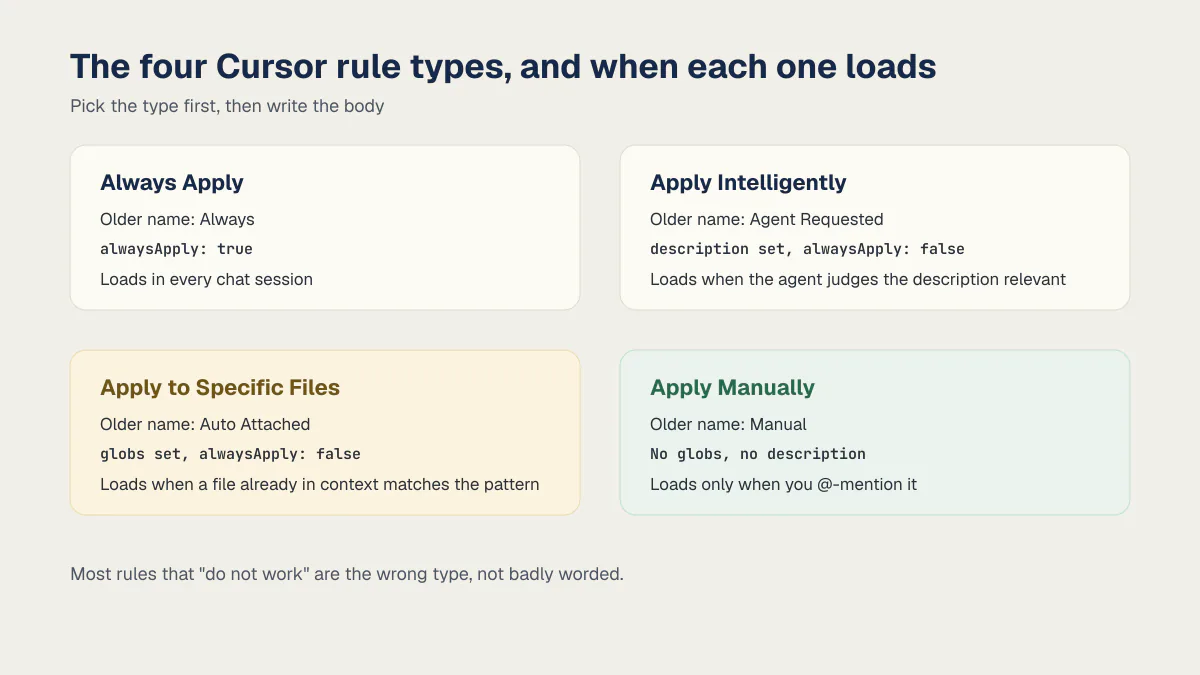
| Rule type (current label) | Older name | Frontmatter | When it enters context | Use it for |
|---|---|---|---|---|
| Always Apply | Always | alwaysApply: true | Every chat session | Short repo-wide facts: package manager, runtime, the command that must pass |
| Apply Intelligently | Agent Requested | description set, alwaysApply: false | When the agent judges the description relevant to the task | Topic rules the agent should reach for, like “writing a migration” |
| Apply to Specific Files | Auto Attached | globs set, alwaysApply: false | When a file already in context matches the pattern | Path-scoped constraints on fragile code |
| Apply Manually | Manual | No globs, no description | Only when you @-mention it, for example @my-rule | Long checklists you want on demand, not by default |
Pick the type first, then write the body. Most rules that “do not work” are the wrong type, not badly worded.
Which rules win: user, project, and team
There are three tiers plus a plain-Markdown option, and they answer different questions.
- User Rules are your global preferences, set in Cursor settings and applied across every project you open.
- Project Rules are the
.mdcfiles in.cursor/rules/, version-controlled with the repo and shared by everyone who clones it. - Team Rules are managed from the dashboard on Team and Enterprise plans and apply across the organization.
- AGENTS.md is a plain Markdown file with no frontmatter, for straightforward repository instructions.
When two tiers disagree, Cursor’s documented precedence is Team Rules, then Project Rules, then User Rules. Practical read: a personal preference cannot override a rule your team set, and a repo rule cannot override a team rule. Put anything that must hold for everyone in the project or team tier, not in your own settings.
Rules can also be imported from a GitHub repository through Customize, then Rules, then Add Rule, then Remote Rule (GitHub). Imported rules land in .cursor/rules/imported/<repoName> with their relative paths preserved, which is a reasonable way to share one house style across several repos without copy-paste drift.
The best Cursor rules define a protected path
Framework and style rules can save review time. They do a different job from a rule guarding authorization, a payment webhook, a database migration, or a secret-handling path. Those areas need a falsifiable instruction rather than a preference.
| What most rule collections cover | What decides whether a change is safe |
|---|---|
| Use functional components, prefer named exports, match the existing folder structure | Never touch a Postgres migration unless a second-account test proves the first account’s row stays unreadable |
| Follow the project’s existing state-management library | Never restructure the payment webhook handler without the signature-verification test passing first |
| Write JSDoc comments on exported functions | Never echo an API key or a signing secret into a chat response or a commit |
Both columns are legitimate .cursor/rules content. The right column is more valuable when a plausible edit could change who may access data or whether a payment is trusted.
What an unscoped fragile area actually costs
I audited a multi-tenant B2B app where the entire tenant boundary lived in one place: a session cookie, written as a plain JSON blob with no signature or encryption, parsed and trusted by the server without a check. Every database query in the app was correctly scoped to a workspace id, the part that would pass a quick read-through. The problem was where that id came from: the cookie, editable from the browser’s dev tools. Change it in one field, reload, and you’re reading and writing another customer’s alerts, tasks, and payments.
That app is one of the 21 third-party apps in AxonBuild’s fixed June and July 2026 cohort. Seven allowed confirmed cross-user data access. This was one direct version: one editable cookie value supplied the tenant identifier for otherwise-scoped queries. The historical cohort does not estimate the prevalence of this bug in all Cursor-assisted projects.
An unsigned session cookie can still look tidy in a diff. A rule auto-attached to the session and authorization paths can require a second-account test whenever those files change. The rule cannot make the test pass or prevent someone from bypassing CI, but it makes the expected evidence explicit at the point of change.
A rule loaded into every chat regardless of what’s open competes with everything else in that context window. A rule that shows up only when the auth file is already open is the one that actually gets read.
Cursor rules examples: a security rule, annotated
A useful rule names a path, a constraint, and a command that can fail. This example uses one explicit glob so its attachment behavior is easy to inspect:
---
description: Authentication and session changes require an authorization-boundary test
globs: src/lib/auth/**
alwaysApply: false
---

<!-- globs is set and alwaysApply is false on purpose: this rule should
     attach automatically whenever this path is already in the
     agent's context, not on every unrelated chat about the UI. -->

- Do not change how a session is created, signed, or read without a passing `pnpm test auth`.
- Keep a second-account test that requests the first account's protected record and expects a denial.
- Never echo an API key, a signing secret, or a service-role token into a chat response, a log line, or a commit, even while debugging.
Two choices in that frontmatter do the work. globs names one fragile path instead of using **/*.ts. alwaysApply stays false, making this an Apply to Specific Files rule rather than a paragraph included in unrelated work. Note the shape of each line: a path, a constraint, and something that can fail. “Follow security best practices” would fail that test, because nothing afterward proves the agent did it or skipped it.
Cursor rules examples you can paste
Three more complete files. Save each one under .cursor/rules/, change the globs to your paths, and delete the lines that do not apply to your stack.
Postgres migrations. The riskiest directory in most AI-built apps, because a bad migration is the one mistake you cannot undo by editing code:
---
description: Migration changes require a rollback path and a second-account isolation test
globs: supabase/migrations/**
alwaysApply: false
---

- Never edit a migration that has already run in production. Write a new one.
- Any migration touching a table with per-user rows ships with its row-level-security policy in the same commit.
- Keep a test that logs in as a second account, requests the first account's row, and expects a denial.
- Write the rollback path in the same commit and state in the PR body how to run it.
- Do not run a destructive statement against a live database to "check" something.
Payment webhooks. The path where a plausible edit quietly gives away paid access:
---
description: Webhook handler changes require signature verification and repeat-delivery safety
globs: src/app/api/webhooks/**
alwaysApply: false
---

- Verify the signature against the raw request body before parsing it. Never trust a parsed payload.
- Reject anything that fails verification with a 400, and log the event id only, never the body.
- Treat repeat deliveries as normal: the same event id must not grant access or charge twice.
- Entitlements are read from the database, never from a value the client sent.
- Do not change this file without `pnpm test webhooks` passing.
A deliberately tiny always-on rule. This one loads on every single turn, so every line has to earn a permanent seat:
---
description: Repo-wide facts every task needs
alwaysApply: true
---

- Package manager is pnpm. Never generate an npm or yarn lockfile.
- Node 22, TypeScript strict mode on.
- `pnpm build && pnpm typecheck && pnpm lint` must pass before you call a task done.
- If a change touches auth, payments, or migrations, stop and ask before editing.
That last file is four lines for a reason. Anything longer belongs in a scoped rule that loads when its path does.
Scoping rules so they attach exactly when it matters
The glob pattern is the entire mechanism, and it rewards specificity over a folder-wide catch-all. supabase/migrations/** matches every migration and nothing else. **/*.sql would also catch a one-off reporting query in a scripts/ folder, attaching the rule to files that were never the risk and diluting it on the ones that are.
| Pattern | What it matches | What it wrongly catches |
|---|---|---|
src/lib/auth/** | Everything under the auth library, at any depth | Nothing outside that folder. This is the shape you want |
supabase/migrations/** | Every migration file | Nothing. Narrow by construction |
app/api/**/route.ts | Route handlers under the API folder | Nothing extra, but it misses the helpers those routes import. Add a second rule if the logic lives elsewhere |
**/*.sql | Every SQL file in the repo | Seed files, fixtures, throwaway reporting queries in scripts/ |
**/*.ts | Every TypeScript file | Effectively the whole repo. At that point use alwaysApply: true and cut the rule to four lines, or narrow the glob |
- 01 Name the two or three paths where a plausible mistake could leak data, grant access, charge money, or break recovery
- 02 Write globs that match those files specifically instead of a repository-wide extension pattern
- 03 Choose Apply to Specific Files for path-scoped rules and reserve Always Apply for instructions that genuinely apply to every task
- 04 Pair each protected path with the exact test or command that must pass
- 05 Reference a matching file in a fresh chat and confirm the rule appears as active context
- 06 Change one matched file in a test branch and verify CI still enforces the required behavior when the model ignores the prose
What not to put in a Cursor rule
Cursor’s own documentation gives this its own heading, and the list is short. Do not copy an entire style guide into a rule, because a linter enforces formatting and a rule only asks. Do not document every possible command; the agent can read your package.json. Do not write instructions for edge cases that come up twice a year. Do not restate what is already in the codebase or the README, because you have just created a second copy that will drift from the first.
The one number Cursor publishes is a ceiling: keep a rule under 500 lines, and split a long one into several composable rules. That ceiling is generous. For an always-on rule, treat 500 as irrelevant and aim for something you could read aloud in fifteen seconds, because that text is prepended to every unrelated turn: the CSS question, the typo fix, the “why is this test flaky” thread. A path-scoped rule can afford to be longer, since it only appears when the file it guards is already open.
Why your Cursor rules are not applying
This is the most common Cursor rules problem, and it is almost always mechanical rather than a model that ignored you. Work down this list in order and stop at the first thing that is wrong.
- 01 Confirm the file ends in .mdc and sits in .cursor/rules/ inside the project you actually have open
- 02 Open Customize, then Rules, and check that the rule type shown there is the one you intended
- 03 Test the glob against one real file, not the folder: open that exact file in a fresh chat and see whether the rule appears
- 04 For an Apply Intelligently rule, reread the description as the agent sees it, since a vague description gets judged irrelevant and never loads
- 05 For an Apply Manually rule, type @name in the chat, because nothing else will load it
- 06 Check the Agent sidebar and confirm the rule is listed as active context before blaming the model
- 07 If the rule loads and the model still ignores it, stop tuning the prose and move the constraint into CI, where it can fail a build
The last step matters more than the other six. A rule is context, not a control. Anything that must hold every time belongs in a test, a lint rule, or a server-side check that runs whether or not the agent read your file. Guardrails for AI coding agents covers those layers in order of whether they bind, from the rules file to the CI check that fails the build.
Cursor rules vs AGENTS.md vs CLAUDE.md vs Skills
Cursor documents AGENTS.md as a plain-Markdown alternative for straightforward project instructions. A root file covers the project, while a file in a subdirectory applies to that directory and its children. Cursor’s CLI also reads root AGENTS.md and CLAUDE.md files alongside .cursor/rules. Those files are useful for concise repository or directory context; .mdc Project Rules are the better fit when you need explicit globs, agent-requested rules, manual invocation, or separate rule files.
Skills are the newer piece and answer a different question. A Cursor skill is a folder containing a SKILL.md file, kept in .agents/skills/ or .cursor/skills/ for a project or the matching path in your home directory for all projects. Cursor discovers them at startup, the agent picks one up when the task matches it, and you can invoke one directly by typing / in chat. The short version: rules gate on a path, an always-on stance, an agent-judged description (Apply Intelligently) or an @-mention (Apply Manually), while skills gate on what the task is. Cline reads several of these formats at once, and Cline rules are their own system with their own toggles.
Do not duplicate the same instruction across every format. Pick one owner, keep repository-wide context short, and use scoped rules for path-specific requirements. The durable part is pairing a fragile area with evidence that can fail, the same discipline why an AI-built app gets harder to change every week covers from the maintainability side.
This post owns Cursor’s .mdc mechanics: how a rule attaches, when it appears, and how to test its scope. The CLAUDE.md sibling piece covers the corresponding Claude Code file, and the AGENTS.md guide covers the cross-tool format, while rules files across tools are compared side by side on their own page. Privacy Mode, agent permissions, and platform vulnerabilities belong in a separate Cursor safety assessment. In every system, the test or policy outside the conversation remains the enforcement layer.
Common questions about cursor rules
What are the Cursor rules best practices?
The Cursor rules best practices come down to picking the right one of the four rule types and keeping the glob narrow: keep always-on rules tiny because they spend context on every turn, scope everything else to the paths where a wrong edit costs data, access, money or recovery, and make each rule name the fragile path, the constraint that must hold and the command or test that supplies the evidence. The four types and the frontmatter line that selects each are in the table near the top of this page.
Where do Cursor rules live?
Project Rules live under the repository’s root .cursor/rules/ directory. You can organize .mdc files in subfolders there, although Cursor says a flat directory is simpler. Cursor does not document automatic attachment from a separate .cursor/rules/ directory inside each project subdirectory. For instructions that inherit by directory, use a nested AGENTS.md; Cursor documents that file as applying to its directory and children. User Rules live in Cursor’s settings, and Team Rules are managed from the dashboard.
How do I create a Cursor rule?
Type /create-rule in the Agent chat and describe what you want the rule to do, or open Customize, then Rules, then Add Rule. Both routes create the .mdc file with valid frontmatter, which is safer than hand-writing it, because the exact serialization of the metadata fields has changed between releases. You can then edit the body and tighten the globs by hand.
Why aren’t my rules applying?
Confirm that the file ends in .mdc and sits in .cursor/rules/, then check its rule type in Cursor’s settings and confirm that an open file actually matches the configured glob. An Apply Intelligently rule needs a description clear enough for the agent to match, and an Apply Manually rule loads only when you @-mention it. Active rules appear in the Agent sidebar, which is a better test than assuming the file was included.
How long should a Cursor rule be?
Cursor’s documented ceiling is 500 lines per rule, with longer rules split into several composable ones. Treat that as a hard maximum rather than a target: an always-on rule should be a handful of lines, because it is prepended to every unrelated turn and competes with your actual question for the context window. Path-scoped rules can afford more length, since they only load when the file they guard is open.
What’s the difference between .cursor/rules and the old .cursorrules file?
.cursorrules is the legacy single-file format at the project root. Cursor’s rules help page says it “will be deprecated.” .cursor/rules/ is the current format: separate .mdc files that can be always applied, attached by glob, requested by the agent, or invoked manually. If you still have a .cursorrules file, split its contents into .mdc rules.
Do I need .cursor/rules if I already use AGENTS.md?
You do not need both carrying the same content. Use a root AGENTS.md for simple, readable repository instructions and .cursor/rules when you need explicit attachment behavior or multiple scoped files. Duplicating one rule in both places creates two copies that can drift.
What is the difference between Cursor rules and Cursor Skills?
Rules are instructions that load based on a path glob, an always-on setting, an agent-judged description (Apply Intelligently) or an @-mention (Apply Manually), and they shape how the agent writes code. A skill is a folder with a SKILL.md file in .agents/skills/ or .cursor/skills/, discovered at startup and picked up when the task matches its description, or invoked directly by typing /. Rules gate mostly on where you are working, with the intelligent and manual types as the exceptions; skills gate on what you are doing.
What does .cursorignore do, and is it a rule?
It is not a rule and it works in the opposite direction. A rule adds instructions; .cursorignore removes files from the model’s reach entirely, blocking them from Agent, Tab, Inline Edit, and @ mentions. One caveat matters: Cursor states that terminal commands and MCP server tools used by the agent cannot block access to ignored files, so treat it as a reduction in exposure, not a guarantee.
Whichever file format you choose, why AI coding tools miss cross-cutting security rules explains the limitation: a scoped instruction only helps when the relevant path enters the task. Confirming the same gap does not already exist elsewhere belongs in a broader launch-readiness review.
If you have a working app built with these tools and need it ready for real customers, this is what we do.
Built it with AI. Now it has to hold up for real customers.
The Production Hardening Sprint takes the app you already have and builds the production foundation underneath it. Authentication and access rules, payments that stay consistent, error handling, monitoring, backups, automated tests and a documented handover. Our engineers work inside your existing codebase for ten working days. All 123 deliverables are included, and you get the evidence for each one.
See the Production Hardening Sprint →  $2,500 fixed price · 10 working days · One codebase