AGENTS.md is a plain Markdown file that gives a coding agent repository-specific instructions: the command that actually starts the app, the test that has to pass before a change ships, and the files that need extra care. The open format requires no frontmatter or fixed headings. Many coding tools support it directly, while others need configuration or a bridge file, so support still has to be checked per tool.
The open question is whether reading it improves the result. Studies published in 2026 disagree about efficiency, and none has established a general correctness gain from adding the file. The file can still give an agent repository knowledge that code alone cannot reveal, but every line needs to justify the attention it consumes. That makes it a small control within an AI-built app that gets harder to change every week, not a substitute for tests or documentation.
What is AGENTS.md, and why did it need to exist
Coding tools have their own instruction systems: Claude Code uses CLAUDE.md, while Cursor has project rules. A team using several tools can end up maintaining near-duplicate guidance. AGENTS.md, now stewarded by the Agentic AI Foundation under the Linux Foundation, supplies a shared plain-Markdown layer. It has no required section list or ordering, so a five-line file and a two-hundred-line file are both valid. Tool-specific files still have a job when a rule applies only to that tool.
Is it a standard or a fad? The format’s own site puts adoption at over 60,000 open-source projects, which is the closest thing to an answer anyone can give you today. That is enough that the filename is worth using even if you never write more than ten lines in it.
What goes in an AGENTS.md file
Start with the five sections the format’s own site names as the popular choices: project overview, build and test commands, code style, testing instructions, and security considerations. None of them are required. The format has no mandatory headings at all, which is why a copy-paste starting point is more useful than a spec.
Here is a complete AGENTS.md you can drop at a repo root and edit. It runs about 45 lines, which is the right order of magnitude for one project:
# AGENTS.md

## Project

Booking app for barbershops. Next.js front end, Supabase for auth and data,
Stripe for payments, deployed on Vercel.

## Setup

- `pnpm install`
- Copy `.env.example` to `.env.local` and fill it from the password manager.
  Never commit `.env.local`.
- `pnpm dev` starts the app on port 3000.

## Build and test

- Build: `pnpm build`
- Full test suite: `pnpm test`
- One test by name: `pnpm vitest run -t "<test name>"`
- Types and lint: `pnpm typecheck && pnpm lint`

Run `pnpm test` and `pnpm typecheck` before calling a change done. If a test
fails, fix the code, not the test.

## Code style

- TypeScript everywhere. No `any`.
- Server code reads secrets from `process.env` only.
- Database access goes through `src/db/`, never a raw client inside a route.

## Fragile areas

- Never touch `app/api/webhooks/stripe/route.ts` without `pnpm test webhooks`
  passing: it asserts the handler verifies the signature against the raw body.
- Never edit `supabase/migrations/*` without a test that signs in as a second
  account and confirms it cannot read the first account's rows.
- `src/lib/pricing.ts` is the only place prices are defined. Do not hardcode
  an amount anywhere else.

## Security

- Read keys from `process.env`. Never paste a literal key into a committed
  file, including this one.
- Any new route that costs money to call needs rate limiting before it merges.
Two things make that file work rather than just look tidy. Every command is runnable, so the agent can check its own work instead of guessing at it. Every fragile-area line names a path and the test that guards it, so the instruction was either followed or visibly not.
AGENTS.md examples by language and framework
There is no Python version of the format, and no Java one. The file above is the shape in every stack, and only four things change between them: the install command, the run command, the test command, and the paths a wrong edit breaks. Swapping those four is the whole of “an AGENTS.md example for Django” or “for .NET”.
| Stack | Commands the file should name | The fragile line that is specific to it |
|---|---|---|
| Python, Django | pip install -r requirements.txt, ./manage.py test, ./manage.py migrate | the migrations folder, plus the test that proves one signed-in account cannot read another account’s rows |
| TypeScript on Bun | bun install, bun test, bun run build | the one module where prices, limits, or plan rules are defined, so no amount is written twice |
| Angular | npm ci, ng test, ng build | the shared service or module every feature imports, where one edit reaches the whole app |
| Java | the wrapper script the repo ships, ./gradlew or ./mvnw, and the exact task your CI runs | the build file itself, because a dependency change passes locally and fails in CI |
| .NET | dotnet build, dotnet test | the dependency-injection setup, where one wrong registration changes behavior everywhere at once |
| Expo, React Native | the dev server command your project uses, and eas build --platform ios or --platform android for a store build | native configuration, because a change there shows up only in a build, never in the dev server |
| Databricks | databricks bundle validate, databricks bundle deploy, databricks bundle run | the bundle YAML that decides which workspace a deploy lands in |
Verified against each vendor’s own documentation on 2026-08-16: Django’s testing overview, bun test, ng test, dotnet test, EAS Build and Databricks Asset Bundles.
For a real file rather than a template, the format’s own site links four that live in maintained repositories, one per language: openai/codex in Rust, apache/airflow in Python, temporalio/sdk-java in Java, and PlutoLang/Pluto in C++. Reading what a working project actually ships teaches you more about length and tone than any generated example, and it is the fastest way to see how short a good one is.
The security section, and the risk nobody writes down
The format lists security considerations as an expected section, and the file above covers the ordinary version: where secrets come from, and which routes cost money when a stranger calls them.
Here is the part no guide on this topic covers. An AGENTS.md is instructions running inside your agent. Fork a repo, vendor a package, or start from a template, and you inherit its AGENTS.md too, and your agent reads it before it reads you. A line in someone else’s file can tell your agent to skip a test, push straight to main, or copy a config value somewhere it does not belong. Read that file yourself before the agent does, the same way you would read a shell script before running it.
Which tools actually read AGENTS.md
Coverage is wider than most guides let on, but it isn’t universal, and the one gap that actually matters for a lot of teams is Claude Code.
| Tool | Reads AGENTS.md |
|---|---|
| OpenAI Codex | Reads AGENTS.md as repository instructions |
| Cursor | Supports a root AGENTS.md alongside Cursor project rules |
| Jules (Google) | Listed as an AGENTS.md-compatible tool |
| Gemini CLI (Google) | Configurable through context.fileName |
| GitHub Copilot code review | Reads a root AGENTS.md for review guidance |
| Claude Code | Reads CLAUDE.md; bridge AGENTS.md with an import or symlink |
The format’s own site lists the participating tools and explains its nesting model. By the same source, OpenAI’s own repository carries 88 separate AGENTS.md files across its subprojects, one per package rather than one giant root file. Vendor behavior is still more precise than a compatibility logo: Gemini CLI requires context.fileName configuration, and GitHub’s June 2026 announcement covers Copilot code review at the repository root. Reading the same filename is only the first column, though, and what each coding tool hands you at ship time is a separate decision.
The six rows above are the ones that trip teams up. The format publishes a longer list, and these are the rest of it:
| Tool | Status (checked 2026-08-05) |
|---|---|
| Aider | Listed; needs read: AGENTS.md in .aider.conf.yml |
| Amp | Listed as compatible by the format’s own site |
| Augment Code | Listed as compatible by the format’s own site |
| Devin | Listed as compatible by the format’s own site |
| Factory | Listed as compatible by the format’s own site |
| goose | Listed as compatible by the format’s own site |
| JetBrains Junie | Listed as compatible by the format’s own site |
| Kilo Code | Listed as compatible by the format’s own site |
| Lovable | Not on the format’s list; its own docs say a root AGENTS.md is always read |
| Ona | Listed as compatible by the format’s own site |
| opencode | Listed as compatible by the format’s own site |
| Phoenix | Listed as compatible by the format’s own site |
| RooCode | Listed as compatible by the format’s own site |
| Semgrep | Listed as compatible by the format’s own site |
| UiPath | Listed as compatible by the format’s own site |
| VS Code | Listed as compatible by the format’s own site |
| Warp | Listed as compatible by the format’s own site |
| Windsurf | Listed as compatible by the format’s own site |
| Zed | Listed as compatible by the format’s own site |
Both tables were checked on 2026-08-05 against the format’s published tool list and each named vendor’s own docs. “Listed as compatible” is the format’s claim, not a behavior I tested in every tool, and compatibility moves, so confirm it in the tool and version your team runs before you treat a row as a control. The Lovable row came from the vendor rather than the format’s list, checked 2026-08-29: Lovable’s knowledge documentation says “root-level AGENTS.md files are always read by the Lovable agent regardless of session length”.
Cline is the cross-tool case worth knowing about, because it goes further than reading one filename. Its own rules live in a .clinerules/ directory, and its rules documentation says it also detects a root AGENTS.md alongside .cursorrules and .windsurfrules, with every detected type listed in a panel you can toggle individually. A repository that already carries an AGENTS.md needs no Cline-specific copy of the same guidance, only a decision about which rules are worth keeping in the tool-specific directory.
Using an existing AGENTS.md with Claude Code
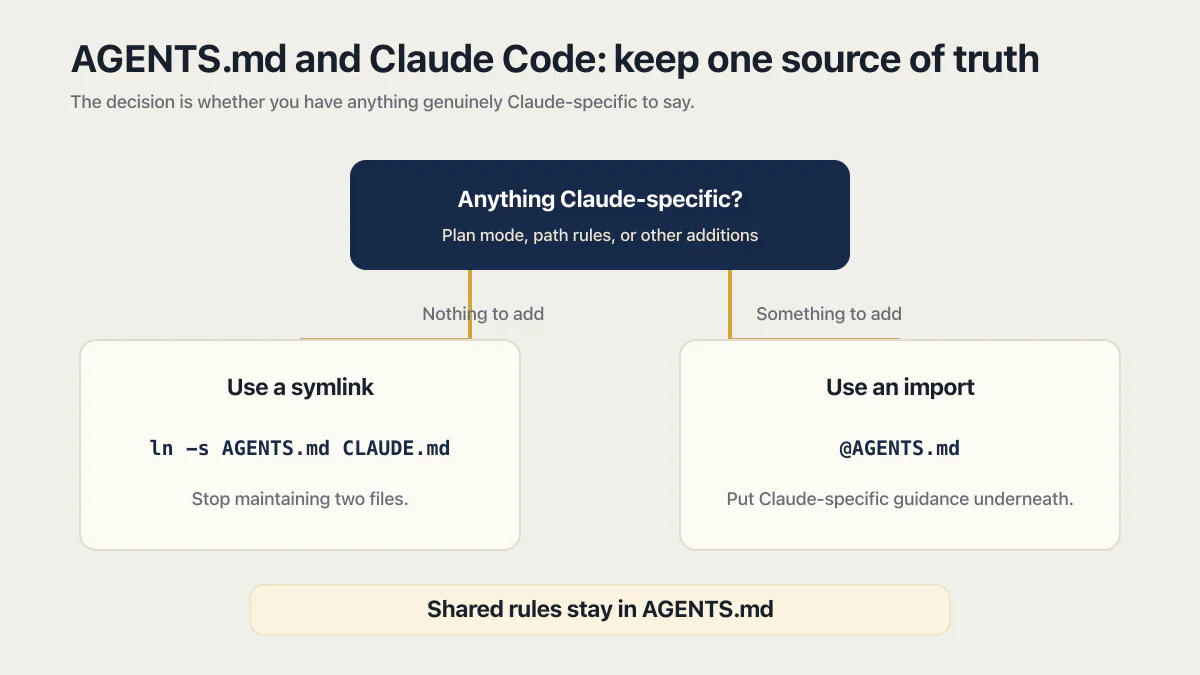
Claude Code reads CLAUDE.md, not AGENTS.md. Anthropic’s own documentation states it flatly: “Claude Code reads CLAUDE.md, not AGENTS.md.” You still don’t need two files that say the same thing twice, and the same page gives the fix in two lines. Either use a symlink, ln -s AGENTS.md CLAUDE.md (on Windows, this requires Administrator privileges or Developer Mode), or put a one-line import at the top of CLAUDE.md: @AGENTS.md, with anything Claude-specific underneath it. Both point every tool at one source of truth instead of two files quietly drifting apart every time someone edits only the one they had open.
The real decision is narrower than “AGENTS.md versus CLAUDE.md” makes it sound: whether you have anything genuinely Claude-specific to say. Nothing to add means symlink and stop maintaining two files. Something to add, a note about when to use plan mode, a path where you want Claude to ask before editing, means the import keeps that addition in one place while the shared rules still live in AGENTS.md for every other tool that reads it. The AGENTS.md vs CLAUDE.md decision, tool by tool, is its own page.
Do AGENTS.md files actually help?
A team of researchers at ETH Zurich tested context files across SWE-bench and a 138-task benchmark drawn from 12 repositories. The result needs more care than the headline it produced. Generated context files changed average resolution rates by about -0.5% on SWE-bench and -2% on CTXbench, with no statistically significant performance effect. Developer-written files averaged a 2.4% improvement, also statistically inconclusive. Generated files raised average cost by 20% and 23% in the two settings; developer-written files also added steps and increased cost by as much as 19%.
Other 2026 evidence complicates the cost result without establishing a correctness gain. An ICSE workshop study covering 124 pull requests across 10 repositories associated AGENTS.md with 28.64% lower median runtime and 16.58% fewer output tokens while reporting comparable task completion. It measured operational efficiency with a different design, so it does not directly cancel the ETH study’s controlled cost comparison.
A smaller July 2026 preprint ran 288 evaluated trials across 15 or 17 tasks in three Python repositories, depending on the agent. It found no measurable correctness difference between no repository context, always-on AGENTS.md context, and selective context retrieval. Its own power analysis says the task sample was too small to reliably detect modest effects, so this is supporting evidence, not a universal verdict.
The ETH study’s strongest finding was behavioral. Agents followed the files, explored more, and ran more tests, but the extra work did not produce a conclusive success-rate gain in those benchmarks. The authors found repository overviews were often redundant with documentation and recommended keeping human-written files to minimal requirements. That does not prove a specific rule improves outcomes. It gives each line a cost, which is a better reason to remove folder tours and vague style advice.
The discussion the ETH paper produced on Hacker News split roughly the way you’d expect: one camp read a marginal effect as not worth the extra cost, another called even a small gain a “must-have” once you count the mistakes it prevents on a real, messy codebase rather than a benchmark task. Both sides were arguing about the same paper. Neither side was wrong about the numbers; they disagreed about what they’re worth.
Context files reliably changed what agents did and how much work they performed. The benchmark did not show a reliable improvement in whether they finished correctly.
How long should an AGENTS.md be?
Short enough that every line still gets read. Two vendors publish a ceiling, and both sit below the length of the files people actually write.
OpenAI’s Codex caps the combined size of the instruction files it loads. The project_doc_max_bytes setting defaults to 32 KiB, and Codex stops adding files once the combined size reaches that limit. Past the cap the file is not rejected with a warning, it simply is not there. Anthropic publishes a length target rather than a byte cap for its own instruction file: aim under 200 lines, because longer files consume more context and reduce adherence.
Adherence matters more than the cap. The IFScale benchmark loaded models with up to 500 simultaneous instructions and found the best frontier models still reached only 68% accuracy at that density, with a measured bias toward instructions that appeared earlier. A long file does not fail loudly. It quietly turns rules into suggestions, and the ones near the bottom go first.
So the number to aim at is a count of rules you would defend, not a line count. The next section is the filter for deciding which ones those are.
AGENTS.md best practices: how to write the lines worth keeping
How to write an AGENTS.md line worth keeping comes down to one filter, simpler than most guides make it sound: a line earns its place by being checkable. Either the thing it describes happened, or it didn’t, and something downstream can tell the difference. “Write clean, maintainable code” fails that test outright; there’s no way to look afterward and say whether it was followed. “Never touch webhook.ts without the signature test passing” passes it, because the test either ran green or it didn’t, and the agent’s own tool output settles the argument.
One of my own production apps shows what a useful instruction can point at. It is a WhatsApp AI-agent platform, one of the founder-owned apps in AxonBuild’s fixed June to July 2026 research cohort. Every server route carried rate-limiting middleware except the inbound message webhook, which triggers a paid model call. Across that historical cohort, 12 of the 14 third-party apps with an AI surface had a confirmed path where a stranger or free account could run up the owner’s model bill, the same denial-of-wallet failure class examined here.
An AGENTS.md line cannot create a missing control. It can require the agent to run the test that proves the control still works. If npm test denial-of-wallet does not exist, the instruction below is theatre until somebody writes the test.
Here’s an AGENTS.md example built around exactly that lesson, roughly what it looks like once you write it down instead of assuming it:
## Fragile areas

- Never touch `routes/whatsapp-webhook.ts` without `npm test denial-of-wallet`
  passing: it asserts the model call rejects an unverified sender and stops
  after a fixed number of messages per hour.
- Never edit `supabase/migrations/*` without a test that signs in as a
  second account and confirms it can't read the first account's row.

## Secrets

Read keys from `process.env`. Never paste a literal key into a committed
file, including this one.
Three checkable rules and a secrets line are enough for this example. The commands, paths, and expected results make each instruction falsifiable.
What not to put in an AGENTS.md
Six things do not belong in the file. Five of them fail the checkable test above. The last one is a security problem, and it is the one people paste in without thinking.
An architecture tour. A folder-by-folder description of the repo is the thing the ETH authors found often redundant with documentation the agent can already read. The code is the current truth; your description of it is a copy that starts going stale the day you write it.
Vague style advice. “Write clean code”, “follow best practices”, “be careful with the database”. Nothing downstream can tell you whether any of them was followed.
Auto-generated bloat. A file produced by asking a model to document the repo runs long, reads plausibly, and contains almost nothing the agent could not derive itself. It also spends the byte budget, so the rules that matter are the ones that get truncated.
Stale paths. A rule naming routes/checkout.ts after the file moved to app/api/checkout/route.ts is worse than no rule. The agent goes looking, finds nothing, and carries on.
Contradictory rules. Six months of additions from different people produce lines that quietly disagree. Anthropic is blunt about the outcome: if two rules contradict each other, the model may pick one arbitrarily.
Secrets. No keys, no tokens, no connection strings. The file is committed, and every agent that touches the repo reads it.
The contradiction problem is really the maintenance problem: the AGENTS.md from a year ago is not the right AGENTS.md for today. Put the file on the same trigger as the code it describes. When you move a path or change a test command the file names, editing the file is part of that change, not a separate chore for later.
Nested AGENTS.md in a monorepo: scoping without frontmatter
Cursor rules best practices give .mdc rules their scoping from frontmatter. The open AGENTS.md format instead defines directory scoping through the filesystem. A root file holds repository-wide guidance, and a second AGENTS.md inside a package can carry package-specific instructions:
repo/
├── AGENTS.md              (root-level rules)
└── apps/
    └── billing-service/
        └── AGENTS.md      (billing-specific rules, read first here)
The split is simpler than it sounds. The root file holds what is true across the whole monorepo: how to install, how to run the full test suite, how secrets are read, and the two or three paths anyone can break from anywhere. A package’s own file holds only that package’s test command and its own fragile paths. A rule that is only ever true inside one package does not belong at the root, where every agent working in every other package pays for it.
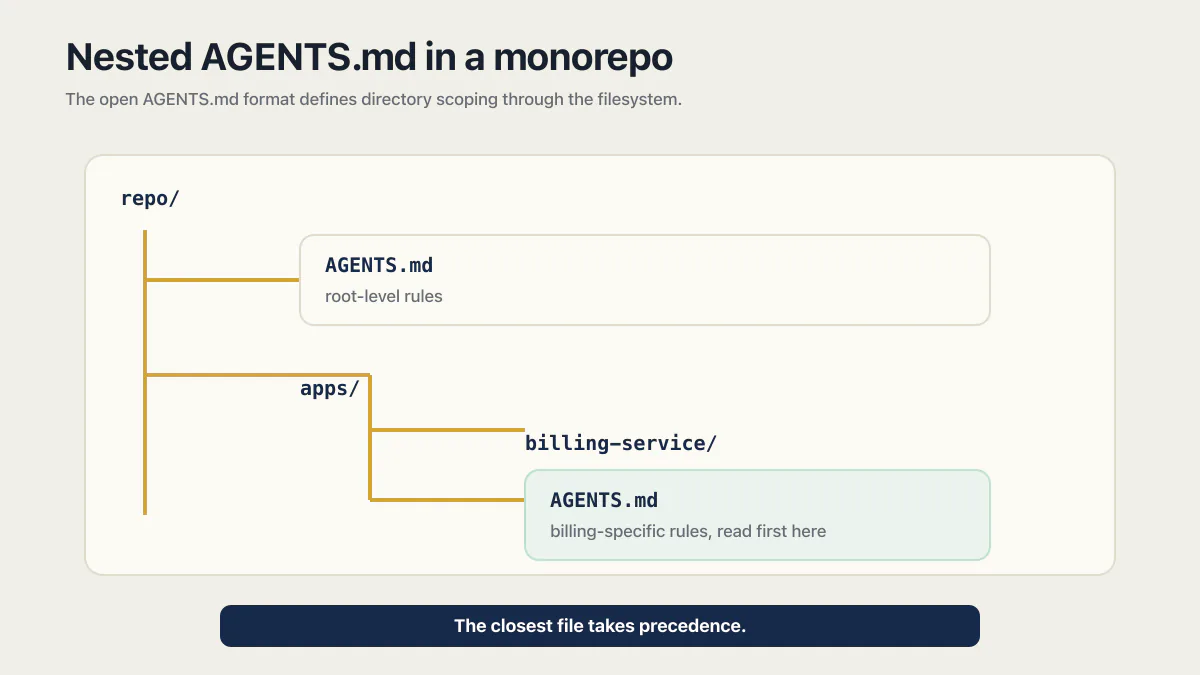
The format says the closest file takes precedence. Tool implementations do not all support every part of the format at the same time, so verify nested-file behavior in the tool and version your team actually uses before relying on it as a control.
When the agent ignores your AGENTS.md
Five causes cover nearly every case, and each one has a check that takes under a minute.
Wrong filename. The format used the singular AGENT.md early on, and plenty of repos still carry it. The official migration is one line, mv AGENT.md AGENTS.md && ln -s AGENTS.md AGENT.md, which renames the file and leaves the old name pointing at the new one.
The tool needs configuring. Not every tool picks the file up on sight. Gemini CLI needs context.fileName set, Aider needs read: AGENTS.md in .aider.conf.yml, and Claude Code needs the symlink or import above. Check the tool’s own docs before assuming the file is being read.
The file is too big. Codex stops loading instruction files once their combined size reaches project_doc_max_bytes, 32 KiB by default. Nothing warns you. Cut redundant rules first; splitting into nested files only helps when it keeps package-specific rules off the paths that do not need them, because every file loaded for a given working path still counts toward the same cap.
Another file is in the mix. Codex reads global instructions from your home directory (~/.codex/AGENTS.override.md, then ~/.codex/AGENTS.md) before it reads anything in the repo, then walks from the git root down, with files closer to your working directory overriding earlier guidance. A personal rule you wrote months ago is sitting in the same context as the team’s.
Stale paths. A rule naming a file that no longer exists gives the agent nothing to look up, and most agents will not tell you the path was stale unless you ask them to verify every path the file names.
Then verify instead of assuming. Codex documents the exact move: run codex --ask-for-approval never "Summarize the current instructions." and it quotes back the guidance it loaded, in precedence order. Any agent can be asked the same thing in plain words. Before it edits anything, ask it to list the instructions it is working from. If your file is not in the answer, nothing in it is a control.
Common questions about AGENTS.md
Do AGENTS.md files work?
They reliably influence agent behavior, but the 2026 ETH Zurich study did not find a statistically conclusive success-rate improvement. Keep requirements minimal, name the commands or files that matter, and use tests or hooks when a rule must be enforced.
Do nested AGENTS.md files work in Cursor?
Verify nested AGENTS.md support against your installed Cursor version before you rely on it. A root AGENTS.md is supported for plain repository instructions, and Cursor project rules remain the tool-specific option when you need metadata or path-scoped behavior.
What happens if two AGENTS.md files conflict?
The file closest to the edited file wins, and an instruction you type into the chat overrides every file on disk. How the rest combine is tool-specific: Codex concatenates from the git root down and lets files closer to your working directory override earlier guidance, so a rule can be overruled without anything telling you. If a rule must hold everywhere, put it in the root file once and do not restate it lower down.
Will the agent run the test commands in AGENTS.md automatically?
Usually, if you list them. The format’s own FAQ says the agent will attempt to run the relevant programmatic checks and fix failures before finishing the task, but no tool guarantees it. That is the reason a rule should name a command whose result you can check afterwards rather than describe an intention.
How do I turn my existing docs into an AGENTS.md?
Don’t paste the README. Pull out only the commands (install, dev, build, test) and the two or three paths where a wrong edit costs money or leaks data, and leave the prose behind. If a doc file is already agent-shaped, the format’s own migration route is to rename it to AGENTS.md and symlink the old name so existing links keep working.
What is the difference between AGENT.md and AGENTS.md?
AGENT.md is the older singular filename; AGENTS.md is the one the format settled on. If your repo still carries the singular file, the official migration is one command, mv AGENT.md AGENTS.md && ln -s AGENTS.md AGENT.md, which renames it and keeps the old name working as a link. A tool looking for the plural name and finding only the singular one reads nothing at all.
The plain spellings people type, an agents md file, an agent md file, or agentsmd, all mean the same thing in conversation, and only one of them is a filename: AGENTS.md, plural, uppercase, with the dot. On a case-sensitive filesystem a lowercase agents.md is simply a different file from AGENTS.md, which is how a repo works on a Mac and then reads nothing in CI. Spell it the way the format does and the question stops coming up.
What actually belongs in an AGENTS.md file?
Setup and test commands first, since those are the two things every agent needs before it can verify anything. After that, a short “fragile areas” list naming the two or three paths where a plausible-looking wrong edit costs money or leaks data, plus one line on how secrets are read. The file tells the agent what to do; what a Claude Code MCP server lets the agent reach is the separate setting that decides what it can touch while doing it. Skip the architecture tour; the research above is specific about that part not paying for itself. Those lines are a small, cheap slice of the larger question of whether the app itself is actually ready to launch; they don’t answer it on their own.
If you have a working app built with these tools and need it ready for real customers, this is what we do.
Built it with AI. Now it has to hold up for real customers.
The Production Hardening Sprint takes the app you already have and builds the production foundation underneath it. Authentication and access rules, payments that stay consistent, error handling, monitoring, backups, automated tests and a documented handover. Our engineers work inside your existing codebase for ten working days. All 123 deliverables are included, and you get the evidence for each one.
See the Production Hardening Sprint →  $2,500 fixed price · 10 working days · One codebase