“I am not an engineer. I do finance, ops and IT at a small startup, mostly alone.” That is one owner describing their own job in public. What they say next about the assistant they set up to help with that job is one short clause: “It has admin on our ERP and our Google Workspace”.
They are not unusual, and they are not careless. A post title in r/AI_Agents on 13 August 2026 catches the same person one step earlier: Solo business owner working full time, want to build an AI agent team to run my en.... The assistant gets the login because giving it the login is what makes it useful, and because the alternative is spending an afternoon working out which of eleven administrator roles is the right one.
An assistant’s admin access breaks down into a list: specific things it can open, and specific things it can change. Four screens hold that list, and you can open all four today. Google Workspace’s own list of prebuilt administrator roles runs to eleven entries, and Super Admin is only the first of them.
Every screen, role name and permission wording below comes from the vendors’ own administrator documentation, read on 26 August 2026: Anthropic’s connectors help page and its organization-authorization help page, Google Workspace’s prebuilt administrator roles page and its app access controls page, Microsoft’s agent overview page for the Microsoft 365 admin center, Zapier’s connection-sharing page and Make’s connect an application page. No account was opened and nothing was executed, and no role or permission name appears that those pages do not use themselves.
What your assistant can reach right now
Four screens hold the answer, and none of them is the assistant. The assistant’s own connectors list, the Google Workspace app access list, the automation tool’s connection list, and the user list inside whichever system holds your money. Open them in that order and the reach list writes itself.
Start with the assistant. Anthropic’s connectors help page defines the thing in one sentence: “Connectors let Claude access your apps and services, retrieve your data, and take actions within connected services.” The last four words are the ones people skim. Taking actions inside a connected service is a different capability from retrieving data out of it, and the same connector carries both.
What is loaded at any given moment is a separate setting again. Anthropic’s tool access help page names three modes, Auto, Always available and On demand, and describes the default this way: “Claude decides dynamically which connectors to load based on what you’re working on.” So the honest answer to what the assistant can reach covers everything sitting in that connectors list, not only what it happened to use this morning. A person finds that list under Customize then Connectors, and an owner finds it under Organization settings then Connectors. The connectors help page carries a smaller control that most people never open: inside a connector, each permission category or individual permission can be set to Always allow, Needs approval or Blocked.
The second screen is the one that pays for the whole exercise. Google Workspace’s app access controls page gives the path: Menu, then Security, then Access and data control, then API controls, then Manage App Access. The accessed-apps list on that screen shows how many people in the company are using each connected app and which Google service APIs, the OAuth scopes, each app is requesting. Every configured app sits in one of four states the page names: Trusted, Limited, Specific Google data, or Blocked. Of the last one the page says only that a blocked app “can’t access any Google data.”
Your automation tool is the third screen, and it is usually the one nobody thinks of as an assistant at all. In Zapier a connection you created can be shared with the rest of a Team or Enterprise account. On Make, according to Make’s connect an application page, every user in a team can use and manage any connection created in that team. Both lists are worth reading in full, because a connection made once for a single task tends to sit there long after the task ended.
Fourth is the user list inside the system that holds invoices, customers or payroll. That list is the only place that says whether the assistant signs in as a person with full rights or as something narrower. Whatever your accounting system calls its roles, the row you are looking for is the one that is not a human being.
| Where to look | What the screen shows | What more than you thought looks like there |
|---|---|---|
| The assistant’s connectors list (Customize, then Connectors) | Every connected app, and per tool whether it is Always allow, Needs approval or Blocked | A connector added for one task in March that nobody removed, still loadable under the Auto setting |
| Google Workspace, Manage App Access | Each connected app, how many users it covers, and the Google service APIs it requests, with a Trusted, Limited, Specific Google data or Blocked state | An app marked Trusted that requests far more OAuth scopes than the job it was added for |
| Zapier or Make connections | Which connections exist, who created them, and who else in the team can use them | A connection created by one person that other people are now running workflows on |
| Microsoft 365 admin center, Agents then Overview | Total agents in the tenant, agents without owners, pending approval requests, agents at risk | Agents nobody in the room remembers publishing, sitting in the registry with no owner |
| Your accounting or operations system’s own user list | Every login that can read or change money and customer records, human or not | The assistant signed in under a person’s full-rights account rather than its own narrower one |
Two of those rows carry licence conditions worth knowing before you go looking. Microsoft’s agent overview page for the Microsoft 365 admin center states that managing agents there requires the relevant Microsoft 365, Microsoft Copilot or Microsoft Agent 365 licences, and it carries a note that the Microsoft Frontier program gives organizations early access to innovative and emerging AI capabilities in Microsoft 365 before those features reach general availability, under existing preview terms. If your tenant has no Agent 365 licence, that screen will not tell you what your agents did.
Every one of those screens answers the same question in a different vocabulary, and none of them is the assistant’s own account of itself. An assistant’s permissions are the permissions of the account that connected it, which is why the Google Workspace app access list is worth more than anything Claude will say when you ask it what it can see.
Wiring a server into a coding agent, and picking which ones are worth a credential at all, is the builder’s half of this question, and the walkthrough for Claude Code carries the install commands and OAuth scopes this page leaves alone. That page is where to read which of your systems a connected server exposes to a coding agent before a server goes on.
What a bad day looks like for each one
The failure mode here is an instruction that was wrong, or text the model read and treated as an instruction, executed at the speed and reach of whatever credential was attached. In one of the audited applications below, what the model could do was approve its own actions.
In one of the 26 apps AxonBuild audited in June and July 2026, a health-data product sold on the promise that a person signs off every clinical action, the sign-off never left the model’s side of the wire. The orchestrator gave the model the same elevated token the approval step used, then wrote a human-confirmed flag onto every action it committed, and the transport read those approval headers straight out of the model’s own tool arguments. A steered or prompt-injected model could rewrite a diagnosis, an allergy or a medication, or place a real phone call or SMS, with the approval signed by the thing being approved.
A second app in that set was a terminal helper that turned plain English into shell commands. When a command failed, the tool re-executed the exact failed command to capture the error text for the model, and its installer wired that into the shell so it fired automatically after any non-zero exit, with no prompt and no notice. If the first run had already charged a customer, created the order before the server returned an error, or applied three statements of a five-statement migration, the second run repeated it while the person watching read a helpful explanation of what went wrong.
Both of those are ordinary features doing what they were built to do, with a credential nobody had narrowed. A post title in r/ClaudeAI on 21 August 2026 describes the same shape in fewer words: Claude subagent got bored and prompt injected my main session into deleting my dat....
Reach matters more than intent here, and unattended reach matters most. One founder writing publicly runs a company on a single small machine with dozens of scheduled jobs and nobody on the payroll, which is another way of saying that every job on that box is a standing credential that fires whether or not anyone is awake.
| What it can reach | What goes wrong when the instruction is wrong | What you would see afterwards |
|---|---|---|
| Mail, with send rights | A summarising job reads a thread containing instructions and sends something on your behalf | A message in Sent you did not write, usually found by the reply |
| Files and shared drives | A cleanup or reorganise task moves or deletes the wrong folder at folder speed | Version history and the trash, if the platform keeps them long enough |
| The money system, with write rights | An invoice, refund or customer record is created or edited from a misread instruction | A row with a timestamp and the assistant’s account on it, if it has its own account |
| The chat tool, with write rights | A nightly summary posts customer detail into a channel wider than intended | The message, and whoever screenshots it |
| A shell or a runner on a machine | A failed command is retried, or a destructive command runs with account credentials | Only the effect, because there is often no record of the second run |
| A scheduled job nobody owns | The wrong instruction repeats on a timer instead of once | A pattern rather than an incident, spotted days later |
The last column is the useful one. For most of these, what you would see afterwards is thin, and it is thin because a permission screen records what is allowed rather than what happened.
”It only has my access” is the part that is wrong
The sentence people say when they are reassuring themselves is that the assistant only has their access, so it can only do what they could do. The first half is documented and correct. The second half assumes nobody else is downstream of the same connection.
Anthropic states the first half plainly on its connectors help page: “Claude inherits each person’s permissions from the connected service. If someone can’t access a specific file, channel, or record in the source system, the connector can’t reach it from Claude either.” That is a real boundary and it is worth knowing about. It also means the boundary is whatever the connecting account could already reach, which for an owner or an operations lead is usually most of the company.
One owner writing publicly described the assistant they had come to depend on in terms that had nothing to do with files at all: “it knows my business model and how I charge my clients”. That is a fair description of what a permission grants. Access to the systems is access to the shape of the business inside them.
Then there is the part the reassurance skips. Zapier’s connection-sharing help page, updated 25 August 2026, is direct about what sharing an app connection does. Everyone it is shared with can “View data used to test a Zap.” and can “Edit steps in a team’s Zap that uses the shared app connection.”, and the item between those two says they can use the shared connection in their own Zap workflows, private and shared alike, to access or update information. The page frames the benefit exactly as it is: sharing “allows them to create Zap workflows with the app account without needing your login credentials to that app.” Make’s connect an application page describes the same arrangement in its own terms, stating that everyone in a Make team can use and manage the connections created in that team. Two vendors documenting the same behaviour makes it a pattern rather than one product’s quirk.
So one person’s credential becomes the team’s ability to act, and the credential itself never moves. The account stays yours while the reach spreads.
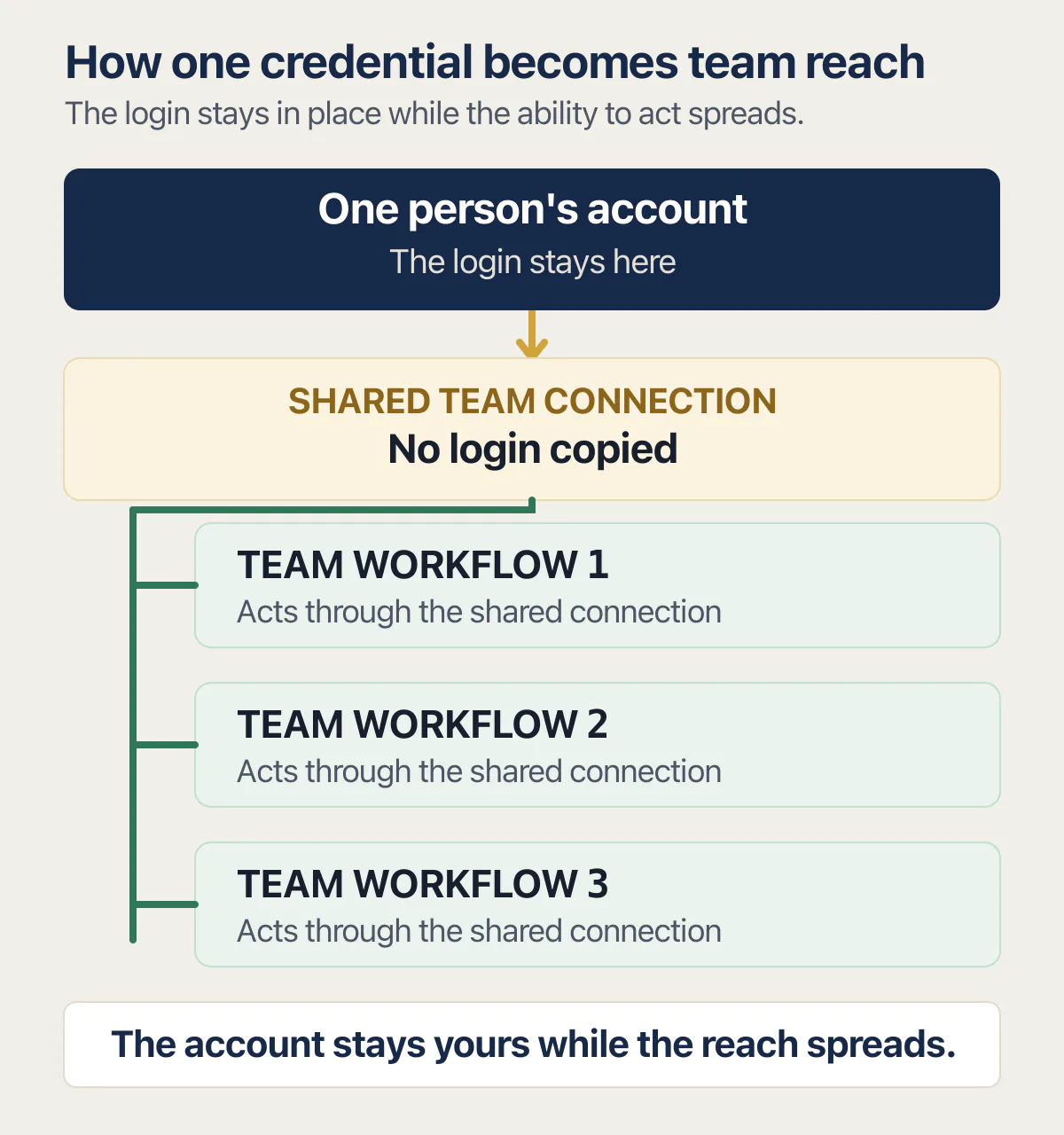
Owner-side control exists and is worth switching on where the plan carries it. Anthropic’s organization-authorization help page says that when connectors are authorized for a whole organization, “You decide which connectors are enabled, which groups or roles get them, and at what access level”, and that access is revoked by deprovisioning someone in the identity provider, which removes their connector access at the same time. That page describes Team and Enterprise plans on Claude. On an individual plan there is no such switch.
The last piece is the role itself, and this is where the biggest available answer is almost never the right one. Google Workspace’s prebuilt administrator roles page defines Super Admin as a role that “Has access to all features in the Google Admin console and Admin API and can manage every aspect of your organization’s account.” Its list of prebuilt roles runs to eleven entries, including Groups Admin, User Management Admin, Help Desk Admin and Services Admin, with Reseller Admin and Indirect Reseller Admin sharing the last one. None of those eleven is the answer for an assistant that needs to read a calendar and file a receipt. Admin console roles govern the organisation’s settings and users, and reading a calendar or writing an expense is an access grant on data: an OAuth consent for the assistant’s own client, limited to the narrowest calendar and expense scopes the task needs, on the one account that owns those records, and no admin role at all.
One owner says plainly that every administrative task in the company now goes through an assistant, which is another way of saying the assistant can reach everything. That is a reasonable way to run a small company. It becomes a problem only when nobody has written down what everything currently includes.
Answering a big customer’s questions about who else can touch their data is a different job from deciding what your own assistant should be able to touch. That one arrives as a spreadsheet with a deadline; this one arrives as a screen you chose to open.
The three permissions worth taking back this week
Three, and then stop. A permissions review that tries to be complete gets abandoned halfway, and a half-finished one leaves you less sure than when you started. Each of these has a screen, a change, and something that will stop working when you make it. The third part is the one to read first.
The standing write on money or customer records
Most assistants are asked to summarise, draft and look things up. Very few are genuinely asked to change an invoice at three in the morning with nobody watching.
The screen is your accounting or operations system’s own user list, plus the assistant’s connectors list. The change is to remove the write and keep the read, or, where the tool carries the finer setting, move the writing tools from Always allow to Needs approval so the action still happens with a person in front of it.
What stops working: any workflow that silently created or edited records now waits for someone to press a button, and anything genuinely unattended, like an overnight reconciliation, has to be listed and decided on its own merits rather than covered by a blanket permission.
The shared connection nobody owns
This is the one that grows on its own. A connection made by one person for one task is now the thing three workflows run on, and in Microsoft’s case the agent equivalent has a name in the product. The Microsoft 365 admin center surfaces “Agents without owners” as one of its governance cards, with an Assign Owner action, alongside pending agent requests and agents flagged at risk. Its agent overview page is explicit about who can act: “Important governance actions such as approving agent requests or assigning ownership can only be performed by users in the AI Administrator or Global Administrator roles. Other roles can monitor governance gaps but can’t take administrative action.” In Zapier and Make the equivalent is the shared or team connection list.
The change is to give every connection a named owner or delete it.
What stops working: anything running on a connection you delete stops immediately, so do this one on a quiet afternoon and expect one workflow to break that nobody remembered building.
Unowned reach is often unapproved reach as well. A post title in r/AI_Agents on 12 August 2026 puts the awkward version of that out loud: automated my own outreach workload with an agent. will telling my manager make me .... An assistant that already touches company systems and that nobody senior has approved is a live permission and an unwritten policy at the same time.
The administrator account the assistant signs in as
The commonest arrangement in a small company is that the assistant uses a person’s login, because that login already worked. It also means every action the assistant takes is recorded as that person, and every right that person holds is a right the assistant holds.
The screen is your identity provider’s user list and, for Google Workspace, the prebuilt administrator roles page. The change is a named account for the assistant with the narrowest prebuilt role that covers its job, and Super Admin removed.
What stops working: anything the assistant did that genuinely required console-wide rights fails until you either narrow the task or grant that one right deliberately. That failure is the point. It tells you which of its jobs actually needed the biggest role, and the answer is usually one job, not all of them.
Whose name the account is in is a different question from what the assistant reaches through it, and both have to be true before you stop worrying about either.
An hour, four browser tabs, and the willingness to break one workflow you can rebuild is the whole cost of this section.
What you cannot see from a settings screen
A permissions screen answers what is possible. It does not answer what the code on the other side of a connection does with the access once it has it, and it does not answer whether an internal tool somebody built themselves checks who is asking before it answers.
Those are the two blind spots, and the second one is common in exactly the companies this page is written for. A post title in r/vibecoding on 11 August 2026 describes the whole genre: Vibecoded a dumb little admin tool for our 2-person studio instead of paying for a.... That tool holds a database credential. It appears in no connectors list, in no app access list and in no agent registry, because nobody ever approved it as an app. It is a page on a URL, and whether it asks who you are before showing a customer record is a question only reading it answers.
The same limit applies to the audited health-data product earlier on this page. Every permission in that system was configured. The approval header was there. Reading the permission screen would have shown a correctly configured approval step, because the flaw was in which side of the wire filled that header in.
Whether the application itself is safe to run is a separate look with a separate method, and it starts inside the code rather than inside a permissions screen. There is a look at whether the app itself is safe to run, and it answers a question no console can.
Choosing which servers deserve a standing credential in the first place is a shopping decision that belongs beside the install, not beside your mail and money systems. The reach list you just made is one of the things a technical reviewer asks for when someone bigger looks at your company, and that review covers a great deal more than access.
The loose end is the one nobody has solved neatly. You can list what the assistant is allowed to reach, and you can narrow it. Getting a plain account of what it actually did last Tuesday remains, on most of these products, harder than it should be.
Common questions about giving an AI agent admin access
How do I secure AI agent access?
Start by listing what it reaches. Open the four screens above, write down every connector, connection and login the assistant holds, then remove the two or three that nothing currently depends on. After that, give the assistant its own named account with the narrowest role that covers its work, so its actions are recorded as itself rather than as you.
Are AI agents a security risk?
An agent is a login with an instruction-follower attached, so it carries exactly the risk that login carries. The difference from a human account is speed and volume: a wrong instruction, or text the model reads and treats as an instruction, executes immediately across everything the credential reaches. Narrow the credential and the size of the bad day narrows with it.
How can I give users access to AI agents?
On Claude’s Team and Enterprise plans, Anthropic’s organization-authorization page describes connectors being authorized centrally, with the organization deciding which connectors are enabled, which groups or roles get them and at what access level. In Zapier, sharing an app connection with a Team or Enterprise account lets other members build on it without receiving your login credentials for that app. Both approaches hand out use of a connection rather than the credential itself.
How do you manage AI agents securely?
Ownership first, then review. Every connection and agent needs a named person responsible for it, which is why the Microsoft 365 admin center surfaces agents without owners as a governance action with an Assign Owner control. After that, the recurring job is small: open the connectors and app access lists on a fixed date each month and remove anything added for a task that has since finished.
Does my assistant see everything in my Google Workspace?
It sees what the connecting account can see. Anthropic states that Claude inherits each person’s permissions from the connected service, so a file or channel that account cannot open is not reachable through the connector either. What that leaves is the size of the connecting account: if it holds Super Admin, the inherited permission set is everything in the console. The app access list under API controls is where to check.
Should the assistant have its own login instead of mine?
Yes, wherever the system supports it. A separate named account gives you two things a shared login cannot: a narrower role, and a record that says which actions were the assistant’s. Google Workspace’s prebuilt administrator roles page lists eleven entries, so the choice is wider than Super Admin or nothing.
What happens to a shared connection when the person who set it up leaves?
For Claude connectors authorized across an organization, Anthropic’s page says access is revoked by deprovisioning someone in the identity provider, which removes their connector access at the same time. Automation tools are less clear: as of 26 August 2026, Zapier’s connection-sharing page describes what sharing allows without stating what happens to a shared connection when the owner’s app account is closed. Treat every shared connection as something to re-create under a named owner before the leaver’s last day.
Can I see what the assistant actually did last week?
Partly, and less than you would expect. Microsoft’s agent overview page describes a snapshot of agent activity and usage trends over the last 30 days for tenants with the relevant licences, and notes that the metric only begins once Agent 365 licences are activated. The connector and connection screens on the other products list what is allowed rather than what ran. Where an assistant acts inside a business system through its own named account, that system’s own record is usually the better trail.
Built it with AI. Can’t get the last part right?
That’s the normal state of an AI-built app, and it’s fixable. I trace what the app actually does, explain what needs changing, and build it if you want me to.
Talk about your app →  Free 20-minute video call with Bilal.