This page is about describing an app to an AI tool and letting the tool write it. Building an app that has artificial intelligence inside it is a different job behind a very similar-looking search, and the first section below shows you how to tell in ten seconds which of the two you are here for.
Two kinds of people type how to make an app with ai into Google. Most of them have built nothing yet and want to know whether the thing they have been told about is real. A smaller group has already been through it, has something running, and is back looking for what to do next. The best-performing organic result on this search today is written by the second kind: a first-person account, posted to a community, of what the writer expected an AI tool to build and what they got instead. That is a search-result observation, read on 1 September 2026, and the account itself is neither quoted nor linked here.
This page is written for both, in that order. It sets out what the builders themselves say happens when you prompt one, side by side, from their own pages. Then it sets out the half none of those pages covers, which is everything after the app exists.
Four moves make up the build loop on every one of these tools: describe the app, let it generate one, refine what came back, then connect data and publish. Three builders document that loop in their own words. The loop ends at publication, and the parts nobody thought to describe are the parts that go wrong first.
Two different questions share this search
There are two searches here wearing almost the same words, and the results barely overlap.
Building an app with AI means what this page describes: you write sentences, a tool writes an application. Building an AI app means putting a model, a data pipeline and a set of guardrails inside a product, which is engineering work with a budget and a team behind it. Two search pulls were run on 1 September 2026, one for each phrasing, ten results deep. One result appeared on both, a builder whose name matches both phrasings, and nothing else was shared. The first pull returned app builders and a personal account. The second returned enterprise software companies, an analyst directory and a course seller.
The clearest single piece of evidence is what the enterprise side tells you to do first. Salesforce’s AI app development guide, read on 1 September 2026, numbers its steps: “Plan your app’s purpose and objectives”, “Build data privacy and security guardrails”, “Gather and prepare data”, “Choose the right AI model or framework”, “Determine if you will train the AI model”. That is a sequence for an organisation deciding whether to train a model. Nobody who wants a booking form for their yoga studio needs step five.
So the ten-second test: if the app you have in mind would still make sense without any AI in it once it is finished, and the AI is only the thing writing it, you are in the right place. Inside that meaning the wording makes no difference: to build an app with AI and to create an app using AI are the same job and the same four moves. If the AI is meant to be a feature your users interact with, this is the wrong page, and no page on this site answers that question either. Better to know now than four sections in.
One more thing about who ranks here, because it changes how the rest of this search reads. Of the results on the first pull, five are either a tool selling its own build loop or a ranking of tools by a publisher, one is the personal account, and one is on the other side of the split above. Zapier ranks with a numbered list of the best AI app builders, and Gartner and DataCamp rank on the enterprise phrasing, one with a reviews directory and one with a course. Those are named here and none of them is linked, because a ranking answers a question about products and this page is about the procedure. The moment before any of this, when there is an idea and nothing built, has its own starting point.
What actually happens when you prompt an app builder
The three build loops set out below were read off Google, Figma and Base44’s own product pages on 1 September 2026 and are described in the words those pages use; nobody here typed a prompt into any of them.
Read side by side, the three pages describe the same four moves in the same order.
Describe it. You write what the app should do in ordinary sentences. Google’s guide to building an app with AI, which carries its own “Last updated: 6/30/2026” stamp, opens its sequence at “Step 1: Define your application prompt” and gives a worked example, a tool that tracks study group sessions and sends a reminder before an exam. Figma’s version starts with a prompt or with a screen you already drew. Base44’s AI app builder page starts at “Describe the app you want to build”.
Let it generate one. The tool returns something that runs. This is the move that convinced everybody the route was real, and all three pages treat it as a single step rather than a phase.
Refine what came back. You look at what it produced and ask for changes in the same plain language, or edit directly. Base44 calls this “Shape it your way, with full control”. Figma calls it “Refine it your way” and says you can prompt again, edit visually, or go into the code. Google’s third step is refining and testing against a live preview.
Connect data and publish. The last move is the one that turns a demo into something with an address. Figma’s fourth step is “Connect data and ship”, described on Figma’s AI app builder page as: “Wire up a backend, test the flows with real information, then publish or push to your repo.” Google’s fifth is “Deploy to Cloud Run”. Base44’s fifth is publishing in a click.
Google’s page calls the whole method “a method some call ‘vibe coding’”, which is the vocabulary you will meet everywhere else on this search. It is also worth seeing what people have actually shipped this way before deciding how much of it applies to you.
| Builder | What its page says it produces | Steps it documents | Where its documentation stops |
|---|---|---|---|
| Google AI Studio with Cloud Run | A working prototype, then a live URL | Five, prompt to deployment | At deployment |
| Figma Make | Screens, logic and interactions, “backed by real code you can read” | Four, prompt or frame to shipping | At the pull request |
| Base44 | Screens, backend logic, a database, sign-in and hosting | Five, description to publishing | At publication |
The loops match. The stopping points do not, and the difference is not about quality. Google’s sequence is built to end at a public URL, so it ends there. Figma’s is built to end inside an existing codebase, so its last documented move is a branch and a pull request, and the page says that connecting to a codebase is “rolling out in beta”. Base44’s is built to end at a published app on its own hosting, so publication is the last thing it describes. Each page stops exactly where the product it sells stops, which is honest of them and is also why reading one of them tells you a third of the story.
Which of these tools suits the thing you are trying to make is a question about your app rather than about the tools, and which builder suits which kind of app is already set out side by side. How far each kind of AI tool carries the job, and the point where each kind stops, is mapped out separately. Putting the steps in an order, when a builder has already produced something, is a different piece of work from the loop itself.
What the builders’ own pages do not say
An absence on a marketing page is not an accusation. These are product pages, written to sell the part the product does, and what they leave out is a fair description of where the documented procedure ends. Each of the three was read against the raw HTML on 1 September 2026, and each stops in a different place.
Google’s page documents nothing after the app is live. Its five steps run from the prompt to “Deploy to Cloud Run”, and as of 1 September 2026 the page does not describe monitoring, access rules, or what to do when something breaks after deployment. It hands you a URL and a working thing at that URL, which is what it promises.
Figma’s page names authentication and does not describe who may read what. As of 1 September 2026 it says you can “Add authentication, databases, and APIs”, and it does not document how a generated build decides which signed-in person may see which record. Those are two different jobs. Signing in proves who somebody is. Deciding what that person is allowed to reach is a separate set of rules, and it is the one that has to be written per screen and per record.
Base44’s page names a security check and does not say what it checks. As of 1 September 2026 it describes a “built-in Security Scanner” that acts as a first line of defence, “identifying common vulnerabilities early in the build process”, and it does not list which checks that scanner runs or what it does not cover. A first line of defence is a useful thing to have. It is not the same as knowing what got looked at.
That last distinction is not theoretical, and it is the one place on this page where evidence from outside the vendor pages is worth having. Applications built this way have been read in bulk and the reading published: audits of twenty-six of them, carried out in June and July 2026, with the method stated. In the 21 third-party applications in the findings ledger from those audits, the authorisation problems shared one shape: the generated code checks whether somebody is signed in, and almost never checks whether that signed-in person owns the row they just asked for.
That is an argument for knowing which questions the loop was never asked rather than an argument against building this way, because the answer to all three pages is the same: the parts they document are the parts they do.
The part no prompt asks for
Here is the thing that makes this route strange, and it is worth understanding before you start rather than after.
The loop is good at producing what a sentence describes. What no sentence in it describes is how the thing behaves once a second person is inside it, and that is the part that fails first.
Nobody prompts for the boring half. You will not write “and make sure the person who signs up second cannot see what the first one typed”, because it does not occur to you, and because you are looking at a screen where you are the only user. The tool will not raise it on its own, even where its page says it generates permissions; a rule it wrote for the sentence you typed is not a rule for the case you did not mention. It answers the sentence you wrote with the same confidence whether the sentence covered everything or a tenth of it, and there is no signal in the output that separates the two.
The reader who has been through this already recognises the shape. One person building an iOS app described their own arrangement in a developer community this way:
I’m not a developer by training. I build it with Claude Code, which writes most of the Swift while I decide what it should do and test everything on my own phone.
Read what they are actually saying about the division of labour. The tool writes. They decide, and they check. The checking is the thing that makes the loop produce something usable rather than an extra step bolted onto the end, and it is the only part of the four moves that no page in the table above documents in any detail.
Practically, expect three things the loop will not hand you. The first is a list of what it did not do, because there is not one. The second is any way of finding out that something is wrong other than a person using the app and telling you. The third is a boundary around what the app should refuse: the generated version usually assumes good faith and one honest user, because that is the only user it ever met.
All of that is a reason to plan for a second piece of work, and the first version is still worth building: it is a demonstration that the idea works, produced faster than it used to be by an enormous margin, and the questions that turn a demonstration into something strangers can use are a separate piece of work with its own list.
Getting it in front of real people
The loop ends with something that answers on a web address. Where that goes next depends on what you promised people, and each of the three routes below is somebody else’s whole page rather than a decision to make here.
If a web address is enough, you may be finished already. Google’s page states, read on 1 September 2026, that “You can now deploy up to two apps from AI Studio to Google Cloud Run absolutely free, no credit card or Google Cloud billing account required…” Two is a count of apps, not a plan, and it is the kind of allowance that changes without notice, so check it on the day. Base44’s page, read the same day, says its apps are “web-based and mobile-responsive” and that people can open them from a link or pin them to a home screen, which is the same answer in a different shape: a browser address, reachable from a phone, with no store involved.
If you want the thing on a phone properly, that is a decision with real consequences and no single right answer. Getting something that already answers on a web address onto a phone is a decision with four possible answers, and getting a browser app onto a phone is worked through on its own page rather than here. The narrower question underneath it, whether a builder can produce something that installs on a phone, has a direct answer of its own.
If the app has to be in an app store, the loop is a long way from finished. A store will not take what comes out of the loop as it stands, and the list of everything that has to exist before a store will take it is kept where the store steps are.
The order matters more than the route. Getting the thing in front of ten people who did not build it will teach you more than any of the three decisions above, and the cheapest way to do that is almost always the address you already have.
When prompting stops being the way out
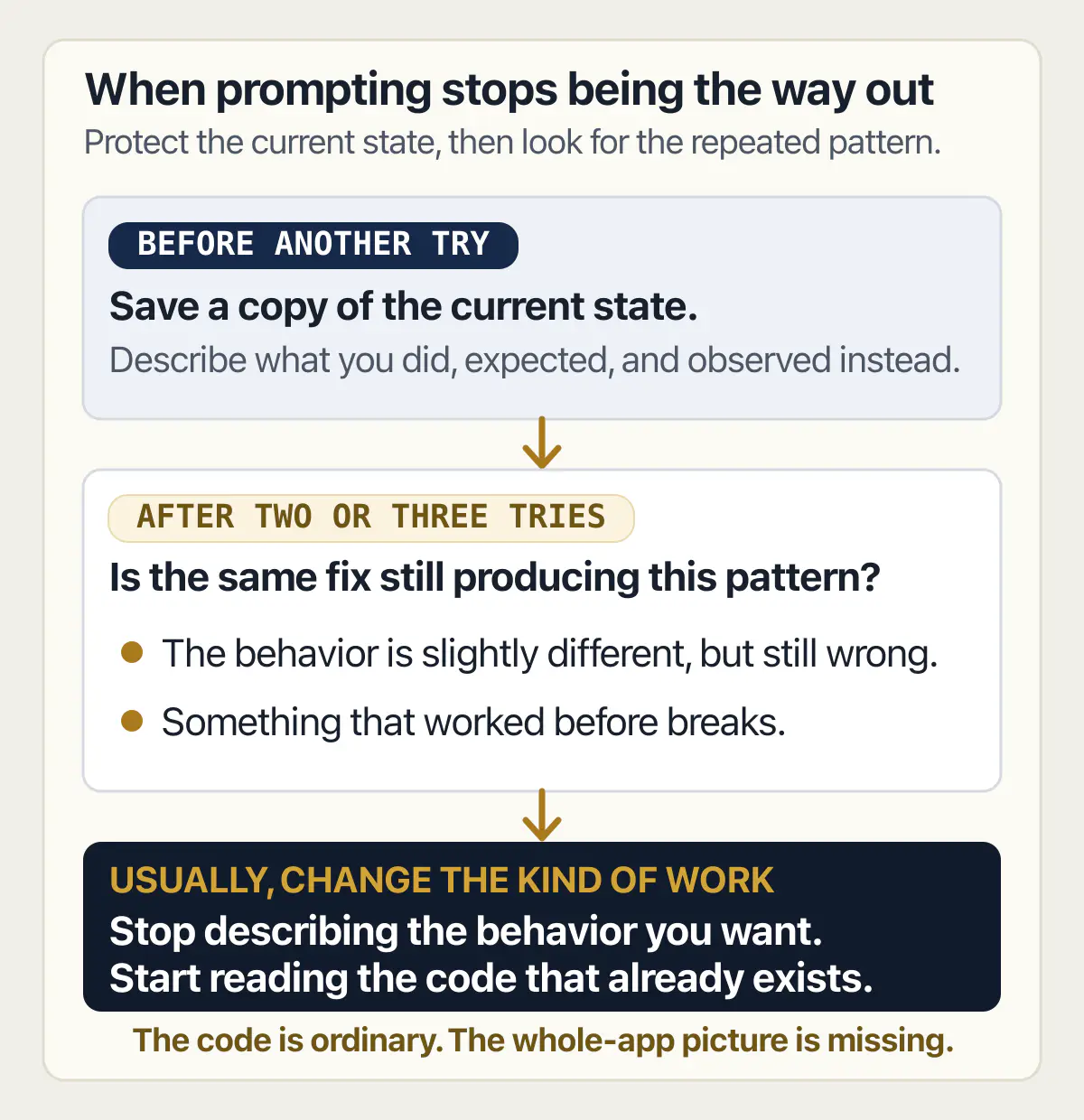
There is a point in this route where asking the tool again stops working. Usually it announces itself the same way: the same fix, requested three times, each time producing a slightly different version of the same wrong behaviour, and each time breaking something that worked before.
An AI-built app is unfamiliar rather than unfixable, which is a much smaller problem. The code is ordinary code. What is missing is the thing a person carries around while they write: a picture of what the whole thing is meant to do, so that changing one part does not quietly break another. The tool never had that picture, and neither does the next prompt.
The moment the job turns into reading what the tool wrote, rather than describing what you want, you are hiring for a different skill. It is also the moment worth checking whether what you built is ready for real users, because the answer decides whether you need one problem solved or a much longer list.
The work that follows a build loop is a list of named problems, and only the first has to be decided now. Building something from scratch is not what this site sells.
Two neighbours to this page hold the parts deliberately left out of it. The whole territory of first versions, what they are for and who builds them, is a wider subject than one build loop. And nobody gets through a build loop without meeting a payment screen, so what those payment screens actually add up to is worked through where the current figures are kept.
Common questions about building an app with AI
Can AI build an app for me?
Yes, for a large and growing class of apps, and the result will run. What it will not do is tell you what it left out, which is why the answer is a genuine yes with a genuine second half rather than a hedge.
How do you build an app with AI if you have never written code?
The same way as everybody else, because none of the four moves requires reading code. You describe the app in ordinary sentences, the tool generates one, you look at it and ask for changes, then you connect data and publish. All three product pages read for this article on 1 September 2026 assume a reader who does not code: Google’s example is a study-group tracker written by a student, Base44’s first step is “Describe the app you want to build”, and Figma’s is a prompt or a frame you already drew. The hard part without a development background is judging whether what came back is right, because the tool sounds equally sure either way.
Can you build an app with AI for free?
Partly, and how far the free part gets you depends on the tool. Base44’s page, read on 1 September 2026, states that it offers a plan with no cost attached that lets you start building immediately with no credit card, and that paid plans unlock more credits and features. Figma’s page, read the same day, says you can start on its free Starter plan and that “Some AI features run on credits, and what you get depends on your plan.” As of 1 September 2026, Figma’s AI app builder page does not render a figure to an automated read. What is free in every case is the first stretch of building, within each plan’s credit or message limit. Hosting, custom domains, higher usage and the things you connect the app to are where the meter starts, and none of that is priced here.
What can an AI app builder produce, and what still needs a person?
On their own pages, read 1 September 2026, the three builders claim a similar output: Base44 lists screens, backend logic, a database, authentication, permissions, integrations and hosting; Figma says it generates “the screens, logic, and interactions, backed by real code you can read”; Google’s route ends at a deployed app on Cloud Run. What none of them claims is judgement about the result. A person still decides what the app is for, checks that it does that, works out what it should refuse to do, and finds out what happens when two people use it at once. That work does not need a development background to start, but it does need somebody willing to look.
Does the code an AI builder writes belong to you?
The builders that answer this in writing say yes, and Base44’s page, read on 1 September 2026, states it plainly: “Everything you build on Base44 belongs to you.” Figma’s page describes pushing a build to your own repository through a branch and a pull request, which is possession in the practical sense of having the code somewhere you control; what you may do with it is still what the tool’s terms and the licences of anything it pulled in say. What varies between tools is how easily you can get the code out and run it somewhere else, which is a question about export and hosting rather than about ownership or licensing. Read the terms of the specific tool you are using before you assume either answer, because no two of them word it the same way.
Is an app built with AI ready for real users?
Usually not on the day the loop finishes, and the gap is smaller than people fear and larger than the demo suggests. What works in front of you is genuine. What has not been established is what happens with a second user, a wrong input, a failed payment or somebody curious. Finding out what breaks before a stranger finds it has a method, and the method is longer than one paragraph: finding out what breaks before a stranger does is where that method is written down. The test worth applying is whether you can say what the app should refuse to do, then watch it refuse.
What is the difference between building an app with AI and building an app that uses AI?
Building an app with AI means the AI writes the software and then steps out of the picture; what ships may have no AI in it at all. Building an app that uses AI means a model is part of what the product does, so it runs every time somebody uses the app, costs money per use, and can be wrong in front of a customer. The first is a way of producing software. The second is a feature with a bill and a failure mode. Search results for the two phrasings, pulled on 1 September 2026, shared exactly one result, a builder whose name matches both phrasings, and nothing else, which is how different the two subjects are.
What do you do when the AI cannot fix its own mistake?
Stop asking. Repeating a failed request usually makes it worse, because each attempt rewrites working code around the broken part. Save a copy of the current state first, so there is something to go back to. Then describe the problem in terms of what you observe rather than what you think is wrong, because the useful information is the behaviour: what you did, what you expected, what happened instead. If that does not shift it in two or three tries, the loop is not going to close and the question of when the tool cannot fix what it wrote becomes a question about who reads the code next.
If you have a working app built with these tools and need it ready for real customers, this is what we do.
Built it with AI. Now it has to hold up for real customers.
The Production Hardening Sprint takes the app you already have and builds the production foundation underneath it. Authentication and access rules, payments that stay consistent, error handling, monitoring, backups, automated tests and a documented handover. Our engineers work inside your existing codebase for ten working days. All 123 deliverables are included, and you get the evidence for each one.
See the Production Hardening Sprint →  $2,500 fixed price · 10 working days · One codebase