SaaS in the title above means a software product that other people pay a subscription to use. The same four letters name a student funding body in Scotland, a stock ticker and an internal support desk, and none of those is the subject below.
The short answer is yes, with a boundary. An AI builder will produce a running subscription product with nobody who writes software anywhere near it. You describe the thing, and something opens at an address you can send people to: screens, a database behind them, a login, a checkout that takes a real card. One person described that route in two sentences on a public forum:
I built a SaaS for tradespeople with zero coding background… No computer science degree.
The boundary sits after the first card clears. Four pieces of a subscription product are not finished when the builder says the app is done, and all four exist only because the money repeats. This page names those four, sets each one against what the published routes actually hand you, and points at the page that answers it.
A builder produces a working subscription product on its own: screens, sign-ups, a database, a checkout that charges a real card. Four pieces stay unfinished. Billing after the first charge, one customer that turns out to be several logins, the screens only the owner needs, and what the app records when money goes back out.
Nothing on this page was built to find out. Each claim about what a route gives you comes from that route’s own page, opened in its raw form on 2 September 2026 and quoted the way it is written there; the account of what a subscription product still needed afterwards is one named person’s published write-up of their own thirty days, read the same day. Where a page gave an automated request no article text at all, that is stated here, along with which requests were tried.
Whether an AI builder can produce your particular app at all is a question with its own answer, settled before this page starts. That page decides whether a builder can produce what you have in mind; this one starts from a yes and says what a subscription adds.
What an AI builder finishes by itself for a product sold by subscription
Take the yes at full size first. What SaaS development with AI hands somebody who cannot write code is documented on the vendors’ own pages, and the documented part is generous.
Base44’s own blog, in a piece its page data dates 10 May 2026, describes the product this way: “Base44 is an AI app builder that turns natural language prompts into complete SaaS applications, handling authentication, database design, hosting and scalability automatically”. Further down the same piece, inside its step about picking what to build on, it widens the list: “It provides ready-made infrastructure, authentication, billing, hosting and scalability”. That is the vendor describing its own product, quoted as the vendor wrote it. The address is base44.com/blog/how-to-build-an-saas-product and it is named rather than linked, because it ranks on the same words this page is written for.
Bubble puts the same claim in one line. The page at bubble.io/solutions/saas-builder carries a stored description that reads “Bubble’s SaaS builder gives you everything to launch a SaaS product: database, auth, payments, and workflows…”. As of 2 September 2026, that page renders no body copy to an automated read: a plain request and a browser-shaped request both returned it with its title and description and no article text at all. The description is in the page source and is quotable. Nothing else on that page is, so nothing else from it appears here.
One founder, writing publicly about their own product, listed what they did not have when they started: nobody on the payroll who wrote software, and no company doing it for them. That is now an ordinary way to start. If you want to see the shape of what comes out of it, real applications built on this route, read one at a time is a better guide than any vendor page.
The prompting loop itself, and what each tool vendor publishes about the moves inside it, is walked through move by move on a page of its own. The four moves of a prompting loop are the same whatever the app is; what changes here is what has to exist afterwards before anybody can be charged twice.
Read the three vendor claims next to each other and they agree on where they stop. Authentication, database, hosting, workflows, payments. Payments, singular, as an event: a card is presented, the card is charged, the person gets in. A subscription is a standing arrangement that has to keep being true every period, and the piece that keeps it true is the message the payment provider sends that the app has to act on, arriving long after anybody last typed a prompt. Only one of the routes read for this page names that piece, and it is the one written for developers.
The four pieces of a subscription product that no builder finishes
Four pieces of a subscription product are not named by any route read here, and nothing read for this page shows a builder finishing them unprompted; treat them as four checks to run on your own app rather than as things a builder cannot do. Billing after the first charge, which is renewals, failures, upgrades and cancellations. A paying account that turns out to be several people. The screens the owner needs to answer a customer without opening the database. And what the app records when money moves back out.
Building SaaS applications and finishing them are two different lists, and only the first one has been automated. Here are the four, against what the builder hands you.
| The piece | What the builder hands you | What is still outstanding | Where that question is settled |
|---|---|---|---|
| Billing after the first charge | A checkout that takes a card | Renewals, a card that fails later, plan changes, cancellations | The payments pages below, one failure each |
| A paying account that is several people | One login each, each seeing their own things | Who may invite, who may see the bill, what a colleague may open | The accounts and permissions page |
| The screens only the owner needs | Screens for the customer, because you described those | Look a customer up, close an account, grant an extra period | Nowhere yet, which is the finding below |
| Money moving back out | Nothing, because nobody prompts for it | Refunds, credits, disputes, and who still gets in afterwards | The paid-access page below |
Billing after the first charge. The checkout is the easy half and the builders do it well. What the generated version rarely carries is the rest of the arrangement: the renewal that has to happen next period, the card that stops working later, the upgrade halfway through a period that has to be counted correctly, and the cancellation that has to stop the next charge without cutting access off early. Two of those already have their own answers here, written from real failures: the card that stops working three months in and what the app still lets a cancelled customer reach. Neither is exotic. Both arrive on their own schedule, without anybody doing anything, which is exactly why they are missed while you are still looking at the app yourself.
A paying account that is several people. One customer signs up. Later that same customer is a company with five people inside it, and the sixth wants to be invited, and the finance person wants to see the invoice and nothing else. The account model, meaning what happens when one paying customer turns out to be several people who each need a login, is a product decision with a page of its own. It is named here and passed on, because getting it wrong is a data question rather than a screens question, and it needs more room than a row in a table.
The screens only the owner needs. This is the piece nothing on the results page and nothing in the vendor documentation covers, and it is the one that arrives fastest. Every prompt you write describes the product from the customer’s side, because that is who you were imagining. Nobody describes the other side. So there is no way to look a customer up by email, no way to see what they are paying for, no way to close an account, no way to give somebody the extra period you just promised them on a support email. The default answer is that you open the database directly and edit a row, which works exactly once before it becomes the thing you dread. A useful test of a build: describe out loud what you would do if a customer wrote in right now asking why they had been charged twice, and count how many of the steps involve the product you built.
Money moving back out. Refunds, credits and disputes are the same event in three costumes, and they all end with one question the app has to answer: does this person still get in. The generated version usually assumes money only ever moves one way, which is how you end up with paid access that turns out to be reachable without paying and, on the other side, a refunded customer who still has everything.
The evidence that this is a build list rather than an opinion sits on a starter kit written by and for developers. Open SaaS, at opensaas.sh, publishes what it pre-configures, and its payments block reads: “No SaaS is complete without payments. We’ve pre-configured checkout and webhooks for Stripe, Polar.sh, and Lemon Squeezy.” Checkout and webhooks, named together, because the second one is the part that keeps the arrangement true. The same kit ships an “Admin Dashboard” and describes it in three words plus an exclamation: “Graphs! Tables! Analytics”. The two prompt-first vendors quoted above name payments. Neither names the message that arrives afterwards, and neither names a screen for the owner. That gap is the whole of this section, and it is why the things a generated build tends to leave out reads as a list of surprises rather than a list of decisions.
The order to work in once a builder has already produced a first version is a five-move sequence, written out where that order is the subject. A first version and a subscription product are not the same object: one has to teach you something, the other has to keep charging people correctly.
What sellers publish for the pieces above, when somebody else builds them, is a price question answered where prices are the subject.
What “SaaS development platform” returns, and which of it is for you
Three products share the phrase. A prompt-first app builder, a no-code visual editor, and an enterprise application platform meant for a company’s own IT department. Only the first two put a working product in the hands of somebody who does not write software, and the results page for the phrase does not sort them for you.
The third of those is the one that fills the results page, and its own copy says who it is for. Salesforce sells one of these platforms, and the copy at salesforce.com/saas/application-development/ says plainly who it is written for. Read on 2 September 2026, it argues that a platform saves you standing up your own infrastructure, and adds: “you don’t need to hire a big team of skilled backend developers since most of the services are already provided”. Read that sentence as a description of its reader. Somebody who was otherwise going to hire a big team of backend developers is not the person searching for how to build a SaaS application without one. The page also links its own ROI calculator, a lead-capture surface rather than a source, and nothing from it is used here.
Amazon’s own hub at aws.amazon.com/saas/build/ is positioned the same way and says so in its page description, which offers resources for building SaaS on AWS and points readers at partner firms with consultancy services. As of 2 September 2026 the resource library on that hub returns loading placeholders instead of the resource titles to both request shapes, so the library’s contents are not described here.
The no-code platforms sit in the middle, and building a SaaS platform of your own on one of them is the route most of these guides assume. They publish long step guides for this exact phrase. WeWeb’s guide at weweb.io/blog/develop-saas-application-step-by-step-guide, read on 2 September 2026, opens its planning section by warning that “Jumping straight into code is a common mistake” and runs four stages before anything is built: “Idea Validation”, “Project Discovery”, “Software Requirement Specification (SRS)” and “Risk Assessment”. That is honest advice for somebody with an idea and nothing else. It is also the shape of every SaaS app development tutorial ranking today, including the eight-step sequence Base44 publishes on its own blog, whose steps run “Validate your idea”, “Define your core features”, “Choose your tech stack”, “Plan your database and architecture”, “Develop the frontend”, “Build the backend”, “Test, test and test again” and “Launch and gather feedback”.
Every one of those guides starts before anything exists. If you have already watched a builder produce something and you are looking for what to do next, you are standing outside step one of all of them, and none of them turns around.
The rest of the results page for the phrase is agencies selling the build. Itransition, Intellias, ScienceSoft and Techformation all rank with SaaS development services pages, and they are named here rather than linked, because a services page answers “who should build this” and not “how do I”. Choosing a company to do the work instead is a different purchase with different questions attached to it. What the word development covers when the application already exists is a definition question with a page of its own.
Any SaaS development tools list that mixes all three shapes without saying so has left the sorting to you.
A SaaS builder search returns website builders as often as product builders
Half that results page sells a different product. Four of the eight organic results for the phrase on 2 September 2026 were website builders, which produce the pages that sell a product rather than the product itself. A third sense, a cloud vendor’s toolkit for software companies, sits underneath both.
That count is from one pull on one day and is stated as nothing more. The three senses are worth separating before you click anything. The first builds the product: Bubble holds the top slot with its SaaS builder page, and an open-source starter kit holds the second. Second come the tools that build the marketing site selling the product, which is what Figma’s AI SaaS website builder, Manus and Brizy are doing in that result set, alongside a listicle ranking ten website builder tools, whose roster is not reproduced here because a publisher’s ranking is a sales exercise rather than evidence. The third sense belongs to cloud vendors: Google’s suggestions for the same phrase, pulled on 2 September 2026, include a builder toolkit for AWS, which is a kit for software companies building products to sell on that cloud.
An ai saas builder search lands in the first sense most of the time. A bubble saas builder search lands there by name. Type a plain “saas builder” search and it lands in all three at once, and half the page will be selling you a marketing site while using the same two words you used.
The practical consequence is small: before reading a word of a page that ranks for this phrase, find the noun. If the page talks about templates, sections, hero images and publishing, it builds the site. If it talks about a database, users, records and logins, it builds the product. Bubble’s page is in the second group and the listicle two slots below it is in the first, and nothing in either title tells you that.
A thread title in a micro-SaaS community puts the same confusion in the first person: “I can’t code, I ship with ai website builder tools, and my real edge turned out to…” The stored title is cut off there, which is a fair image of the problem. Somebody who ships with website builder tools and calls the result a SaaS is describing two different jobs with one phrase, and the pages ranking for it will keep obliging.
No builder is recommended here. What this section gives you is a way to read a results page that files three products under one name.
What a SaaS starter kit is, and who it is written for
A starter kit is a working codebase a developer copies and then changes, with the standing pieces of a subscription product already wired into it. It is not a builder and it writes nothing for you. Its value to somebody who cannot read code is the published list of what it includes.
The word kit reads like something you use and describes something somebody else uses on your behalf. Open SaaS is a good example, because it says plainly what it comes with. Its authentication block reads “Pre-configured full-stack Auth that you own.” Its payments block names checkout and webhooks for three named providers. It ships an admin dashboard. Read that as a statement of assumptions rather than a product to buy: people who build subscription products for a living assume, before any feature of yours exists, that the product needs logins you control, a checkout, the message that comes back from the payment provider, and a screen for whoever runs the business.
That list is a better inventory for a generated app than anything a prompt will produce, because nobody who wrote it had any stake in flattering your build.
The autocomplete around this phrase tells you who is searching it. Google’s suggestions for saas starter kit on 2 September 2026 run to GitHub, Next.js, Laravel, Supabase, Vercel and open source. Those are the names of code repositories, frameworks and hosting accounts, which is a developer’s shopping list. If you cannot read code, a starter kit is not a route you can take on your own, and no amount of prompting turns one into a product without somebody who can open it.
The useful move is to take the list and not the kit. Write out the feature list of any kit that publishes one, then walk your own generated app line by line, asking for each item whether it exists and whether you have ever watched it work. On the list above, the first two items are usually there, because you saw them the day the builder produced them. The webhook and the admin screen are the two nobody has ever looked at.
The point where a person is cheaper than more prompting
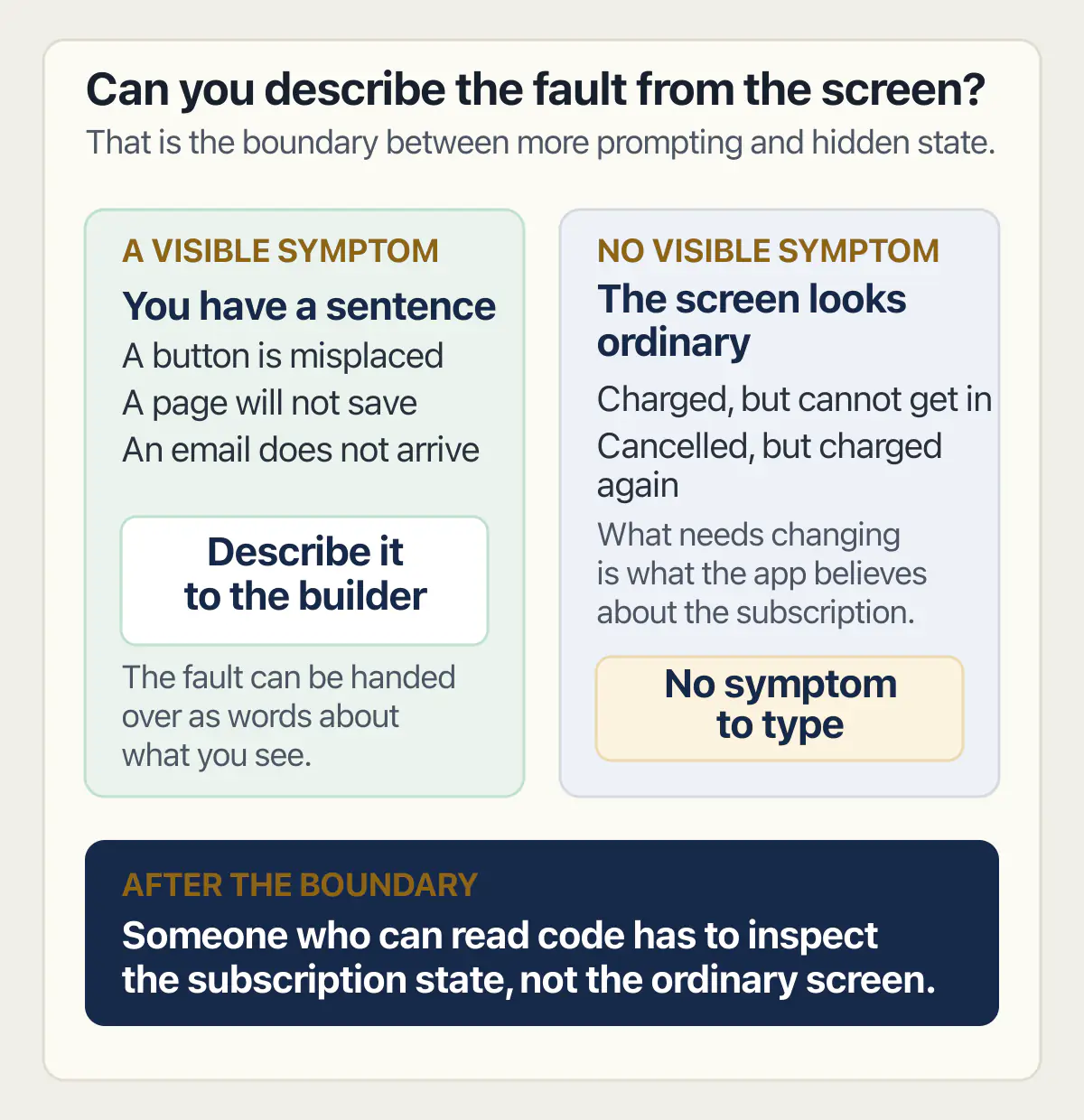
The tell is a problem with no symptom to describe. Up to that point, every fault has a sentence you can type into the builder. After it, the thing that needs changing is what the app believes about a subscription, and the screen in front of you looks completely ordinary.
There is a moment on this route where more prompting stops paying, and that tell is what marks it. Before it, a button is in the wrong place, a page will not save, the email does not arrive, and each of those is a sentence you can hand to the builder. After it, there is nothing to hand over, because nothing looks wrong. A customer says they were charged and cannot get in, or that they cancelled and were charged anyway, and the app shows you a perfectly ordinary screen for a perfectly ordinary account. You cannot prompt your way out of a state you cannot see.
A developer who published a dated account of building his own small subscription product put a number on the split. Writing in ITNEXT on 15 February 2026, Dobri Kostadinov, who says he had been building applications for years and knows how to write code, ship features and debug production issues, titled his account of the work Building a SaaS Is Nothing Like Building an App and gave it the subtitle “The code was 30% of the work.” As of 2 September 2026 that essay refused a plain automated request with an HTTP 403 and returned the full article to a browser-shaped request, which is how it was read here. The figure is one person’s split of his own effort on his own product, not a rule. It matters here because of who is saying it. Somebody who can write the code, and did, still found the code was the smaller part.
The same account draws the line this page is about, in his words:
When you build an app, you’re done when it works. When you build a SaaS, you’re done when someone else can: Find it… Understand it… Set it up… Use it daily… Pay for it… Get help…
And then: “The code that actually ‘does the thing’ is a small fraction of the whole picture.”
Notice which of those six a builder produces on its own. It builds the thing, and it builds a version of “use it daily”. The rest is work that has to be done by a person, and one of the six is the piece this page opened on.
How much calendar time each half of this takes, counted from what publishers state rather than guessed at, is measured elsewhere. This page says what the work is; the length of it is a different measurement and it is taken somewhere else.
A community thread asks the underlying question directly: “What are your views on non-technical builders trying to build tech products?” The honest answer visible from the evidence on this page is that the building is settled and the finishing is not. That is a division of labour rather than a verdict on anybody. The standing part of it, what somebody has to keep owning once it is live, is set out separately, and so is the question of whether it is fit for people you do not know, which is answered before the first stranger pays.
Who that person is depends on how much of the four pieces is missing and whether the product is already charging people. Finding somebody who can work on a product that already bills customers is its own decision, with its own set of questions.
Common questions about building a SaaS application
Does building a SaaS application need coding?
No, not to get a running one. A prompt-first builder will produce screens, a database, logins and a checkout from a description, and the vendors say so on their own pages. Coding, or somebody who can read code, becomes necessary at the four pieces above: billing after the first charge, accounts that hold several people, the owner’s own screens, and anything that moves money back out. Those are the parts nobody describes in a prompt, because nobody thinks of them while looking at a screen where they are the only user.
Can I start a SaaS with no money?
You can get to a working product without paying anybody to build it, and that is what has changed. What you cannot avoid is the running accounts underneath it: somewhere to host the app, somewhere to keep the data, and an account with a payment provider. This page prints no figures for any of them, because each vendor publishes its own and those pages move; read them on the vendor’s own pricing page on the day you decide.
Is it difficult to build a SaaS?
The building is not difficult any more. The finishing is, and the difficulty there is a strange one: the remaining work is invisible from where you are standing. A demonstration and a product look identical on your own screen, and the difference only appears when a second person, then a hundredth, uses the thing while money moves in and out of it on a repeating schedule.
What is a SaaS development platform?
Three different products go by that name. Prompt-first app builders make the product from a written description. No-code platforms give you a visual editor and expect you to design it yourself. Enterprise application platforms are places for a company’s IT department to build internal software on top of software it already pays for. The first two are the ones that put a product in the hands of somebody who does not write software; the third is answering a different buyer entirely, and its own marketing copy says so.
Can an AI builder handle subscriptions and recurring payments?
It will produce a working checkout, and the vendors name payments among the things they handle. What is usually missing is everything the arrangement needs after the first charge: the renewal, the card that fails later, the plan change part-way through a period, the cancellation that has to keep access alive until the period ends, and the message from the payment provider that tells the app any of this happened.
Who ends up keeping a small subscription product going afterwards, and what stays with the tool, is a separate question from how it gets built.
What does a SaaS starter kit include?
A published kit lists what it wires in before your features exist. One open-source kit names authentication you own, a pre-configured checkout with webhooks for three named payment providers, an admin dashboard, file uploads and email sending. Kits are written for developers and are not a route for somebody who cannot open the code, but the list is worth reading anyway, because it tells you what people who ship these for a living assume a subscription product needs.
How do I create a SaaS website without a developer?
Note that this is a different job from building the product, and the results pages mix the two constantly. A website builder produces the pages that describe and sell your product. A product builder produces the thing people log into. If you searched for a SaaS builder and landed on a page talking about templates, hero sections and publishing, you are looking at the first kind. You will probably need both, and they are rarely the same tool.
Can I build a SaaS on Bubble?
Bubble publishes a page for exactly this, and its stored description says its SaaS builder gives you a database, authentication, payments and workflows with no coding required. As of 2 September 2026 that page renders no body copy to an automated read, on either a plain or a browser-shaped request, so the description is all that can be quoted from it here. The four pieces named on this page apply the same way on Bubble as anywhere else: a checkout is not a subscription, and an owner’s screen is something you have to decide to build.
What is different about building a SaaS instead of an ordinary app?
An ordinary app is finished when it works. A subscription product is finished when it can keep being true without you: the charge repeats, the access matches what was paid, a second person from the same customer gets the right view, and somebody can answer a billing question without opening the database. That is why the four pieces above are build work rather than upkeep. They have to exist before the second charge, not after somebody complains.
Keeping one of these running once people pay every month is a separate job, and it begins where this page stops.
If you have a working app built with these tools and need it ready for real customers, this is what we do.
Built it with AI. Now it has to hold up for real customers.
The Production Hardening Sprint takes the app you already have and builds the production foundation underneath it. Authentication and access rules, payments that stay consistent, error handling, monitoring, backups, automated tests and a documented handover. Our engineers work inside your existing codebase for ten working days. All 123 deliverables are included, and you get the evidence for each one.
See the Production Hardening Sprint →  $2,500 fixed price · 10 working days · One codebase